
相对布局--RelativeLayout
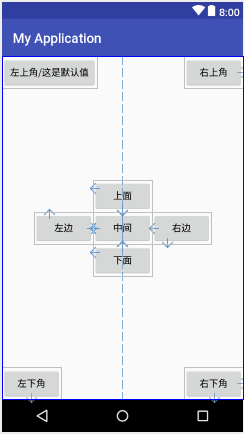
<?xml version="1.0" encoding="utf-8"?>

<RelativeLayout xmlns:android="http://schemas.android.com/apk/res/android"

    android:layout_width="match_parent"

    android:layout_height="match_parent">

    <Button

        android:layout_width="wrap_content"

        android:layout_height="wrap_content"

        android:id="@+id/center"

        android:text="中间"

        android:layout_centerInParent="true"/>

    <Button

        android:layout_width="wrap_content"

        android:layout_height="wrap_content"

        android:id="@+id/above"

        android:text="上面"

        android:layout_above="@id/center"

        android:layout_alignLeft="@id/center"/>

    <Button

        android:layout_width="wrap_content"

        android:layout_height="wrap_content"

        android:id="@+id/below"

        android:text="下面"

        android:layout_alignLeft="@id/center"

        android:layout_below="@id/center"/>

    <Button

        android:layout_width="wrap_content"

        android:layout_height="wrap_content"

        android:id="@+id/left"

        android:text="左边"

        android:layout_below="@id/above"

        android:layout_toLeftOf="@id/center"/>

    <Button

        android:layout_width="wrap_content"

        android:layout_height="wrap_content"

        android:id="@+id/right"

        android:text="右边"

        android:layout_above="@id/below"

        android:layout_toRightOf="@id/center"/>

    <Button

        android:layout_width="wrap_content"

        android:layout_height="wrap_content"

        android:text="左上角/这是默认值"/>

    <Button

        android:layout_width="wrap_content"

        android:layout_height="wrap_content"

        android:text="右上角"

        android:layout_alignParentRight="true"/>

    <Button

        android:layout_width="wrap_content"

        android:layout_height="wrap_content"

        android:text="左下角"

        android:layout_alignParentBottom="true"/>

    <Button

        android:layout_width="wrap_content"

        android:layout_height="wrap_content"

        android:text="右下角"

        android:layout_alignParentRight="true"

        android:layout_alignParentBottom="true"/>

</RelativeLayout>
相对布局--RelativeLayout的更多相关文章
- Android相对布局(RelativeLayout)
Android相对布局(RelativeLayout) 备注:这里的视图和元素是等同的概念. RelativeLayout是一个允许子视图相对于其他兄弟视图或是父视图显示的视图组(通过ID指定).每个 ...
- Android 自学之相对布局 RelativeLayout
相对布局(RelativeLayout),相对布局容器内子组件的位置总是相对兄弟组件.父容器来决定的. RelativeLayout的XML属性及相关方法说明 XML属性 相关方法 说明 androi ...
- .Net程序猿玩转Android开发---(7)相对布局RelativeLayout
相对布局RelativeLayout是Android布局中一个比較经常使用的控件,使用该控件能够布局出适合各种屏幕分辨率的布局,RelativeLayout採用相对位置进行 ...
- Xamarin.Forms的相对布局RelativeLayout
Xamarin.Forms的相对布局RelativeLayout 相对布局RelativeLayout是App中常用的布局方式.它是以界面中的某个元素为基准,设置另外一个元素的位置和大小.通过这种 ...
- Android学习笔记(14):相对布局RelativeLayout
相对布局RelativeLayout,继承自ViewGroup.相对布局的子组件的位置总是相对于兄弟组件或者父容器决定的. RelativeLayout支持的XML属性: android:gravit ...
- Android布局_相对布局RelativeLayout
一.RelativeLayout(相对布局)概述 RelativeLayout是相对布局控件,它包含的子控件将以控件之间的相对位置或者子类控件相对父类容器的位置的方式排列 二.RelativeLayo ...
- 相对布局RelativeLayout
一. public class RelativeLayout extends ViewGroup java.lang.Object ↳ android.view.View ↳ an ...
- 线性布局LinearLayout和相对布局RelativeLayout 之间的比较
LinearLayout和RelativeLayout之间: 共有属性:java代码中通过btn1关联次控件android:id="@+id/btn1" 控件宽度android:l ...
- 定义自己的布局RelativeLayout
绘制网格线
在Android画线必须由一个载体,无论是控制,无论是布局.实际上它们是从继承View.由画线的方式自己的控制或布局的定义是最常见的. 以下是在其定义中的小样本实现RelativeLayout绘制网络 ...
- Android开发之布局--RelativeLayout布局
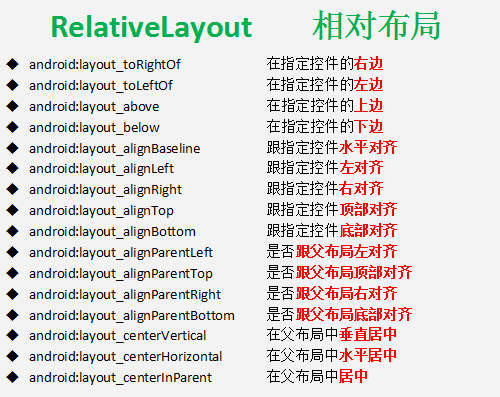
RelativeLayout 相对布局 true或false属性 Layout_centerHorizontal 当控件位于父控件的横向中间位置 Layout_centerVertical 当 ...
随机推荐
- Linq与数据库的连接显示查询(一)
使用linq查询sql数据库是首先需要创建一个 linq to sql 类文件 创建linq to sql的步骤: 1在Visual Studio 2015开发环境中建立一个目标框架 Fra ...
- .Net 数据缓存浅析
目录 1场景出发 1.1数据请求 1.2优化改进 2缓存 3缓存进阶 3.1缓存清除 3.2有效性 3.3线程安全 4适用场景和优劣 4.1适用场景 4.2优劣 5结语 1场景出发 1.1数据请求 小 ...
- 遍历datatable的几种方法(C# )
转载 遍历datatable的方法2009-09-08 10:02方法一: DataTable dt = dataSet.Tables[0]; for(int i = 0 ; i ...
- SQL查询速度慢的原因分析和解决方案
SQL查询速度慢的原因分析和解决方案 查询速度慢的原因很多,常见如下几种: 1.没有索引或者没有用到索引(这是查询慢最常见的问题,是程序设计的缺陷) 2.I/O吞吐量小,形成了瓶颈效应. 3.没有创建 ...
- Android ScrollView 子控件不占满的问题
经常碰到很笨的 ScrollView的子控件无法占满 ScrollView 的空间的问题. 其实只需要加一行,android:fillViewport="true" 但不加上这行就 ...
- python中的内置函数,递归,递归文件显示(二),二分法
1.部分内置函数 repr()显示出字符串的官方表示形式,返回一个对象的string形式 # repr 就是原封不动的输出, 引号和转义字符都不起作用 print(repr('大家好,\n \t我叫周 ...
- PHP设计超级好用的文件上传处理类一 (37)
<?php class FileUpload { private $filepath; //指定上传文件保存的路径 private $allowtype=array('gif', 'jpg', ...
- IDEA 引入外部jar包 pom 配置,防止打包失败
1. <!--添加外部依赖--> <dependency> <groupId>Ice</groupId> ...
- clang命令理解程序
Xcode 创建一个mac OS command Line Tool程序 步骤打开终端 cd + 工程路径(绝对路径)(注:拖拽main.m文件到终端) input —preprocessor— ...
- Java线程池学习心得
一.普通线程和线程池的对比 new Thread的弊端如下: a. 每次new Thread新建对象性能差.b. 线程缺乏统一管理,可能无限制新建线程,相互之间竞争,及可能占用过多系统资源导致死机或o ...