
Custom Exception in ASP.NET Web API 2 with Custom HttpResponse Message
A benefit of using ASP.NET Web API is that it can be consumed by any client with the capability of making HTTP calls and processing JSON data. The client can use HTTP methods to perform Read/Write operations. They make use of HttpRequestMessage and HttpResponseMessage to manage messaging to and from Web API. For each action method, Web API uses IHttpActionResult type to manage responses with HttpStatusCode.
Since the HttpStatusCode is pre-configured for default HTTP error codes like 500, 403, etc, it is a challenge to respond with the exact exception that occurred on the server-side while processing a request. This challenge can be addressed by implementing Exception filter on the Web API Controller. The exception filter will catch all errors that happens inside an action while it is executing.
When the ApiController (the base class for the Web API) executes an action from the class, it loads the ExceptionFilterResult if an exception occurs during the execution. The ExceptionFilterResult implements IHttpActionResult. The ExceptionFilterResult catches all exception and then passes these exceptions to the Exception Filter attribute. We have the liberty to implement the Exception filter as per the logical requirements of our application.
The following diagram gives an idea of the exception filter process:
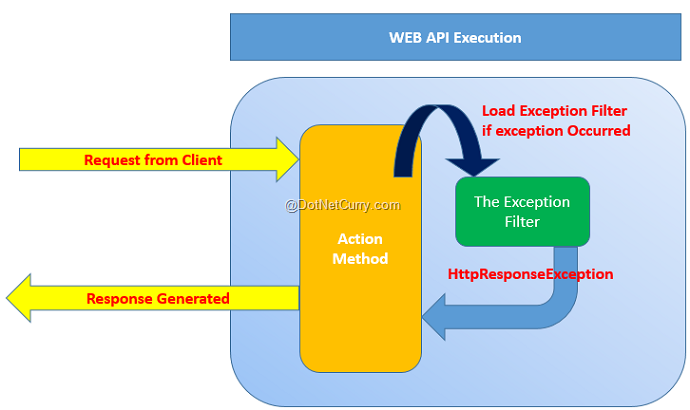
Lets’ implement a custom Exception Filter in a Web API controller class.
Step 1: Open the free Visual Studio 2013 Community Edition (or any other VS 2013/2015 edition of your choice) and create a new Web API application of the name WEBAPI_Exception. In this project in the App_Data folder, add a new SQL Server database of name Application.mdf. In this database add a new EmployeeInfo table with following schema:
CREATE TABLE [dbo].[EmployeeInfo] (

    [EmpNo]       INT          IDENTITY (1, 1) NOT NULL,

    [EmpName]     VARCHAR (50) NOT NULL,

    [Salary]      INT          NOT NULL,

    [DeptName]    VARCHAR (50) NOT NULL,

    [Designation] VARCHAR (50) NOT NULL,

    PRIMARY KEY CLUSTERED ([EmpNo] ASC)

);
Step 2: In the models folder add a new ADO.NET Entity Data Model. Name this as ApplicationEDMX. In the wizard, select Application.mdf and select EmployeeInfo table. After completing this wizard, the project will generate table mapping for EmployeeInfo table as shown in the following diagram:

Step 3: In the project add a new folder of the name CustomFilterRepo. In this folder add a new class file with the following code. This code contains class derived from the Exception base class and contains constructor for exception message.
using System;

namespace WEBAPI_Execption.CustomFilterRepo

{

    /// <summary>

    /// The base Exception Class

    /// </summary>

    public class ProcessException : Exception

    {

        public ProcessException(string message)

            : base(message)

        {

        }

    }

}
Step 4: In the CustomFilterRepo folder add a new class file with the following code:
using System.Net;

using System.Net.Http;

using System.Web.Http.Filters;

namespace WEBAPI_Execption.CustomFilterRepo

{

    /// <summary>

    /// The Custom Exception Filter

    /// </summary>

    public class ProcessExceptionFilterAttribute : ExceptionFilterAttribute,IExceptionFilter

    {

        public override void OnException(HttpActionExecutedContext actionExecutedContext)

        {

            //Check the Exception Type

            if (actionExecutedContext.Exception is ProcessException)

            {

                //The Response Message Set by the Action During Ececution

                var res = actionExecutedContext.Exception.Message;

             //Define the Response Message

                HttpResponseMessage response = new HttpResponseMessage(HttpStatusCode.InternalServerError) {

                 Content = new StringContent(res),

                 ReasonPhrase = res

                };

                //Create the Error Response

                actionExecutedContext.Response = response;

            }

        }

    }

}
This class is derived from ExceptionFilterAttribute base class. This allows you to implement a custom exception filter in Web API. The above code checks the exception occurred during action processing using HttpActionExecutedContext object. This object reads the exception message set to the Message property of the exception class in the action method. Finally this information is returned using the Response property of the HttpActionExecutedContext.
Step 5: In the Models class add a new class file with following code:
using System.ComponentModel.DataAnnotations;

namespace WEBAPI_Execption.Models

{

    [MetadataType(typeof(EmployeeInfoMetadata))]

    public partial class EmployeeInfo

    {

        private class EmployeeInfoMetadata

        {

            public int EmpNo { get; set; }

            [Required(ErrorMessage = "Value is Must")]

            public string EmpName { get; set; }

            [Required(ErrorMessage = "Salary is Must")]

            public int Salary { get; set; }

            [Required(ErrorMessage = "DeptName is Must")]

            public string DeptName { get; set; }

            [Required(ErrorMessage = "Designation is Must")]

            public string Designation { get; set; }

        }

    }

}
The above data annotations defines validation rules on properties of EmployeeInfo Class. We will be requiring this for POST operations.
Step 6: In the Controllers folder add a new empty Web API controller of the name EmployeeInfoAPIController. Add the following code in the Web API Controller class:
using System.Net;

using System.Net.Http;

using System.Web.Http;

using WEBAPI_Execption.Models;

using WEBAPI_Execption.CustomFilterRepo;

using System.Web.Http.Description;

namespace WEBAPI_Execption.Controllers

{

    /// <summary>

    /// Apply the Exception Filter at the Class level

    /// </summary>

    public class EmployeeInfoAPIController : ApiController

    {

        ApplicationEntities ctx;

        public EmployeeInfoAPIController()

        {

            ctx = new ApplicationEntities();

        }

        [ResponseType(typeof(EmployeeInfo))]

        public IHttpActionResult Get(int id)

        {

            var emp = ctx.EmployeeInfoes.Find(id);

            if (emp == null)

            {

                throw new ProcessException("Record Not Found, It may be removed");

            }

            return Ok(emp);

        }

        [ResponseType(typeof(EmployeeInfo))]

        public IHttpActionResult Post(EmployeeInfo employeeInfo)

        {

            if (!ModelState.IsValid)

            {

                //Throw the Exception by settings Error Message

                throw new ProcessException("One or more entered values are invalid, please check");

            }

            ctx.EmployeeInfoes.Add(employeeInfo);

            ctx.SaveChanges();

            return CreatedAtRoute("DefaultApi", new { id = employeeInfo.EmpNo }, employeeInfo);

        }

    }

}
In the above code, the Get() action method accepts id parameter and looks for the Employee based on id, if the record is not present then this will throw the ProcessException with an error message. The Post() action method accepts EmployeeInfo object and validates it before saving it in a database. If the validation fails, then the ProcessException is thrown with an error message.
Step 7: To handle exceptions, we need to register a custom exception filter. Open WebApiConfig.cs file and add the exception filter in HttpConfiguration as shown in the following code:
config.Filters.Add(new ProcessExceptionFilterAttribute());
Step 8: In the project add the jQuery library using NuGet Package.
Step 9: In the Controllers folder, add an empty MVC controller of the name TestController. Scaffold Index.cshtml from the Index () action method of this controller. In the Index.cshtml add the following code:
@{

    ViewBag.Title = "Index";

}

<script src="~/Scripts/jquery-2.1.3.min.js"></script>

<script type="text/javascript">

    $(document).ready(function () {

        $("#btnget").on('click', function (){

            $.ajax({

                url: "http://localhost:49747/api/EmployeeInfoAPI/1999",

                type:"GET"

            }).done(function (resp) {

                alert("EmpNo" + resp.EmpNo + " EmpName " + resp.EmpName);

            }).error(function (xhr, textStatus, errorThrown) {

                alert("Err " + textStatus + "   " + errorThrown);

            });

        });

        $("#btnpost").on('click', function () {

            var Emp = {};

            Emp.EmpName = "MM";

          //  Emp.Salary = 12300;

            Emp.DeptName = "SYS";

            Emp.Designation = "MGR";

            $.ajax({

                url: "http://localhost:49747/api/EmployeeInfoAPI",

                type: "POST",

                data: Emp,

                datatype: "json",

                contenttype:"application/json;utf-8"

            }).done(function (resp) {

                alert("Record Added" + resp.EmpNo);

            }).error(function (xhr, textStatus, errorThrown) {

                alert("Err " + errorThrown);

            });

        });

    });

</script>

<h2>Index</h2>

<table class="table table-bordered table-striped">

    <tr>

        <td>Click Here to Received the Employee</td>

        <td>

            <input type="button" id="btnget" value="Get" />

        </td>

    </tr>

    <tr>

        <td>

            Click Here to Post the Employee

        </td>

        <td>

            <input type="button" id="btnpost" value="Post" />

        </td>

    </tr>

</table>
In the above view, the Html button defines a click event to make an Ajax call to Web API. Note the URL for Web API is hard-coded. The .error() callback for Ajax call accepts errorThrown parameter which will be used to display actual error thrown on the server. The database does not contain EmpNo as 1999, so this call will definitely fail.
Run the view.

Click on the Get button, this will throw exception as follows:
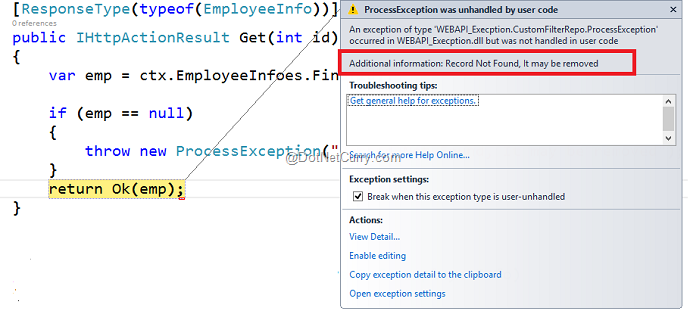
This shows the Error Message as Record Not Found, it may be removed. Continuing debugging here and it will show the error captured by Ajax in an alert box:

This shows the actual error message thrown in exception on the Server by Web API.
Similarly in the Post button click, the JavaScript object Emp is declared and it is used to post Employee record to Web API. The code has Emp.Salary expression as commented out, this means that Salary will not be posted to the Server. In Step 5 we have applied DataAnnotations on EmployeeInfo object with [Required] attribute on the Salary property. Since we are not passing Salary with the POST request, our call will fail with actual server side exception message as following:

This shows a server side error message as One or more entered values are invalid please check. Continue execution, the client side alert box will display error as following:

That’s it.
Conclusion: Custom Exception filters acts as a value addition in ASP.NET Web API to manage custom messages to be sent to the client application.
Download the entire source code of this article (Github)
Custom Exception in ASP.NET Web API 2 with Custom HttpResponse Message的更多相关文章
- Exception Handling in ASP.NET Web API
public static void RegisterGlobalFilters(GlobalFilterCollection filters) { filters.Add(new HandleErr ...
- Exception Handling in ASP.NET Web API webapi异常处理
原文:http://www.asp.net/web-api/overview/error-handling/exception-handling This article describes erro ...
- 【ASP.NET Web API教程】6.2 ASP.NET Web API中的JSON和XML序列化
谨以此文感谢关注此系列文章的园友!前段时间本以为此系列文章已没多少人关注,而不打算继续下去了.因为文章贴出来之后,看的人似乎不多,也很少有人对这些文章发表评论,而且几乎无人给予“推荐”.但前几天有人询 ...
- Asp.Net Web API 2第七课——Web API异常处理
前言 阅读本文之前,您也可以到Asp.Net Web API 2 系列导航进行查看 http://www.cnblogs.com/aehyok/p/3446289.html 本文主要来讲解Asp.Ne ...
- 【ASP.NET Web API教程】3.2 通过.NET客户端调用Web API(C#)
原文:[ASP.NET Web API教程]3.2 通过.NET客户端调用Web API(C#) 注:本文是[ASP.NET Web API系列教程]的一部分,如果您是第一次看本博客文章,请先看前面的 ...
- 【ASP.NET Web API教程】4.3 ASP.NET Web API中的异常处理
原文:[ASP.NET Web API教程]4.3 ASP.NET Web API中的异常处理 注:本文是[ASP.NET Web API系列教程]的一部分,如果您是第一次看本系列教程,请先看前面的内 ...
- 【ASP.NET Web API教程】4.2 路由与动作选择
原文:[ASP.NET Web API教程]4.2 路由与动作选择 注:本文是[ASP.NET Web API系列教程]的一部分,如果您是第一次看本系列教程,请先看前面的内容. 4.2 Routing ...
- Asp.Net Web API(四)
HttpResponseException-----HTTP响应异常 如果Web API控制器抛出一个未捕捉的异常,会发生什么呢?在默认情况下,大多数异常都会转换为一个带有状态码500的内部服务器错误 ...
- Global Error Handling in ASP.NET Web API 2(webapi2 中的全局异常处理)
目前,在Web API中没有简单的方法来记录或处理全局异常(webapi1中).一些未处理的异常可以通过exception filters进行处理,但是有许多情况exception filters无法 ...
随机推荐
- hdu 4739 Zhuge Liang's Mines DFS
http://acm.hdu.edu.cn/showproblem.php?pid=4739 题意: 给定100*100的矩阵中n(n<= 20)个点,每次只能一走能够形成正方形的四个点,正方形 ...
- Tensorflow一些常用基本概念与函数(四)
摘要:本系列主要对tf的一些常用概念与方法进行描述.本文主要针对tensorflow的模型训练Training与测试Testing等相关函数进行讲解.为‘Tensorflow一些常用基本概念与函数’系 ...
- javascript之反柯里化(uncurrying)
在JavaScript中,当我们调用对象的某个方法时,其实不用去关心该对象原本是否被设计为拥有这个方法,这是动态类型语言的特点.可以通过反柯里化(uncurrying)函数实现,让一个对象去借用一个原 ...
- MQ选型对比RabbitMQ RocketMQ ActiveMQ Kafka
几种MQ产品说明: ZeroMQ : 扩展性好,开发比较灵活,采用C语言实现,实际上他只是一个socket库的重新封装,如果我们做为消息队列使用,需要开发大量的代码 RabbitMQ :结合erla ...
- mysql插入中文数据报错 java.sql.SQLException: Incorrect string value: '\xE5\x90\x88\xE8\xAE\xA1' for column
1.我们创建数据库的时候没有更改数据库的字符集为utf8. 在mysql工具中,右击数据库,->"改变数据库",->选择“基字符集”为utf-8; 2,数据库中表的字符 ...
- Halcon12新特性之VS可视化调试插件
当我们用VC\C#调试halcon代码的时候,通常会遇到一个头痛的问题,我们无法看到halcon变量的调试信息 如下图:什么鬼...什么鬼 比如我们想看一个double数值变量,我们需要 doub ...
- XML——概述
body, table{font-family: 微软雅黑; font-size: 10pt} table{border-collapse: collapse; border: solid gray; ...
- centos7下的防火墙
在cengos7下的防火墙是交给systemctl来管理服务和程序,包括了service和chkconfig. 查看firewalld.service 是否启动 systemctl stop fire ...
- specialized English for automation-Lesson 3 CMOS Logic Circuit
CMOS logic is a newer technology, based on the use of complementary MOS transistors toperform logic ...
- tensorflow :ckpt模型转换为pytorch : hdf5模型
参考链接:https://github.com/bermanmaxim/jaccardSegment/blob/master/ckpt_to_dd.py import tensorflow as tf ...