
Custom Exception in ASP.NET Web API 2 with Custom HttpResponse Message
A benefit of using ASP.NET Web API is that it can be consumed by any client with the capability of making HTTP calls and processing JSON data. The client can use HTTP methods to perform Read/Write operations. They make use of HttpRequestMessage and HttpResponseMessage to manage messaging to and from Web API. For each action method, Web API uses IHttpActionResult type to manage responses with HttpStatusCode.
Since the HttpStatusCode is pre-configured for default HTTP error codes like 500, 403, etc, it is a challenge to respond with the exact exception that occurred on the server-side while processing a request. This challenge can be addressed by implementing Exception filter on the Web API Controller. The exception filter will catch all errors that happens inside an action while it is executing.
When the ApiController (the base class for the Web API) executes an action from the class, it loads the ExceptionFilterResult if an exception occurs during the execution. The ExceptionFilterResult implements IHttpActionResult. The ExceptionFilterResult catches all exception and then passes these exceptions to the Exception Filter attribute. We have the liberty to implement the Exception filter as per the logical requirements of our application.
The following diagram gives an idea of the exception filter process:
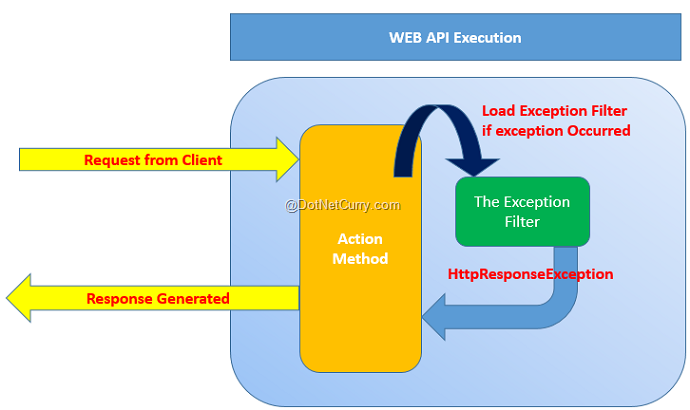
Lets’ implement a custom Exception Filter in a Web API controller class.
Step 1: Open the free Visual Studio 2013 Community Edition (or any other VS 2013/2015 edition of your choice) and create a new Web API application of the name WEBAPI_Exception. In this project in the App_Data folder, add a new SQL Server database of name Application.mdf. In this database add a new EmployeeInfo table with following schema:
CREATE TABLE [dbo].[EmployeeInfo] (

    [EmpNo]       INT          IDENTITY (1, 1) NOT NULL,

    [EmpName]     VARCHAR (50) NOT NULL,

    [Salary]      INT          NOT NULL,

    [DeptName]    VARCHAR (50) NOT NULL,

    [Designation] VARCHAR (50) NOT NULL,

    PRIMARY KEY CLUSTERED ([EmpNo] ASC)

);
Step 2: In the models folder add a new ADO.NET Entity Data Model. Name this as ApplicationEDMX. In the wizard, select Application.mdf and select EmployeeInfo table. After completing this wizard, the project will generate table mapping for EmployeeInfo table as shown in the following diagram:

Step 3: In the project add a new folder of the name CustomFilterRepo. In this folder add a new class file with the following code. This code contains class derived from the Exception base class and contains constructor for exception message.
using System;

namespace WEBAPI_Execption.CustomFilterRepo

{

    /// <summary>

    /// The base Exception Class

    /// </summary>

    public class ProcessException : Exception

    {

        public ProcessException(string message)

            : base(message)

        {

        }

    }

}
Step 4: In the CustomFilterRepo folder add a new class file with the following code:
using System.Net;

using System.Net.Http;

using System.Web.Http.Filters;

namespace WEBAPI_Execption.CustomFilterRepo

{

    /// <summary>

    /// The Custom Exception Filter

    /// </summary>

    public class ProcessExceptionFilterAttribute : ExceptionFilterAttribute,IExceptionFilter

    {

        public override void OnException(HttpActionExecutedContext actionExecutedContext)

        {

            //Check the Exception Type

            if (actionExecutedContext.Exception is ProcessException)

            {

                //The Response Message Set by the Action During Ececution

                var res = actionExecutedContext.Exception.Message;

             //Define the Response Message

                HttpResponseMessage response = new HttpResponseMessage(HttpStatusCode.InternalServerError) {

                 Content = new StringContent(res),

                 ReasonPhrase = res

                };

                //Create the Error Response

                actionExecutedContext.Response = response;

            }

        }

    }

}
This class is derived from ExceptionFilterAttribute base class. This allows you to implement a custom exception filter in Web API. The above code checks the exception occurred during action processing using HttpActionExecutedContext object. This object reads the exception message set to the Message property of the exception class in the action method. Finally this information is returned using the Response property of the HttpActionExecutedContext.
Step 5: In the Models class add a new class file with following code:
using System.ComponentModel.DataAnnotations;

namespace WEBAPI_Execption.Models

{

    [MetadataType(typeof(EmployeeInfoMetadata))]

    public partial class EmployeeInfo

    {

        private class EmployeeInfoMetadata

        {

            public int EmpNo { get; set; }

            [Required(ErrorMessage = "Value is Must")]

            public string EmpName { get; set; }

            [Required(ErrorMessage = "Salary is Must")]

            public int Salary { get; set; }

            [Required(ErrorMessage = "DeptName is Must")]

            public string DeptName { get; set; }

            [Required(ErrorMessage = "Designation is Must")]

            public string Designation { get; set; }

        }

    }

}
The above data annotations defines validation rules on properties of EmployeeInfo Class. We will be requiring this for POST operations.
Step 6: In the Controllers folder add a new empty Web API controller of the name EmployeeInfoAPIController. Add the following code in the Web API Controller class:
using System.Net;

using System.Net.Http;

using System.Web.Http;

using WEBAPI_Execption.Models;

using WEBAPI_Execption.CustomFilterRepo;

using System.Web.Http.Description;

namespace WEBAPI_Execption.Controllers

{

    /// <summary>

    /// Apply the Exception Filter at the Class level

    /// </summary>

    public class EmployeeInfoAPIController : ApiController

    {

        ApplicationEntities ctx;

        public EmployeeInfoAPIController()

        {

            ctx = new ApplicationEntities();

        }

        [ResponseType(typeof(EmployeeInfo))]

        public IHttpActionResult Get(int id)

        {

            var emp = ctx.EmployeeInfoes.Find(id);

            if (emp == null)

            {

                throw new ProcessException("Record Not Found, It may be removed");

            }

            return Ok(emp);

        }

        [ResponseType(typeof(EmployeeInfo))]

        public IHttpActionResult Post(EmployeeInfo employeeInfo)

        {

            if (!ModelState.IsValid)

            {

                //Throw the Exception by settings Error Message

                throw new ProcessException("One or more entered values are invalid, please check");

            }

            ctx.EmployeeInfoes.Add(employeeInfo);

            ctx.SaveChanges();

            return CreatedAtRoute("DefaultApi", new { id = employeeInfo.EmpNo }, employeeInfo);

        }

    }

}
In the above code, the Get() action method accepts id parameter and looks for the Employee based on id, if the record is not present then this will throw the ProcessException with an error message. The Post() action method accepts EmployeeInfo object and validates it before saving it in a database. If the validation fails, then the ProcessException is thrown with an error message.
Step 7: To handle exceptions, we need to register a custom exception filter. Open WebApiConfig.cs file and add the exception filter in HttpConfiguration as shown in the following code:
config.Filters.Add(new ProcessExceptionFilterAttribute());
Step 8: In the project add the jQuery library using NuGet Package.
Step 9: In the Controllers folder, add an empty MVC controller of the name TestController. Scaffold Index.cshtml from the Index () action method of this controller. In the Index.cshtml add the following code:
@{

    ViewBag.Title = "Index";

}

<script src="~/Scripts/jquery-2.1.3.min.js"></script>

<script type="text/javascript">

    $(document).ready(function () {

        $("#btnget").on('click', function (){

            $.ajax({

                url: "http://localhost:49747/api/EmployeeInfoAPI/1999",

                type:"GET"

            }).done(function (resp) {

                alert("EmpNo" + resp.EmpNo + " EmpName " + resp.EmpName);

            }).error(function (xhr, textStatus, errorThrown) {

                alert("Err " + textStatus + "   " + errorThrown);

            });

        });

        $("#btnpost").on('click', function () {

            var Emp = {};

            Emp.EmpName = "MM";

          //  Emp.Salary = 12300;

            Emp.DeptName = "SYS";

            Emp.Designation = "MGR";

            $.ajax({

                url: "http://localhost:49747/api/EmployeeInfoAPI",

                type: "POST",

                data: Emp,

                datatype: "json",

                contenttype:"application/json;utf-8"

            }).done(function (resp) {

                alert("Record Added" + resp.EmpNo);

            }).error(function (xhr, textStatus, errorThrown) {

                alert("Err " + errorThrown);

            });

        });

    });

</script>

<h2>Index</h2>

<table class="table table-bordered table-striped">

    <tr>

        <td>Click Here to Received the Employee</td>

        <td>

            <input type="button" id="btnget" value="Get" />

        </td>

    </tr>

    <tr>

        <td>

            Click Here to Post the Employee

        </td>

        <td>

            <input type="button" id="btnpost" value="Post" />

        </td>

    </tr>

</table>
In the above view, the Html button defines a click event to make an Ajax call to Web API. Note the URL for Web API is hard-coded. The .error() callback for Ajax call accepts errorThrown parameter which will be used to display actual error thrown on the server. The database does not contain EmpNo as 1999, so this call will definitely fail.
Run the view.

Click on the Get button, this will throw exception as follows:
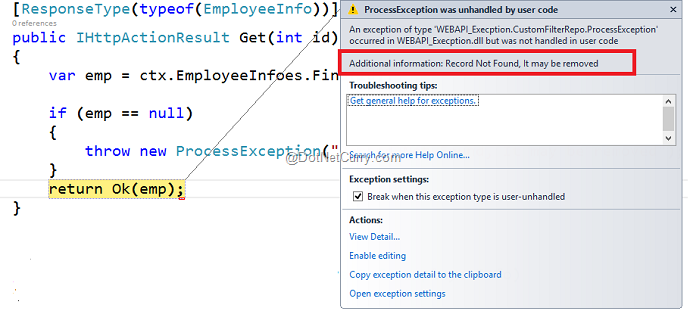
This shows the Error Message as Record Not Found, it may be removed. Continuing debugging here and it will show the error captured by Ajax in an alert box:

This shows the actual error message thrown in exception on the Server by Web API.
Similarly in the Post button click, the JavaScript object Emp is declared and it is used to post Employee record to Web API. The code has Emp.Salary expression as commented out, this means that Salary will not be posted to the Server. In Step 5 we have applied DataAnnotations on EmployeeInfo object with [Required] attribute on the Salary property. Since we are not passing Salary with the POST request, our call will fail with actual server side exception message as following:

This shows a server side error message as One or more entered values are invalid please check. Continue execution, the client side alert box will display error as following:

That’s it.
Conclusion: Custom Exception filters acts as a value addition in ASP.NET Web API to manage custom messages to be sent to the client application.
Download the entire source code of this article (Github)
Custom Exception in ASP.NET Web API 2 with Custom HttpResponse Message的更多相关文章
- Exception Handling in ASP.NET Web API
public static void RegisterGlobalFilters(GlobalFilterCollection filters) { filters.Add(new HandleErr ...
- Exception Handling in ASP.NET Web API webapi异常处理
原文:http://www.asp.net/web-api/overview/error-handling/exception-handling This article describes erro ...
- 【ASP.NET Web API教程】6.2 ASP.NET Web API中的JSON和XML序列化
谨以此文感谢关注此系列文章的园友!前段时间本以为此系列文章已没多少人关注,而不打算继续下去了.因为文章贴出来之后,看的人似乎不多,也很少有人对这些文章发表评论,而且几乎无人给予“推荐”.但前几天有人询 ...
- Asp.Net Web API 2第七课——Web API异常处理
前言 阅读本文之前,您也可以到Asp.Net Web API 2 系列导航进行查看 http://www.cnblogs.com/aehyok/p/3446289.html 本文主要来讲解Asp.Ne ...
- 【ASP.NET Web API教程】3.2 通过.NET客户端调用Web API(C#)
原文:[ASP.NET Web API教程]3.2 通过.NET客户端调用Web API(C#) 注:本文是[ASP.NET Web API系列教程]的一部分,如果您是第一次看本博客文章,请先看前面的 ...
- 【ASP.NET Web API教程】4.3 ASP.NET Web API中的异常处理
原文:[ASP.NET Web API教程]4.3 ASP.NET Web API中的异常处理 注:本文是[ASP.NET Web API系列教程]的一部分,如果您是第一次看本系列教程,请先看前面的内 ...
- 【ASP.NET Web API教程】4.2 路由与动作选择
原文:[ASP.NET Web API教程]4.2 路由与动作选择 注:本文是[ASP.NET Web API系列教程]的一部分,如果您是第一次看本系列教程,请先看前面的内容. 4.2 Routing ...
- Asp.Net Web API(四)
HttpResponseException-----HTTP响应异常 如果Web API控制器抛出一个未捕捉的异常,会发生什么呢?在默认情况下,大多数异常都会转换为一个带有状态码500的内部服务器错误 ...
- Global Error Handling in ASP.NET Web API 2(webapi2 中的全局异常处理)
目前,在Web API中没有简单的方法来记录或处理全局异常(webapi1中).一些未处理的异常可以通过exception filters进行处理,但是有许多情况exception filters无法 ...
随机推荐
- BZOJ 3238 【AHOI2013】 差异
题目链接:差异 写题时发现这道题当初已经用后缀数组写过了……但是既然学了后缀自动机那就再写一遍吧…… 观察一下题目所给的式子:\[\sum_{1\leqslant i < j \leqslant ...
- 用PendingIntent传送数据丢失解决办法
当要设置一个闹钟时,可以把数据放在Intent里,再用intent对象生成一个PendingIntent对象,然后用AlarmManager 来邦定PendingIntent对象设置闹钟,具体代码如下 ...
- 雷林鹏分享:Ruby 异常
Ruby 异常 异常和执行总是被联系在一起.如果您打开一个不存在的文件,且没有恰当地处理这种情况,那么您的程序则被认为是低质量的. 如果异常发生,则程序停止.异常用于处理各种类型的错误,这些错误可能在 ...
- 2018-2019-2 网络对抗技术 20165332 Exp1 PC平台逆向破解
2018-2019-2 网络对抗技术 20165332 Exp1 PC平台逆向破解 NOP, JNE, JE, JMP, CMP汇编指令的机器码 NOP汇编指令:执行到NOP指令时,CPU仅仅当做一个 ...
- 如何获取Android应用的packageName和ActivityName,识别应用中的控件
1.获取Android应用的packageName和ActivityName A:adb logcat >log.txt 在log中搜索package B:adb shell logcat | ...
- UVA-1610 Party Games (构造)
题目大意:给出一系列字符串,构造出一个字符串大于等于其中的一半,小于另一半. 题目分析:取大小为中间的两个a,b(a<b).实际上就是找出第一个小于b的同时大于等于a的字符串,直接构造即可.要注 ...
- Leetcode 64
class Solution { public: int minPathSum(vector<vector<int>>& grid) { int n = grid.si ...
- Digitalocean+DNSPod搭建Meteor.js博客Telescope.js
1. 什么是Meteor.js 基于Node.js的一个快速开发平台. 简言之,Node.js>Meteor.js 对等于Ruby>Ruby on Rails的关系. 官网:http:// ...
- HDU 1029 基础dp
题目链接:Ignatius and the Princess IV 大意:就是在N个数里找出唯一一个至少出现过(N+1)/ 2 次的数. 1 <= N <= 999999. hash: / ...
- PLSQL 触发器
触发器权限 数据库创建用户时想要在本用户下使用触发器,需要给用户触发器的权限 使用DBA用户执行 GRANT CREATE TRIGGER TO user_name; 如果想在当前用户下创建其他用户 ...