
nginx部署(普通用户)
$ sudo yum install pcre pcre-devel openssl-devel perl gcc make -y
$ wget http://nginx.org/download/nginx-1.6.2.tar.gz

$ tar xzvf nginx-1.6.2.tar.gz
# chown -R youaijj:youaijj /home/youaijj
$ mkdir /home/youaijj/etc
$ mkdir /home/youaijj/usr
$ mkdir /home/youaijj/var
$ cd nginx-1.6.2
$ ./configure --prefix=/home/youaijj/etc/nginx --sbin-path=/home/youaijj/usr/sbin/nginx --conf-path=/home/youaijj/etc/nginx/nginx.conf --error-log-path=/home/youaijj/var/log/nginx/error.log --http-log-path=/home/youaijj/var/log/nginx/access.log --pid-path=/home/youaijj/var/run/nginx.pid --lock-path=/home/youaijj/var/run/nginx.lock --http-client-body-temp-path=/home/youaijj/var/cache/nginx/client_temp --http-proxy-temp-path=/home/youaijj/var/cache/nginx/proxy_temp --http-fastcgi-temp-path=/home/youaijj/var/cache/nginx/fastcgi_temp --http-uwsgi-temp-path=/home/youaijj/var/cache/nginx/uwsgi_temp --http-scgi-temp-path=/home/youaijj/var/cache/nginx/scgi_temp --user=youaijj --group=youaijj--with-http_ssl_module --with-http_ssl_module --with-http_realip_module --with-http_addition_module --with-http_sub_module --with-http_dav_module --with-http_flv_module --with-http_mp4_module --with-http_gunzip_module --with-http_gzip_static_module --with-http_random_index_module --with-http_secure_link_module --with-http_stub_status_module --with-http_auth_request_module --with-mail --with-mail_ssl_module --with-file-aio --with-ipv6 --with-http_spdy_module --with-cc-opt='-O2 -g -pipe -Wp,-D_FORTIFY_SOURCE=2 -fexceptions -fstack-protector --param=ssp-buffer-size=4 -m64 -mtune=generic'
$ ./configure \

--prefix=/home/youaijj/etc/nginx \

--sbin-path=/home/youaijj/usr/sbin/nginx \

--conf-path=/home/youaijj/etc/nginx/nginx.conf \

--error-log-path=/home/youaijj/var/log/nginx/error.log --http-log-path=/home/youaijj/var/log/nginx/access.log \

...

...
$ make && make install

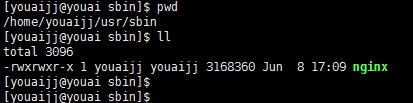
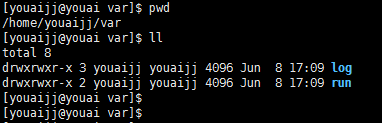
...

# another virtual host using mix of IP-, name-, and port-based configuration

#

 server {

  listen 8031;

  server_name cjj.test.dev;

  access_log /home/youaijj/var/log/nginx/access.test.log;

  location / {

   root html;

   index index.html index.htm;

  }

 }

...
$ cd /home/youaijj/usr/sbin

$ ./nginx
[youaijj@youai ~]$ curl localhost:8031

<!DOCTYPE html>

<html>

<head>

<title>Welcome to nginx!</title>

<style>

    body {

        width: 35em;

        margin: 0 auto;

        font-family: Tahoma, Verdana, Arial, sans-serif;

    }

</style>

</head>

<body>

<h1>Welcome to nginx!</h1>

<p>If you see this page, the nginx web server is successfully installed and

working. Further configuration is required.</p>

<p>For online documentation and support please refer to

<a href="http://nginx.org/">nginx.org</a>.<br/>

Commercial support is available at

<a href="http://nginx.com/">nginx.com</a>.</p>

<p><em>Thank you for using nginx.</em></p>

</body>

</html>

[youaijj@youai ~]$

nginx部署(普通用户)的更多相关文章
- vue+uwsgi+nginx部署路飞学城
vue+uwsgi+nginx部署路飞学城 有一天,老男孩的苑日天给我发来了两个神秘代码,听说是和mjj的结晶 超哥将这两个代码,放到了一个网站上,大家可以自行下载 路飞学城django代码 ht ...
- linux vue uwsgi nginx 部署路飞学城 安装 vue
vue+uwsgi+nginx部署路飞学城 有一天,老男孩的苑日天给我发来了两个神秘代码,听说是和mjj的结晶 超哥将这两个代码,放到了一个网站上,大家可以自行下载 路飞学城django代码#这个代码 ...
- Nginx部署部分https与部分http【转】
转自 Nginx部署部分https与部分http - na_tion的专栏 - 博客频道 - CSDN.NEThttp://blog.csdn.net/na_tion/article/details/ ...
- 转:在 Ubuntu 上使用 Nginx 部署 Flask 应用
转:http://Python.jobbole.com/84286/ 原文出处: Vladik 译文出处:开源中国 我职业生涯的大部分都在使用微软的架构,最近我决定走出技术的舒适区,步入开源 ...
- Django + Gunicorn + Nginx 部署 Ubuntu 服务器
Django + Gunicorn + Nginx 部署服务器 获取腾讯云 root权限 本人的服务器使用的是腾讯云,腾讯云默认是没有开放 root 用户的,我们来创建 root 用户. 创建 roo ...
- Flask采用Virtualenv+Supervisor+Nginx部署应用
Flask采用Virtualenv+Supervisor+Nginx部署应用 -- 首先是概念解释 WSGI服务器,负责我们的app与服务器的交互,常用的有Gunicorn Web服务器,是个HTTP ...
- SpringBoot电商项目实战 — 前后端分离后的优雅部署及Nginx部署实现
在如今的SpringBoot微服务项目中,前后端分离已成为业界标准使用方式,通过使用nginx等代理方式有效的进行解耦,并且前后端分离会为以后的大型分布式架构.弹性计算架构.微服务架构.多端化服务(多 ...
- Linux 集群概念 , wsgi , Nginx负载均衡实验 , 部署CRM(Django+uwsgi+nginx), 部署学城项目(vue+uwsgi+nginx)
Linux 集群概念 , wsgi , Nginx负载均衡实验 , 部署CRM(Django+uwsgi+nginx), 部署学城项目(vue+uwsgi+nginx) 一丶集群和Nginx反向代理 ...
- [技术博客]nginx 部署 apt 源
[技术博客] nginx 部署 apt 源 出于各种各样的原因, 有时需要自己配置apt源, 比如发布自己编写的debian软件包, 内网中只有一台电脑可以访问外网,或者在本地配置自己的apt源.我们 ...
- centosflask+uWSGI+nginx部署
centosflask+uWSGI+nginx部署 1. 概念 Flask自带webserver--Werkzeug,可以搭建服务,运行网站.但在开发时,一般会用专业的--uWSGI. 另外 ...
随机推荐
- Scrum立会报告+燃尽图 07
作业要求[https://edu.cnblogs.com/campus/nenu/2018fall/homework/2289] 版本控制:https://git.coding.net/liuyy08 ...
- 2018.11.29 Wireless technology roadmap(1)
1物联网还是卖开发板阶段. BT NBIoT 窄带物联网(Narrow Band Internet of Things) Sigfox Zigbee Wifi:大数据量传输 LoRA :远距离无线电( ...
- NameError: name 'picamera' is not defined
/********************************************************************************* * NameError: name ...
- 7-17 Hashing(25 分)
The task of this problem is simple: insert a sequence of distinct positive integers into a hash tabl ...
- LG4777 【模板】扩展中国剩余定理(EXCRT)
题意 题目描述 给定\(n\)组非负整数\(a_i, b_i\),求解关于\(x\)的方程组 \[\begin{cases} x \equiv b_1\ ({\rm mod}\ a_1) \\ x\e ...
- C#在64位操作系统上连接Oracle的问题和解决方案
C#使用System.Data.OracleClient连接Oracle数据库.之前在WinXP上正常运行的程序移植到Windows 2008 x64上之后就连不上数据库了.错误信息如下: 尝试加载O ...
- anrdroid AVD启动不起来的问题。Waiting for HOME ('android.process.acore') to be launched
Waiting for HOME ('android.process.acore') to be launched 卡在这里了. 可以到sdk mananager里面先启动起来AVD,然后在eclip ...
- Centos7配置 SNMP服务
本文转载至:http://blog.51cto.com/5001660/2097212 一.安装yum源安装SNMP软件包 1.更新yum源: yum clean all yum makecach ...
- python set集合运算(交集,并集,差集,对称差集)
1>交集>>> x={1,2,3,4}>>> y={3,4,5,6}>>> xset([1, 2, 3, 4])>>> y ...
- 下载windows server ISO(msdn订户下载)
http://msdn.microsoft.com 也可以直接登录 https://msdn.microsoft.com 提示登录: 国内个人windows镜像: http://www.imsdn. ...