
CSS元素、边框、背景、列表样式
一、元素样式
1.width控制元素宽度
2.height控制元素宽度
3.padding控制元素内边距
内容与边框之间的距离
4.margin控制元素外边距
元素边框与其他元素边框之间的距离,如果两元素都设置了margin属性,浏览器只对较大值有效。
<!DOCTYPE html>

<html lang="en">

<head>

    <meta charset="UTF-8">

    <title></title>

    <style>

        div{

                width:100px;

                height:50px;

                padding:20px;

                margin:20px;

                background-color:#ccc;

        }

    </style>

</head>

<body>

    <div>这是div里面的内容</div>

</body>

</html>
演示结果
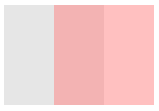
5.opacity 、filter:alpha(opacity= )控制元素透明度,后者兼容IE6-8
取值(0-1) (0-100)
CSS:

    div{ width:100px; height:100px background-color: black; opacity:0.5}

HTML:

    <div><div>
演示结果
二、边框样式
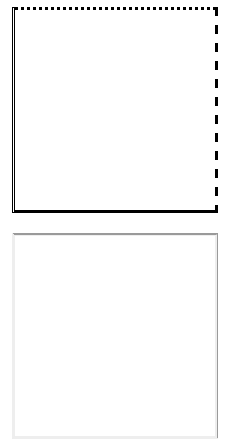
1.border-style 选择线型
取值:none,hidden,dotted,dashed,solid,double,groove,ridge,inset,outset
2.border-width 控制线宽
取值:medium,thin,thick,length
3.border-color: 控制边框颜色
取值:color name,rgba(),十六进制
4.border-image 控制边框图片
border-image-source
border-image-slice
border-image-width
border-image-outset
border-image-repeat
<!DOCTYPE html>

<html lang="en">

<head>

    <meta charset="UTF-8">

    <title></title>

    <style type="text/css">

    div{

        width: 200px;

        height: 200px;

        margin: 20px;

        border-color:#000;

    }

    .div1{

        border-top: dotted;   /* 点划线 */

        border-right: dashed;  /* 虚线 */

        border-bottom: solid;  /* 实线 */

        border-left: double;  /* 双横线 */

    }

    .div2{

        border-top: groove;  /* 沟槽线 */

        border-right: ridge;  /* 隆起线 */

        border-bottom: inset;   /* 凹入 */

        border-left:outset;  /* 凸起 */

    }

    </style>

</head>

<body>

    <div class="div1"></div>

    <div class="div2"></div>

</body>

</html>
演示结果
5.边框缩写语法:
border: width | style | color;
eg:
border:1px solid black;
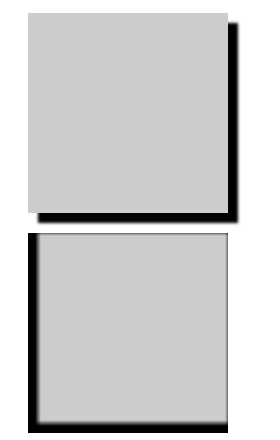
三、box-shadow 盒子阴影,控制元素阴影
取值:(X Y blur length color set)X水平偏移量,Y垂直偏移量,模糊程度,阴影半径扩展,投影方式。其中X,Y可为负值
<!DOCTYPE html>

<html lang="en">

<head>

    <meta charset="UTF-8">

    <title></title>

    <style type="text/css">

    div{

        width: 200px;

        height: 200px;

        margin: 20px;

        background-color: #ccc;

    }

    .div1{

        box-shadow: 10px 10px 3px black;

    }

    .div2{

        box-shadow: 5px -5px 5px 5px black inset;

    }

    </style>

</head>

<body>

    <div class="div1"></div>

    <div class="div2"></div>

</body>

</html>
演示结果
四、段落样式
1.line-height 设置行高
2.text-indent 设置文本缩进
3.text-align 设置文本对齐
取值:left,right,center,justify(两端对齐)
4.letter-spacing 控制文字间距
5.text-overflow 控制文字溢出时的样式
取值:clip,ellipsis
6.word-wrap 控制文本超出容器时是否换行
7.white-space:nowrap 强制文本不换行
<!DOCTYPE html>

<html lang="en">

<head>

    <meta charset="UTF-8">

    <title></title>

    <style type="text/css">

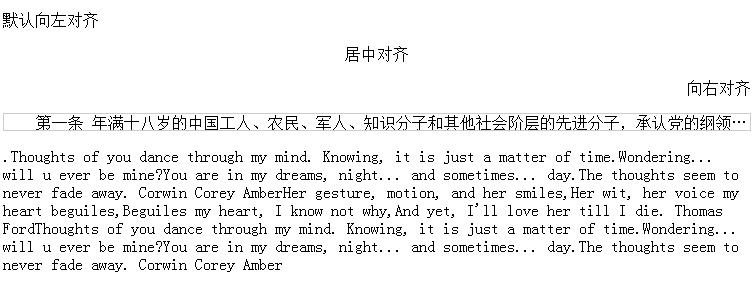
        p:first-of-type{

            text-align: left;

        }

        p:nth-of-type(2){

            text-align: center;

        }

        p:nth-of-type(3){

            text-align: right;

        }

        .china{

            height: 1em;

            border: 1px solid #ccc;

            text-indent: 2em;            /*控制文本缩进*/

            white-space: nowrap;          /*不允许换行*/

            overflow: hidden;            /*超出容器部分隐藏*/

            text-overflow: ellipsis;    /*用...替代隐藏部分*/

        }

        .english{

            line-height: 2em;        /*设置行高*/

            letter-spacing: 3px;    /*控制文字间距*/

            text-align: justify;     /*设置两端对齐*/

        }

    </style>

</head>

<body>

    <p>默认向左对齐</p>

    <p>居中对齐</p>

    <p>向右对齐</p>

    <p class="china">第一条 年满十八岁的工人、农民、军人、知识分子和其他社会阶层的先进分子的纲领和章程,愿意参一个组织并在其中积极工作、决议和按期交费的,可以申请二条 级的有共产主义觉悟的先锋战士

</p>

<p class="english">

    .Thoughts of you dance through my mind. Knowing, it is just a matter of time.Wondering... will u ever be mine?You are in my dreams, night... and sometimes... day.The thoughts seem to never fade away. Corwin Corey AmberHer gesture, motion, and her smiles,Her wit, her voice my heart beguiles,Beguiles my heart, I know not why,And yet, I'll love her till I die. Thomas FordThoughts of you dance through my mind. Knowing, it is just a matter of time.Wondering... will u ever be mine?You are in my dreams, night... and sometimes... day.The thoughts seem to never fade away. Corwin Corey Amber

</p>

</body>

</html>
结果演示
五、背景样式
1.background-color 设置背景色
2background-image:url() 引入背景图片
3.background-repeat 设置是否平铺,取值:repeat(默认),no-repeat
4.background-position:left top 设置背景位置,left,top的值可为负值
<!DOCTYPE html>

<html lang="en">

<head>

    <meta charset="UTF-8">

    <title></title>

    <style type="text/css">

        div{

            width: 300px;

            height: 300px;

            background-color: #ccc;

            background-image: url("bg.png");

            background-repeat: no-repeat;

            background-position: center center;

        }

    </style>

</head>

<body>

    <div></div>

</body>

</html>
演示结果

5.背景缩写语法:
background:#ccc url("bg.png") no-repeat center center;
6.background-clip 设置背景显示区域
取值:border-box,显示全部背景图
padding-box,显示内容和内边距部分背景图
content-box 只显示内容部分的背景图
7.background-origin 在北京不平铺的前提下才能使用,设置背景起始位置
8.background-size 设置背景尺寸
auto
length(px)
% 以背景容器来计算
cover 完全覆盖
contain 某一边紧贴容器边缘为止
9.设置多重背景 background:url(1) repeat position,url(2) repeat positon,...,url(n)...
六、列表样式
1.list-style-type 设置列表项目符号样式
取值(常用):none不显示项目符号,
dis实心圆,circle空心圆,
square实心方块,
decimal阿拉伯数字,
lower-roman小写罗马数字
upper-roman大写罗马数字
lower-alpha小写英文
upper-alpha大写英文
2.list-style-position 设置列表项目符号位置
取值:inside
outside
3.list-style-image 自定义列表项图片
CSS元素、边框、背景、列表样式的更多相关文章
- DIV+CSS颜色边框背景等样式
1.使用css缩写 使用缩写可以帮助减少你CSS文件的大小,更加容易阅读.css缩写的主要规则请参看<常用css缩写语法总结>,css缩写的主要规则如下: 颜色 16进制的色彩值,如果每两 ...
- css背景|列表样式
背景样式 背景区包含内容.padding 和 boder 不包含外边距 background-color 设置元素的背景颜色 background-image 把图像设置为背景,包含内边距和边框,不包 ...
- CSS外边框、边界样式常用组合
一.CSS框线一览表 border-top : 1px solid #6699cc; /*上框线*/ border-bottom : 1px solid #6699cc; /*下框线*/ border ...
- 使用css设置边框背景图片
使用css的特有属性,给不同的盒子添加边框图片. 为什么会有这一场景呢.因为,UI给我们前端的边框图片可能未必适合我们当前的内容. 这里我们主要使用到的属性有: border-image-source ...
- css样式表----------样式属性(背景与前景、边界和边框、列表与方块、格式与布局)
一.背景与前景 (1).背景 line-height: 1.5 !important;">90; /*背景色(以样式表为主,样式表优先.)*/ background-image:url ...
- CSS 颜色 字体 背景 文本 边框 列表 display属性
1 颜色属性 <div style="color:blueviolet">ppppp</div> <div style="color:#f ...
- CSS背景样式和列表样式
background-color 设置元素的背景颜色 background-image 把图像设置为背景 background-position 设置背景图像的起始位置 background-atta ...
- CSS的列表样式和网页背景
CSS的列表样式 1. 设置title和列表 HTML: <!DOCTYPE html><html lang="en"><head> &l ...
- CSS基础(背景、文本、列表、表格、轮廓)
CSS 背景属性 属性 描述 background 简写属性,作用是将背景属性设置在一个声明中. background-attachment 背景图像是否固定或者随着页面的其余部分滚动. backgr ...
随机推荐
- 01 - spring mvc 概述及配置DispatcherServlet
1.Spring mvc 基于model2实现,整体框架流程如(图片来自百度): ①web容器接收到http请求,若匹配DispatcherServlet的请求映射路径(web.xml),则容器会交给 ...
- MyEclipse优化,解决MyEclipse运行慢、卡顿问题
工具: myeclipse2015 2.0 最近想用myeclipse做一下测试,发现myeclipse运行非常卡,直接影响代码的开发,而且还出现软件卡退的情况,让我十分恼火. 一.加大JVM的非 ...
- mongodb-的副本集
复制的重要性不再多说,其主要就是提供数据保护,数据高可用和灾难恢复. 复制是跨多个mongodb服务器分布和维护的方法.mongodb可以把数据从一个节点复制到其他节点并在修改时进行同步. mongo ...
- Ecplise项目转移到Android Studio,以及Genymotion模拟器介绍
一.移植android项目 今天简单分享一个从ecplise开发项目转移到Android Studio的方法,之前一直在ecplise上开发android项目,但是因为google现在主打Androi ...
- 【安装】ES的安装过程
1.安装ES 首先我们需要去官网下载安装包 官方下载地址 下载后不需要编译,直接解压 解压后结构是这样的(2.5以上版本会有plugins目录,没有的需要手动创建) 方式一: 创建一个es用户(因为 ...
- Asp.net下拉树实现(Easy UI ComboTree)
场景描述:某个公司有多个部门并且部门存在子部门,通过一个下拉框选取多个部门,但是如果某个部门的子部门被全部选择,则只取该部门,而忽略子部门.(叶子节点全被选中时,只取父节点) 知识点:ComboTre ...
- Mininet实验 设置带宽之简单性能测试
原文:设置带宽之简单性能测试 这个实验主要还是说明通过python程序来设定Mininet中的链路带宽. 目的: Python脚本实现自定义拓扑 设置链路的带宽.延迟及丢包率 iperf测试主机间的带 ...
- codeforces 9 div2 C.Hexadecimal's Numbers 暴力打表
C. Hexadecimal's Numbers time limit per test 1 second memory limit per test 64 megabytes input stand ...
- thinkphp3.2笔记(5)创建项目 创建模型 实例化
一 创建项目 1 拷贝框架 目录 public thinkphp .htaccess index.php [application不用拷贝,会自动生成] 2 public 下面创 ...
- Mongo Plugin插件(编辑器PyCharm的Mongo插件安装与使用)
博主接触到MongoDB数据库.用普通的Navicat工具 是不支持的 正准备重新安装一款对应的可视化工具.刚好发现在PyCharm编辑中有连接mongoDB数据的插件 Mongo Plugin 这里 ...