
python 文件上传本地服务器
1:python之上传文件
1.1.url代码
 """untitled1222 URL Configuration

 The `urlpatterns` list routes URLs to views. For more information please see:

     https://docs.djangoproject.com/en/2.1/topics/http/urls/

 Examples:

 Function views

     1. Add an import:  from my_app import views

     2. Add a URL to urlpatterns:  path('', views.home, name='home')

 Class-based views

     1. Add an import:  from other_app.views import Home

     2. Add a URL to urlpatterns:  path('', Home.as_view(), name='home')

 Including another URLconf

     1. Import the include() function: from django.urls import include, path

     2. Add a URL to urlpatterns:  path('blog/', include('blog.urls'))

 """

 from django.contrib import admin

 from django.urls import path

 from app01 import views

 urlpatterns = [

     path('admin/', admin.site.urls),

     path('upload/',views.upload),

 ]
1.2.views代码
 from django.shortcuts import render

 from django.shortcuts import HttpResponse

 # Create your views here.

 def upload(request):

     if request.method=='GET':

         return render(request,'upload.html')

     else:

         user=request.POST.get('user')

         print(user)

         #img是一个对象,包含文件名,文件大小、内容....

         img=request.FILES.get('img')

         print(img)

         print(img.name)

         print(img.size)

         #上传到本地服务器

         f=open(img.name,'wb')

         for line in img.chunks():

             f.write(line)

         f.close()

         return HttpResponse('OK')
1.3.templates中upload.html
 <!DOCTYPE html>

 <html lang="en">

 <head>

     <meta charset="UTF-8">

     <title>Title</title>

 </head>

 <body>

 <form action="/upload/" method="post" enctype="multipart/form-data">

     <input type="text" name="user">

     <input type="file" name="img">

     <input type="submit" value="提交">

 </form>

 </body>

 </html>
1.4.效果显示
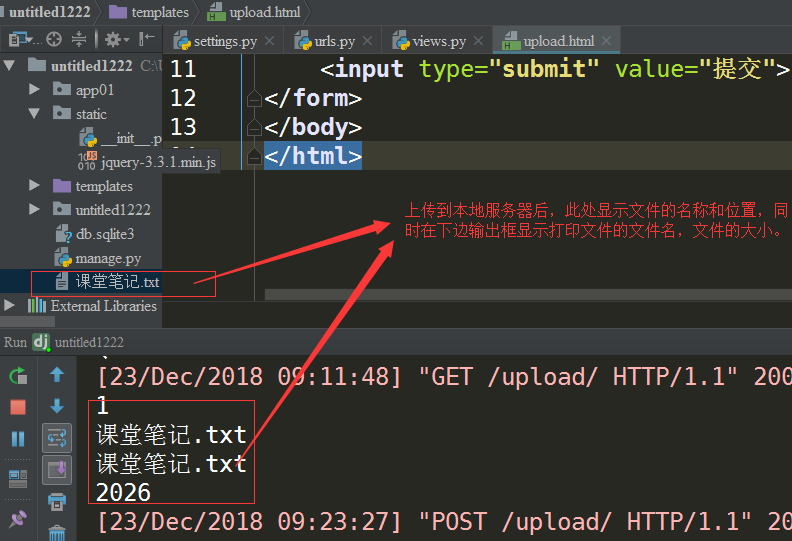
2.上传文件按钮优化
2.1按钮优化只需在原有upload.html文件中进行相关样式设置即可,重点设置透明度:opacity:0
 <!DOCTYPE html>

 <html lang="en">

 <head>

     <meta charset="UTF-8">

     <title>Title</title>

 </head>

 <body>

 <form action="/upload/" method="post" enctype="multipart/form-data">

     <input type="text" name="user">

     <div style="position: relative;">

         <a>上传</a>

     <input type="file" name="img" style="opacity: 0.2;position:absolute; top:0;left: 0;">

     </div>

     <input type="submit" value="提交">

 </form>

 <script src="/static/jquery-3.3.1.min.js"></script>

 </body>

 </html>
2.2.优化后的效果显示:
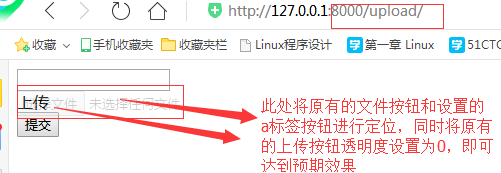
3.python之Form组件文件上传(与上述自定义上传文件的区别在:form上传文件多了验证功能)
 from django.shortcuts import render

 from django.shortcuts import HttpResponse

 # Create your views here.

 from django import forms

 from django.forms import fields

 #from组件形式的文件上传

 class UploadImg(forms.Form):

     user=fields.CharField()

     img=fields.FileField()

 def upload(request):

     if request.method=='GET':

         return render(request,'upload.html')

     else:

         OBJ=UploadImg(request.POST,request.FILES)

         if OBJ.is_valid():

             user=OBJ.cleaned_data['user']

             img=OBJ.cleaned_data['img']

             f = open(img.name, 'wb')

             for line in img.chunks():

                 f.write(line)

             f.close()

         #自定义形式文件上传

         # def upload(request):

         #     if request.method == 'GET':

         #         return render(request, 'upload.html')

         #     else:

         #         user=request.POST.get('user')

         #         print(user)

         #         #img是一个对象,包含文件名,文件大小、内容....

         #         img=request.FILES.get('img')

         #         print(img)

         #         print(img.name)

         #         print(size)

         #         f = open(img.name, 'wb')

         #         for line in img.chunks():

         #             f.write(line)

         #         f.close()

         #         return HttpResponse('OK')

         return HttpResponse('OK')
python 文件上传本地服务器的更多相关文章
- ubuntu中将本地文件上传到服务器
(1)在本地的终端下,而不是在服务器上.在本地的终端上才能将本地的文件拷入服务器. (2) scp -r localfile.txt username@192.168.0.1:/home/userna ...
- 基于paramiko将文件上传到服务器上
通过安装使用paramiko模块,将本地文件上传到服务器上 import paramiko import datetime import os hostname = '服务器ip' username ...
- Java实现文件上传到服务器(FTP方式)
Java实现文件上传到服务器(FTP方式) 1,jar包:commons-net-3.3.jar 2,实现代码: //FTP传输到数据库服务器 private boolean uploadServer ...
- Linux 文件上传Linux服务器
进入命令行 在图形化桌面出现之前,与Unix系统进行交互的唯一方式就是借助由shell所提供的文本命令行界面(command line interface,CLI).CLI只能接受文本输入,也只能显示 ...
- 一、手把手教你docker搭建fastDFS文件上传下载服务器
在搭建fastDFS文件上传下载服务器之前,你需要准备的有一个可连接的linux服务器,并且该linux服务器上已经安装了docker,若还有没安装docker的,先百度自行安装docker. 1.执 ...
- Linux 将本地文件上传Linux服务器, 即ssh 命令上传本地文件
利用ssh传输文件 在linux下一般用scp这个命令来通过ssh传输文件. 1.从服务器上下载文件 scp username@servername:/path/filename /var/www ...
- Linux 将本地文件上传Linux服务器, 即ssh 命令上传本地文件
http://blog.csdn.net/rodulf/article/details/71169996 利用ssh传输文件 在linux下一般用scp这个命令来通过ssh传输文件. 1.从服务器上下 ...
- c#将本地文件上传至服务器(内网)
using System; using System.Collections.Generic; using System.ComponentModel; using System.Data; usin ...
- python+selenium上传本地文件
迅雷号自媒体视频文件自动上传,贴标签发布 难点 本地文件上传,通过send_keys(‘文件路径’)的方式实现上传的目的 文件名通过正则匹配的方式进行处理,主要匹配出中文标题名称 处理过程中文件名称中 ...
随机推荐
- 支持n多视频网站的下载,推荐 you-get
其实刚开始是想下载youtube视频, 网上找了下 其中之一:http://jingyan.baidu.com/article/39810a23d2deb2b637fda66c.html 访问一个在线 ...
- Slf4j打印异常的堆栈信息
一.前言 直接用logger.info("异常信息为:"+e)或者logger.info(e.getMessage())只能记录到异常的描述信息,却没有其异常具体发生在哪一行代码. ...
- Sql Server 2012 Local DB发布到服务器端后无法访问
背景 基于Windows认证的Web application, 通过Visual Studio 2013创建的LocalDB位于App_Data目录下 现象 本地调试没有任何问题.发布到服务器(Win ...
- spring boot(3)-Rest风格接口
Rest接口 虽然现在还有很多人在用jsp,但是其实这种动态页面早已过时,现在前端流行的是静态HTML+ rest接口(json格式).当然,如果是单台服务器,用动态还是静态页面可能没什么很大区别,但 ...
- Android根据URL下载文件保存到SD卡
//下载具体操作 private void download() { try { URL url = new URL(downloadUrl); //打开连接 URLConnection conn = ...
- 最近选购MP3而有感便携追求音质的一些心得
之前的创新小石头MP3的耳机接口松动了.考虑到它已经服役了4年了.所以我准备重新买一个.而小石头出色的外放,我决定让给宝宝当玩具. 选购心得MP3的时候,原来的主导思想,是在低价位的里面考虑一台国际品 ...
- [翻译] ZLSwipeableView
ZLSwipeableView A simple view for building card like interface like Tinder and Potluck. ZLSwipeableV ...
- [翻译] BBCyclingLabel
BBCyclingLabel BBCyclingLabel is just like a UILabel but allows you to perform custom animations whe ...
- CAShapeLayer的使用[1]
CAShapeLayer的使用[1] 使用CoreAnimation绘制动画带来的系统开销非常的小,CoreAnimation通常都是使用GPU的. CAShapeLayer属于CoreAnimati ...
- JFinal启动报错:Exception in thread "main" java.lang.NoClassDefFoundError: org/eclipse/jetty/server/Connector
- 错误: Exception in thread "main" java.lang.NoClassDefFoundError: org/eclipse/jetty/server/ ...