
UITableView划动删除的实现
- #import <UIKit/UIKit.h>
- @interface UITableCellSwapDeleteViewController : UIViewController <UITableViewDelegate>{
- IBOutlet UITableView *testTableView;
- NSMutableArray *dataArray;
- }
- @property (nonatomic, retain) UITableView *testTableView;
- @property (nonatomic, retain) NSMutableArray *dataArray;
- @end
- - (void)viewDidLoad {
- [super viewDidLoad];
- dataArray = [[NSMutableArray alloc] initWithObjects:@"1",@"2",@"3",@"4",@"5",nil];
- }
- - (NSInteger)numberOfSectionsInTableView:(UITableView *)tableView {
- // Return the number of sections.
- return 1;
- }
- - (NSInteger)tableView:(UITableView *)tableView numberOfRowsInSection:(NSInteger)section {
- // Return the number of rows in the section.
- return [dataArray count];
- }
- // Customize the appearance of table view cells.
- - (UITableViewCell *)tableView:(UITableView *)tableView cellForRowAtIndexPath:(NSIndexPath *)indexPath {
- static NSString *CellIdentifier = @"Cell";
- UITableViewCell *cell = [tableView dequeueReusableCellWithIdentifier:CellIdentifier];
- if (cell == nil) {
- cell = [[[UITableViewCell alloc] initWithStyle:UITableViewCellStyleDefault reuseIdentifier:CellIdentifier] autorelease];
- }
- // Configure the cell...
- cell.textLabel.text = [dataArray objectAtIndex:indexPath.row];
- return cell;
- }
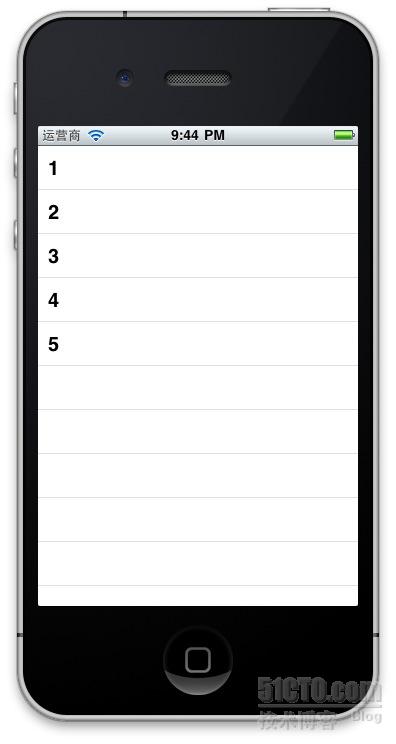
- - (BOOL)tableView:(UITableView *)tableView canEditRowAtIndexPath:(NSIndexPath *)indexPath {
- return YES;
- }
- - (void)tableView:(UITableView *)tableView commitEditingStyle:(UITableViewCellEditingStyle)editingStyle forRowAtIndexPath:(NSIndexPath *)indexPath {
- if (editingStyle == UITableViewCellEditingStyleDelete) {
- [dataArray removeObjectAtIndex:indexPath.row];
- // Delete the row from the data source.
- [testTableView deleteRowsAtIndexPaths:[NSArray arrayWithObject:indexPath] withRowAnimation:UITableViewRowAnimationFade];
- }
- else if (editingStyle == UITableViewCellEditingStyleInsert) {
- // Create a new instance of the appropriate class, insert it into the array, and add a new row to the table view.
- }
- }
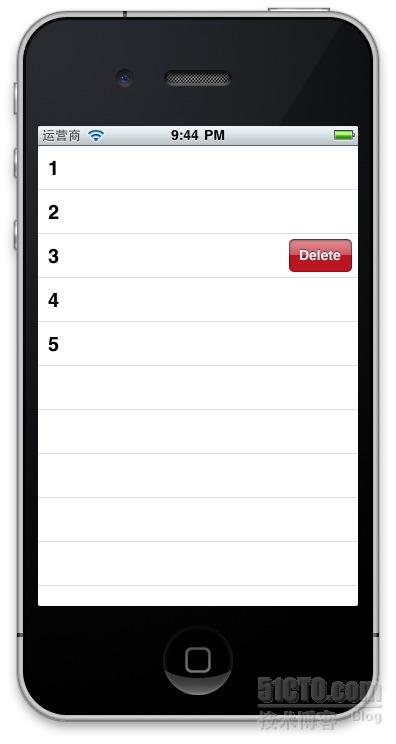
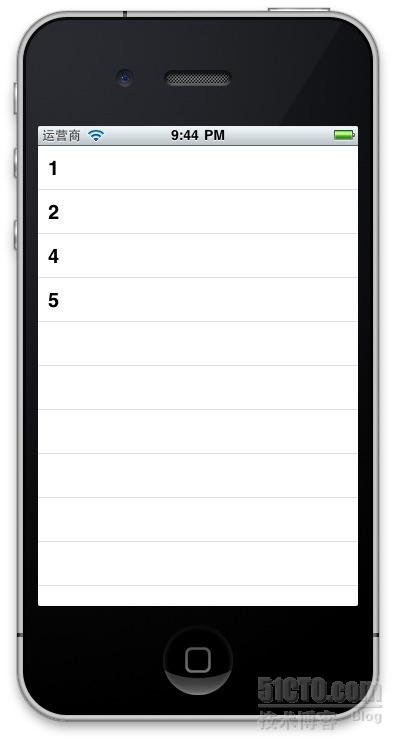
- - (NSString *)tableView:(UITableView *)tableView titleForDeleteConfirmationButtonForRowAtIndexPath:(NSIndexPath *)indexPath{
- return @"下载";
- }

相关文章:
UITableView多选删除,类似mail中的多选删除效果
具体代码见附件
本文出自 “rainbird” 博客,请务必保留此出处http://rainbird.blog.51cto.com/211214/634587
UITableView划动删除的实现的更多相关文章
- iOS UITableView划动删除的实现
标签:划动删除 iphone 滑动删除 ios UITableView 原创作品,允许转载,转载时请务必以超链接形式标明文章 原始出处 .作者信息和本声明.否则将追究法律责任.http://rainb ...
- ios UITableView多选删除
第一步, - (UITableViewCellEditingStyle)tableView:(UITableView *)tableView editingStyleForRowAtIndexPath ...
- UItableView的编辑--删除移动cell
// // RootViewController.m // UI__TableView的编辑 // // Created by dllo on 16/3/17. // Copyright © 2016 ...
- jquery左划出现删除按钮,右滑隐藏
jquery左侧划出显示删除按钮,右滑动隐藏删除按钮 <!doctype html> <html> <head> <meta charset="ut ...
- Swift基础--手势识别(双击、捏、旋转、拖动、划动、长按)
// // ViewController.swift // JieUITapGestureRecognizer // // Created by jiezhang on 14-10-4. // ...
- android提供ToolBar实现划动菜单的陷阱
代码如下: <LinearLayout xmlns:android="http://schemas.android.com/apk/res/android" android: ...
- iphone练习之手势识别(双击、捏、旋转、拖动、划动、长按)UITapGestureRecognizer
首先新建一个基于Sigle view Application的项目,名为GestureTest;我的项目结构如下: 往viewController.xib文件里拖动一个imageView,并使覆盖整个 ...
- Swift中实现点击、双击、捏、旋转、拖动、划动、长按手势的类和方法介绍
1.UITapGestureRecognizer 点击/双击手势 代码如下: var tapGesture = UITapGestureRecognizer(target: self, action: ...
- ios7禁止默认划动返回
self.navigationController.interactivePopGestureRecognizer.enabled = NO; 或 在使用之前先要判断是否ios7,不然会导致crash ...
随机推荐
- [Makefile]多目录Makefile写法
最近需要写一个测试程序,这个测试程序需要集成一些功能,写在同一个文件看上去很不好,多个文件的Makefile又不是很熟,于是分享下面这篇文章 先介绍下,调试Makefile时,想知道某个变量的值,怎么 ...
- asp.net mvc 4 AntiForgery 提供的防伪标记适用于用户“”,但当前用户为“XX” 问题处理记录
情景: 某页面未登录下可以访问,但具体操作时发现未登录就弹出登录窗,待完成登录后继续操作. 当登录成功,前端继续操作(post后端接口)时发现以下错误: 提供的防伪标记适用于用户“”,但当前 ...
- redis4安装
第一步官网下载 https://redis.io/ rz 上传或者直接wget http://download.redis.io/releases/redis-4.0.2.tar.gz 2.将其下 ...
- DataGridView使用技巧十一:DataGridView用户输入时,单元格输入值的设定
通过DataGridView.CellParsing事件可以设定用户输入的值.下面的示例:当输入英文文本内容的时候,立即被改变为大写.DataGridView.CellParsing在离开编辑的单元格 ...
- java-servlet的url-pattern匹配规则详细描述
http://www.cnblogs.com/51kata/p/5152400.html http://www.cnblogs.com/canger/p/6084846.html 一.概述 在利用se ...
- cs108 04 oop design
oop design 分为以下几个方面: - encapsulation and modularity(封装和模块化) - API/Client interface design(API 接口给调用类 ...
- etl获取转换文件名
- 轻松使用jquery解析XML
xml文件结构:books.xml <?xml version="1.0" encoding="UTF-8"?><root> &l ...
- 【这特么是个坑。。。】iOS 10.3下解决Charles抓包ssl证书信任问题
针对近期iOS 10.3以上的系统charles抓https信任问题 前言 最近iPhone系统更新到ios 10.3后,在公司里用Charles抓包竟然出现了一些问题,https的请求都会失败,提示 ...
- C#基础概念二十五问
1.静态成员和非静态成员的区别? 答: 静态变量使用 static 修饰符进行声明,在类被实例化时创建,通过类进行访问 不带有 static 修饰符声明的变量称做非静态变量,在对象被实例化时创建,通过 ...