
spring-AOP(面向切面编程)-注解方式配置
项目结构:
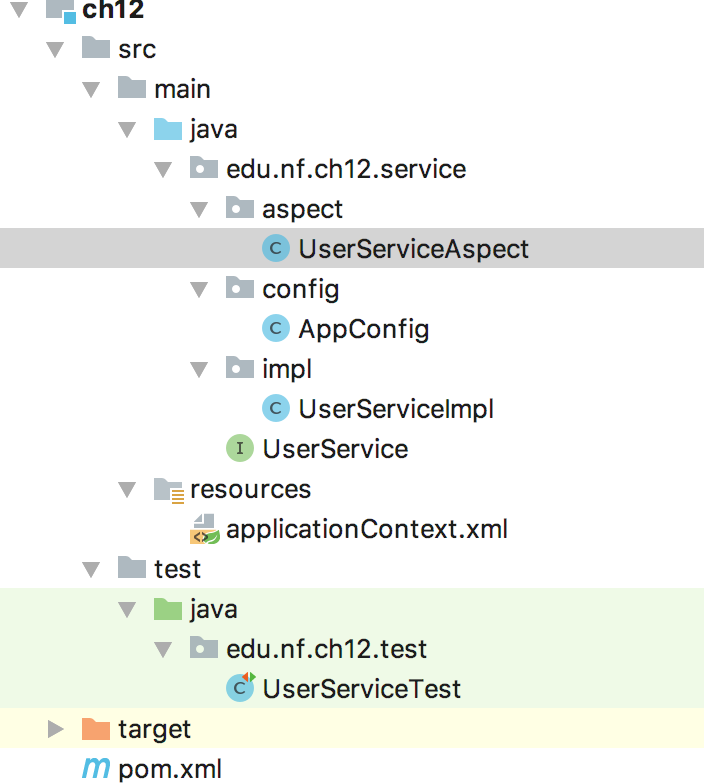
切面类:
package edu.nf.ch12.service.aspect;

import org.aspectj.lang.JoinPoint;

import org.aspectj.lang.ProceedingJoinPoint;

import org.aspectj.lang.annotation.*;

import org.springframework.stereotype.Component;

/**

 * @author wangl

 * @date 2018/10/24

 */

@Aspect //这个注解标识当前的类为一个切面

@Component //标识容器受管的Bean对象

public class UserServiceAspect {

    /**

     * 声明一个切入点,并编写切入点表达式

     */

    @Pointcut("execution(* edu.nf.ch12.service.*.*(..))")

    public void pointcut(){

    }

    /**

     * 前置通知,指定切入点函数

     * 也可在注解中自定义不同的切入点表达式

     * @Before("execution(...)")

     *

     */

    @Before("pointcut()")

    public void before(JoinPoint joinPoint){

        System.out.println("前置通知..."+joinPoint.getArgs()[0]);

    }

    /**

     * 后置通知

     */

    @AfterReturning(value = "pointcut()", returning = "returnVal")

    public void afterReturn(String returnVal){

        System.out.println("后置通知..." + returnVal);

    }

    /**

     * 环绕通知

     */

    @Around("pointcut()")

    public Object around(ProceedingJoinPoint pjp) throws Throwable {

        System.out.println("环绕通知前...");

        Object returnVal = pjp.proceed();

        System.out.println("环绕通知后...");

        return returnVal;

    }

    /**

     * 异常通知

     * 通过pointcut指定切入点

     */

    @AfterThrowing(pointcut = "pointcut()", throwing = "e")

    public void throwableAdvice(Throwable e){

        System.out.println("异常通知..." + e.getMessage());

    }

    /**

     * 最终通知

     */

    @After("pointcut()")

    public void after(){

        System.out.println("最终通知...");

    }

}
配置类AppConfig:
package edu.nf.ch12.service.config;

import org.springframework.context.annotation.ComponentScan;

import org.springframework.context.annotation.EnableAspectJAutoProxy;

/**

 * @author wangl

 * @date 2018/10/24

 */

@ComponentScan("edu.nf.ch12") //启用包扫描

@EnableAspectJAutoProxy //启用AspectJ注解自动配置,proxyTargetClass用于指定是否强制使用cglib代理

public class AppConfig {

}
接口类:
package edu.nf.ch12.service;

/**

 * @author wangl

 * @date 2018/10/24

 */

public interface UserService {

    /**

     * 查询用户

     * @param uid

     * @return

     */

    String getUserNameById(String uid);

}
接口实现类:
package edu.nf.ch12.service.impl;

import edu.nf.ch12.service.UserService;

import org.springframework.stereotype.Service;

/**

 * @author wangl

 * @date 2018/10/24

 */

@Service("userService")

public class UserServiceImpl implements UserService {

    @Override

    public String getUserNameById(String uid) {

        System.out.println("查询用户..."+uid);

        return "user1";

    }

}
程序测试类:
package edu.nf.ch12.test;

import edu.nf.ch12.service.UserService;

import edu.nf.ch12.service.config.AppConfig;

import org.junit.Test;

import org.springframework.context.ApplicationContext;

import org.springframework.context.annotation.AnnotationConfigApplicationContext;

import org.springframework.context.support.ClassPathXmlApplicationContext;

/**

 * @author wangl

 * @date 2018/10/24

 */

public class UserServiceTest {

    @Test

    public void testGetUser(){

        //ApplicationContext context = new ClassPathXmlApplicationContext("applicationContext.xml");

        ApplicationContext context = new AnnotationConfigApplicationContext(AppConfig.class);

        UserService service = context.getBean("userService", UserService.class);

        service.getUserNameById("1001");

    }

}
如果半注解半配置文件实现的话, new ClassPathXmlApplicationContext("applicationContext.xml");实例 然后再配置一个xml
applicationContext:
<?xml version="1.0" encoding="UTF-8"?>

<beans xmlns="http://www.springframework.org/schema/beans"

       xmlns:xsi="http://www.w3.org/2001/XMLSchema-instance"

       xmlns:context="http://www.springframework.org/schema/context"

       xmlns:aop="http://www.springframework.org/schema/aop"

       xsi:schemaLocation="http://www.springframework.org/schema/beans http://www.springframework.org/schema/beans/spring-beans.xsd http://www.springframework.org/schema/context http://www.springframework.org/schema/context/spring-context.xsd http://www.springframework.org/schema/aop http://www.springframework.org/schema/aop/spring-aop.xsd">

    <!-- 启用包扫描 -->

    <context:component-scan base-package="edu.nf.ch12"/>

    <!-- 启用AspectJ注解自动配置,proxy-target-class是否强制使用cglib动态代理,true表示强制-->

    <aop:aspectj-autoproxy/>

</beans>
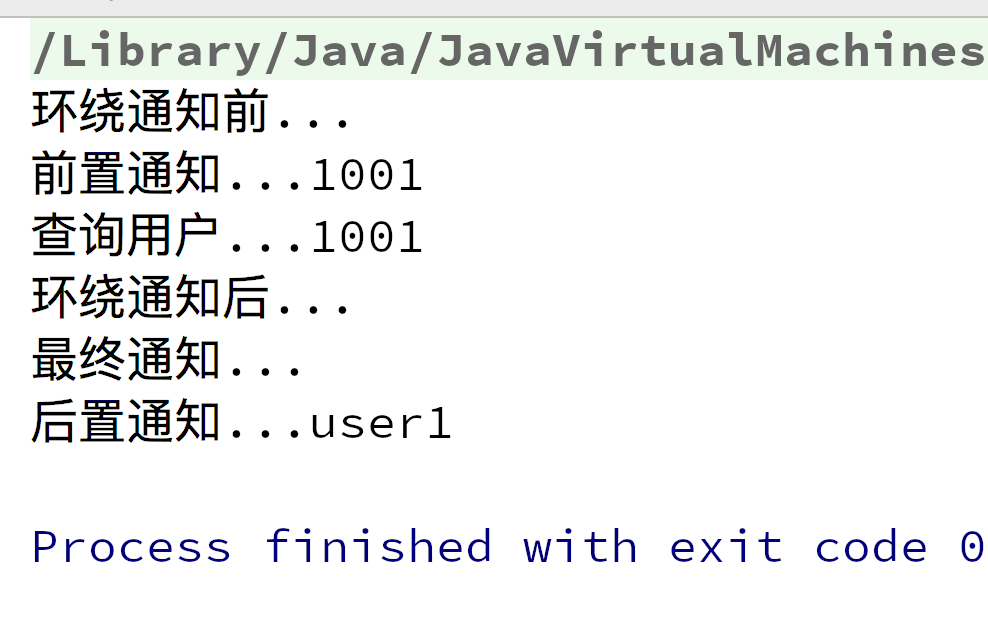
运行结果:
spring-AOP(面向切面编程)-注解方式配置的更多相关文章
- 详细解读 Spring AOP 面向切面编程(二)
本文是<详细解读 Spring AOP 面向切面编程(一)>的续集. 在上篇中,我们从写死代码,到使用代理:从编程式 Spring AOP 到声明式 Spring AOP.一切都朝着简单实 ...
- 浅谈Spring AOP 面向切面编程 最通俗易懂的画图理解AOP、AOP通知执行顺序~
简介 我们都知道,Spring 框架作为后端主流框架之一,最有特点的三部分就是IOC控制反转.依赖注入.以及AOP切面.当然AOP作为一个Spring 的重要组成模块,当然IOC是不依赖于Spring ...
- Spring AOP 面向切面编程相关注解
Aspect Oriented Programming 面向切面编程 在Spring中使用这些面向切面相关的注解可以结合使用aspectJ,aspectJ是专门搞动态代理技术的,所以比较专业. ...
- spring AOP面向切面编程学习笔记
一.面向切面编程简介: 在调用某些类的方法时,要在方法执行前或后进行预处理或后处理:预处理或后处理的操作被封装在另一个类中.如图中,UserService类在执行addUser()或updateUse ...
- 【Spring系列】Spring AOP面向切面编程
前言 接上一篇文章,在上午中使用了切面做防重复控制,本文着重介绍切面AOP. 在开发中,有一些功能行为是通用的,比如.日志管理.安全和事务,它们有一个共同点就是分布于应用中的多处,这种功能被称为横切关 ...
- 从源码入手,一文带你读懂Spring AOP面向切面编程
之前<零基础带你看Spring源码--IOC控制反转>详细讲了Spring容器的初始化和加载的原理,后面<你真的完全了解Java动态代理吗?看这篇就够了>介绍了下JDK的动态代 ...
- Spring AOP面向切面编程详解
前言 AOP即面向切面编程,是一种编程思想,OOP的延续.在程序开发中主要用来解决一些系统层面上的问题,比如日志,事务,权限等等.在阅读本文前希望您已经对Spring有一定的了解 注:在能对代码进行添 ...
- 详细解读 Spring AOP 面向切面编程(一)
又是一个周末, 今天我要和大家分享的是 AOP(Aspect-Oriented Programming)这个东西,名字与 OOP 仅差一个字母,其实它是对 OOP 编程方式的一种补充,并非是取而代之. ...
- Spring Aop面向切面编程&&自动注入
1.面向切面编程 在程序原有纵向执行流程中,针对某一个或某一些方法添加通知,形成横切面的过程叫做面向切面编程 2.常用概念 原有功能:切点,pointcut 前置通知:在切点之前执行的功能,befor ...
随机推荐
- leetcode — permutation-sequence
import java.util.ArrayList; import java.util.List; /** * Source : https://oj.leetcode.com/problems/p ...
- SpringMVC入门学习三
今天是Springmvc学习的第三天,今天我将主要介绍一下: 常用注解的使用 关于非post.get请求的处理 文件上传与下载 拦截器 常用注解的使用 老大在此 @Controller @Cont ...
- 03_SQL server数据类型
SQL server数据类型 String类型: 数据类型: 描述 存储 char(n) 固定长度的字符串.最多 8,000 个字符.定义类型为char(5),那么就表示该类型可以存储5个字符,即使存 ...
- 如何快速使用Access实现一个登录验证界面?
大三上学期期末总结,嗯,没错,上学期,写在新学期开始,hhhh. 上学期末的时候信管班的一个同学问我会不会Access,能不能它实现一个登录验证界面,说实话,之前对Access只是有所耳闻,随便敷衍了 ...
- CentOS 7.0 上安装和配置 VNC 服务器
作为一个系统管理员,大多数时间是通过网络管理服务器的.在管理服务器的过程中很少会用到图形界面,多数情况下我们只是用 SSH 来完成我们的管理任务.在这篇文章里,我们将配置 VNC 来提供一个连接我们 ...
- T-SQL基础(四)之集合运算
三个运算符 T-SQL支持三个集合运算符:UNION.INTERSECT.EXCEPT. 集合运算符查询的一般形式如下: Query1 <set_operator> Query2 -- 这 ...
- C#开源框架(转载)
Json.NET http://json.codeplex.com/ Json.Net 是一个读写Json效率比较高的.Net框架.Json.Net 使得在.Net环境下使用Json更加简单.通过Li ...
- Echarts3.0 引入百度地图(转载)
转载来源: https://blog.csdn.net/yc_1993/article/details/52431989 Echarts3.0引入百度地图 update: 由于目前echarts3.8 ...
- ORA-00959: tablespace 'PSAPTEMP' does not exist
错误 : ORA-00959: tablespace 'PSAPTEMP' does not exist 解决办法: CREATE TEMPORARY TABLESPACE PSAPTEMP TEM ...
- Java细节整理——数组与内存控制
重点:使用Java数组之前,必须对数组对象进行初始化. 当数组的所有元素都被分配了合适的内存空间,并指定了初始值时,数组的初始化完成.程序以后将不能重新改变数组对象在内存中的位置和大小. 知识点整理: ...