
Mybatis笔记一:写一个demo
什么是Mybatis?
在Java中,我们连接数据库可以使用最初级的JDBC,但是这样很麻烦,每次都要写好多,所以Mybatis出现了,Mybatis可以帮我们很简单很简单的实现与数据库的读取改写操作
引入文件
- Maven引入一个Mybatis的包
        <dependency>

            <groupId>org.mybatis</groupId>

            <artifactId>mybatis</artifactId>

            <version>3.5.0</version>

        </dependency>
- 还需要一个Mybatis的配置文件,可以起名为Mybatis.xml
<?xml version="1.0" encoding="UTF-8"?>

<!DOCTYPE configuration PUBLIC "-//mybatis.org//DTD Config 3.0//EN"

        "http://mybatis.org/dtd/mybatis-3-config.dtd">

<configuration>

    <!-- 设置一个默认的连接环境信息 -->

    <environments default="mysql_developer">

        <environment id="mysql_developer">

            <!-- mybatis使用jdbc事务管理方式 -->

            <transactionManager type="JDBC"></transactionManager>

            <!-- mybatis使用连接池方式来获取连接 -->

            <dataSource type="POOLED">

                <!-- 配置与数据库交互的4个必要属性,不要直接写,单独写在一个配置文件中 -->

                <property name="driver" value="com.mysql.cj.jdbc.Driver"/>

                <property name="url" value="jdbc:mysql://127.0.0.1:3306/shuyunquan?serverTimezone=UTC"/>

                <property name="username" value="root"/>

                <property name="password" value="123"/>

            </dataSource>

        </environment>

    </environments>

    <!-- 加载映射文件-->

    <mappers>

        <mapper resource="config/Message.xml"/>

    </mappers>

</configuration>
这里Mybatis写了连接数据库的几个要素,还有下面的mappers写了我们要加载的类的配置文件,这个我们下面细讲
- 类的配置文件
<?xml version="1.0" encoding="utf-8"?>
<!DOCTYPE mapper PUBLIC
"-//mybatis.org//DTD Mapper 3.0//EN"
"http://mybatis.org/dtd/mybatis-3-mapper.dtd">
<!-- mapper标签都有一个唯一标示,即为命名空间namespace -->
<mapper namespace="Message">
<!--
数据库查询数据
insert、select、delete、update:sql语句类型
id:sql语句唯一标识
resultType:结果返回值类型-包名+类名 或 基本数据类型
parameterType:匹配字段值-包名+类名 或 基本数据类型
-->
<select id="selectListMessage" parameterType="com.vae.springboot.study.bean.Message" resultType="com.vae.springboot.study.bean.Message">
select * from message where 1=1
<if test="command !=null and !"".equals(command.trim())">and COMMAND =#{command}</if>
<if test="description !=null and !"".equals(description.trim())">and DESCRIPTION like '%' #{description} '%'</if>
</select>
<select id="selectOneMessage" parameterType="com.vae.springboot.study.bean.Message" resultType="com.vae.springboot.study.bean.Message">
select * from message where ID=#{ID}
</select>
<!--<insert id="xx1" resultType="xx" parameterType="xxx">-->
<!--insert into tb(c1) values(#{v1})-->
<!--</insert>-->
<delete id="deleteOneMessage" parameterType="com.vae.springboot.study.bean.Message">
delete from message where ID = #{para}
</delete>
<!--<update id="xx3" parameterType="xxx">-->
<!--update advertis set c1 = v1 where c2 =#{v2};-->
<!--</update>-->
</mapper>
这个其实,我想取的数据库,对应的字段我建立了一个对应的Java Bean,然后这里xml主要写的是增删改查之类的
看看我的数据库
两个配置文件复制一下,看看我的数据库
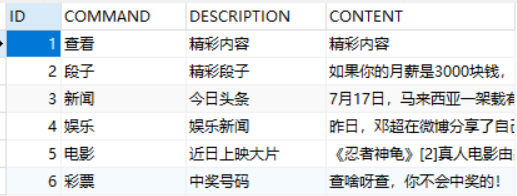
看看我的Java Bean
package com.vae.springboot.study.bean;

/**

 * 消息表对应的Java Bean

 */

public class Message {

    private String id;

    private String command;

    private String description;

    private String content;

    public String getId() {

        return id;

    }

    public void setId(String id) {

        this.id = id;

    }

    public String getCommand() {

        return command;

    }

    public void setCommand(String command) {

        this.command = command;

    }

    public String getDescription() {

        return description;

    }

    public void setDescription(String description) {

        this.description = description;

    }

    public String getContent() {

        return content;

    }

    public void setContent(String content) {

        this.content = content;

    }

}
看看我的Controller
package com.vae.springboot.study.Controller;

import com.vae.springboot.study.DB.DBAcess;

import com.vae.springboot.study.bean.Message;

import org.apache.ibatis.session.SqlSession;

import org.springframework.stereotype.Controller;

import org.springframework.web.bind.annotation.RequestBody;

import org.springframework.web.bind.annotation.RequestMapping;

import org.springframework.web.bind.annotation.ResponseBody;

import java.io.IOException;

import java.util.ArrayList;

import java.util.List;

/**

 * 列表页面初始化

 */

@Controller

public class ListController {

    @ResponseBody

    @RequestMapping("/list")

    public List<Message> list(@RequestBody Message message) throws IOException {

        List<Message> list=new ArrayList<>();

        DBAcess dbAcess=new DBAcess();

        SqlSession sqlSession = dbAcess.getSqlSession();

        System.out.println("---------------"+message.getCommand());

        System.out.println("---------------"+message.getDescription());

        try {

            list =sqlSession.selectList("Message.selectListMessage",message);

            return list;

        }finally {

            sqlSession.close();

        }

    }

    @ResponseBody

    @RequestMapping("/getOne")

    public List<Message> getOne() throws IOException {

        List<Message> list=new ArrayList<>();

        DBAcess dbAcess=new DBAcess();

        SqlSession sqlSession = dbAcess.getSqlSession();

        try {

            list =sqlSession.selectList("Message.selectOneMessage",1);

            System.out.println(list.get(0));

            return list;

        }finally {

            sqlSession.close();

        }

    }

    @ResponseBody

    @RequestMapping("/delete")

    public List<Message> delete(@RequestBody Message message) throws IOException {

        List<Message> list=new ArrayList<>();

        DBAcess dbAcess=new DBAcess();

        SqlSession sqlSession = dbAcess.getSqlSession();

        System.out.println("---------------"+message.getCommand());

        System.out.println("---------------"+message.getDescription());

        try {

            list =sqlSession.selectList("Message.deleteOneMessage",message);

            return list;

        }finally {

            sqlSession.close();

        }

    }

}
由于sqlSessionFactory经常会需要创建,所以我们把创建sqlSessionFactory返回sqlSession封装一下,就叫DBAcess
package com.vae.springboot.study.DB;

import org.apache.ibatis.io.Resources;

import org.apache.ibatis.session.SqlSession;

import org.apache.ibatis.session.SqlSessionFactory;

import org.apache.ibatis.session.SqlSessionFactoryBuilder;

import java.io.IOException;

import java.io.Reader;

public class DBAcess {

    public SqlSession getSqlSession() throws IOException {

        Reader reader=Resources.getResourceAsReader("config/Mybatis.xml");

        SqlSessionFactory sqlSessionFactory=new SqlSessionFactoryBuilder().build(reader);

        SqlSession sqlSession = sqlSessionFactory.openSession();

        return sqlSession;

    }

}
测试类
package com.vae.springboot.study.Controller;

import com.vae.springboot.study.DB.DBAcess;

import com.vae.springboot.study.bean.Message;

import org.apache.ibatis.session.SqlSession;

import org.junit.Test;

import org.junit.runner.RunWith;

import org.springframework.boot.test.context.SpringBootTest;

import org.springframework.test.context.junit4.SpringRunner;

import java.io.IOException;

import java.util.ArrayList;

import java.util.List;

@RunWith(SpringRunner.class)

@SpringBootTest

public class ListControllerTest {

    @Test

    public void test() throws IOException {

        List<Message> list=new ArrayList<>();

        DBAcess dbAcess=new DBAcess();

        SqlSession sqlSession = dbAcess.getSqlSession();

        list = sqlSession.selectList("Message.selectListMessage");

        System.out.println(list);

    }

    @Test

    public void getOne() throws IOException {

        List<Message> list=new ArrayList<>();

        DBAcess dbAcess=new DBAcess();

        SqlSession sqlSession = dbAcess.getSqlSession();

        try {

            list =sqlSession.selectList("Message.selectOneMessage",1);

            System.out.println(list.get(0).getId()+list.get(0).getCommand()+list.get(0).getDescription());

        }finally {

            sqlSession.close();

        }

    }

}
我的前端,使用Ajax技术
<!DOCTYPE html PUBLIC "-//W3C//DTD XHTML 1.0 Transitional//EN" "http://www.w3.org/TR/xhtml1/DTD/xhtml1-transitional.dtd">
<html xmlns="http://www.w3.org/1999/xhtml">
<head>
<meta http-equiv="Content-Type" content="text/html; charset=UTF-8" />
<meta http-equiv="X-UA-Compatible"content="IE=9; IE=8; IE=7; IE=EDGE" />
<title>内容列表页面</title>
<link href="css/all.css" rel="stylesheet" type="text/css" />
<script src="js/jquery-1.8.0.min.js"></script>
</head>
<body style="background: #e1e9eb;">
<form action="" id="mainForm" method="post">
<div class="right">
<div class="current">当前位置:<a href="javascript:void(0)" style="color:#6E6E6E;">内容管理</a> > 内容列表</div>
<div class="rightCont">
<p class="g_title fix">内容列表 <a class="btn03" href="#">新 增</a> <a class="btn03" href="#">删 除</a></p>
<table class="tab1">
<tbody>
<tr>
<td width="90" align="right">指令:</td>
<td>
<input type="text" id="command" class="allInput" value=""/>
</td>
<td width="90" align="right">描述:</td>
<td>
<input type="text" id="description" class="allInput" value=""/>
</td>
<td width="85" align="right"><input type="button" class="tabSub" onclick="refurbishIndex()" value="查 询" /></td>
</tr>
</tbody>
</table>
<div class="zixun fix">
<table class="tab2" width="100%">
<tr>
<th><input type="checkbox" id="all" onclick="#"/></th>
<th>id</th>
<th>指令</th>
<th>描述</th>
<th>操作</th>
</tr>
<tbody id="tbodydata">
</tbody>
</table>
<div class='page fix'>
共 <b>4</b> 条
<a href='###' class='first'>首页</a>
<a href='###' class='pre'>上一页</a>
当前第<span>1/1</span>页
<a href='###' class='next'>下一页</a>
<a href='###' class='last'>末页</a>
跳至 <input type='text' value='1' class='allInput w28' /> 页
<a href='###' class='go'>GO</a>
</div>
</div>
</div>
</div>
</form>
</body>
</html>
<script type="text/javascript">
$(function () {
refurbishIndex();
})
function refurbishIndex(){
var queryData = {
command : $('#command').val(),
description : $('#description').val()
}
$.ajax({
type:"post",
url:"/list",
data:JSON.stringify(queryData),
contentType : "application/json",
success:function (data) {
var str="";
for (i in data) {
str += "<tr>" +
"<td>"+"<input type=\"checkbox\" />"+"</td>"+
"<td align='center'>" + data[i].id + "</td>" +
"<td align='center'>" + data[i].command + "</td>" +
"<td align='center'>" + data[i].description + "</td>" +
"<td>\n" +
"<a href=\"#\">修改</a>\n" +
"<a href=\"#\">删除</a>\n" +
"</td>"
"</tr>";
}
document.getElementById("tbodydata").innerHTML=str;
}
});
}
</script>
Mybatis笔记一:写一个demo的更多相关文章
- python 学习笔记 12 -- 写一个脚本获取城市天气信息
近期在玩树莓派,前面写过一篇在树莓派上使用1602液晶显示屏,那么可以显示后最重要的就是显示什么的问题了. 最easy想到的就是显示时间啊,CPU利用率啊.IP地址之类的.那么我认为呢,假设可以显示当 ...
- DuiLib学习笔记2——写一个简单的程序
我们要独立出来自己创建一个项目,在我们自己的项目上加皮肤这才是初衷.我的新建项目名为:duilibTest 在duilib根目录下面有个 Duilib入门文档.doc 我们就按这个教程开始入门 首先新 ...
- 根据前面的FtpUtil写一个demo
说说现在开发中一般都是对象化,对于配置文件也不例外. 1.FTPConfig 配置类 /*** * * @author * */public class FTPConfig { private St ...
- shiro入门笔记之第一个demo创建
前言 看到这篇文章之前,可能很多小伙伴都没听过shiro,那么shiro是什么呢?shiro是Apache基金会下一个非常有名的开源项目(项目官网: http://shiro.apache.org/ ...
- 通过写一个Demo展示C#中多种常用的集合排序方法
不多说,程序很简单,就是将集合中的数据进行排序,但使用到的知识点还是比较多的,大牛勿喷,谨献给初学者!直接上程序吧! namespace Demo { /// <summary> /// ...
- 《python灰帽子》学习笔记:写一个windos 调试器(一)
一.开发内容介绍 为了对一个进程进行调试,你首先必须用一些方法把调试器和进程连接起来.所以, 我们的调试器要不然就是装载一个可执行程序然后运行它, 要不然就是动态的附加到一个运行的进程.Windows ...
- DuiLib学习笔记2.写一个简单的程序
我们要独立出来自己创建一个项目,在我们自己的项目上加皮肤这才是初衷.我的新建项目名为:duilibTest 在duilib根目录下面有个 Duilib入门文档.doc 我们就按这个教程开始入门 首先新 ...
- 如何在WTL和MFC中使用duilib及如何静态使用duilib库!(初级讲解 附带一个Demo)
关于duilib的历史,我也就不多说了,能看到这篇文章的人都是有一定了解才能找到这个的. 我直接说下对这个库的基本使用吧. 我个人对一些好技术都是比较感兴趣的. 因为个人原因 喜欢接触一个好技术. 所 ...
- Cocos2dx游戏开发系列笔记13:一个横版拳击游戏Demo完结篇
懒骨头(http://blog.csdn.net/iamlazybone QQ:124774397 ) 写下这些东西的同时 旁边放了两部电影 周星驰的<还魂夜> 甄子丹的<特殊身份& ...
随机推荐
- SpringBoot之get请求404
后台:SpringBoot 前台:VUE 异常:调get接口,返回404 场景:get请求传参,后台返回n条数据,不传参则返回所有 原因:原请求url为"~/one/{param}" ...
- 在一台服务器上配置多个Tomcat的方法
原文来自:http://blog.csdn.net/lmb55/article/details/49561669 这段时间在开发智能导航的热部署功能,需要从一台服务器去访问其它的24台服务器去进行相关 ...
- BZOJ3277 串 【后缀数组】【二分答案】【主席树】
题目分析: 用"$"连接后缀数组,然后做一个主席树求区间内不同的数的个数.二分一个前缀长度再在主席树上求不同的数的个数. 代码: #include<bits/stdc++.h ...
- Codeforces1023E Down or Right 【贪心】
题目分析: 从起点开始询问终点连通性,优先右走.从终点开始询问起点连通性,优先上走. 代码: #include<bits/stdc++.h> using namespace std; in ...
- SpringBoot整合ssm
1.创建工程 使用idea可以快速创建SpringBoot的工程 这里选择常用的类库,SpringBoot将各种框架类库都进行了封装,可以减少pom文件中的引用配置: 比如Spring和Mybatis ...
- 正睿 2019 省选附加赛 Day10
A 核心就是一个公式 \[\sum_{i = 0}^{k} S(k, i) \tbinom{x}{i} i\] S是第二类斯特林数 递推公式 \(S_2(n,k)=S_2(n−1,k−1)+kS_2( ...
- 「HNOI2016」网络 解题报告
「HNOI2016」网络 我有一个绝妙的可持久化树套树思路,可惜的是,它的空间是\(n\log^2 n\)的... 注意到对一个询问,我们可以二分答案 然后统计经过这个点大于当前答案的路径条数,如果这 ...
- Haproxy Nginx cluster构建
-----client---------haproxy-------nginx1---------nginx2------192.168.1.250 192.168.1.1 192.168.1.10 ...
- LOJ#6285. 数列分块入门 9
有点难..... 要求区间众数,所以我可以先把区间分块,然后我预处理出从第 i 块到第 j 块的众数,用dp[i][j]记录下来. 因为需要知道众数的num值, 所以我可以用一个vector来保存每个 ...
- CodeVS1288埃及分数(IDA*)
在古埃及,人们使用单位分数的和(形如1/a的, a是自然数)表示一切有理数. 如:2/3=1/2+1/6,但不允许2/3=1/3+1/3,因为加数中有相同的. 对于一个分数a/b,表示方法有很多种,但 ...