
MySQL数据库——表操作
I、表操作
一、创建表
基本语法如下:
create table 表名(

    列名    类型    是否可以为空,

    列名    类型    是否可以为空

)ENGINE=InnoDB DEFAULT CHARSET=utf8;

下面这两个变量是:

ENGINE :存储引擎

charset:字符集
1、是否可空,null表示空,非字符串
not null    - 不可空

null           - 可空
2、默认值,创建列时可以指定默认值,当插入数据时如果未主动设置,则自动添加默认值
create table tb1(

  nid int not null defalut 2,
  num int not nul
)
3、自增,如果为某列设置自增列,插入数据时无需设置此列,默认将自增(表中只能有一个自增列
create table tb1(

    nid int not null auto_increment primary key,

    num int null

)

或

create table tb1(

    nid int not null auto_increment,

    num int null,

    index(nid)

)
注意:
(1)对于自增列,必须是索引(含主键)
(2)对于自增可以设置步长和起始值
show session variables like 'auto_inc%';

set session auto_increment_increment=2;

set session auto_increment_offset=10;

shwo global  variables like 'auto_inc%';

set global auto_increment_increment=2;

set global auto_increment_offset=10;
4、主键,一种特殊的唯一索引,不允许有空值,如果主键使用单个列,则它的值必须唯一,如果是多列,则其组合必须唯一。
create table tb1(

    nid int not null auto_increment primary key,

    num int null

)

或

create table tb1(

    nid int not null,

    num int not null,

    primary key(nid,num)

)
5、外键,一个特殊的索引,只能是指定内容
creat table color(

    nid int not null primary key,

    name char(16) not null

)

create table fruit(

    nid int not null primary key,

    smt char(32) null ,

    color_id int not null,

    constraint fk_cc foreign key (color_id) references color(nid)

)
二、删除表
drop table 表名
三、清空表
表还存在,表内容清空
delete from 表名   速度慢,能回滚。

truncate table 表名 速度快,不能回滚。
四、修改表
1、添加列
(1)添加新的一列,默认添加到最后面
alter table 表名 add 列名 类型
(2)添加新的一列,位于指定列的后面/前面
alter table 表名 add 列名 类型 after/before 指定列列名;
(3)添加新的一列,位于第一列
alter table 表名 add 列名 类型 first;
2、删除列
alter table 表名 drop column 列名
3、修改列
(1)只修改列的类型
alter table 表名 modify column 列名 类型; -- 类型
(2)既修改列名也修改类型
alter table 表名 change 原列名 新列名 类型; -- 列名,类型
4、添加主键
alter table 表名 add primary key(列名);
5、删除主键
alter table 表名 drop primary key;

alter table 表名  modify  列名 int, drop primary key;
6、添加外键
alter table 从表 add constraint 外键名称(形如:FK_从表_主表) foreign key 从表(外键字段) references 主表(主键字段);
7、删除主键
alter table 表名 drop foreign key 外键名称
8、修改默认值
ALTER TABLE testalter_tbl ALTER i SET DEFAULT 1000;
9、删除默认值
ALTER TABLE testalter_tbl ALTER i DROP DEFAULT;
实例:
show tables; #展示当前库下的所有表名

SELECT * from user_info; #查看表的信息

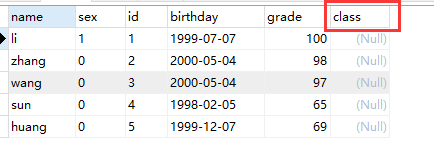
alter table user_info add class int(4) #为表添加一新的一列,默认添加到最后面。
10、修改表名字,rename法
--语法: rename table 原表名 to 新表名;
--更改user_infor表为user。

mysql> rename table user_info to user;
II、表内容操作
一、增
语法:insert into 表 (列名,列名...) values (值,值,值...)
1、插入单条数据
insert into 表 (列名,列名...) values (值,值,值...)
2、插入多条数据
insert into 表 (列名,列名...) values (值,值,值...),(值,值,值...)
3、插入另一条语句的查询结果
insert into 表 (列名,列名...) select 列名,列名... from 表
二、删
语法:delete from 表
delete from 表;

delete from 表 where id=1;
三、改
语法:update 表 set 列名 = '更改数值' where id>1 (where后携带条件)
update 表 set name = 'nick' where id>1
四、查
语法:select * from 表
select * from 表

select * from 表 where id > 1

select nid,name,gender as gg from 表 where id > 1
注:as用做别名,可省略
五、条件
语法:select * from 表 where id > 1
1、多个条件(and)
select * from 表 where id > 1 and name != 'nick' and num = 12; # 多个条件
2、id在5到16之间(between ... and)
select * from 表 where id between 5 and 16; # id在5到16之间
3、id在元祖中(in)
select * from 表 where id in (11,22,33); # id在元祖中
4、id不在元祖中(not in)
select * from 表 where id not in (11,22,33); # id不在元祖中
5、id在查询结果中
select * from 表 where id in (select nid from 表); # id在查询结果中
六、通配符
语法:select * from 表 where name like '_n%'
1、ni开头的所有(多个字符串)
select * from 表 where name like 'ni%' # ni开头的所有(多个字符串)
2、s开头的所有(一个字符)
select * from 表 where name like 's_'
七、限制
语法:select * from 表 limit 9,5;
1、前n行
select * from 表 limit 5; # 前5行
2、从第n行开始的m行
select * from 表 limit 9,5; # 从第9行开始的5行
select * from 表 limit 5 offset 9 # 从第9行开始的5行
八、排序
语法:select * from 表 order by 列1 desc,列2 asc
注:asc(升序)、desc(降序),默认升序
1、根据 “列” 从小到大排列
select * from 表 order by 列 asc
2、根据 “列” 从大到小排列
select * from 表 order by 列 desc
3、根据 “列1” 从大到小排列,如果相同则按列2从小到大排序
select * from 表 order by 列1 desc,列2 asc
九、分组
语法:select num from 表 group by num
select num from 表 group by num           # 根据num分组

select num,nid from 表 group by num,nid   # 根据num和nid分组

select num,nid from 表  where nid > 10 group by num,nid order nid desc

select num,nid,count(*),sum(score),max(score),min(score) from 表 group by num,nid  # 内置函数

select num from 表 group by num having max(id) > 10    # 前面计算的结果交由后面处理
注:
(1)group by必须在where之后,order by之前
十、连表
语法:inner join . on(内连接)、left join . on(左连接)、right join . on(右连接)
1、无对应关系则不显示(where)
select A.num, A.name, B.name

from A,B

Where A.nid = B.nid
2、无对应关系则不显示(inner join ... on)
select A.num, A.name, B.name

from A inner join B

on A.nid = B.nid
3、A表所有显示,如果B中无对应关系,则值为null(left join ... on)
select A.num, A.name, B.name

from A left join B

on A.nid = B.nid
4、B表中所有显示,如果B中无对应关系,则值为null(right join ... on)
select A.num, A.name, B.name

from A right join B

on A.nid = B.nid
十一、组合
语法:union、union all
1、组合,自动处理重合
select nickname

    from A

    union

    select name

    from B
2、组合,不处理重合
select nickname

    from A

    union all

    select name

    from B
MySQL数据库——表操作的更多相关文章
- Database学习 - mysql 数据库 表操作
mysql 数据库 表操作 创建数据表 基本语法格式: 创建数据表: create table 表名( 字段名 datatype 约束, 字段名 datatype 约束, ...... ) 修改表名 ...
- MySQL数据库-表操作-SQL语句(二)
1. MySQL多表查询 1.1 外键约束 为了消除多张表查询出现的笛卡尔积的现象,MySQL在建表并进行多表之间的关键查询可以使用外键关联查询. 外键:从表1(sub)的某列引用(ref)另外一个表 ...
- MySQL数据库-表操作-SQL语句(一)
1. 数据库操作与存储引擎 1.1 数据库和数据库对象 数据库对象:存储,管理和使用数据的不同结构形式,如:表.视图.存储过程.函数.触发器.事件等. 数据库:存储数据库对象的容器. 数据库分两种 ...
- Mysql 数据库表操作
☞ 创建表CREATE TABLE `数据库`.`表` ( `id` INT( 11 ) NOT NULL AUTO_INCREMENT COMMENT '注释',`type_name` VARCHA ...
- mysql数据库表操作-表的主键索引和普通索引
数据库索引就象书的目录一样,如果在字段上建立了索引,那么以索引列为查询条件时可以加快查询数据的速度.查询数据库,按主键查询是最快的,每个表只能有一个主键列,但是可以有多个普通索引列,主键列要求列的所有 ...
- mysql数据库 --表操作
一.表与表之间建关系 (1) 将所有的数据放在一张表内的弊端 表的组织结构不清晰 浪费存储时间 可扩展性极差 ---> 类似于将所有的代码写入到一个py文件中 -->解耦部分 (2) 如何 ...
- MySql数据库表操作(二)
一.增加表记录: insert [into] tab_name (field1,field2....) values (values1,values2....) , (values1,values2. ...
- 第二百七十八节,MySQL数据库-表内容操作
MySQL数据库-表内容操作 1.表内容增加 insert into 表 (列名,列名...) values (值,值,值...); 添加表内容添加一条数据 insert into 表 (列名,列名. ...
- 数据库 MySQL 之 表操作、存储引擎
数据库 MySQL 之 表操作.存储引擎 浏览目录 创建(复制) 删除 修改 查询 存储引擎介绍 一.创建(复制) 1.语法: 1 2 3 4 5 CREATE TABLE 表名( 字段名1 ...
随机推荐
- idea类里面编译报错,快速定位快捷键设置
settings---->keyMap------->Main menu----------->在搜索框里输入error,找到Next Highlighted Error 和Prev ...
- python之路(五)-文件操作
文件操作无非两个,即:读.写 python 2.x: 文件句柄 = file('文件路径', '模式') python3.x: 文件句柄 = open('文件路径', '模式') 打开文件的模式有: ...
- Xamarin常见问题
1. Could not locate Java 6 or 7 SDK. (Download from http://www.oracle.com/technetwork/java/javase/do ...
- Https,Http,TCP,IP的一些理解
网络模型分为7层,应用层,表现层,会话层,传输层,网络层,链路层,物理层,每一层有很多不同的协议. http:属于应用层的协议,负责的是数据以什么结构传输也可以说成是打包成什么样子 SSL/TLS:属 ...
- WordPress自动裁剪768w像素缩略图的解决办法
最新观赏鱼在折腾一个新的WordPress站点,即使通过后台把多媒体裁剪的宽高都设置为0时,移除主题可能存在的自动裁剪大小,WordPress依然会在上传图片的时候自动裁剪一个宽为768像素的图片.并 ...
- TDD:什么是桩(stub)和模拟(mock)?
背景 本文假设你对TDD.Stub和Mock已经有了初步的认识,本文简单解释一下stub和mock的区别和使用场景,先看看他们之间的关系: 由上图可以知道mock框架可以非常容易的开发stub和moc ...
- VSCode插件开发全攻略(二)HelloWord
更多文章请戳VSCode插件开发全攻略系列目录导航. 写着前面 学习一门新的语言或者生态首先肯定是从HelloWord开始. 您可以直接克隆我放在GitHub上vscode-plugin-demo 的 ...
- nginx关于限制请求数和连接数
nginx轻巧功能强大,能承受几百并发量,ddos攻击几乎没有影响到nginx自身的工作,但是,太多的请求就开始影响后端服务了.所以必须要在nginx做相应的限制,让攻击没有到后端的服务器.这里阐述的 ...
- AI - 机器学习常见算法简介(Common Algorithms)
机器学习常见算法简介 - 原文链接:http://usblogs.pwc.com/emerging-technology/machine-learning-methods-infographic/ 应 ...
- git提示error setting certificate verify locations以及fatal: unable to access 的解决办法
z当使用git ------上传文件到GitHub上时!~~~出现了以下错误 :fatal: unable to access ' 可以采用以下解决方式: 修改GitHub上的地址格式=====ht ...