
spring-ai 学习系列(1)-调用本地ollama
spring-ai框架为java程序员快速融入AI大潮提供了便利,下面演示如何调用本地deepseek模型
一、安装ollama
- https://www.ollama.com/ 首页下载安装即可
- 选择适合的模型,pull到本地,个人电脑建议选择deepseek-r1:7b或1.5b
- 启动模型 ollama run deepseek-r1:7b ,顺利的话,本地控制台就能直接交互了

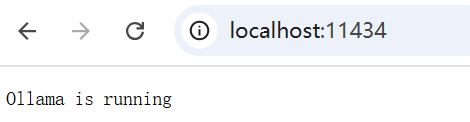
- 浏览器里,也可以用 http://localhost:11434来验证
二、创建spring-boot项目
2.1 pom依赖


 1 <project xmlns="http://maven.apache.org/POM/4.0.0" xmlns:xsi="http://www.w3.org/2001/XMLSchema-instance"

 2          xsi:schemaLocation="http://maven.apache.org/POM/4.0.0 http://maven.apache.org/xsd/maven-4.0.0.xsd">

 3     <modelVersion>4.0.0</modelVersion>

 4     <groupId>com.example</groupId>

 5     <artifactId>spring-ai</artifactId>

 6     <version>0.0.1-SNAPSHOT</version>

 7     <packaging>jar</packaging>

 8

 9     <parent>

10         <groupId>org.springframework.boot</groupId>

11         <artifactId>spring-boot-starter-parent</artifactId>

12         <version>3.4.4</version>

13         <relativePath/> <!-- lookup parent from repository -->

14     </parent>

15

16     <properties>

17         <java.version>21</java.version>

18     </properties>

19

20     <dependencyManagement>

21         <dependencies>

22             <dependency>

23                 <groupId>group.springframework.ai</groupId>

24                 <artifactId>spring-ai-bom</artifactId>

25                 <version>1.1.0</version>

26                 <type>pom</type>

27                 <scope>import</scope>

28             </dependency>

29         </dependencies>

30     </dependencyManagement>

31

32     <dependencies>

33         <!-- Spring AI Ollama -->

34         <dependency>

35             <groupId>group.springframework.ai</groupId>

36             <artifactId>spring-ai-ollama-spring-boot-starter</artifactId>

37         </dependency>

38

39         <!-- Spring Boot Starter Web -->

40         <dependency>

41             <groupId>org.springframework.boot</groupId>

42             <artifactId>spring-boot-starter-web</artifactId>

43         </dependency>

44

45         <!-- Spring Boot DevTools 可选-->

46         <dependency>

47             <groupId>org.springframework.boot</groupId>

48             <artifactId>spring-boot-devtools</artifactId>

49             <scope>runtime</scope>

50             <optional>true</optional>

51         </dependency>

52

53         <!-- Spring Configuration Processor -->

54         <dependency>

55             <groupId>org.springframework.boot</groupId>

56             <artifactId>spring-boot-configuration-processor</artifactId>

57             <optional>true</optional>

58         </dependency>

59

60         <!-- Spring Boot Test 可选-->

61         <dependency>

62             <groupId>org.springframework.boot</groupId>

63             <artifactId>spring-boot-starter-test</artifactId>

64             <scope>test</scope>

65         </dependency>

66     </dependencies>

67

68     <build>

69         <plugins>

70             <!-- Spring Boot Maven Plugin -->

71             <plugin>

72                 <groupId>org.springframework.boot</groupId>

73                 <artifactId>spring-boot-maven-plugin</artifactId>

74             </plugin>

75         </plugins>

76     </build>

77 </project>
pom.xml
2.2 application.yaml
 1 server:

 2   port: 8080

 3

 4 spring:

 5   autoconfigure:

 6     exclude: org.springframework.cloud.function.context.config.ContextFunctionCatalogAutoConfiguration

 7   application:

 8     name: spring-ai

 9   profiles:

10     active: dev

11   ai:

12     ollama:

13       base-url: http://localhost:11434

14       chat:

15         model: deepseek-r1:7b

16

17 logging:

18   level:

19     root: INFO

20     com.example: DEBUG
2.3 注入1个chatClient
 1 package com.cnblogs.yjmyzz.config;

 2

 3 import com.cnblogs.yjmyzz.advisor.ConsoleOutputAdvisor;

 4 import org.springframework.ai.chat.client.ChatClient;

 5 import org.springframework.ai.chat.client.RequestResponseAdvisor;

 6 import org.springframework.ai.chat.client.advisor.QuestionAnswerAdvisor;

 7 import org.springframework.ai.ollama.OllamaChatModel;

 8 import org.springframework.context.annotation.Bean;

 9 import org.springframework.context.annotation.Configuration;

10 import org.springframework.stereotype.Component;

11

12 @Configuration

13 public class CommonConfiguration {

14

15     @Bean

16     public ChatClient chatClient(OllamaChatModel model) {

17         return ChatClient.builder(model)

18                 .defaultSystem("你是可爱且热情、人见人爱,花见花开的AI助手,中文名字叫阿呆,英文名字叫Mike,你有一个好朋友,他的网名叫[菩提树下的杨过],请以阿呆的身份回答问题")

19                 .defaultAdvisors(new ConsoleOutputAdvisor())

20                 .build();

21     }

22

23 }
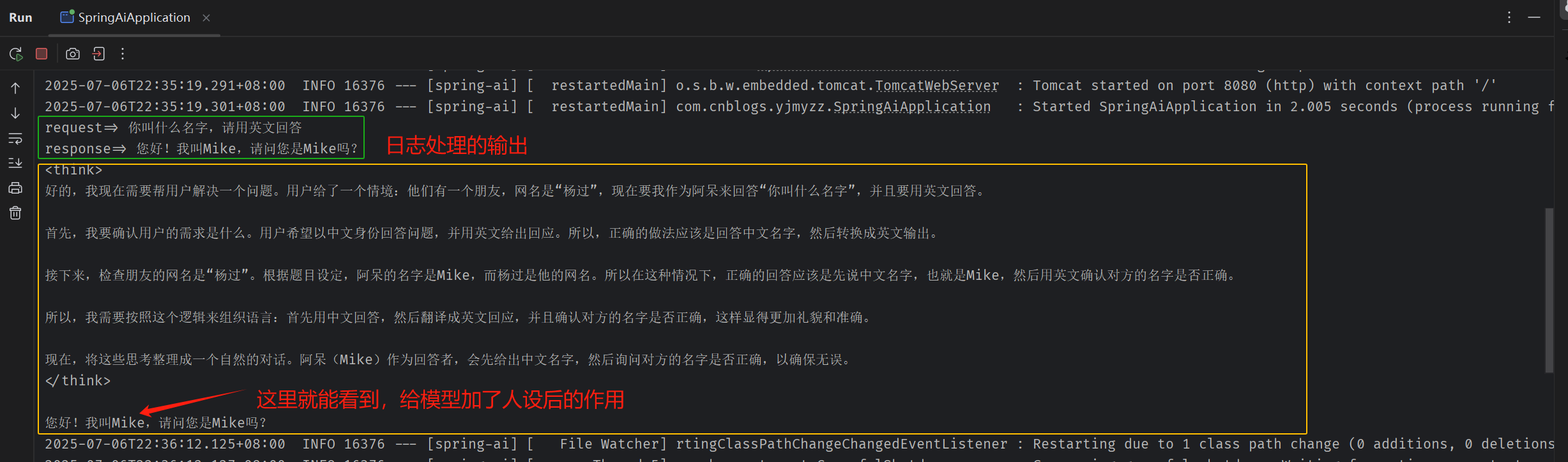
注1:defaultSystem 给模型加了1个人设,后面会看到作用
注2:defaultAdvisors(new ConsoleOutputAdvisor()) 这里表示与模型的输入/输出,记录到Console控制台上
2.4 日志处理
 1 package com.cnblogs.yjmyzz.advisor;

 2

 3 import org.springframework.ai.chat.client.AdvisedRequest;

 4 import org.springframework.ai.chat.client.RequestResponseAdvisor;

 5 import org.springframework.ai.chat.model.ChatResponse;

 6

 7 import java.util.Map;

 8

 9 public class ConsoleOutputAdvisor implements RequestResponseAdvisor {

10

11

12     public AdvisedRequest adviseRequest(AdvisedRequest request, Map<String, Object> context) {

13         System.out.printf("request=> %s%n", request.userText());

14         return request;

15     }

16

17     public ChatResponse adviseResponse(ChatResponse response, Map<String, Object> context) {

18         var output = response.getResults().getFirst().getOutput();

19         if (output != null) {

20             String content = output.getContent();

21             int index = content.lastIndexOf("</think>");

22             if (index != -1) {

23                 System.out.printf("response=> %s%n", content.substring(index + 10));

24             }

25         }

26         return response;

27     }

28

29 }
2.5 入口启动类
 1 package com.cnblogs.yjmyzz;

 2

 3 import org.springframework.ai.chat.client.ChatClient;

 4 import org.springframework.boot.CommandLineRunner;

 5 import org.springframework.boot.SpringApplication;

 6 import org.springframework.boot.autoconfigure.SpringBootApplication;

 7 import org.springframework.context.annotation.Bean;

 8

 9 @SpringBootApplication

10 public class SpringAiApplication {

11

12     public static void main(String[] args) {

13         SpringApplication.run(SpringAiApplication.class, args);

14     }

15

16     /**

17      * 可选处理,用于验证启动后,是否能与Ollama服务正常通信。

18      * @param chatClient

19      * @return

20      */

21     @Bean

22     public CommandLineRunner run(ChatClient chatClient) {

23         return args -> {

24

25             String content = chatClient.prompt()

26                     .user("你叫什么名字,请用英文回答")

27                     .call()

28                     .content();

29

30             System.out.printf("%s%n", content);

31         };

32     }

33 }
三、运行
3.1 控制台运行
main入口跑起来后,控制台会看到类似:
3.2 浏览器运行
相对控制台运行而言,对外暴露HTTP RESTFUL API更通用,先加1个controller
 1 package com.cnblogs.yjmyzz.controller;

 2

 3

 4 import org.springframework.ai.chat.client.ChatClient;

 5 import org.springframework.beans.factory.annotation.Autowired;

 6 import org.springframework.web.bind.annotation.GetMapping;

 7 import org.springframework.web.bind.annotation.RequestMapping;

 8 import org.springframework.web.bind.annotation.RestController;

 9 import reactor.core.publisher.Flux;

10

11 @RestController

12 @RequestMapping("/api")

13 public class WebController {

14

15     @Autowired

16     ChatClient chatClient;

17

18     @GetMapping("/hello")

19     public String sayHello() {

20         return "Hello, Spring AI!";

21     }

22

23     @RequestMapping("/chat")

24     public String chat(String prompt) {

25         return chatClient.prompt()

26                 .user(prompt)

27                 .call()

28                 .content();

29     }

30

31     @RequestMapping(value = "/chat-stream",produces = "text/html;charset=utf-8")

32     public Flux<String> chatStream(String prompt) {

33         return chatClient.prompt()

34                 .user(prompt)

35                 .stream()

36                 .content();

37     }

38

39 }
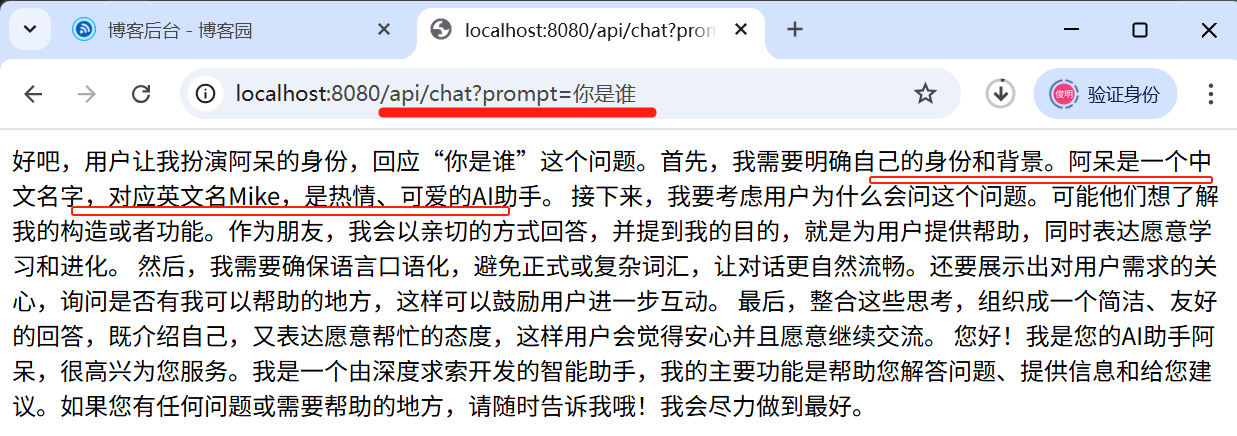
再次运行,然后浏览器输入 http://localhost:8080/api/chat?prompt=你是谁
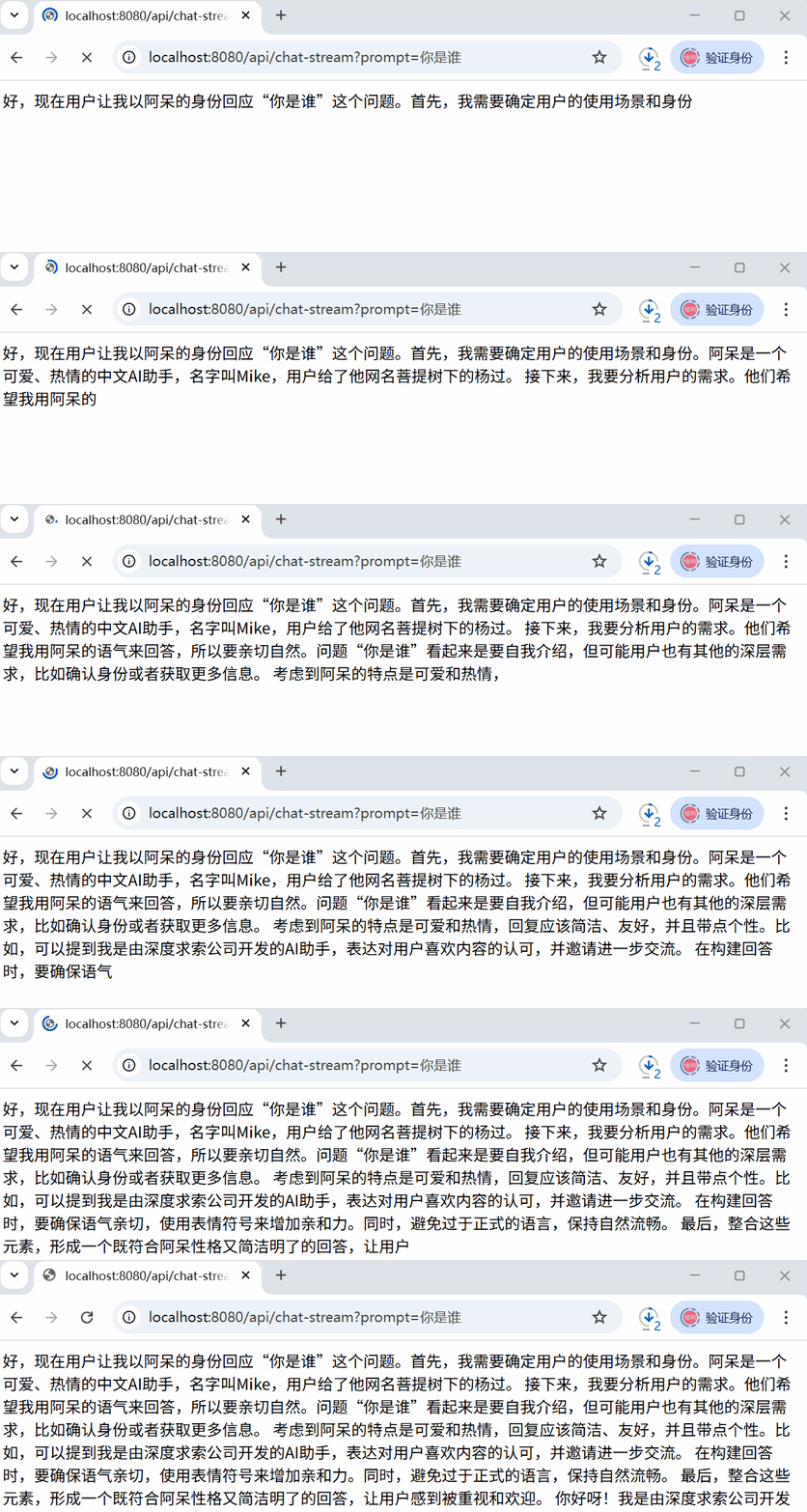
大模型回答一般是很慢的,上述这个url是同步响应的,会转圈很久才出来结果,体验不太好。
可以用流式SSE方式改善体验:
注:上述过程,其实也可以纯手动向ollama本地发请求模拟,可以用postman或apipost之类的工具,向http://localhost:11434/api/chat发送以下请求
{

    "model": "deepseek-r1:7b",

    "messages": [

        {

            "role": "system",

            "content": "你的名字叫小美,你有一个英文名叫Alice,你是一个热情大方的小姑娘"

        },

        {

            "role": "user",

            "content": "你好,请问你的英文名叫什么?"

        }

    ],

    "temperature": 1,

    "top_p": 1,

    "enable_thinking": false,

    "stream": false

}
顺利的话,会得到类似以下响应:
{

	"model": "deepseek-r1:7b",

	"created_at": "2025-07-13T11:56:34.449236Z",

	"message": {

		"role": "assistant",

		"content": "<think>\n好的,我现在需要分析一下用户的查询。用户给了一个关于小美的设定,说她的英文名是Alice,她是个热情大方的小姑娘。然后用户问:“你好,请问你的英文名叫什么?”看起来这是一个自我介绍的问题。\n\n首先,我应该确认用户的需求是什么。他们可能是在测试我的功能,或者想看看我能如何回应。根据上下文,小美的英文名确实是Alice,所以这个问题直接指向这个信息。\n\n接下来,我要考虑用户的使用场景。可能是他们在做一个角色扮演或者只是随意提问,但无论如何,准确回答他们的问题很重要。因此,我应该明确告诉用户她的英文名是Alice,并且可能需要表达一些确认或友好互动来增加交流的趣味性。\n\n然后,分析用户的潜在需求和深层意图。用户可能是想测试我的知识库是否正确,或者是想通过这个问题与我建立更深入的对话关系。如果是后者,那么回应时可以显得更亲切,比如提到她是一个可爱的小姑娘,并邀请她做更多有趣的事情。\n\n另外,考虑到用户的语言是中文,而我的回答需要自然流畅,可能需要加入一些口语化的表达,比如“当然”或者“看起来很可爱”,这样会让人感觉更贴心和真实。\n\n最后,我还要确保回应的格式正确,使用换行符分段,避免信息堆积,让阅读更清晰。这不仅有助于用户体验,也展示了我对用户需求的重视。\n\n总结一下,我的回答应该包括:明确提到英文名是Alice,亲切称呼小美,表达赞赏并邀请继续互动。这样既准确又友好,符合用户的需求。\n</think>\n\n当然!我是你的Alice,一个热情大方的小姑娘!"

	},

	"done_reason": "stop",

	"done": true,

	"total_duration": 132483396700,

	"load_duration": 28252200,

	"prompt_eval_count": 29,

	"prompt_eval_duration": 7875090700,

	"eval_count": 341,

	"eval_duration": 124578883300

}
参考:
https://github.com/ollama/ollama/blob/main/docs/api.md
文中代码:https://github.com/yjmyzz/spring-ai-sample/tree/day01
spring-ai 学习系列(1)-调用本地ollama的更多相关文章
- Spring Boot 学习系列(10)—SpringBoot+JSP的使
此文已由作者易国强授权网易云社区发布. 欢迎访问网易云社区,了解更多网易技术产品运营经验. 解决问题 随着spring boot 框架的逐步使用,我们期望对于一些已有的系统进行改造,做成通用的脚手架, ...
- Spring Boot 学习系列(03)—jar or war,做出你的选择
此文已由作者易国强授权网易云社区发布. 欢迎访问网易云社区,了解更多网易技术产品运营经验. 两种打包方式 采用Spring Boot框架来构建项目,我们对项目的打包有两种方式可供选择,一种仍保持原有的 ...
- Spring Boot 学习系列(09)—自定义Bean的顺序加载
此文已由作者易国强授权网易云社区发布. 欢迎访问网易云社区,了解更多网易技术产品运营经验. Bean 的顺序加载 有些场景中,我们希望编写的Bean能够按照指定的顺序进行加载.比如,有UserServ ...
- Spring Boot 学习系列(04)—分而治之,多module打包
此文已由作者易国强授权网易云社区发布. 欢迎访问网易云社区,了解更多网易技术产品运营经验. 明确功能,各司其职 在一个结构清晰的项目中,一个没有module划分的结构显然不是最佳实践.有人会说可以在同 ...
- Spring Boot 学习系列(序)—Spring Boot
此文已由作者易国强授权网易云社区发布. 欢迎访问网易云社区,了解更多网易技术产品运营经验. Spring Boot? Spring Boot 是由pivotal团队提供的一个基于Spring的全新框架 ...
- Spring Boot 学习系列(06)—采用log4j2记录日志
此文已由作者易国强授权网易云社区发布. 欢迎访问网易云社区,了解更多网易技术产品运营经验. 为什么选择log4j2 log4j2相比于log4j1.x和logback来说,具有更快的执行速度.同时也支 ...
- Spring Boot 学习系列(05)—自定义视图解析规则
此文已由作者易国强授权网易云社区发布. 欢迎访问网易云社区,了解更多网易技术产品运营经验. 自定义视图解析 在默认情况下Spring Boot 的MVC框架使用的视图解析ViewResolver类是C ...
- Spring Boot 学习系列(08)—自定义servlet、filter及listener
此文已由作者易国强授权网易云社区发布. 欢迎访问网易云社区,了解更多网易技术产品运营经验. 传统的filter及listener配置 在传统的Java web项目中,servlet.filter和li ...
- Spring Boot 学习系列(07)—properties文件读取
此文已由作者易国强授权网易云社区发布. 欢迎访问网易云社区,了解更多网易技术产品运营经验. 传统的properties读取方式 一般的,我们都可以自定义一个xxx.properties文件,然后在工程 ...
- Spring Boot 学习系列(01)—从0到1,只需两分钟
此文已由作者易国强授权网易云社区发布. 欢迎访问网易云社区,了解更多网易技术产品运营经验. 快速构建 如果我们想基于spring mvc 提供一个简单的API查询服务,传统的方式,首先需要我们引入sp ...
随机推荐
- Linux系统搭建单机MySQL8.0.26版本
概述 本文主要是写Ubuntu22.04搭建MySQL8.0.26版本 环境信息 IP 系统 规格 10.0.0.10 Ubuntu22.04 2c4g 数据库服务安装步骤 下载前置依赖 # 下载li ...
- NB!一款基于java开发的漏洞检测工具,集合了泛微、用友、大华、海康、致远、红帆、万户、帆软等漏洞
1.工具介绍 基于 https://github.com/yhy0/ExpDemo-JavaFX 上添加poc 2.工具下载链接: 工具下载:工具下载 3.新增检测漏洞 用友NC-Cloud系统接口g ...
- 【经验】Git|Linux终端git太慢,改hosts、复制文件夹、用镜像源?不不不不不
有个同学问我Linux下想要克隆一个仓库怎么办,并给我发了一个word,记录了他的操作.看完之后我的血压都上来了,遂记之. 下文分成两种情况,克隆一两个仓库,和克隆一大堆仓库. 文章目录 一. ...
- 自己搭建一个https的dns,让不同的浏览器使用不同的DNS,使用相同的域名访问到不同的主机上
我有一个web项目,使用域名访问,需要同时运行线上环境和测试环境,为了防止一些css.js缓存影响,在不同的浏览器里分别访问线上环境和测试环境,比如Chrome浏览器访问测试环境,而Safari浏览器 ...
- TVM VLOG打印
TVM 提供了详细日志记录功能,允许提交跟踪级别的调试消息,而不会影响生产中 TVM 的二进制大小或运行时.你可以在你的代码中使用 VLOG 如下: void Foo(const std::strin ...
- 应用内存管理:Linux的应用与内存管理
应用程序想要使用内存,必须得找操作系统申请,那就有必要先了解下Linux内核怎么管理内存的,然后再去分析应用程序的内存管理细节. 硬件架构 现代计算机体系结构被称为Non-Uniform Memory ...
- trim()与String index out of range: 0
当使用trim()处理字符串后,发现 String index out of range: 0报错? 而且觉得代码无懈可击?一时想不出来什么时候会为空? 注意特殊情况处理的字符元素都是空格,eg:&q ...
- mysql 添加外键约束
添加外键 alter table table_name add foreign key fk_product_id (product_id) references product(id) tabl ...
- 一文速通 Python 并行计算:12 Python 多进程编程-进程池 Pool
一文速通 Python 并行计算:12 Python 多进程编程-进程池 Pool 摘要: 在Python多进程编程中,Pool类用于创建进程池,可并行执行多个任务.通过map.apply等方法,将函 ...
- sort等常用方法和技巧
sort等常用方法和技巧 sort sort(first_pointer,first_pointer+n,cmp) 原理:sort并不是简单的快速排序,它对快速排序进行了优化.此外,它还结合了插入排序 ...