
JfreeChart 乱码问题处理
在前面之间加上下面这段代码即可。
    	//创建主题样式

        StandardChartTheme standardChartTheme=new StandardChartTheme("CN");

        //设置标题字体

        standardChartTheme.setExtraLargeFont(new Font("隶书",Font.BOLD,20));

        //设置图例的字体

        standardChartTheme.setRegularFont(new Font("宋书",Font.PLAIN,15));

        //设置轴向的字体

        standardChartTheme.setLargeFont(new Font("宋书",Font.PLAIN,15));

        //应用主题样式

        ChartFactory.setChartTheme(standardChartTheme);
为了验证,先给出没有上面代码的一串代码:
import java.awt.Font;

import javax.swing.JPanel;

import org.jfree.chart.ChartFactory;

import org.jfree.chart.ChartPanel;

import org.jfree.chart.JFreeChart;

import org.jfree.chart.axis.CategoryAxis;

import org.jfree.chart.plot.CategoryPlot;

import org.jfree.chart.plot.PlotOrientation;

import org.jfree.chart.title.TextTitle;

import org.jfree.data.category.CategoryDataset;

import org.jfree.data.category.DefaultCategoryDataset;

import org.jfree.ui.ApplicationFrame;

public class JFreeChartTest2 extends ApplicationFrame

{

    public JFreeChartTest2(String title)

    {

        super(title);

        this.setContentPane(createPanel()); //构造函数中自动创建Java的panel面板

    }

    public static CategoryDataset createDataset() //创建柱状图数据集

    {

        DefaultCategoryDataset dataset=new DefaultCategoryDataset();

        dataset.setValue(10,"a","管理人员");

        dataset.setValue(20,"b","市场人员");

        dataset.setValue(40,"c","开发人员");

        dataset.setValue(15,"d","其他人员");

        return dataset;

    }

    public static JFreeChart createChart(CategoryDataset dataset) //用数据集创建一个图表

    {

        JFreeChart chart=ChartFactory.createBarChart("hi", "人员分布",

                "人员数量", dataset, PlotOrientation.VERTICAL, true, true, false); //创建一个JFreeChart

        chart.setTitle(new TextTitle("某公司组织结构图",new Font("宋体",Font.BOLD+Font.ITALIC,20)));//可以重新设置标题,替换“hi”标题

        CategoryPlot plot=(CategoryPlot)chart.getPlot();//获得图标中间部分,即plot

        CategoryAxis categoryAxis=plot.getDomainAxis();//获得横坐标

        categoryAxis.setLabelFont(new Font("微软雅黑",Font.BOLD,12));//设置横坐标字体

        return chart;

    }

    public static JPanel createPanel()

    {

        JFreeChart chart =createChart(createDataset());

        return new ChartPanel(chart); //将chart对象放入Panel面板中去,ChartPanel类已继承Jpanel

    }

    public static void main(String[] args)

    {

        JFreeChartTest2 chart=new JFreeChartTest2("某公司组织结构图");

        chart.pack();//以合适的大小显示

        chart.setVisible(true);

    }

}
执行结果如下:

再给出加了那段代码的这块代码:
import java.awt.Font;

import javax.swing.JPanel;

import org.jfree.chart.ChartFactory;

import org.jfree.chart.ChartPanel;

import org.jfree.chart.JFreeChart;

import org.jfree.chart.StandardChartTheme;

import org.jfree.chart.axis.CategoryAxis;

import org.jfree.chart.plot.CategoryPlot;

import org.jfree.chart.plot.PlotOrientation;

import org.jfree.chart.title.TextTitle;

import org.jfree.data.category.CategoryDataset;

import org.jfree.data.category.DefaultCategoryDataset;

import org.jfree.ui.ApplicationFrame;

public class JFreeChartTest2 extends ApplicationFrame

{

    public JFreeChartTest2(String title)

    {

        super(title);

        this.setContentPane(createPanel()); //构造函数中自动创建Java的panel面板

    }

    public static CategoryDataset createDataset() //创建柱状图数据集

    {

        DefaultCategoryDataset dataset=new DefaultCategoryDataset();

        dataset.setValue(10,"a","管理人员");

        dataset.setValue(20,"b","市场人员");

        dataset.setValue(40,"c","开发人员");

        dataset.setValue(15,"d","其他人员");

        return dataset;

    }

    public static JFreeChart createChart(CategoryDataset dataset) //用数据集创建一个图表

    {

        JFreeChart chart=ChartFactory.createBarChart("hi", "人员分布",

                "人员数量", dataset, PlotOrientation.VERTICAL, true, true, false); //创建一个JFreeChart

        chart.setTitle(new TextTitle("某公司组织结构图",new Font("宋体",Font.BOLD+Font.ITALIC,20)));//可以重新设置标题,替换“hi”标题

        CategoryPlot plot=(CategoryPlot)chart.getPlot();//获得图标中间部分,即plot

        CategoryAxis categoryAxis=plot.getDomainAxis();//获得横坐标

        categoryAxis.setLabelFont(new Font("微软雅黑",Font.BOLD,12));//设置横坐标字体

        return chart;

    }

    public static JPanel createPanel()

    {

        JFreeChart chart =createChart(createDataset());

        return new ChartPanel(chart); //将chart对象放入Panel面板中去,ChartPanel类已继承Jpanel

    }

    public static void main(String[] args)

    {

		// 创建主题样式

		StandardChartTheme standardChartTheme = new StandardChartTheme("CN");

		// 设置标题字体

		standardChartTheme.setExtraLargeFont(new Font("隶书", Font.BOLD, 20));

		// 设置图例的字体

		standardChartTheme.setRegularFont(new Font("宋书", Font.PLAIN, 15));

		// 设置轴向的字体

		standardChartTheme.setLargeFont(new Font("宋书", Font.PLAIN, 15));

		// 应用主题样式

		ChartFactory.setChartTheme(standardChartTheme);

        JFreeChartTest2 chart=new JFreeChartTest2("某公司组织结构图");

        chart.pack();//以合适的大小显示

        chart.setVisible(true);

    }

}
执行结果如下:
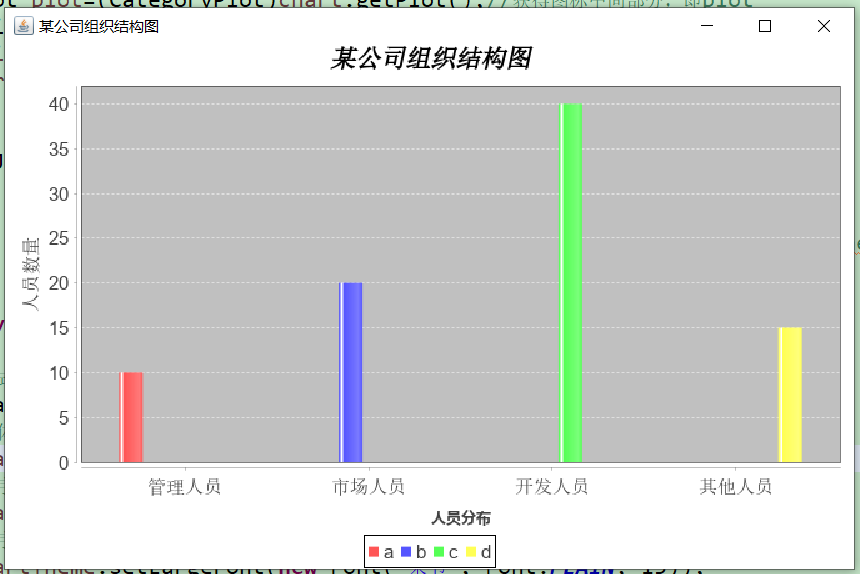
说明:上面的代码来源于网络,并非本人原创,特此声明,仅供参考学习。
JfreeChart 乱码问题处理的更多相关文章
- Jfreechart 乱码
整个图标分成三部分chart title,chart 的plot还有chart的 legend三个部分需要对他们分别设置字体就对了. 先看解决方法( 把这几个全部设置了,都搞定了就可以了): ...
- java web 学习十(HttpServletRequest对象1)
一.HttpServletRequest介绍 HttpServletRequest对象代表客户端的请求,当客户端通过HTTP协议访问服务器时,HTTP请求头中的所有信息都封装在这个对象中,通过这个对象 ...
- JFreechart在linux下不显示及中文乱码问题
一.使用JFreeChart建的报表,在window下能正常显示,但是放到linux下就报错,而且有时候会把tomcat挂掉, 原因是jfreechart的在linux系统中需要访问java awt库 ...
- JFreechart 在linux下不显示及中文乱码问题
一.使用JFreeChart建的报表,在window下能正常显示,但是放到linux下就报错,而且有时候会把tomcat挂掉, 原因是jfreechart的在linux系统中需要访问java awt库 ...
- 解决JFreeChart中文乱码问题
以下是解决X轴,Y轴中文字符乱码的代码: JFreeChart chart = ChartFactory.createBarChart3D("管网损耗",// 图表标题 " ...
- jfreechart图表汉字乱码问题解决方案
系统工作迁移环境 linux centos 6.5 tomcat8 mysql5.6 系统部署上之后,所有的jfreechart图表上的汉字,全部乱码. 如图: 经分析: 1)数据库动态读出来的是正常 ...
- JFreeChart的简单应用及乱码解决
一.JFreeChart介绍: JFreeChart是JAVA平台上的一个开放的图表绘制类库.它完全使用JAVA语言编写,是为applications, applets, servlets 以及JSP ...
- jfreechart中文乱码问题解决方案(转)
参考网址:http://zhidao.baidu.com/link?url=y88rR1_aAHaFofonx9o_IaEu87MpkTQImsqDcy587eG55JkfQV6EzzzloIgXuQ ...
- 【Java EE 学习 74 下】【数据采集系统第六天】【使用Jfreechart的统计图实现】【将JFreechart整合到项目中】
之前说了JFreechart的基本使用方法,包括生成饼图.柱状统计图和折线统计图的方法.现在需要将其整合到数据采集系统中根据调查结果生成三种不同的统计图. 一.统计模型的分析和设计 实现统计图显示的流 ...
随机推荐
- luoguP4213 【模板】杜教筛(Sum)杜教筛
链接 luogu 思路 为了做hdu来学杜教筛. 杜教筛模板题. 卡常数,我加了register居然跑到不到800ms. 太深了. 代码 // luogu-judger-enable-o2 #incl ...
- [LeetCode] 907. Sum of Subarray Minimums 子数组最小值之和
Given an array of integers A, find the sum of min(B), where B ranges over every (contiguous) subarra ...
- 深入学习 esp8266 wifimanager源码解析(打造专属自己的web配网)
QQ技术互动交流群:ESP8266&32 物联网开发 群号622368884,不喜勿喷 单片机菜鸟博哥CSDN 1.前言 废话少说,本篇博文的目的就是深入学习 WifiManager 这个gi ...
- LeetCode 118:杨辉三角 II Pascal's Triangle II
公众号:爱写bug(ID:icodebugs) 作者:爱写bug 给定一个非负索引 k,其中 k ≤ 33,返回杨辉三角的第 k 行. Given a non-negative index k whe ...
- PCA:主成分分析
PCA的概念: 主要思想是将n维特征映射到k维上,这k维是全新的正交特征,这k维特征被称为主成分,在原数据的基础上重新构造出来k维.就是从原始的空间顺序的找出一组相互正交的坐标轴,新坐标轴的选择和数据 ...
- ShellScript之变量
Shell脚本之变量学习 ##########################ShellScript初学者,文章摘自菜鸟教程################################ 1.She ...
- openresty nginx systemtap netdata
https://openresty.org/cn/getting-started.html https://github.com/openresty https://github.com/openre ...
- 容斥原理--计算错排的方案数 UVA 10497
错排问题是一种特殊的排列问题. 模型:把n个元素依次标上1,2,3.......n,求每一个元素都不在自己位置的排列数. 运用容斥原理,我们有两种解决方法: 1. 总的排列方法有A(n,n),即n!, ...
- fiverr无法注册的解决办法,fiverr注册教程
转载 https://www.wok99.com/450.html
- 如何将云上的Linux文件自动备份到本地服务器
需求场景: 将云上一台Linux服务器文件备份到本地服务器,一周一备即可. 面对这样一个需求,我们可能面临下列几个问题, 备份方式:是云服务器推文件到本地服务器写入,还是本地服务器从云服务器拉文件?这 ...