
MySQL 8.0.18 InnoDB Cluster 主从(MGR)完整安装配置
提示: MySQL InnoDB Cluster底层依赖Group Replication模式,至少3台机器
1. 准备3台 CentOS Linux 7 (Core), 修改各主机名:db-host1, db-host2, db-host3 然后配置各台机器 hosts 映射, 对应如下
cat << EOF >> /etc/hosts

192.168.50.181 db-host1

192.168.50.182 db-host2

192.168.50.183 db-host3

EOF
2. 确保3台服务器要互相访问正常,为了保险期间请关闭防火墙,firewalld常用命令 如:
# 启动

systemctl start firewalld

# 关闭

systemctl stop firewalld

# 查看状态

systemctl status firewalld

# 开机禁用

systemctl disable firewalld

# 开机启用

systemctl enable firewalld

# 查看所有打开的端口

 firewall-cmd --zone=public --list-ports
3. 确保互访使用ssh 共享,这里使用root 账户 如:在db-host1 执行,其它以此类推:
ssh-keygen -t rsa

ssh-copy-id -i ~/.ssh/id_rsa.pub 192.168.50.182

ssh-keygen -t rsa

ssh-copy-id -i ~/.ssh/id_rsa.pub 192.168.50.183
4. 准备安装 mysql-community-server,mysql-shell,mysql-router 在3台机器安装,注意版本:
wget https://dev.mysql.com/get/mysql80-community-release-el7-3.noarch.rpm

rpm -ivh mysql80-community-release-el7-3.noarch.rpm

yum install mysql-community-server
wget https://dev.mysql.com/get/Downloads/MySQL-Shell/mysql-shell-8.0.18-1.el7.x86_64.rpm

rpm -ivh mysql-shell-8.0.18-1.el7.x86_64.rpm

yum install mysql-shell
wget https://dev.mysql.com/get/Downloads/MySQL-Router/mysql-router-community-8.0.18-1.el7.x86_64.rpm

rpm -ivh mysql-router-community-8.0.17-1.el7.x86_64.rpm

yum install mysql-router
5. 安装完MysqlServer 后,依次每台初始化mysql,步骤如下:#初始化:
mysqld --initialize;

#赋访问权限:
chown mysql:mysql /var/lib/mysql -R

#启动mysql服务:
systemctl start mysqld.service;

#设置mysql开机自启
mysql systemctl enable mysqld;

#命令查看数据库的密码:
cat /var/log/mysqld.log | grep password

#进入mysql命令行:
mysql -uroot -p (输入上述查看的数据库密码进入mysql命令行)

#命令来修改密码:
ALTER USER 'root'@'localhost' IDENTIFIED WITH mysql_native_password BY  '密码';

#创建远程访问权限:
create user 'root'@'%' identified with mysql_native_password by  '密码';

GRANT ALL PRIVILEGES ON *.* TO 'root'@'%' WITH GRANT OPTION;

flush privileges;
6. 由于依赖组复制,在host1 修改 /etc/my.cnf
server_id = 4000000161

loose-group_replication_group_name="a38e32fd-5fb6-11e8-ad7a-00259015d941"

loose-group_replication_local_address= "192.168.50.181:3306"

loose-group_replication_group_seeds= "192.168.50.181:3306,192.168.50.182:3306,192.168.50.183:3306"

loose-group_replication_single_primary_mode=TRUE
然后拷贝 /etc/my.cnf到另外2台机器
rsync -e "ssh -p22" -avpgolr /etc/my.cnf root@192.168.50.182:/etc/

rsync -e "ssh -p22" -avpgolr /etc/my.cnf root@192.168.50.183:/etc/
确保各自 server_id 和 address
host1 server_id = 4000000161
loose-group_replication_local_address= "192.168.50.181:3306"
host2 server_id = 4000000162
loose-group_replication_local_address= "192.168.50.182:3306"
host3 server_id = 4000000163
loose-group_replication_local_address= "192.168.50.183:3306"
7. 3台mysql server 启动组复制
start group_replication
8. 检查实例配置, 使用 mysqlsh
dba.checkInstanceConfiguration('root@db-host1:3306')

dba.checkInstanceConfiguration('root@db-host2:3306')

dba.checkInstanceConfiguration('root@db-host3:3306')
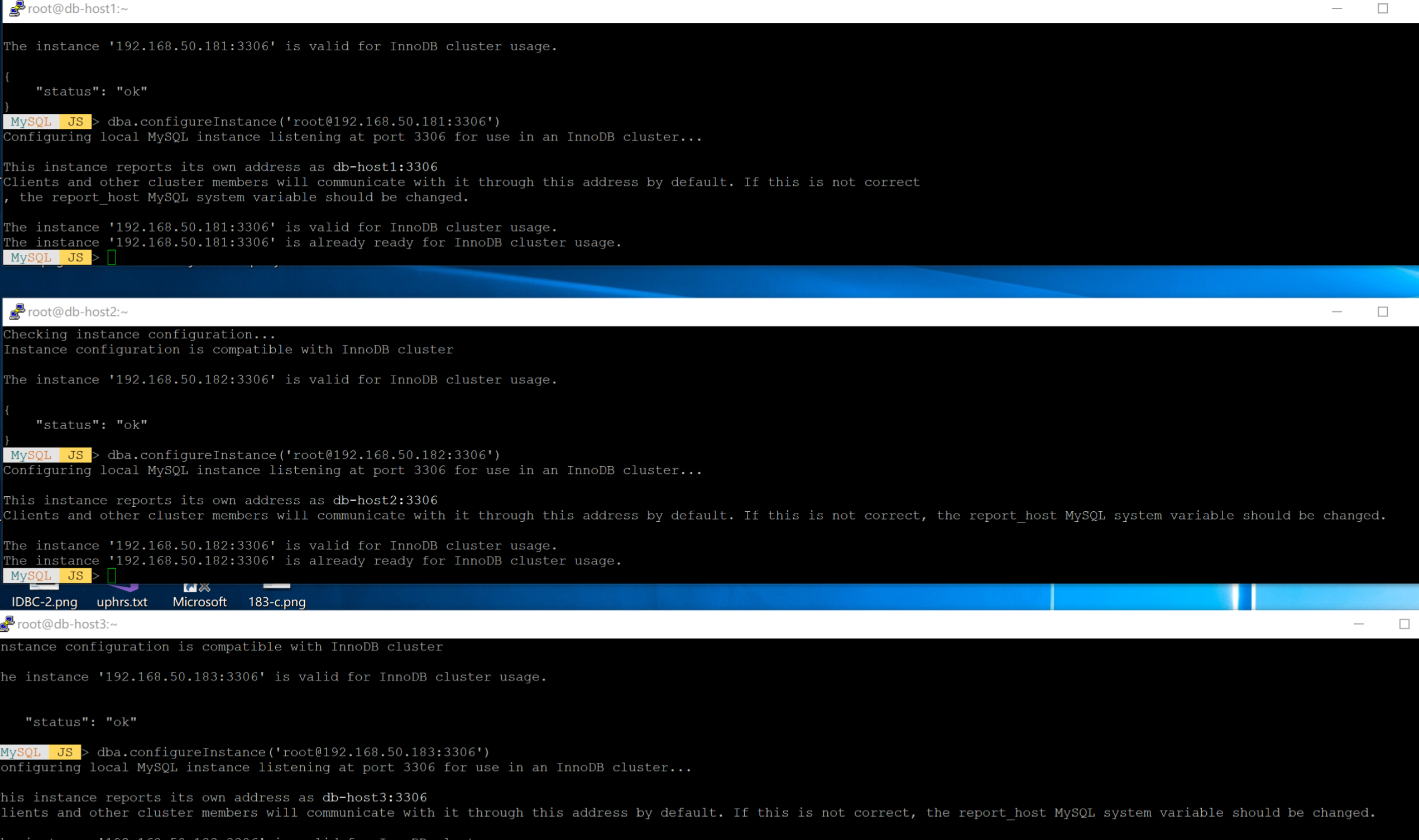
8. 配置实例
dba.configureInstance('root@db-host1:3306',{'restart': true})

dba.configureInstance('root@db-host2:3306',{'restart': true})

dba.configureInstance('root@db-host3:3306',{'restart': true})

9. 创建添加实例
var cluster = dba.createCluster('mycluster');

var cluster=dba.getCluster('mycluster')

cluster.addInstance('root@db-host2:3306');

cluster.addInstance('root@db-host3:3306');
10. 登录主服务器 ,查看,配置成功
mysql> select * from performance_schema.replication_group_members;

注意:由于8.0 中的一些变化和5.X配置有所配置不同,按照以前的配置容易出错,要善于对应分析日志进行排错
推荐参考资料:
https://blog.csdn.net/wzy0623/article/details/100779450
https://www.jianshu.com/p/6e2918845ec8
https://lefred.be/content/mysql-8-0-innodb-cluster-the-quick-hands-on-manual/
https://cloud.tencent.com/developer/article/1445710
MySQL 8.0.18 InnoDB Cluster 主从(MGR)完整安装配置的更多相关文章
- mysql 8.0.18 mgr 搭建及其切换
mysql 8.0.18 mgr 搭建及其切换 一.系统安装包 yum -y install make gcc-c++ cmake bison-devel ncurses-devel readline ...
- mysql 8.0.18 手工安装记录
mysql 8.0.18 手工安装记录 为了日常方便,特记录如下. 一.安装系统依赖包 #.系统依赖包安装 yum -y install make gcc-c++ cmake bison-devel ...
- win10 安装mysql 8.0.18 解决Navicat初次连接报错
win10 安装mysql 8.0.18 解决Navicat初次连接报错 win10 安装mysql 8.0.18-winx64 一,先去官网下载mysql 安装包 https://dev.mysql ...
- MySQL 8.0.18安装教程(windows 64位)
目录 1-先去官网下载点击的MySQL的下载 2-配置初始化的my.ini文件的文件3-初始化MySQL4-安装MySQL服务 + 启动MySQL 服务5-连接MySQL + 修改密码 * 第一项 ...
- mysql 8.0.18 hash join测试(内外网首文)
CREATE TABLE COLUMNS_hj as select * from information_schema.`COLUMNS`; INSERT INTO COLUMNS_hj SELECT ...
- MySQL 8.0.18 在 Windows Server 2019 上的安装(ZIP)公开
AskScuti MySQL : Windows Server 2019 安装 MySQL 8.0 温馨提示:为了展现我最“魅力”的一面,请用谷歌浏览器撩我. 一切就绪,点我开撩
- MySQL 8.0.18 在 Windows Server 2019 上的安装(MSI)公开
AskScuti MySQL : Windows Server 2019 安装 MySQL 8.0 温馨提示:为了展现我最“魅力”的一面,请用谷歌浏览器撩我.那个 IE 啊,我很无奈. 一切就绪,点我 ...
- Ubuntu 16.04 + CUDA 8.0 + cuDNN v5.1 + TensorFlow(GPU support)安装配置详解
随着图像识别和深度学习领域的迅猛发展,GPU时代即将来临.由于GPU处理深度学习算法的高效性,使得配置一台搭载有GPU的服务器变得尤为必要. 本文主要介绍在Ubuntu 16.04环境下如何配置Ten ...
- mysql 8.0.18 小白安装教程
1. 下载 官网下载:https://dev.mysql.com/downloads/mysql/ 嫌官网网速慢可以加q群,在群文件里下载: 1.下载第一个download 2.解压在自己建的目录(各 ...
随机推荐
- 关于使用mySqlSugar插入数据异常解决方案
项目的解决方案中引用的有mysqlsugar的数据库操作库,在使用插入数据过程中一些特殊的生僻字或表情符号总会提示: Incorrect string value: '\xF0\x9F...' for ...
- SQL Server 连接字符串总结
这里记录的是c# 在vs中连接sql server数据库中的连接字符串的总结. 1.标准安全连接 Data Source = myServerAddress;Initial Catalog = myD ...
- django中navie时间和aware时间详解
navie时间和aware时间: 什么是navie时间?什么是aware时间? navie时间:不知道自己的时间表示的是哪个时区的.也就是不知道自己几斤几两.比较幼稚. aware时间:知道自己的时间 ...
- tensorflow中使用变量作用域及tf.variable(),tf,getvariable()与tf.variable_scope()的用法
一 .tf.variable() 在模型中每次调用都会重建变量,使其存储相同变量而消耗内存,如: def repeat_value(): weight=tf.variable(tf.random_no ...
- 【真】CSP2019退役记(upd:12.21)
这是第一次CSP(Counter-Strike Professor),也是最后一次. Day-1 上午考试,日常被虐. 下午颓mc Day0 上午考试,日常被虐. 下午颓mc 晚上看了下悬线法.最小表 ...
- [译] Ruby如何访问Excel文件
Parsing Excel Files with Ruby BY: MATT NEDRICH 翻译:佣工7001 本文中,我将会评判几种Ruby语言访问Excel文件的库.我将要讨论针对不同格式 ...
- Java 之 多线程
一.并发与并行 1.并发 指两个或多个事件在同一时间段内发生. 2.并行 指两个或多个事件在同一时刻发生(同时发生). 在操作系统中,安装了多个程序,并发指的是在一段时间内宏观上有多个程序同时运行,这 ...
- redis-Jedis连接集群
关闭防火墙或把端口加入防火墙 一.通过代码 @Test public void testJedisCluster() throws Exception { //创建一连接,JedisCluster对象 ...
- 以服务方式启动tomcat无法访问NFS共享盘
用startup.bat方式启动tomcat,程序的可以访问NFS共享盘的文件.但用 1).以服务的方式启动tomcat 2).或者用windows的任务计划去执行startup.bat的方式启动to ...
- mongodb 通过嵌入文档中的字段排序
mongodb中的全部数据: db.testInfo.find({}) .sort({_id:-1}) .limit(100) 查询结果: /* 1 createdAt:2019/10/11 下午5: ...