
修改Switch 的颜色
1:效果图
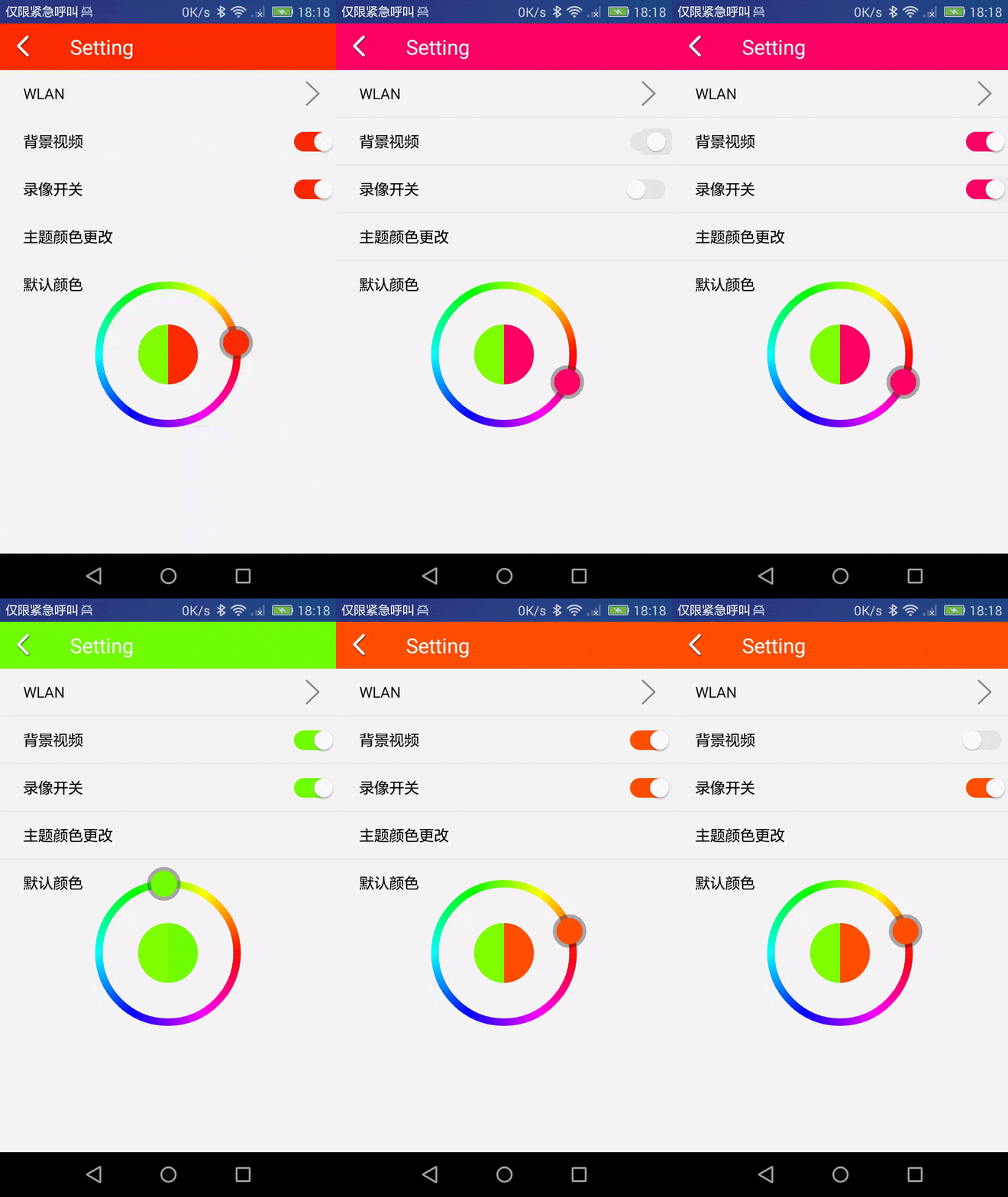
2:布局
<Switch

    android:id="@+id/switch_bg"

    style="@style/switchStyle"

    android:layout_width="30dp"

    android:layout_height="wrap_content"

    android:layout_weight="1"

    android:checked="false"

    android:switchMinWidth="52dp" />
3:switchStyle
<style name="switchStyle">

    <item name="android:layout_height">wrap_content</item>

    <item name="android:layout_width">wrap_content</item>

    <item name="android:textOff">""</item>

    <item name="android:textOn">""</item>

    <item name="android:thumb">@drawable/switch_thumb</item>

    <item name="android:thumbTextPadding">10dp</item>

    <item name="android:track">@drawable/switch_track</item>

</style>
4: switch_thumb
<?xml version="1.0" encoding="utf-8"?>

<selector xmlns:android="http://schemas.android.com/apk/res/android">

    <item android:state_checked="true" android:drawable="@drawable/abc_btn_switch_to_on_mtrl_00012" />

    <item android:drawable="@drawable/abc_btn_switch_to_on_mtrl_00001" />

</selector>
5: switch_track
<?xml version="1.0" encoding="utf-8"?>

<selector xmlns:android="http://schemas.android.com/apk/res/android">

    <item  android:state_checked="true" >

        <shape xmlns:android="http://schemas.android.com/apk/res/android">

            <size android:width="@dimen/switch_w"

                android:height="@dimen/switch_h"/>

            <solid android:color="@color/colorDefaultThemeGreen"/>

            <corners android:radius="@dimen/switch_r"/>

        </shape>

    </item>

    <item  android:state_checked="false" >

        <shape xmlns:android="http://schemas.android.com/apk/res/android">

            <size android:width="@dimen/switch_w"

                android:height="@dimen/switch_h"/>

            <solid android:color="@color/colorGray"/>

            <corners android:radius="@dimen/switch_r"/>

        </shape>

    </item>

</selector>
6:实现方法
  private void setSwitchColor(Switch switch_bg,int color){

        StateListDrawable stateListDrawable = (StateListDrawable) switch_bg.getTrackDrawable();

        try {

            Class stateListDrawableClass = StateListDrawable.class;

            Method getStateCountMethod = stateListDrawableClass.getDeclaredMethod("getStateCount", new Class[0]);

            Method getStateSetMethod = stateListDrawableClass.getDeclaredMethod("getStateSet", int.class);

            Method getDrawableMethod = stateListDrawableClass.getDeclaredMethod("getStateDrawable", int.class);

            int count = (Integer) getStateCountMethod.invoke(stateListDrawable, new Object[]{});

            Log.d("Tag:", "setSwitchColor: --count:  "+count);

            for (int i = 0; i < count; i++) {

                int[] stateSet = (int[]) getStateSetMethod.invoke(stateListDrawable, 0);

                if (stateSet == null || stateSet.length == 0) {

                    GradientDrawable drawable = (GradientDrawable) getDrawableMethod.invoke(stateListDrawable, i);

                    drawable.setColor(color);

                } else {

                    Log.d("Tag:", "setSwitchColor:length: "+stateSet.length);

                    for (int j = 0; j < stateSet.length; j++) {

                        Log.d("Tag:", "setSwitchColor: "+stateSet[j]);

                        if(stateSet[j]==android.R.attr.state_checked){

                            Drawable drawable = (Drawable) getDrawableMethod.invoke(stateListDrawable, j);

                            drawable.setColorFilter(color, PorterDuff.Mode.SRC_ATOP);

                        }else {

                            Drawable drawable = (Drawable) getDrawableMethod.invoke(stateListDrawable, j);

                            drawable.setColorFilter(Color.RED, PorterDuff.Mode.SRC_ATOP);

                        }

                    }

                }

            }

        } catch (Exception e) {

            e.printStackTrace();

        }

    }
7:code
链接: https://pan.baidu.com/s/1h-KzOa-_mOrqlsSMqttZKQ 密码: i9uh
修改Switch 的颜色的更多相关文章
- Android Studio -修改LogCat的颜色
Android Studio -修改LogCat的颜色 author:Kang,Leo weibo:http://weibo.com/kangyi 效果图 设置 Preference->Edit ...
- 复选框输入Android Studio 如果修改LogCat的颜色,默认全是黑色看着挺不舒服的
今天一直在查找复选框输入之类的问题,上午正好有机会和大家分享一下. 怎么找到并表现LogCat这里就不需要再讲了吧,主要说一下本篇的主题,如何修改他的颜色 .我们在使用Eclipse的时候应该都用过L ...
- 修改tabbar 字体颜色
NSDictionary *seletedTextAttrs = @{NSForegroundColorAttributeName:[UIColor orangeColor]}; 修改tabbar 字 ...
- 如何解决在GDI画图中,多次修改画笔的颜色
首先创建个画笔对象: CPen gPen;gPen.CreatePen(PS_SOLID, 1, RGB(120,120,130));//一定灰度的画笔〈/br〉CPen* pOldPen = pDC ...
- 修改UISearchBar背景颜色
UISearchBar是由两个subView组成的,一个是UISearchBarBackGround,另一个是UITextField. 要IB中没有直接操作背景的属性.方法一:是直接将 UISearc ...
- jquery入门 修改网页背景颜色
我们在浏览一些网站,尤其是一些小说网站的时候,都会有修改页面背景颜色的地方,这个功能使用jquery很容易实现. 效果图: show you code: <!doctype html> & ...
- 修改cocos2dx 背景颜色
只需要在AppDelegate的设置FPS后面加入一行: glClearColor(1.0, 1.0, 1.0, 1.0); 同理如果要修改成其它颜色,只需修改里面的值即可( r, g, b, a);
- ubuntu修改顶栏颜色
title: ubuntu修改顶栏颜色 toc: false date: 2018-09-29 19:14:01 categories: methods tags: Ubuntu 编辑shell主题的 ...
- HTML 颜色输入框修改事件的触发,以及获取修改后的颜色
HTML 颜色输入框修改事件的触发,以及获取修改后的颜色 <!DOCTYPE html> <html lang="en"> <head> < ...
随机推荐
- 20180429NOIP提高组精英班Day1测试
- POJ 2823 Sliding Window & Luogu P1886 滑动窗口
Sliding Window Time Limit: 12000MS Memory Limit: 65536K Total Submissions: 66613 Accepted: 18914 ...
- The meaning of the number displayed on the man page in Linux
0 Header files 0p Header files (POSIX) 1 Executable programs or shell commands 1p Executable program ...
- Linux - redis-cluster搭建
目录 Linux - redis-cluster搭建 Linux - redis-cluster搭建 1.准备6个数据库节点,也就是6个redis实例,也就是6个配置文件 配置文件如下 redis-7 ...
- Golang之路
目录 Golang之路 Golang之路 Golang(一) - 开篇必须吹牛逼 Golang(二) - 第一个go程序和基本语法 Golang(三) - 函数 Golang(四) - 流程控制 Go ...
- Flask-SQLAlchemy中解决1366报错
会报下面这个1366的错 安装MySQL驱动(我升级过Python,所以要再装一遍) 本想安装MySQL官方驱动mysql-connector-python的,然而官方目前只支持到3.4 我又懒,所以 ...
- Dajngo——10 请求与响应 文件上传 GET和POST请求 类视图
Dajngo——10 HttpRequest对象 HttpResponse对象及子类 form标签中的GET和POST GET提交方式 POST提交方式 request得GET和POST属性 文件上传 ...
- play snake on windows
今天和人吃晚饭突然想起来 之前西佳佳老师说小学期会要求两星期撸一个小游戏 有人已经撸完一个俄罗斯方块了... 菜逼我决定从最简单的贪吃蛇玩起... 我是直接参考的这个博客 算是相当简单而且很Low的实 ...
- wmpnetwk.exe怎么禁启动
Win7控制面板--管理工具--服务,找到并选中"Windows Media Player Network Sharing Service"服务,右键点"属性" ...
- Blue Jeans POJ 3080 寻找多个串的最长相同子串
Description The Genographic Project is a research partnership between IBM and The National Geographi ...