
Android EditText+ListPopupWindow实现可编辑的下拉列表
使用场景
AutoCompleteEditText只有开始输入并且与输入的字符有匹配的时候才弹出下拉列表.Spinner的缺点是不可以编辑.所以本文介绍如何使用EditText+ListPopupWindow实现可编辑的下拉列表.使用场景可以是有记住密码功能的登录框.
给EditText增加上下箭头
我们需要一个箭头图片,放在EditText的右面,用来点击后弹出下拉列表.如图所示

要想实现这个很容易,只需要在布局文件中给EditText设置一个drawableRight的属性.
<EditText

        android:layout_width="match_parent"

        android:layout_height="wrap_content"

        android:drawableRight="@drawable/pull_down1"/>
如何在点击的时候切换箭头的方向
切换箭头的上下方向,实际上就是重新设置EditText的drawableRight.这就需要动态的设置EditText的drawableRight.
setCompoundDrawables(left, top, right, bottom);

setCompoundDrawablesWithIntrinsicBounds(left, top, right, bottom);
意思是设置Drawable显示在text的左、上、右、下位置。
但是两者有些区别:
setCompoundDrawables 画的drawable的宽高是按drawable.setBound()设置的宽高,所以才有The Drawables must already have had setBounds(Rect) called.意思是说使用之前必须使用Drawable.setBounds设置Drawable的长宽。
而setCompoundDrawablesWithIntrinsicBounds是画的drawable的宽高是按drawable固定的宽高,即通过getIntrinsicWidth()与getIntrinsicHeight()获得,所以才有The Drawables’ bounds will be set to their intrinsic bounds.这句话之说!
例如:
editTest.setCompoundDrawablesWithIntrinsicBounds(getResources().getDrawable(R.drawable.test), null, null, null);
给EditText添加触摸监听事件,当点击到drawableRight部位的时候,就重新设置图片资源
editText.setOnTouchListener(new View.OnTouchListener() {

            @Override

            public boolean onTouch(View view, MotionEvent event) {

                final int DRAWABLE_LEFT = ;

                final int DRAWABLE_TOP = ;

                final int DRAWABLE_RIGHT = ;

                final int DRAWABLE_BOTTOM = ;

                if (event.getAction() == MotionEvent.ACTION_UP) {

                    if (event.getX() >= (editText.getWidth() - editText

                            .getCompoundDrawables()[DRAWABLE_RIGHT].getBounds().width())) {

                        // your action here

                        editText.setCompoundDrawablesWithIntrinsicBounds(null, null, getResources().getDrawable(R.drawable.pull_up1), null);

                        return true;

                    }

                }

                return false;

            }

        });
ListPopupWindow
最后一步就是显示列表了
private void showListPopulWindow(){

        String[] list = { "item1", "item2", "item3", "item4" };

        listPopupWindow = new ListPopupWindow(this);

        listPopupWindow.setAdapter(new ArrayAdapter<String>(this,

                android.R.layout.simple_list_item_1, list));

        listPopupWindow.setAnchorView(editText);

        listPopupWindow.setModal(true);

        listPopupWindow.show();

    }
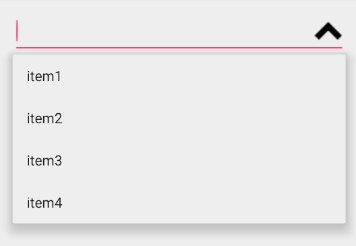
可以给listPopupWindow 设置监听事件,当item被选择的时候干啥,当listPopupWindow消失的时候干啥
listPopupWindow.setOnItemClickListener(new AdapterView.OnItemClickListener() {

            @Override

            public void onItemClick(AdapterView<?> adapterView, View view, int i, long l) {

                editText.setText(list[i]);

            }

        });

listPopupWindow.setOnDismissListener(new PopupWindow.OnDismissListener() {

            @Override

            public void onDismiss() {

                editText.setCompoundDrawablesWithIntrinsicBounds(null, null, getResources().getDrawable(R.drawable.pull_down1), null);

            }

        });
Android EditText+ListPopupWindow实现可编辑的下拉列表的更多相关文章
- android中将EditText改成不可编辑的状态
今天在做项目的时候,要想实现一个将EditText变成不可编辑的状态,通过查找博客,发现一个好方法,对于单独的EditText控件我们可以单独设置 1.首先想到在xml中设置Android:edita ...
- Android EditText属性
1.EditText输入的文字为密码形式的设置 (1)通过.xml里设置: 把该EditText设为:android:password="true" // 以”.”形式显示文本 ( ...
- Android EditText多行显示及所有属性
android:id="@+id/editSms" android:layout_width="fill_parent" android:layout_heig ...
- Android EditText自动弹出输入法焦点
http://mobile.51cto.com/aprogram-403138.htm 1. 看一个manifest中Activity的配置,如果这个页面有EditText,并且我们想要进入这个页面的 ...
- Android EditText不弹出输入法总结,焦点问题的总结
看一个manifest中Activity的配置,如果这个页面有EditText,并且我们想要进入这个页面的时候默认弹出输入法,可以这样设置这个属相:android:windowSoftInputMod ...
- Android EditText悬浮在输入法之上
Android EditText悬浮在输入法之上 使用 android:windowSoftInputMode="adjustResize" 会让界面整体被顶上去,很多时候我们不需 ...
- Android EditText 不弹出输入法
当第一次进入一个activity的时候 一般是第一个edittext是默认选中的,但是该死的软键盘也一起弹出来了 那是相当的不美观哈!(#‵′)凸.为此, 本大人就去寻找在刚进入这个activity ...
- android EditText获取光标位置并安插字符删除字符
android EditText获取光标位置并插入字符删除字符1.获取光标位置int index = editText.getSelectionStart(); 2.在光标处插入字符int index ...
- Android EditText截获与监听输入事件
Android EditText截获与监听输入事件共有2种方法: 1.第一种方法:使用setOnKeyListener(),不过这种方式只能监听硬键盘事件. edittext.setOnKeyLi ...
随机推荐
- poj 2488 A Knight's Journey(dfs+字典序路径输出)
转载请注明出处:http://blog.csdn.net/u012860063?viewmode=contents 题目链接:http://poj.org/problem? id=2488 ----- ...
- Sambaserver搭建
1. 安装Samba及相关包 $ sudo apt-getinstall samba samba-common smbfspython-glade2system-config-samba 2. 创建共 ...
- Asp.net button防止点击多次数据提交
<!DOCTYPE html> <html xmlns="http://www.w3.org/1999/xhtml"> <head runat= ...
- caffe中lenet_solver.prototxt配置文件注解
caffe框架自带的例子mnist里有一个lenet_solver.prototxt文件,这个文件是具体的训练网络的引入文件,定义了CNN网络架构之外的一些基础参数,如总的迭代次数.测试间隔.基础学习 ...
- RMAN删除归档脚本
crosscheck archivelog all; delete noprompt expired archivelog all; delete noprompt archivelog un ...
- 转 c#中 base64字符串与普通字符串互转
https://blog.csdn.net/hwt0101/article/details/79758912 转成 Base64 形式的 System.String: string a = &q ...
- 全国所有省市县地理坐标Json格式
https://www.cnblogs.com/yzbubble/p/7707129.html
- GDOI2016酱油记(补发)
这篇酱油记是前年发在MCHacker一个叫code-hub的博客上的(已崩),现在来补发一下... GDOI2016扯淡(爆零记) 大家好,我是巨弱DCDCBigBig,在五一期间和一群神牛去考GDO ...
- vue 连接后台
在 index.js 中可以配置后台的地址:代理的方式: 这个文件在 config 中 proxyTable: { // 连接后台 '/api':{ target:"http://new.w ...
- 推荐学习《组织与管理研究的实证方法(第2版)》中文PDF
在写文章论文时,会涉及到观点论证,需要掌握一些实证方法. 建议学习<组织与管理研究的实证方法(第2版)>,对管理研究中涉及的方法进行了介绍,例如实验室研究,二手数据的研究,实地研究等,这对 ...