
spring的quartz定时任务
一、版本:
1.spring:4.1.7;
2.quartz:2.2.1;
二、基于ssm项目:
1.引入jar包:quartz-2.2.1.jar;spring所需包。
2.说明:quartz版本和spring版本要兼容,低版本的quartz集成在高版本的spring中会报错:java.lang.ClassNotFoundException: org.quartz.impl.JobDetailImpl。
其实在spring4.1.x的源码中已经有对应的说明了,原文如下:
Compatible with Quartz 2.1.4 and higher, as of Spring 4.1.
3.常见异常原因ClassNotFoundException: org.springframework.scheduling.quartz.CronTriggerBean:
在quartz 1.8.6及以前版本的时候 调度触发器 依赖的类是 org.springframework.scheduling.quartz.CronTriggerBean
在2.xx版本之后就改为了org.springframework.scheduling.quartz.CronTriggerFactoryBean
因此当你依赖2.x.x版本之后只需将调度触发器的依赖类改为 org.springframework.scheduling.quartz.CronTriggerFactoryBean即可
三、代码:
quartz文件配置applicationContext-quartz.xml:
<?xml version="1.0" encoding="UTF-8"?>

<beans xmlns="http://www.springframework.org/schema/beans" xmlns:context="http://www.springframework.org/schema/context"

       xmlns:xsi="http://www.w3.org/2001/XMLSchema-instance" xmlns:aop="http://www.springframework.org/schema/aop"

       xmlns:tx="http://www.springframework.org/schema/tx" xmlns:p="http://www.springframework.org/schema/p"

       xmlns:util="http://www.springframework.org/schema/util" xmlns:jdbc="http://www.springframework.org/schema/jdbc"

       xmlns:cache="http://www.springframework.org/schema/cache"

       xsi:schemaLocation="

    http://www.springframework.org/schema/context

    http://www.springframework.org/schema/context/spring-context.xsd

    http://www.springframework.org/schema/beans

    http://www.springframework.org/schema/beans/spring-beans.xsd

    http://www.springframework.org/schema/tx

    http://www.springframework.org/schema/tx/spring-tx.xsd

    http://www.springframework.org/schema/jdbc

    http://www.springframework.org/schema/jdbc/spring-jdbc.xsd

    http://www.springframework.org/schema/cache

    http://www.springframework.org/schema/cache/spring-cache.xsd

    http://www.springframework.org/schema/aop

    http://www.springframework.org/schema/aop/spring-aop.xsd

    http://www.springframework.org/schema/util

    http://www.springframework.org/schema/util/spring-util.xsd">

    <!-- quartz定时任务 -->

    <!-- <bean id="marketTest" class="com.test.www.web.timeTask.MarketMaintainEmailRemind">

    </bean> -->

      <!--第四步 把定义好的任务放到调度(Scheduler)工厂里面,注意这里的ref bean -->

    <bean id="schedulerFactoryBean3"

        class="org.springframework.scheduling.quartz.SchedulerFactoryBean">

        <property name="applicationContextSchedulerContextKey" value="applicationContext"/>

        <property name="triggers">

            <list>

                <ref bean="printTimerTrigger10" />

            </list>

        </property>

    </bean>

    <!-- CronTriggerBean -->

    <bean id="printTimerJob10"

        class="org.springframework.scheduling.quartz.MethodInvokingJobDetailFactoryBean">

        <property name="targetObject" ref="marketMaintainEmailRemind" />  <!-- marketMaintainEmailRemind marketTest -->

        <property name="targetMethod" value="run" />

        <property name="concurrent" value="false"/>

    </bean>

    <bean id="printTimerTrigger10" class="org.springframework.scheduling.quartz.CronTriggerFactoryBean">

        <property name="jobDetail" ref="printTimerJob10" />

        <property name="cronExpression" value="0 54 12 * * ?" />

    </bean>

</beans>
在spring的配置文件applicationContext.xml中引入配置文件applicationContext-quartz.xml:
<import resource="applicationContext-quartz.xml" />
定时类:
package com.test.www.web.timeTask;

import javax.annotation.Resource;

import org.springframework.stereotype.Component;

import com.test.www.util.PrimaryKeyGenerator;

import com.test.www.web.entity.user.User;

import com.test.www.web.service.user.UserService;

//注:MarketMaintainEmailRemind类注册bean默认名称为类名且首字母小写,可通过注解方式自定义名称修改bean名称

@Component //@Service("marketTest")  @Component("marketTest")

public class MarketMaintainEmailRemind {

    @Resource

    private UserService userService;

    public void run() {

        try {

            System.out.println("aa");

            User user = new User();

            user.setId(PrimaryKeyGenerator.getLongKey());

            user.setUsername("定时任务Test");

            user.setPassword("dingshirenwuTest");

            userService.insertUser(user);

        } catch (Exception e) {

            e.printStackTrace();

        }

    }

}
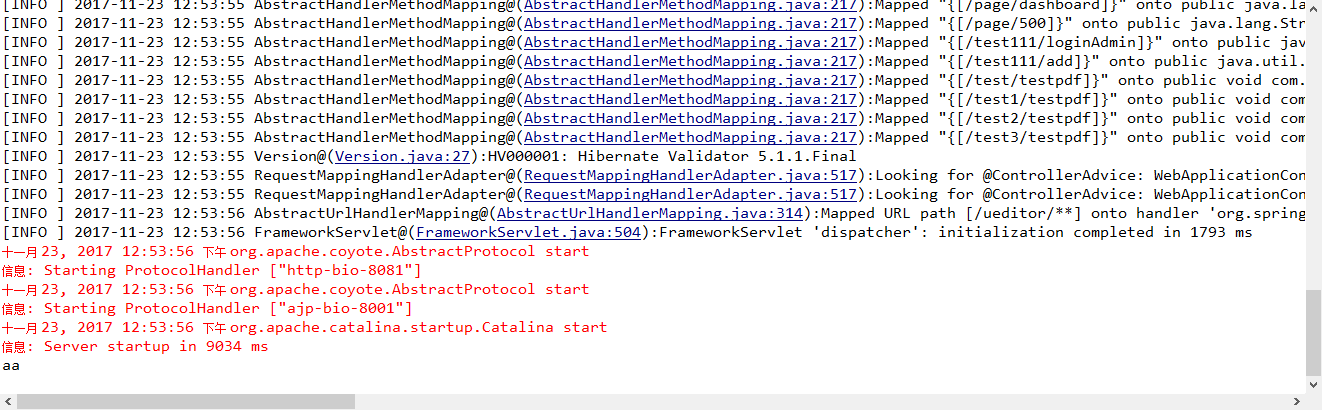
完成后,设定quartz中的时间,等待触发。时间一到就会执行MarketMaintainEmailRemind中的run方法。执行结果如下图所示:
spring的quartz定时任务的更多相关文章
- Spring整合Quartz定时任务执行2次,Spring定时任务执行2次
Spring整合Quartz定时任务执行2次,Spring定时任务执行2次 >>>>>>>>>>>>>>>&g ...
- Spring整合Quartz定时任务 在集群、分布式系统中的应用(Mysql数据库环境)
Spring整合Quartz定时任务 在集群.分布式系统中的应用(Mysql数据库环境) 转载:http://www.cnblogs.com/jiafuwei/p/6145280.html 单个Q ...
- (2)Spring集成Quartz定时任务框架介绍和Cron表达式详解
在JavaEE系统中,我们会经常用到定时任务,比如每天凌晨生成前天报表,每一小时生成汇总数据等等.我们可以使用java.util.Timer结合java.util.TimerTask来完成这项工作,但 ...
- Spring集成Quartz定时任务框架介绍和Cron表达式详解
原文地址:http://www.cnblogs.com/obullxl/archive/2011/07/10/spring-quartz-cron-integration.html 在JavaEE系统 ...
- Spring整合Quartz定时任务 在集群、分布式系统中的应用
概述 虽然单个Quartz实例能给予你很好的Job调度能力,但它不能满足典型的企业需求,如可伸缩性.高可靠性满足.假如你需要故障转移的能力并能运行日益增多的 Job,Quartz集群势必成为你应用的一 ...
- Spring集成Quartz定时任务框架介绍
在JavaEE系统中,我们会经常用到定时任务,比如每天凌晨生成前天报表,每一小时生成汇总数据等等.我们可以使用java.util.Timer结合java.util.TimerTask来完成这项工作,但 ...
- Spring之Quartz定时任务和Cron表达式详解
1.定时业务逻辑类 public class ExpireJobTask { /** Logger */ private static final Logger logger = LoggerFact ...
- Spring集成Quartz定时任务
1.导入jar包 2.配置applicationContext.xml文件 <!-- 任务调度1 --> <!-- bean id="simpleJob" cla ...
- Spring MVC+Quartz 定时任务持久化
请自行参考: http://sloanseaman.com/wordpress/2011/06/06/spring-and-quartz-and-persistence/ https://object ...
随机推荐
- poj 3311 Hie with the Pie (TSP问题)
Hie with the Pie Time Limit: 2000MS Memory Limit: 65536K Total Submissions: 4491 Accepted: 2376 ...
- 110个经常使用Oracle函数总结
1. ASCII 返回与指定的字符相应的十进制数; SQL> select ascii(A) A,ascii(a) a,ascii(0) zero,ascii( ) space from dua ...
- http://www.secrepo.com 安全相关的数据获取源
来自:http://www.secrepo.com Network MACCDC2012 - Generated with Bro from the 2012 dataset A nice datas ...
- windows快速找到host文件
https://jingyan.baidu.com/article/1e5468f96f7345484961b71e.html
- Servlet简单计算器 2.0
jsp 输入界面: <%@ page language="java" contentType="text/html; charset=UTF-8" pag ...
- javascript对象的相关操作
Window对象 我们知道浏览器对象模型(BOM)是javascript的组成之一,它提供了独立于内容与浏览器窗口进行交互的对象.其分层结构如下: window对象是整个BOM的核心其有documen ...
- 问题集锦 ~ jQuery
#addClass失败 $target.addClass('show'); show 这个单词可能和内部某处起冲突了吧,有时成功有时失败,只能换个class名了,难受……
- (转载)Android学习之Intent使用
ndroid学习之Intent使用 1.使用显示Intent Intent intent = new Intent(FirstActivity.this,SecondActivity.class) ...
- hiho 1572 - set.upper_bound,排序树
链接 小Hi家的阳台上摆着一排N个空花盆,编号1~N.从第一天开始,小Hi每天会选择其中一个还空着花盆,栽种一株月季花,直到N个花盆都栽种满月季. 我们知道小Hi每天选择的花盆的编号依次是A1, A2 ...
- web监控脚本
#!/bin/bashvalues=`curl -H 'Cache-Control: no-cache' -k -s -m 10 --connect-timeout 10 "$1" ...