
Django会话cookie&session
任务描述:实现登录和退出
1.项目结构
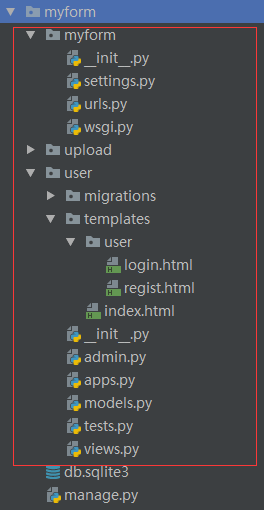
2.源代码
urls.py
from django.conf.urls import url

from django.contrib import admin

from user import views

admin.autodiscover()

urlpatterns = [

	url(r'^admin/', admin.site.urls),

	url(r'index/', views.index),

	url(r'user/regist/', views.regist),

	url(r'user/login/', views.login),

	url(r'user/logout/', views.logout),

]
views.py
from django.shortcuts import render

from django import forms

from  django.http import HttpResponseRedirect, HttpResponse

import sqlite3

from . import models

class UserForm(forms.Form):

	username = forms.CharField(max_length=100)

	password = forms.CharField(widget=forms.PasswordInput)

	headimg = forms.FileField()

class LoginForm(forms.Form):

	username = forms.CharField(max_length=100)

	password = forms.CharField(widget=forms.PasswordInput)

def insert(user):

	# 连接数据保存

	models.User.objects.create(username=user.username, password=user.password, headimg=user.headimg)

	return True

def find_user(user):

	users = models.User.objects.filter(username=user.username, password=user.password)

	if users:

		return True

	else:

		return False

def regist(request):

	context = {}

	if request.method == 'POST':

		uf = UserForm(request.POST, request.FILES)

		if uf.is_valid():

			username = uf.cleaned_data['username']

			password = uf.cleaned_data['password']

			headimg = uf.cleaned_data['headimg']

			user = models.User(username=username, headimg=headimg.name, password=password)

			# save headimg

			fp = open('upload/' + headimg.name, 'wb')

			s = headimg.read()

			fp.write(s)

			fp.close()

			if insert(user):

				return HttpResponseRedirect('/user/login')  # 重定向到登录界面

	else:

		uf = UserForm()

	context = {'uf': uf}

	return render(request, 'user/regist.html', context)

def login(request):

	context = {}

	if request.method == 'POST':

		uf = LoginForm(request.POST)

		if uf.is_valid():

			username = uf.cleaned_data['username']

			password = uf.cleaned_data['password']

			user = models.User(username=username, password=password)

			if find_user(user):

				print('find it!')

				# session

				request.session['username'] = username

				response = HttpResponseRedirect('/index/')

				# cookie

				# response.set_cookie('username', username, 3600)  # 将username写入浏览器cookie,失效时间为3600

				response.set_cookie('password', password, 3600)  # 将password写入浏览器cookie,失效时间为3600

				return response

			else:

				return render(request,'/user/login/',context)

	else:

		uf = LoginForm()

	print('not find it!')

	context = {'uf': uf}

	return render(request, 'user/login.html', context)

def logout(request):

	response = HttpResponseRedirect('/user/login/')

	try:

		del request.session['username']

	except Exception as e:

		print(e)

	# response.delete_cookie('username')

	response.delete_cookie('password')  # 删除cookie

	return response

def index(request):

	context = {}

	# session

	username = request.session.get('username', 'anybody')

	context['username'] = username

	# cookie

	if request.COOKIES:

		print(request.COOKIES)

	return render(request, 'index.html', context)
index,html
<!DOCTYPE html>

<html lang="en">

<head>

    <meta charset="UTF-8">

    <title>index</title>

</head>

<body>

<h2>This is index page!</h2>

<p>welcome,{{username}} !</p>

<a href="/user/logout/">Logout</a>

</body>

</html>
login.html
<!DOCTYPE html>

<html lang="en">

<head>

    <meta charset="UTF-8">

    <title>login</title>

</head>

<body>

<form method="post" action="/user/login/">

    {% csrf_token %}

    {{uf.as_p}}

    <input type="submit" value="submit">

</form>

</body>

</html>
regist.html
<!DOCTYPE html>

<html lang="en">

<head>

    <meta charset="UTF-8">

    <title>regist</title>

</head>

<body>

<h3>regist</h3>

<hr>

<form method="post" enctype="multipart/form-data">

    {% csrf_token %}

    {{uf.as_p}}

    <input type="submit" value="submit">

</form>

</body>

</html>
models.py
from django.db import models

class User(models.Model):

	username = models.CharField(max_length=100)

	password = models.CharField(max_length=20, default='123456')

	headimg = models.FileField()

	def __str__(self):

		return self.username + ',' + self.password + ',' + self.headimg.name
3.运行测试
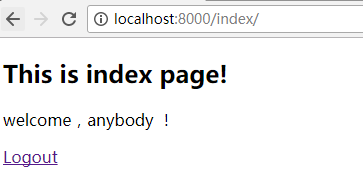
未登录访问:
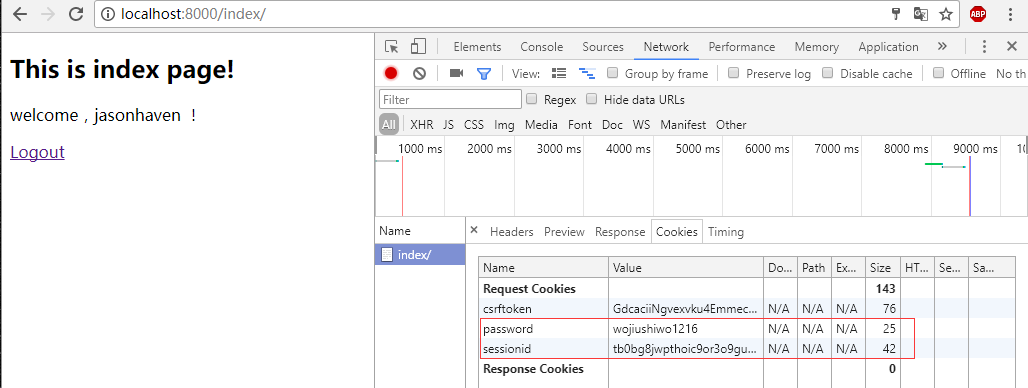
登录后访问:

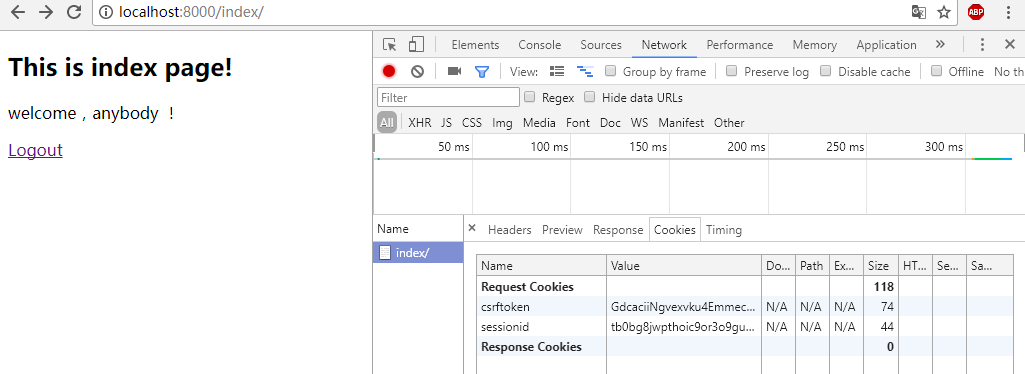
退出
Django会话cookie&session的更多相关文章
- day09 Django: 组件cookie session
day09 Django: 组件cookie session 一.cookie和session都是会话跟踪技术 1.什么是会话 可以理解为客户端和服务端之间的一次会 ...
- django - 总结 - cookie|session
Cookie是通过HTTP请求和响应头在客户端和服务器端传递的. 在Web开发中,使用session来完成会话跟踪,session底层依赖Cookie技术. --------------------- ...
- python框架之Django(7)-Cookie&Session使用
Cookie 添加 response.set_cookie 添加明文cookie response.set_cookie(key, value='', max_age=None, expires=No ...
- python 全栈开发,Day76(Django组件-cookie,session)
昨日内容回顾 1 json 轻量级的数据交换格式 在python 序列化方法:json.dumps() 反序列化方法:json.loads() 在JS中: 序列化方法:JSON.stringfy() ...
- Django中cookie&session的实现
1.什么叫Cookie Cookie翻译成中文是小甜点,小饼干的意思.在HTTP中它表示服务器送给客户端浏览器的小甜点.其实Cookie是key-value结构,类似于一个python中的字典.随着服 ...
- Django之cookie+session
前言 HTTP协议 是短连接.且状态的,所以在客户端向服务端发起请求后,服务端在响应头 加入cokie响应给浏览器,以此记录客户端状态: cook是来自服务端,保存在浏览器的键值对,主要应用于用户登录 ...
- Django之cookie&session
cookie Cookie 是在 HTTP 协议下,服务器或脚本可以维护客户工作站上信息的一种方式.Cookie 是由 Web 服务器保存在用户浏览器(客户端)上的小文本文件,它可以包含有关用户的信息 ...
- django框架--cookie/session
目录 一.http协议无状态问题 二.会话跟踪技术--cookie 1.对cookie的理解 2.cookie的使用接口 3.cookie的属性 4.使用cookie的问题 三.会话跟踪技术--ses ...
- Django组件-cookie,session
昨日内容回顾: json 轻量级的数据交换格式 在python 序列化方法:json.dumps() 反序列化方法:json.loads() 在JS中: 序列化方法:JSON.stringfy() 反 ...
随机推荐
- Zabbix主动代理模式 + 主动模式agent客户端
2.1.1 安装软件 ]# rpm -qa zabbix* zabbix-proxy-sqlite3-3.4.15-1.el7.x86_64 zabbix-proxy-mysql-3.4.15-1.e ...
- CF-833B The Bakery(线段树优化Dp)
Some time ago Slastyona the Sweetmaid decided to open her own bakery! She bought required ingredie ...
- actionbar spinner-用法实例
今天需要更改一个actionbar上的spinner的字体颜色,结果试了好长时间都没有解决,最后才发现,原来他是在代码下增加的一个textview,然后使用adapter加载的,并不是直接用frame ...
- bootstrap课程12 滚动监听如何实现(bootstrap方式和自定义方式)
bootstrap课程12 滚动监听如何实现(bootstrap方式和自定义方式) 一.总结 一句话总结:通过监听滚动的高,判断滚动的高是否大于元素距离顶端的距离 1.如何知道屏幕滚动的高? st=$ ...
- JS/CSS 响应式样式实例
<!DOCTYPE html> <html> <head> <meta charset="utf-8"> <title> ...
- Lintcode 将整数A转换为B
例子 如把31转换为14,须要改变2个bit位. ()10=()2 ()10=()2 贴代码 class Solution { public: /** *@param a, b: Two intege ...
- 写给自己的TypeScript 入门小纲
前几日,在知乎上写了一些技术类的文章,有人私信问我,是不是要找一份工作,有没有想过要跳槽,然后我回到,你们公司都是用的什么框架什么技术,他罗列了一堆,其中就包含了TypeScript,我甚至不知道有这 ...
- UVA 11609 - Teams 组合、快速幂取模
看题传送门 题目大意: 有n个人,选一个或者多个人参加比赛,其中一名当队长,如果参赛者相同,队长不同,也算一种方案.求一共有多少种方案. 思路: 排列组合问题. 先选队长有C(n , 1)种 然后从n ...
- php ignore_user_abort()实现计划(定时执行)任务功能
? 1 2 3 4 5 6 7 8 9 10 11 12 <?php ignore_user_abort(TRUE); //关掉浏览器,PHP脚本也可以继续执行. set_ti ...
- Virtualizing physical memory in a virtual machine system
A processor including a virtualization system of the processor with a memory virtualization support ...