
如何让你的Sublime和Codeblocks支持C++11
闲来没事看了一下C++11,比起C++0x多了很多新功能,像auto变量,智能指针等,g++4.7以上版本也提供了对C++11的支持,但是,如何在你的编辑器上执行C++11代码呢?
刚开始以为用法和以前的版本一样,于是写了个C++11的小代码:

完事后一编译发现不对,于是又手工调用g++编译了一下:
g++ -o test2 test2.cpp
发现还是不对。
百度了一下才发现原来编译C++11不同于C++0x,要加一个编译选项-std=c++11 :
g++ -std=c++ -o test2 test2.cpp
编译顺利通过!!!
可是,如何将这个编译选项应用到IDE上呢?
我常用的编辑器是Codeblocks和Sublime
找了一下,其实Codeblocks的设置蛮简单的:
Setting->Compiler
直接在“Have g++ follow the C++11 ISO C++ language standard [-std=c++11]” 选项上打勾 保存就可以了
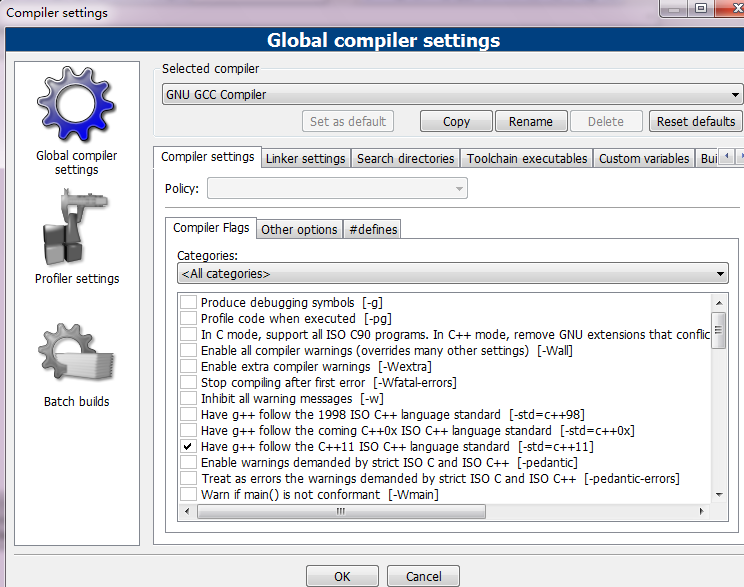
Sunlime的配置则比较麻烦一些:
Tools->Build System->New Build System...
然后把下面的代码粘贴到新打开的文件中:
 {

      "cmd": ["g++", "-std=c++11", "${file}", "-o", "${file_path}/${file_base_name}"], // For GCC On Windows and Linux

      //"cmd": ["CL", "/Fo${file_base_name}", "/O2", "${file}"],     // For CL on Windows Only

      "file_regex": "^(..[^:]*):([0-9]+):?([0-9]+)?:? (.*)$",

      "working_dir": "${file_path}",

      "selector": "source.c, source.c++",

      "variants":

      [

           {

                "name": "Run",

                //"cmd": ["bash", "-c", "g++ '${file}' -o '${file_path}/${file_base_name}' && '${file_path}/${file_base_name}'"]  // Linux Only

                "cmd": ["CMD", "/U", "/C", "g++ -std=c++11 ${file} -o ${file_base_name} && ${file_base_name}"]  // For GCC On Windows Only

                //"cmd": ["CMD", "/U", "/C", "CL /Fo${file_base_name} /O2 ${file} && ${file_base_name}"]   // For CL On Windows Only

           }

      ]

 }
然后保存,在保存文件对话框中把文件名字改成“C++11.sublime-build” 保存即可
然后选择Tools->Build System->C++11
这时你的Sublime Text就是一个完美的支持C++11的编辑器了!

Chierush原创,转载请注明地址:http://www.cnblogs.com/Chierush/
如何让你的Sublime和Codeblocks支持C++11的更多相关文章
- Sublime和Codeblocks支持C++11
Sublime和Codeblocks支持C++11 闲来没事看了一下C++11,比起C++0x多了很多新功能,像auto变量,智能指针等,g++4.7以上版本也提供了对C++11的支持,但是,如何在你 ...
- Codeblocks支持C++11
Setting->Compiler 直接在“Have g++ follow the C++11 ISO C++ language standard [-std=c++11]” 选项上打勾 保存就 ...
- Sublime Text 3 支持的热门插件推荐
SublimeText是一款非常精巧的文本编辑器,适合编写代码.做笔记.写文章.它用户界面十分整洁,功能非同凡响,性能快得出奇.这些非常棒的特性 包括任意跳转(Goto Anything).多重选择( ...
- Sublime Text 3 支持的热门插件推荐(转载)
SublimeText是一款非常精巧的文本编辑器,适合编写代码.做笔记.写文章.它用户界面十分整洁,功能非同凡响,性能快得出奇.这些非常棒的特性 包括任意跳转(Goto Anything).多重选择( ...
- [转] Sublime Text 3支持GB2312和GBK编码
Sublime Text 3与Sublime Text 2的不同 其实有不少人写过如何让Sublime Text 2支持GB2312和GBK编码,例如这篇.基本原理就是先装好Package Contr ...
- Sublime codeIntel 配置支持php自动提示
Sublime codeIntel 配置支持php自动提示 下载地址:https://github.com/SublimeCodeIntel/SublimeCodeIntel 安装方法:下载后放到su ...
- 怎样让CodeBlocks支持C99
转载请注明出处,否则将追究法律责任http://blog.csdn.net/xingjiarong/article/details/47080303 CodeBlocks是一个写C/C++的比較好的编 ...
- mac上 sublime的配置,支持c++11且支持输入
首先下载mac版本的 sublimetext3 下载链接: https://www.sublimetext.com/3 接着可以按照其他博客的方法来安装一些插件,便于我们的工作和学习 安装sublim ...
- codeblocks不支持c++11的有效解决办法
首先cb支持c++11编程开发,但是不支持编译 看了网上好多,说setting里面设置一下就好了,16.01版本我安装了带ide的不带IDE的,安了好多次,但是就是没有那个选项 找不到c++11那个选 ...
随机推荐
- Java开发环境安装,环境变量
下载地址:www.oracle.com Java 9下载地址:https://www.oracle.com/technetwork/java/javase/downloads/java-archive ...
- HTTP协议(一些报头字段的作用,如cace-control、keep-alive)
---恢复内容开始--- Http连接是一种短连接,是一种无状态的连接. 所谓的无状态,是指浏览器每次向服务器发起请求的时候,不是通过一个连接,而是每次都建立一个新的连接. 如果是一个连接的话,服务器 ...
- 《DELPHI赋》
<DELPHI赋> -- 武汉NET_TO_DB DELPHI者,经典开发工具.美奂美仑之开发环境也.盖论DELPHI其身世,实为神界之神物,后借宝蓝公司之手,于1990年代,现于江湖. ...
- .net core下,Ocelot网关与Spring Cloud Gateway网关的对比测试
有感于 myzony 发布的 针对 Ocelot 网关的性能测试 ,并且公司下一步也需要对.net和java的应用做一定的整合,于是对Ocelot网关.Spring Cloud Gateway网关做个 ...
- Windows下安装MySQL(解压版本)
解压缩 将下载到的文件解压缩到自己喜欢的位置,例如我自己的位置是D:\Program Files\mysql-5.7.10-winx64 添加环境变量 右键计算机->属性->高级系统设置- ...
- Python多线程 简明例子
综述 多线程是程序设计中的一个重要方面,尤其是在服务器Deamon程序方面.无论何种系统,线程调度的开销都比传统的进程要快得多. Python可以方便地支持多线程.可以快速创建线程.互斥锁.信号量 ...
- SQList3 and SQL入门学习笔记
SQL 这是一个标准的计算机语言进行访问和操作数据库. 什么是 SQL? · SQL 指结构化查询语言 · SQL 使我们有能力訪问数据库 · SQL 是一种 AN ...
- 使用lead分析功能相似的结构9*9乘法口诀功能
今天兄弟们的帮助,数据库,具有数据如下面的表: no name 1 a 2 b 3 c 4 d 怎样用一个sql显演示样例如以下结果: ab ac ad bc bd cd 对 ...
- aspnetboilerplate && .net core 使用原生sql
利用aspnetboilerplate提供的工具类IDbContextProvider private readonly IDbContextProvider<XXXDbContext> ...
- C++ CGI开发环境备录
1. 安装apache2: apt-get install apache2 2. 配置用户目录 在/etc/apache2/apache2.conf中配置用户目录 <Directory /hom ...