
完整的html+css+javascript实现跟随鼠标移动显示选中效果
1,显示效果:
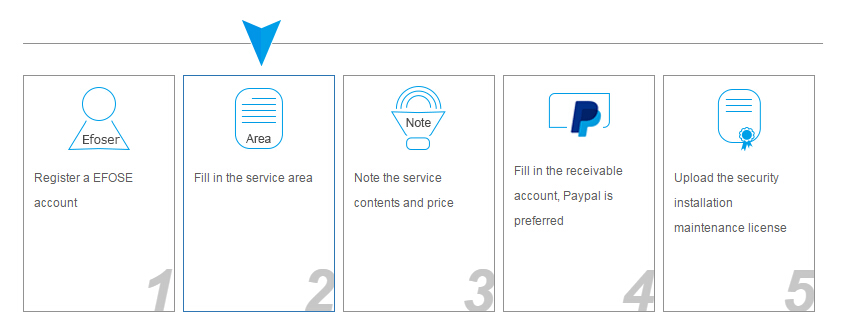
2,html结构
             <div class="process_list-lpu">

                 <div class="process_line"></div>

                 <div class="content_list">

                     <ul>

                         <li><a href="javascipt:;">End customer get product<b>1</b></a> </li>

                         <li><a href="javascipt:;">Log in EFOSE website and present installation or maintenance requirements <b>2</b></a></li>

                         <li><a href="javascipt:;">EFOSE prefer contact service point<b>3</b></a> </li>

                         <li style="margin-left:115px;"><a href="javascipt:;">Customer contact service point to get service<b>4</b></a> </li>

                         <li><a href="javascipt:;">Customer pays the bill directly or EFOSE pays the maintenance cost<b>5</b></a> </li>

                     </ul>

                     <div class="clear"></div>

                 </div>

             </div>
3,主要的css样式
.line-lpu{ height:55px; position:relative; width:100%; overflow:hidden;}

    .line-lpu span{ width:43px; height:46px; background:url('https://www.efose.com/images/banners/lpu_03.png') no-repeat; position:absolute;top:;}

    .border-lpu{border-bottom:1px  solid #959595; height:23px; }

     .join-lpu li{ width:19%; float:left; margin-right:8px;background:none; padding:; }

    .join-lpu li a{ display:block; color:#606060; text-decoration:none; border:1px solid #959595; min-height:215px; padding:10px;position:relative; overflow:hidden;}

    .join-lpu li a:hover{border:1px solid #337ab7;}

    .join-lpu li b{ font-size:60px; position:absolute; bottom:7px; right:-1px; font-style:italic; color:#c7c7c7;}

    .clear{clear:both;}

    .step-lpu span{ background:url('https://www.efose.com/images/banners/icon-lpu.png') no-repeat; display:block; width:75px; height:65px; margin-left:28px;}

    .step-lpu .icon0{ background-position:0 0;}

    .step-lpu .icon1{ background-position:0 -70px;}

    .step-lpu .icon2{ background-position:0 -140px;}

    .step-lpu .icon3{ background-position:0 -204px; height:58px; margin-bottom:7px;}

    .step-lpu .icon4{ background-position:0 -260px;}
4,JavaScript的编写
 <script type="text/javascript">

         //实例化animationHover对象

         window.onload = function(){

             var ah = new animationHover();

             ah.init();

         };

         //初始化标签对象

         function animationHover(){

             this.step = document.getElementById('step');

             this.stepLi = this.step.getElementsByTagName('li');

             this.line = document.getElementById('line');

             this.attr = null;

             this.timer = null;

             this.target = null;

             }

         //初始化事件

         animationHover.prototype.init=function(){

             This =this;

             for(var i=0;i<this.stepLi.length;i++){

                 this.stepLi[i].index=i;

                 //给li标签绑定事件

                 this.stepLi[i].onmouseover=function(e){

                     var myIndex=this.index;

                     This.onOver(This.line,(myIndex*162+55));

                     };

                 this.stepLi[i].onmouseout=function(){

                    This.line.style.left=myIndex*162+55+'px';

                     };

                 }

             };

         //定义鼠标经过的处理函数

         animationHover.prototype.onOver=function(obj,target){

             This=this;

             clearInterval(this.timer);

             This.target=target;

             timer=setInterval(function(){

                 var target=This.target; //停止的目标点

                 var attrValue=parseInt(This.getStyle(obj,'left'));

                 var dx=target-attrValue; //距目标点的"路程"

                 var speed=1/10*dx;

                 speed=speed>0?Math.ceil(speed):Math.floor(speed);

                             //防止取整引起的抖动

                 if(target==attrValue) clearInterval(timer);

                             //如果到达目标点,关闭定时器

                 else{

                     obj.style.left=attrValue+speed+'px';

                 }

                 },100);

             };

         //获取当前标签对象的css属性值

         animationHover.prototype.getStyle =function(obj,attr){

             if(obj.currentStyle){

                 return obj.currentStyle[attr];

             }else{

                 return getComputedStyle(obj,false)[attr];

             }

             };

 </script>
完整的html+css+javascript实现跟随鼠标移动显示选中效果的更多相关文章
- 文本跟随鼠标并且显示x轴和y轴位置
一.文本跟随鼠标并且显示x轴和y轴位置 代码如下: window.onload=function(){ var mydiv = document.createElement("div&quo ...
- javascript元素跟随鼠标在指定区域运动
元素跟随鼠标在指定区域运动通常是用在商城图片的放大镜中,下面是完整的Demo: <!DOCTYPE html> <html lang="en"> <h ...
- 关于wpf中popup跟随鼠标移动显示
最近在做一个画图工具,里面有一个功能是需要实现,当鼠标移动的时候在,鼠标的旁边显示坐标信息. 第一反应是想到了tooltip,但是tooltip有许多的限制,查询资料的过程中看到了popup,popu ...
- javascript创建跟随鼠标好玩的东西
不说话,直接上代码. css: #createGoDivBox{ display: none; } #createGoDivBox div{ background-color: #00A6C2; po ...
- javascript div跟随鼠标移动
<!DOCTYPE html> <html xmlns="http://www.w3.org/1999/xhtml"> <head> <m ...
- 浅谈CSS和JQuery实现鼠标悬浮图片放大效果
对于刚刚学习网页前台设计的同学一定对图片的处理非常苦恼,那么这里简单的讲解一下几个图片处理的实例. 以.net为平台,微软的Visual Studio 2013为开发工具,当然前台技术还是采用CSS3 ...
- 使用JavaScript实现使用鼠标画线的效果
<!DOCTYPE html PUBLIC "-//W3C//DTD XHTML 1.0 Transitional//EN" "http://www.w3.org/ ...
- CSS或者JS实现鼠标悬停显示另一元素
想达到鼠标悬停到元素a上,显示另一个元素b,可以通过css实现也可以通过js实现.js:写两个函数:mouseenter,mouseleave,例如:其中 $("#a").mous ...
- [ActionScript 3.0] AS3 用于拖动对象时跟随鼠标的缓动效果
package com.fylibs.components.effects { import flash.display.DisplayObject; import flash.events.Even ...
随机推荐
- php执行运算符
php执行运算符 简介 php 支持一个执行运算符:反引号(``).反引号(``)位于键盘Tab键左上方.php 将尝试将反引号中的内容作为外壳命令来执行,并将其输出信息返回(例如,可以赋给一个变量而 ...
- hdoj--1533--Going Home(最小费用流)
Going Home Time Limit: 10000/5000 MS (Java/Others) Memory Limit: 65536/32768 K (Java/Others) Tota ...
- HTTP请求与请求头
HTTP 的请求报文分为三个部分 请求行.请求头和请求体,格式如图:一个典型的请求消息头域,如下所示: POST/GET http://download.microtool.de:80/somedat ...
- vue插件 vue-seamless-scroll 无缝滚动插件ES6使用总结
最近因为需求需要写一个项目信息无缝向上滚动组件,在网上搜了一下,看到大家的一致好评就果断的使用了vue-seamless-scroll组件.下面就简单的介绍它的使用,具体详细的使用推荐大家去看下开发者 ...
- tinyxml使用
1.下载地址 http://sourceforge.net/projects/tinyxml/ 2.tinyxml不仅支持Linux编译,同时也支持windows下编译,由于tinyxml仅有6个文件 ...
- 使用BindingList来实现DataGridview数据源为list时的动态增删改
当DataGridview的数据源list的时候,对list进行操作后重新绑定,数据并不会更新 使用BindingList能很好的解决这个问题(framework2.0新增) 例如,使用list时候的 ...
- gitlab quickly install
一.安装gitlab依赖环境 yum -y install vim wget epel-release yum install curl policycoreutils openssh-server ...
- css中max-width和min-width的应用
max-width:从字面意思可以看出,是规定元素本身最大宽度,元素本身宽度应小于等于最大宽度值. min-width:从字面意思可以看出,是规定元素本身最小宽度,元素本身宽度应大于等于最小宽度值. ...
- 在windows系统下虚拟机和ubuntu系统的安装和卸载
一.安装 之前有装过双系统,但是吧,一直用ubuntu系统,很久没进windows之后的某一天,自己再进windows,发现windows系统崩了,我也不知道为什么,找了很多方法没有解决,最后只好重装 ...
- swiper套路
swiper插件 quick start 基本结构 <div class="swiper-container"> <div class="swiper- ...