
朴素贝叶斯(Naive Bayesian)
- 简介
Naive Bayesian算法 也叫朴素贝叶斯算法(或者称为傻瓜式贝叶斯分类)
朴素(傻瓜):特征条件独立假设
贝叶斯:基于贝叶斯定理
这个算法确实十分朴素(傻瓜),属于监督学习,它是一个常用于寻找决策面的算法。
- 基本思想
(1)病人分类举例
有六个病人 他们的情况如下:
| 症状 | 职业 | 病名 |
| 打喷嚏 | 护士 | 感冒 |
| 打喷嚏 | 农夫 | 过敏 |
| 头痛 | 建筑工人 | 脑震荡 |
| 头痛 | 建筑工人 | 感冒 |
| 打喷嚏 | 教师 | 感冒 |
| 头痛 | 教师 | 脑震荡 |
根据这张表 如果来了第七个病人 他是一个 打喷嚏 的 建筑工人
那么他患上感冒的概率是多少
根据贝叶斯定理:
P(A|B) = P(B|A) P(A) / P(B)
可以得到:
P(感冒|打喷嚏x建筑工人) = P(打喷嚏x建筑工人|感冒) x P(感冒) / P(打喷嚏x建筑工人)
假定 感冒 与 打喷嚏 相互独立 那么上面的等式变为:
P(感冒|打喷嚏x建筑工人) = P(打喷嚏|感冒) x P(建筑工人|感冒) x P(感冒) / ( P(打喷嚏) x P(建筑工人) )
P(感冒|打喷嚏x建筑工人) = 2/3 x 1/3 x 1/2 /( 1/2 x 1/3 )= 2/3
因此 这位打喷嚏的建筑工人 患上感冒的概率大约是66%
(2)朴素贝叶斯分类器公式
假设某个体有n项特征,分别为F1、F2、…、Fn。现有m个类别,分别为C1、C2、…、Cm。贝叶斯分类器就是计算出概率最大的那个分类,也就是求下面这个算式的最大值:
P(C|F1 x F2 ...Fn) = P(F1 x F2 ... Fn|C) x P(C) / P(F1 x F2 ... Fn)
由于 P(F1xF2 … Fn) 对于所有的类别都是相同的,可以省略,问题就变成了求
P(F1 x F2 ... Fn|C)P(C)
的最大值
根据朴素贝叶斯的朴素特点(特征条件独立假设),因此:
P(F1 x F2 ... Fn|C)P(C) = P(F1|C) x P(F2|C) ... P(Fn|C)P(C)
上式等号右边的每一项,都可以从统计资料中得到,由此就可以计算出每个类别对应的概率,从而找出最大概率的那个类。
- 代码实现
环境:MacOS mojave 10.14.3
Python 3.7.0
使用库:scikit-learn 0.19.2
在终端输入下面的代码安装sklearn
pip install sklearn
sklearn库官方文档http://scikit-learn.org/stable/modules/generated/sklearn.naive_bayes.GaussianNB.html
>>> import numpy as np

>>> X = np.array([[-1, -1], [-2, -1], [-3, -2], [1, 1], [2, 1], [3, 2]])

>>> Y = np.array([1, 1, 1, 2, 2, 2])

#生成六个训练点,其中前三个属于标签(分类)1 后三个属于标签(分类)2

>>> from sklearn.naive_bayes import GaussianNB

#导入外部模块

>>> clf = GaussianNB()#创建高斯分类器,把GaussianNB赋值给clf(分类器)

>>> clf.fit(X, Y)#开始训练

#它会学习各种模式,然后就形成了我们刚刚创建的分类器(clf)

#我们在分类器上调用fit函数,接下来将两个参数传递给fit函数,一个是特征x 一个是标签y#最后我们让已经完成了训练的分类器进行一些预测,我们为它提供一个新点[-0.8,-1]

>>> print(clf.predict([[-0.8, -1]]))

[1]
上面的流程为:创建训练点->创建分类器->进行训练->对新的数据进行分类
上面的新的数据属于标签(分类)2
- 绘制决策面
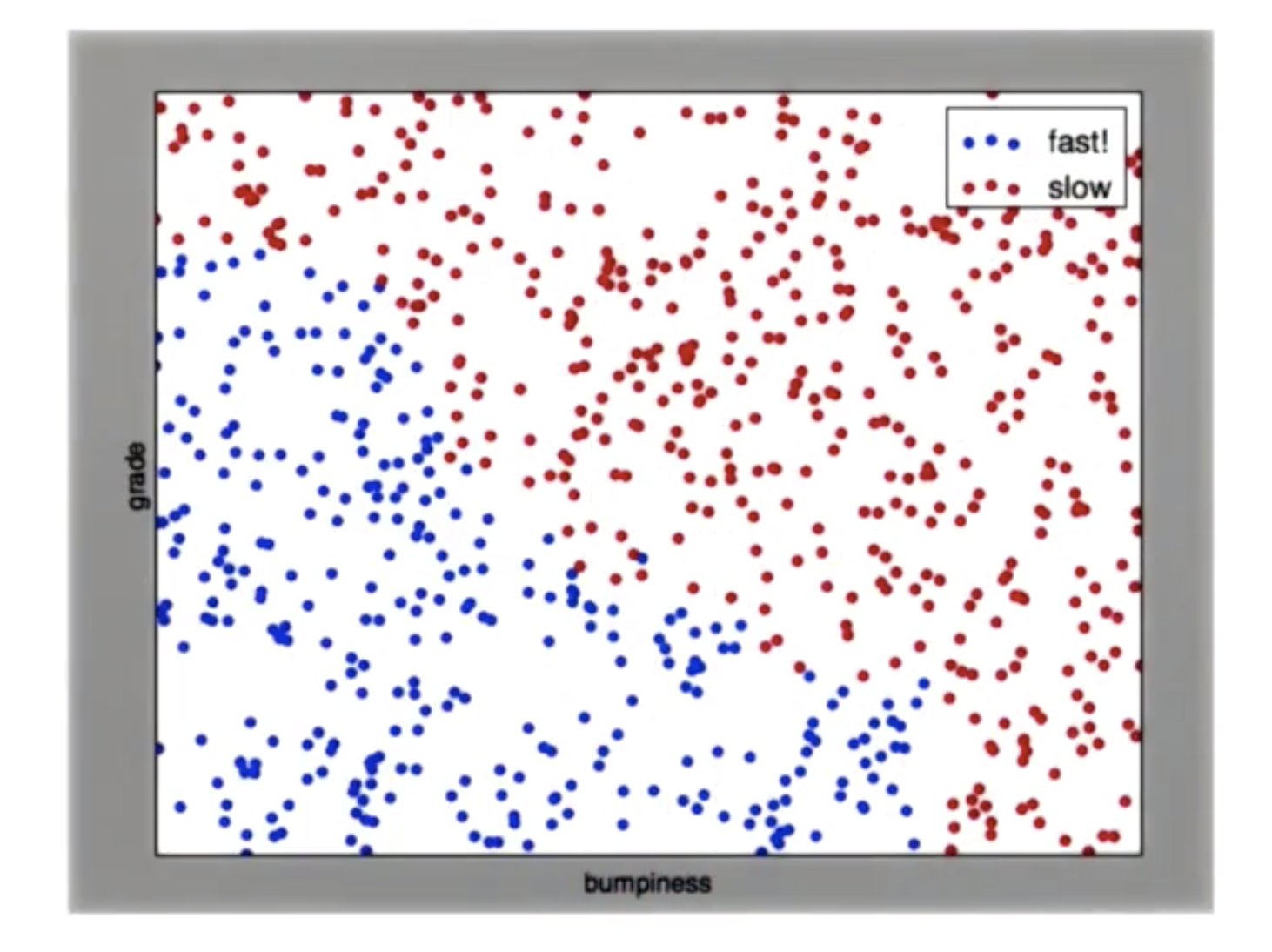
对于给定的一副散点图,其中蓝色是慢速区 红色是快速区,如何画出一条线 将点分开
perp_terrain_data.py
生成训练点
import random

def makeTerrainData(n_points=1000):

###############################################################################

### make the toy dataset

    random.seed(42)

    grade = [random.random() for ii in range(0,n_points)]

    bumpy = [random.random() for ii in range(0,n_points)]

    error = [random.random() for ii in range(0,n_points)]

    y = [round(grade[ii]*bumpy[ii]+0.3+0.1*error[ii]) for ii in range(0,n_points)]

    for ii in range(0, len(y)):

        if grade[ii]>0.8 or bumpy[ii]>0.8:

            y[ii] = 1.0

### split into train/test sets

    X = [[gg, ss] for gg, ss in zip(grade, bumpy)]

    split = int(0.75*n_points)

    X_train = X[0:split]

    X_test  = X[split:]

    y_train = y[0:split]

    y_test  = y[split:]

    grade_sig = [X_train[ii][0] for ii in range(0, len(X_train)) if y_train[ii]==0]

    bumpy_sig = [X_train[ii][1] for ii in range(0, len(X_train)) if y_train[ii]==0]

    grade_bkg = [X_train[ii][0] for ii in range(0, len(X_train)) if y_train[ii]==1]

    bumpy_bkg = [X_train[ii][1] for ii in range(0, len(X_train)) if y_train[ii]==1]

#    training_data = {"fast":{"grade":grade_sig, "bumpiness":bumpy_sig}

#            , "slow":{"grade":grade_bkg, "bumpiness":bumpy_bkg}}

    grade_sig = [X_test[ii][0] for ii in range(0, len(X_test)) if y_test[ii]==0]

    bumpy_sig = [X_test[ii][1] for ii in range(0, len(X_test)) if y_test[ii]==0]

    grade_bkg = [X_test[ii][0] for ii in range(0, len(X_test)) if y_test[ii]==1]

    bumpy_bkg = [X_test[ii][1] for ii in range(0, len(X_test)) if y_test[ii]==1]

    test_data = {"fast":{"grade":grade_sig, "bumpiness":bumpy_sig}

            , "slow":{"grade":grade_bkg, "bumpiness":bumpy_bkg}}

    return X_train, y_train, X_test, y_test

#    return training_data, test_data
ClassifyNB.py
高斯分类
def classify(features_train, labels_train):

    ### import the sklearn module for GaussianNB

    ### create classifier

    ### fit the classifier on the training features and labels

    ### return the fit classifier

    from sklearn.naive_bayes import GaussianNB

    clf = GaussianNB()

    clf.fit(features_train, labels_train)

    return clf

    pred = clf.predict(features_test)
class_vis.py
绘图与保存图像
import warnings

warnings.filterwarnings("ignore")

import matplotlib

matplotlib.use('agg')

import matplotlib.pyplot as plt

import pylab as pl

import numpy as np

#import numpy as np

#import matplotlib.pyplot as plt

#plt.ioff()

def prettyPicture(clf, X_test, y_test):

    x_min = 0.0; x_max = 1.0

    y_min = 0.0; y_max = 1.0

    # Plot the decision boundary. For that, we will assign a color to each

    # point in the mesh [x_min, m_max]x[y_min, y_max].

    h = .01  # step size in the mesh

    xx, yy = np.meshgrid(np.arange(x_min, x_max, h), np.arange(y_min, y_max, h))

    Z = clf.predict(np.c_[xx.ravel(), yy.ravel()])

    # Put the result into a color plot

    Z = Z.reshape(xx.shape)

    plt.xlim(xx.min(), xx.max())

    plt.ylim(yy.min(), yy.max())

    plt.pcolormesh(xx, yy, Z, cmap=pl.cm.seismic)

    # Plot also the test points

    grade_sig = [X_test[ii][0] for ii in range(0, len(X_test)) if y_test[ii]==0]

    bumpy_sig = [X_test[ii][1] for ii in range(0, len(X_test)) if y_test[ii]==0]

    grade_bkg = [X_test[ii][0] for ii in range(0, len(X_test)) if y_test[ii]==1]

    bumpy_bkg = [X_test[ii][1] for ii in range(0, len(X_test)) if y_test[ii]==1]

    plt.scatter(grade_sig, bumpy_sig, color = "b", label="fast")

    plt.scatter(grade_bkg, bumpy_bkg, color = "r", label="slow")

    plt.legend()

    plt.xlabel("bumpiness")

    plt.ylabel("grade")

    plt.savefig("test.png")
Main.py
主程序
from prep_terrain_data import makeTerrainData

from class_vis import prettyPicture

from ClassifyNB import classify

import numpy as np

import pylab as pl

features_train, labels_train, features_test, labels_test = makeTerrainData()

### the training data (features_train, labels_train) have both "fast" and "slow" points mixed

### in together--separate them so we can give them different colors in the scatterplot,

### and visually identify them

grade_fast = [features_train[ii][0] for ii in range(0, len(features_train)) if labels_train[ii]==0]

bumpy_fast = [features_train[ii][1] for ii in range(0, len(features_train)) if labels_train[ii]==0]

grade_slow = [features_train[ii][0] for ii in range(0, len(features_train)) if labels_train[ii]==1]

bumpy_slow = [features_train[ii][1] for ii in range(0, len(features_train)) if labels_train[ii]==1]

clf = classify(features_train, labels_train)

### draw the decision boundary with the text points overlaid

prettyPicture(clf, features_test, labels_test)
运行得到分类完成图像:
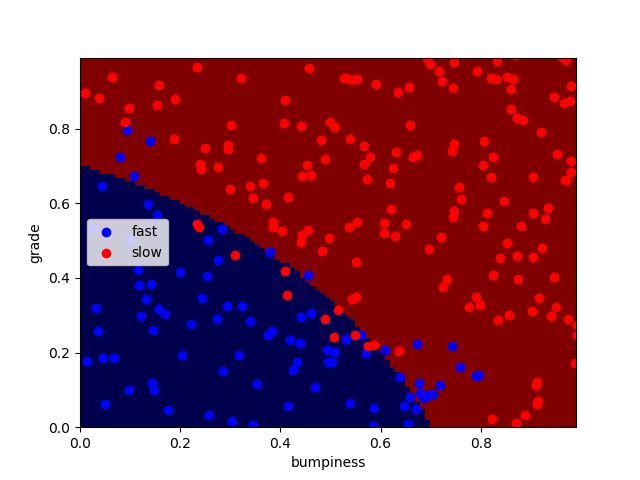
可以看到并不是所有的点都正确分类了,还有一小部分点被错误分类了
计算分类正确率:
accuracy.py
from class_vis import prettyPicture

from prep_terrain_data import makeTerrainData

from classify import NBAccuracy

import matplotlib.pyplot as plt

import numpy as np

import pylab as pl

features_train, labels_train, features_test, labels_test = makeTerrainData()

def submitAccuracy():

    accuracy = NBAccuracy(features_train, labels_train, features_test, labels_test)

    return accuracy
在主程序Main结尾加入一段:
from studentCode import submitAccuracy

print(submitAccuracy())
得到正确率:0.884
- 朴素贝叶斯的优势与劣势
优点:1、非常易于执行 2、它的特征空间非常大 3、运行非常容易、非常有效
缺点:它会与间断、由多个单词组成且意义明显不同的词语不太适合(eg:芝加哥公牛)
朴素贝叶斯(Naive Bayesian)的更多相关文章
- 朴素贝叶斯 Naive Bayes
2017-12-15 19:08:50 朴素贝叶斯分类器是一种典型的监督学习的算法,其英文是Naive Bayes.所谓Naive,就是天真的意思,当然这里翻译为朴素显得更学术化. 其核心思想就是利用 ...
- 机器学习算法实践:朴素贝叶斯 (Naive Bayes)(转载)
前言 上一篇<机器学习算法实践:决策树 (Decision Tree)>总结了决策树的实现,本文中我将一步步实现一个朴素贝叶斯分类器,并采用SMS垃圾短信语料库中的数据进行模型训练,对垃圾 ...
- 【机器学习速成宝典】模型篇05朴素贝叶斯【Naive Bayes】(Python版)
目录 先验概率与后验概率 条件概率公式.全概率公式.贝叶斯公式 什么是朴素贝叶斯(Naive Bayes) 拉普拉斯平滑(Laplace Smoothing) 应用:遇到连续变量怎么办?(多项式分布, ...
- NLP系列(2)_用朴素贝叶斯进行文本分类(上)
作者:龙心尘 && 寒小阳 时间:2016年1月. 出处: http://blog.csdn.net/longxinchen_ml/article/details/50597149 h ...
- 【Udacity】朴素贝叶斯
机器学习就像酿制葡萄酒--好的葡萄(数据)+好的酿酒方法(机器学习算法) 监督分类 supervised classification Features -->Labels 保留10%的数据作为 ...
- [ML学习笔记] 朴素贝叶斯算法(Naive Bayesian)
[ML学习笔记] 朴素贝叶斯算法(Naive Bayesian) 贝叶斯公式 \[P(A\mid B) = \frac{P(B\mid A)P(A)}{P(B)}\] 我们把P(A)称为"先 ...
- 后端程序员之路 18、朴素贝叶斯模型(Naive Bayesian Model,NBM)
贝叶斯推断及其互联网应用(一):定理简介 - 阮一峰的网络日志http://www.ruanyifeng.com/blog/2011/08/bayesian_inference_part_one.ht ...
- [机器学习] 分类 --- Naive Bayes(朴素贝叶斯)
Naive Bayes-朴素贝叶斯 Bayes' theorem(贝叶斯法则) 在概率论和统计学中,Bayes' theorem(贝叶斯法则)根据事件的先验知识描述事件的概率.贝叶斯法则表达式如下所示 ...
- Python机器学习算法 — 朴素贝叶斯算法(Naive Bayes)
朴素贝叶斯算法 -- 简介 朴素贝叶斯法是基于贝叶斯定理与特征条件独立假设的分类方法.最为广泛的两种分类模型是决策树模型(Decision Tree Model)和朴素贝叶斯模型(Naive Baye ...
随机推荐
- HDU 1429--胜利大逃亡(续)【BFS && 状态压缩】
胜利大逃亡(续) Time Limit: 4000/2000 MS (Java/Others) Memory Limit: 65536/32768 K (Java/Others) Total S ...
- UVA 10025(数学)
The ? 1 ? 2 ? ... ? n = k problem The problem Given the following formula, one can set operators ' ...
- Oracle 数据块损坏与恢复具体解释
1.什么是块损坏: 所谓损坏的数据块,是指块没有採用可识别的 Oracle 格式,或者其内容在内部不一致. 通常情况下,损坏是由硬件故障或操作系统问题引起的.Oracle 数据库将损坏的块标识为&qu ...
- 创建MFC应用程序的类型:单文档+多文档+基于对话框
单文档支持文档视图架构.数据的保存--(读取--改动)文档类功能--显示(视图类功能),比較方便. 基于对话框,主窗体是对话框类型.能够方便的使用控件,所见即所得的编程,比較方便. 单文档类似&quo ...
- luogu1347 排序
题目大意 一个不同的值的升序排序数列指的是一个从左到右元素依次增大的序列.给你一系列形如A<B的关系,并要求你判断是否能够根据这些关系确定这个数列的顺序(能,矛盾,不确定).确定n个元素的顺序后 ...
- actionbarsherlock示例
package com.example.viewpagerandtabdemo; import java.util.ArrayList; import java.util.List; import a ...
- 第8章 MyBatis简介
# 创建一个名称为mybatis的数据库 CREATE DATABASE mybatis; # 使用名称为mybatis的数据库 USE mybatis; # 创建一个tb_user表,有id.nam ...
- docker(部署常见应用):docker部署nginx
上回说到centos安装docker. 这次用实战,docker部署运行常见的应用. docker常用命令 参看:docker命令大全.这里不做赘述. docker部署nginx 1.docker h ...
- BZOJ 2729 高精度+组合数学
思路: 考虑 把男生排成一排 女生和老师往里插 分成两种情况. 1. 女生中间夹着老师 2. 女生中间没有夹着老师 求一下组合* 阶乘就好了 先放Python代码 简洁易懂 def fact(n): ...
- Hadoop MapReduce编程 API入门系列之join(二十六)(未完)
不多说,直接上代码. 天气记录数据库 Station ID Timestamp Temperature 气象站数据库 Station ID Station Name 气象站和天气记录合并之后的示意图如 ...