
AndroidStudio使用properties资源文件
在Android项目开发中,为了一些公用资源使用方便,可以在assets资源文件夹中将需要用到的资源写成.properties或者.json的文件形式,并进行读取使用。在做html5+javascript+android的混合开发中,一般html5和javascript以及相关资源可以存放在Assets文件夹内,因此assets的使用十分必要。
由于AndroidStudio与Eclipse不同,项目中默认没有assets文件夹,因此首先需要在工程目录下添加assets文件夹,具体位置在:src/main/assets。这个位置可以通过XXX.iml 设置assets的目录( XXX代表项目名),设置如下:<option name="ASSETS_FOLDER_RELATIVE_PATH" value="/src/main/assets" />
也可以通过AndroidStudio自动添加,步骤如下:
1. 在app项目栏上用鼠标右键打开选择菜单,点选New,在下级菜单中选择Folder,再下级菜单中选择Assets Folder
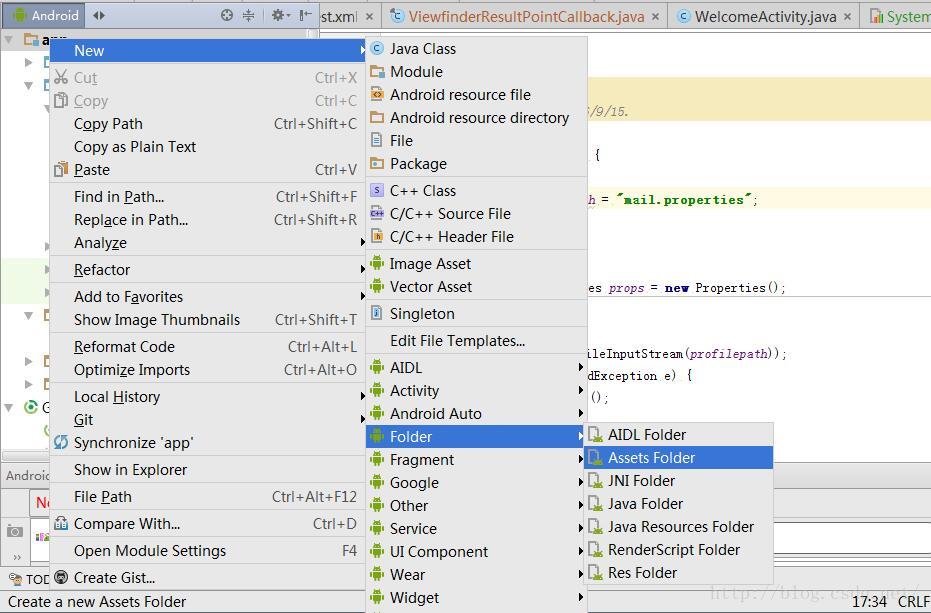
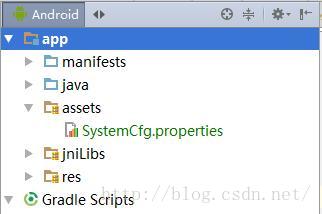
这样,assets文件夹就创建好了。
接下来为大家介绍一下properties文件的读取。
AndroidStudio读取.properties配置文件在实际的开发中使用的很多,总结了一下,常用的有以下两种方法:
一、通过jdk提供的java.util.Properties类。
此类继承自java.util.HashTable,即实现了Map接口,所以,可使用相应的方法来操作属性文件,但不建议使用像put、putAll这两个方法,因为put方法不仅允许存入String类型的value,还可以存入Object类型的。因此java.util.Properties类提供了getProperty()和setProperty()方法来操作属性文件,同时使用store或save(已过时)来保存属性值(把属性值写入.properties配置文件)。在使用之前,还需要加载属性文件,它提供了两个方法:load和loadFromXML。
load有两个方法的重载:load(InputStream inStream)、load(Reader reader),所以,可根据不同的方式来加载属性文件。
可根据不同的方式来获取InputStream,如:
1、通过当前类加载器的getResourceAsStream方法获取
InputStream inStream = TestProperties.class.getClassLoader().getResourceAsStream("test.properties");
2、从文件方式获取
InputStream inStream = new FileInputStream(new File("filePath"));
3、通过类加载器获取
InputStream in = ClassLoader.getSystemResourceAsStream("filePath");
4、在servlet中,可以通过context获取
InputStream in = context.getResourceAsStream("filePath");
5、通过url获取
URL url = new URL("path");
InputStream inStream = url.openStream();
接下来就是具体内容的读取了:
Properties prop = new Properties();
prop.load(inStream);
String key = prop.getProperty("username");
//String key = (String) prop.get("username");
二、通过java.util.ResourceBundle类来读取,这种方式比使用Properties要方便一些。
1、通过ResourceBundle.getBundle()静态方法来获取(ResourceBundle是一个抽象类),这种方式来获取properties属性文件不需要加.properties后缀名,只需要文件名即可。
ResourceBundle resource = ResourceBundle.getBundle("com/mmq/test");//test为属性文件名,放在包com.mmq下,如果是放在src下,直接用test即可
String key = resource.getString("username");
2、从inputstream中获取内容,根据第一种方法中的获取到instream后
ResourceBundle resource = new PropertyResourceBundle(inStream);
然后就可以获取具体内容了。
注意:在使用中遇到的最大的问题可能是配置文件的路径问题,如果配置文件入在当前类所在的包下,那么需要使用包名限定,如:test.properties入在com.mmq包下,则要使用com/mmq/test.properties(通过Properties来获取)或com/mmq/test(通过ResourceBundle来获取);属性文件在src根目录下,则直接使用test.properties或test即可。
在本介绍中,我们把.properties文件放在src/main/assets路径下,获取方法:
-
public static Properties loadProperties(Context context) {
-
Properties properties = new Properties();
-
try {
-
InputStream in = context.getAssets().open("test.properties");
-
properties.load(in);
-
in.close();
-
}
-
catch (IOException e) {
-
e.printStackTrace();
-
return null;
-
}
-
return properties;
-
}
AndroidStudio使用properties资源文件的更多相关文章
- java中根据key获取resource下properties资源文件中对应的参数
properties资源文件是放在resource目录下的: 新建工具类: package com.demo.utils; import java.io.InputStream; import jav ...
- Spring3.x 获取properties资源文件的值
Spring3.x 获取properties资源文件的值有两种方式: 第一种:使用<context:property-placeholder />标签 <context:prop ...
- 读取web工程中.properties资源文件的模板代码
读取web工程中.properties资源文件的模板代码 // 读取web工程中.properties资源文件的模板代码 private void test2() throws IOException ...
- 在服务端中,读取properties资源文件中的数据
1.获取到资源的路径 2.读取数据 //properties文件对象 Properties properties = new Properties(); //通过HttpServletRequest ...
- 不停服务,动态加载properties资源文件
系统运行过程中,我们用注解@Value("${****}")可以获取资源文件中的内 容,获取的内容会被存储在spring缓存中,因此如果我们修改了资源文件,要 想读取到修改后的内容 ...
- 装载Properties资源文件的项目中使用
ssm项目中打算将发短信的每小时每天的限定变成可配置的.于是将配置信息写在资源文件中,现在有两种方式加载资源文件,一个是使用spring注入方式,@Value注解注入,当然,前面需要在项目中装载.第二 ...
- maven 打包时动态替换properties资源文件中的配置值
pom build节点下面添加resource配置: <resources> <resource> <directory>src/main/resources/&l ...
- Spring读取properties资源文件
我们知道可以通过读取资源文件流后加载到Properties对象,再使用该对象方法来获取资源文件.现在介绍下利用Spring内置对象来读取资源文件. 系统启动时加载资源文件链路:web.xml --&g ...
- properties 资源文件读取
1. 在source中添加资源文件 resource.properties #FTP 相关配置 #FTP 的ip地址 FTP_ADDRESS=192.168.88.142 FTP_PORT=21 ...
随机推荐
- Swift iOS tableView static cell动态计算高度
TableView是iOS开发中经常使用的组件.有些表格由于UILabel包括的文本字数不一样,须要显示的高度也会不同,因此须要动态计算static cell的高度.我用的是static cell,注 ...
- element ui源码解析 -- button篇
要看源码就得从最简单的开始,button够简单的了,就从他开始吧. 安装依赖后源码目录在:node_modules/element-ui/packages中,可以看到这里的文件夹命名是不是很熟悉,就是 ...
- 一、Github博客搭建之jekyll安装
注意:以下步骤是FQ后操作的,需要了解FQ的可以移步 -> 枫叶主机 一.安装jekyll需要Ruby-2.1.0以上版本,本人是mac pro系统版本10.12.5(macOS Sierra) ...
- HDoj-1163- Digital Roots
Problem Description The digital root of a positive integer is found by summing the digits of the int ...
- WordPress通过插件发送邮件
原文发表自我的个人站点,欢迎大家訪问~转载请保留本段,或注明原文链接:http://www.hainter.com/wordpress-send-email-via-plugins WordPress ...
- java的对象锁和对象传递
1.对象传递 在JAVA的參数传递中,有两种类型,第一种是基本类型传递,比如int,float,double等,这样的是值传递,第二种是对象传递,比方String或者自己定义的类,这样的是引用传递. ...
- Hadoop基本原理之一:MapReduce 分类: A1_HADOOP 2014-08-17 19:26 1113人阅读 评论(0) 收藏
1.为什么需要Hadoop 目前,一块硬盘容量约为1TB,读取速度约为100M/S,因此完成一块硬盘的读取需时约2.5小时(写入时间更长).若把数据放在同一硬盘上,且全部数据均需要同一个程序进行处理, ...
- 9个完整android开源app项目
一.photoup 介绍: photoup 是一款开源的相册类app,主要功能是将本地图片提交到facebook上去,虽然他的功能和facebook的远程服务相关,但是本身是可以被当作一款 相册应用的 ...
- listener监听器笔记
listener:三个域对象的监听器,,还有属性的变化. 监听三个域对象的创建和销毁:servletContextListenerservletRequestListenerservletsessio ...
- 应用:udp聊天器
说明 在一个电脑中编写1个程序,有2个功能 1.获取键盘数据,并将其发送给对方 2.接收数据并显示 并且功能数据进行选择以上的2个功能调用 要求 实现上述程序 参考代码 import socketde ...