
如何部署Icinga客户端
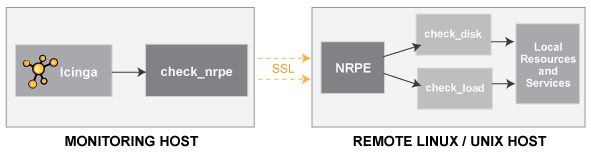
Icinga客户端的部署相对于服务器端来说,简单很多。对于服务器端来说,如果要通过以下这种方式来监控服务器,必须包含三个组件,Icinga内核,Icinga插件,NRPE(Nagios Remote Plugin Executor)。对于Icinga客户端来说,只需要部署Icinga插件和NRPE。
icinga 中文化项目的下载地址为:http://sourceforge.net/projects/icinga-cn/files/
其中,Icinga插件,NRPE均在icinga plugins目录中。
在这里,我下载了nagios-cn-plugins-2.0.3.tar.xz和icinga-nrpe-2.14.tar.gz。
新建icinga用户
# useradd icinga -s /sbin/nologin
安装nagios-cn-plugins
# cd /usr/src/
# tar xvf /root/nagios-cn-plugins-2.0.3.tar.xz
# cd nagios-cn-plugins-2.0.3/
# ./configure --prefix=/usr/local/icinga
最后输出如下:
config.status: creating po/Makefile

            --with-apt-get-command:

              --with-ping6-command: /usr/sbin/ping6 -n -U -w %d -c %d %s

               --with-ping-command: /usr/bin/ping -n -U -w %d -c %d %s

               --with-package-name: nagios-plugins

               --with-nagios-user:

               --with-nagios-group:

                       --with-ipv6: yes

                      --with-mysql: no

                    --with-openssl: yes

                     --with-gnutls: no

               --enable-extra-opts: yes

                       --with-perl: /usr/bin/perl

             --enable-perl-modules: no

                     --with-cgiurl: /nagios/cgi-bin

               --with-trusted-path: /bin:/sbin:/usr/bin:/usr/sbin

                   --enable-libtap: no
# make
# make install
设置权限
# chown -R icinga.icinga /usr/local/icinga/
安装NRPE
# cd /usr/src/
# tar xvf /root/icinga-nrpe-2.14.tar.gz
# cd icinga-nrpe-2.14/
# ./configure --enable-command-args
最后输出如下:
*** Configuration summary for nrpe 2.14 -- ***:

 General Options:

 -------------------------

 NRPE port:

 NRPE user:    icinga

 NRPE group:   icinga

 Icinga user:  icinga

 Icinga group: icinga

Review the options above for accuracy.  If they look okay,

type 'make all' to compile the NRPE daemon and client.
按照提示,
# make all
输出结果如下:
*** Compile finished ***

  make install

     - This installs files in /usr/local/icinga

  make install-plugin

     - This installs init-script files in /usr/local/icinga/libexec

  make install-init

     - This installs init-script files in /etc/init.d

  make install-xinetd

     - This installs sample-config/nrpe.xinetd in /etc/xinit.d

  make install-init-freebsd

     - This installs init-script.freebsd files in /etc/init.d

  make install-init-debian

     - This installs init-script.debian files in /etc/init.d

  make install-init-suse

     - This installs init-script.suse files in /etc/init.d

  make install-daemon-config

     - This installs the Nrpe config file in /usr/local/icinga/etc

If the NRPE daemon and client compiled without any errors, you

can continue with the installation or upgrade process.

Read the PDF documentation (NRPE.pdf) for information on the next

steps you should take to complete the installation or upgrade.
对于Linux系统,可运行make install, make install-plugin,make install-init,make install-xinetd, make install-daemon-config。各项的具体作用可参考上述的说明。
修改NRPE的配置文件
# vim /usr/local/icinga/etc/nrpe.cfg
在allowed_hosts后面添加Icinga服务端的地址
allowed_hosts=127.0.0.1,192.168.244.145
启动NRPE服务
# /etc/init.d/icinga-nrpe start
Starting icinga-nrpe (via systemctl):  Warning: Unit file of icinga-nrpe.service changed on disk, 'systemctl daemon-reload' recommended.

                                                           [  OK  ]
# systemctl daemon-reload
# /etc/init.d/icinga-nrpe start
查看5666端口是否开启监听
# netstat -ntlup | grep 5666
tcp 0.0.0.0: 0.0.0.0:* LISTEN /nrpe
在服务端上进行验证
# /usr/local/icinga/libexec/check_nrpe -H 192.168.244.146
其中192.168.244.146是客户端的地址
如果输出的是NRPE的版本号:
NRPE v2.
则代表服务端和客户端已建立通信。
总结:
1. 如果在服务端上进行验证时,报以下错误:
CHECK_NRPE: Error - Could not complete SSL handshake.
一般是NRPE的配置文件没有修改,或防火墙规则阻止了Icinga服务端和NRPE进程之间的连接。
2. 系统账号的shell使用 /sbin/nologin ,此时无法登陆系统,即使给了密码也不行。
所谓“无法登陆”指的仅是这个用户无法使用bash或其他shell来登陆系统而已,并不是说这个账号就无法使用系统资源。举例来说,各个系统账号中,打印作业有lp这个账号管理,www服务器有apache这个账号管理,他们都可以进行系统程序的工作,但就是无法登陆主机而已。有时候有些服务,比如邮件服务,大部分都是用来接收主机的邮件而已,并不需要登陆。假如有账号试图连接我的主机取得shell,我们就可以拒绝。另外,如果我想要让某个具有 /sbin/nologin 的用户知道,他们不能登陆主机时,可以新建 /etc/nologin.txt 这个文件,在文件内面写上不能登陆的原因,当用户登录时,屏幕上就会出现这个文件里面的内容。
参考:
http://docs.icinga.org/latest/en/nrpe.html
http://blog.chinaunix.net/uid-28216282-id-3373188.html
如何部署Icinga客户端的更多相关文章
- Office 365 系列二 ------- 如何批量部署Office 客户端
针对于第一篇文章所讲的,我们最用使用用户可以单个点击进行安装,但是如果我们终端用户太多的情况,不可能大家都点击单个文件进行安装了,这样子既耗费时间也耗费 公司的网络带宽,那么我们可以采取离线下载的方式 ...
- 使用saltstack批量部署服务器运行环境事例——批量部署nagios客户端
之前关于搭建web服务器集群实验的这篇文章http://www.cnblogs.com/cjyfff/p/3553579.html中,关于如何用saltstack批量部署服务器这一点当时没有记录到文章 ...
- 在net安装程序中部署oracle客户端全攻略
在net安装程序中部署oracle客户端全攻略 主要的是要做三件工作: 打包文件,写注册表,注册环境变量说明:我的oracle版本为9, 在2000 advanced server 上测试通过,可以正 ...
- Linux 部署 iSCSI 客户端配置(Windows)
Linux 部署 iSCSI 客户端配置(Windows) 客户端环境 Client :Windows 7 ip :192.168.121.138 一.首先查看客户端本地所有的磁盘 查看路径:邮件计算 ...
- Linux 部署 iSCSI 客户端配置(Linux)
Linux 部署 iSCSI 客户端配置(Linux) 客户端环境 Client :RHEL8 IP : 192.168.121.11 一.测试与服务端的连通性 [root@Client-linux ...
- PinPoint单节点部署及客户端配置方法
在一次做项目中,需要涉及全链路压测,为了更好定位链路中某一节点可能会出现的问题,在繁忙之余,快速部署及应用了该链路工具,分享给大家~ 话不多说,开始部署~ 一.环境配置1.1 获取需要的依赖包进入ho ...
- 如何部署Icinga服务端
Icinga是Nagios的一个变种,配置,使用方式几乎一样,而且完全兼容Nagios的插件.所以下面的部署方案对Nagios同样使用. 它还推出了两个中文版本,icinga-cn原版和icinga- ...
- Centos7 下的NTP-server(Chorny) 部署及客户端时间同步配置
一.介绍 1.本博客以 ceph 集群搭建时的NTP-server 为例. 2.hosts # vim /etc/hosts 10.6.32.20 ceph1 (作为时间服务器) 10. ...
- Skywalking部署+NetCore客户端
一.介绍 应用官方的说法:Apache SkyWalking是观察性分析平台和应用性能管理系统.提供分布式追踪.服务网格遥测分析.度量聚合和可视化一体化解决方案 GitHub地址:https://gi ...
随机推荐
- https://oj.leetcode.com/problems/majority-element/
Given an array of size n, find the majority element. The majority element is the element that appear ...
- HDU--跑道相遇
跑道相遇 Time Limit: 3000/1000 MS (Java/Others) Memory Limit: 65535/32768 K (Java/Others)Total Submis ...
- 在Excel中把横行与竖列进行置换、打勾号
在Excel中把横行与竖列进行置换:复制要置换的单元,在新的单元上右键->选择性复制,会出现对话框,选中“置换”,即可在Excel中打勾号,左手按住ALT不放,右手在小键盘也就是右边的数字键盘依 ...
- html 5 实现拖放效果
在html5中要实现拖放操作,相对于以前通过鼠标操作实现,要简单得多,数据安全性也更有保障.只需要以下几步即可. 给被拖拽元素添加draggable属性,如果是文件拖放. 在拖拽元素的dragstar ...
- 编译可在Android上运行的qemu user mode
前言 本文在Ubuntu 64位系统上对qemu项目进行交叉编译,并且只编译与qemu user mode有关的代码. 下文中的”NDK”若无特殊说明均指”Android NDK”. 下文中”$NDK ...
- 常用[js,css,jquery,html]
目录: 一.javascript事件和属性 二.jquery事件和方法 三.js 四.css 五.html 六.js操作cookies 七.插件 javascript事件和属性 事件 onblur ...
- 【转载】十步完全理解SQL
很多程序员视 SQL 为洪水猛兽.SQL 是一种为数不多的声明性语言,它的运行方式完全不同于我们所熟知的命令行语言.面向对象的程序语言.甚至是函数语言(尽管有些人认为 SQL 语言也是一种函数式语言) ...
- Java Socket
什么是Socket Socket的概念很简单,它是网络上运行的两个程序间双向通讯的一端,既可以接收请求,也可以发送请求,利用它可以较为方便地编写网络上数据的传递. 所以简而言之,Socket就是进程通 ...
- iOS开发系列--C语言之指针
概览 指针是C语言的精髓,但是很多初学者往往对于指针的概念并不深刻,以至于学完之后随着时间的推移越来越模糊,感觉指针难以掌握,本文通过简单的例子试图将指针解释清楚,今天的重点有几个方面: 什么是指针 ...
- ASP.NET MVC 5 Web编程1 -- 入门
开篇引言 说起ASP.NET MVC,我想作为WebForms开发者第一点要问的是:为什么要使用它?我的理解是:MVC是更细节化的框架,“细节可控”意味着你的系统更精致.具体体现在应用上.MVC的出现 ...