
(转)Bootstrap 之 Metronic 模板的学习之路 - (5)主题&布局配置
https://segmentfault.com/a/1190000006736457
Theme Setup 主题配置
Metronic comes with 6 color themes,
default,darkblue,blue,grey,light,light2. To setup a selected theme. Include../assets/layouts/layout/css/themes/[theme_name].cssin page head. For instance, if you like to use blue theme, include../assets/layouts/layout/css/themes/darkblue.csscss file. CSS file load order should be followed as shown below:
Metronic 具有6中色彩主题,default, darkblue, blue, grey, light, light2.要部署一种主题,你需要包含../assets/layouts/layout/css/themes/[theme_name].css 在页面的 head 部分。
例如,你喜欢蓝色主题,包含../assets/layouts/layout/css/themes/darkblue.css css 文件。CSS 文件调用命令如下:
<link href="../assets/layouts/layout/css/themes/default.css" rel="stylesheet" type="text/css" id="style_color"/>Theme Style 主题样式
Metronic by default comes with "square corners" style. To change it to "rounded corners" just change "components.css" to "components-rounded.css" as shown below:
Metronic 默认采用直角样式,若要改为圆角,只需要改变 "components.css" 为 "components-rounded.css"即可。如下所示:
<link href="../assets/global/css/components-rounded.css" rel="stylesheet" type="text/css" id="style_components"/>Layout Settings 布局配置
The best way to learn how to use Metronic's available layout options, please go to one of Metronic pages and use the "Theme Settings" panel located at the top right of the page. Choose you preferred layout options, and use Chrome's Developer Tool and Firefox's Firebug Tool to see the HTML code changes upon you select your layout combination. When you change the laypout option, mostly some css classes will be added into the page's body element. When you change the layout settings only the most parent HTML elements will be modified, the page content part remains as it is.
To learn how to use the browser developer tools you can refer to below links:
了解如何使用 Metronic 可用布局选项的最好的方式,就是打开 Metronic 页面,使用位于页面右上角的 "Theme Settings" 面板。选择你的首选布局选项,当你的布局组合变化时,采用 Chrome 开发工具或者 Firefox 的 Firebug 工具去看 HTML 源码改变。当你改变某个布局选项,通常一些 css 样式会增加到你的页面主体元素中。当你改变布局设置,仅仅这最高父 HTML 元素被改变,页面内容则保持原样。
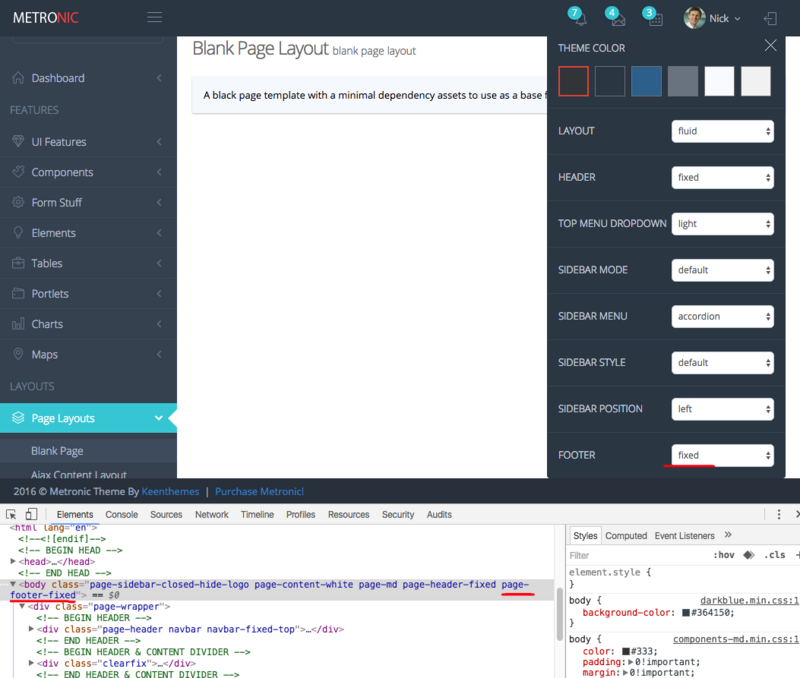
如何使用浏览器开发工具,你可以
Fixed Header & Footer On Mobile Devices 在移动设备上固定头部或底部
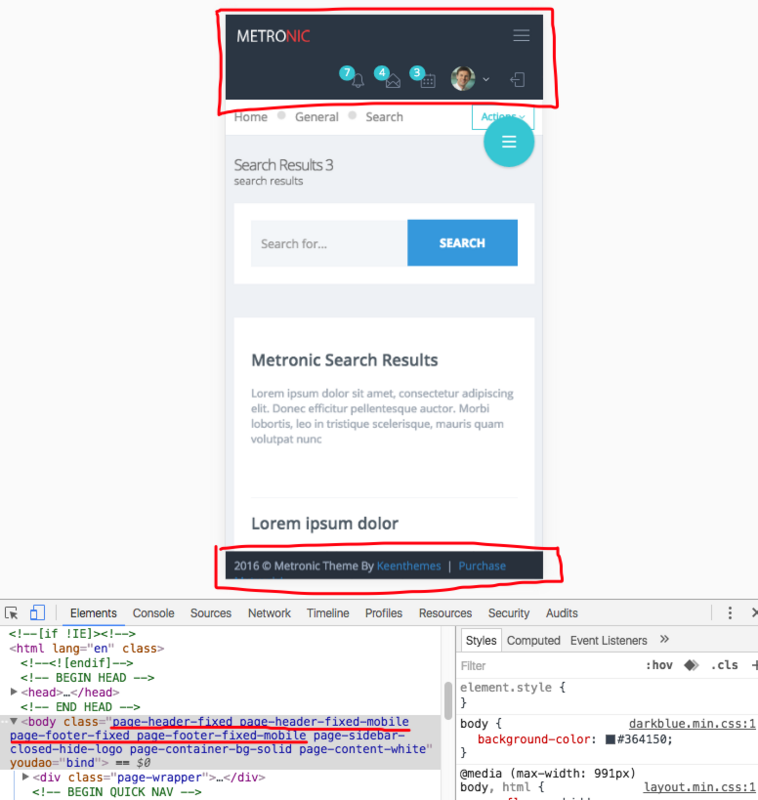
If fixed header or footer is set then by default these features will be disabled on mobile devices. To force the fixed header & footer on mobile devices you will need to apply page-footer-fixed page-footer-fixed-mobile and page-header-fixed page-header-fixed-mobile classes to the HTML body element accordingly.
在移动设备上,顶部和底部固定这个效果默认是禁止的。如果要想在设置这个选项,你需要定位到移动设备的头部或底部,并应用page-footer-fixed page-footer-fixed-mobile 和 page-header-fixed page-header-fixed-mobile 类到 HTML 相应的主体元素上。
Sidebar Menu Settings 侧边栏菜单配置
By default the sidebar menu comes with data-auto-scroll="true" and data-slide-speed="200" settings. To disable the auto scrolling feature of the sidebar menu apply data-auto-scroll="false" parameter to the sidebar menu's HTML tag(page-sidebar-menu). To change the submenu's slide speed apply a new value as data-slide-speed="300".
默认的侧边栏菜单带有data-auto-scroll="true"和data-slide-speed="200"配置。若要禁用侧边栏的自动滚动效果,应用data-auto-scroll="false"到page-sidebar-menu标签。要改变子菜单滑动速度,则设置一个新的值data-slide-speed="300".
<ul class="page-sidebar-menu page-header-fixed" data-keep-expanded="false" data-auto-scroll="true" data-slide-speed="300" style="padding-top: 20px">Sidebar Menu Light Style 侧边栏 Light 样式
To use the light sidebar menu style you will need to apply page-sidebar-menu-light class right after page-sidebar-menu class.
用着浅色侧边栏样式,你需要应用 page-sidebar-menu-light class 属性在 page-sidebar-menu class 属性后面。
<ul class="page-sidebar-menu page-sidebar-menu-light page-header-fixed " data-keep-expanded="false" data-auto-scroll="true" data-slide-speed="200" style="padding-top: 20px">Sidebar Menu With Hover Submenus 侧边栏菜单弹出子菜单模式
To use this feature you will need to apply page-sidebar-menu-hover-submenu class right after page-sidebar-menu class.
要启用这个效果你需要应用page-sidebar-menu-hover-submenu 在 page-sidebar-menu 样式后。
<ul class="page-sidebar-menu page-sidebar-menu-hover-submenu page-header-fixed " data-keep-expanded="false" data-auto-scroll="true" data-slide-speed="200" style="padding-top: 20px">(转)Bootstrap 之 Metronic 模板的学习之路 - (5)主题&布局配置的更多相关文章
- Bootstrap 之 Metronic 模板的学习之路 - (1)总览
写在前面 bootstrap 的模板非常多,Envato 上有着各种各样的免费及付费模板.Metronic 是我最喜欢的模板之一(看一眼就喜欢上的那种),当前售价 $28 ,觉得赞的,不妨支持一下作者 ...
- (转)Bootstrap 之 Metronic 模板的学习之路 - (2)源码分析之 head 部分
https://segmentfault.com/a/1190000006684122 下面,我们找个目录里面想对较小的文件来分析一下源码结构,我们可以看到,page_general_help.htm ...
- (转)Bootstrap 之 Metronic 模板的学习之路 - (1)总览
https://segmentfault.com/a/1190000006673582#articleHeader0 写在前面 bootstrap 的模板非常多,Envato 上有着各种各样的免费及付 ...
- (转)Bootstrap 之 Metronic 模板的学习之路 - (4)源码分析之脚本部分
https://segmentfault.com/a/1190000006709967 上篇我们将 body 标签主体部分进行了简单总览,下面看看最后的脚本部门. 页面结尾部分(Javascripts ...
- (转)Bootstrap 之 Metronic 模板的学习之路 - (6)自定义和扩展
https://segmentfault.com/a/1190000006815041 前面我们将 Metronic 的结构和源码大致浏览了一遍,Metronic 整个文件包有三百多兆,在实际项目中, ...
- (转)Bootstrap 之 Metronic 模板的学习之路 - (7)GULP 前端自动化工具
https://segmentfault.com/a/1190000006738327 初步了解 Metronic 的结构和应用后,我们就可以在项目中应用起来了.考虑到实际项目应用时,会有很多文件需要 ...
- (转)Bootstrap 之 Metronic 模板的学习之路 - (3)源码分析之 body 部分
https://segmentfault.com/a/1190000006697252 body 的组成结构 body 部分包含了 HEADER.CONTAINER.FOOTER,其中 CONTAIN ...
- 中小研发团队架构实践之生产环境诊断工具WinDbg 三分钟学会.NET微服务之Polly 使用.Net Core+IView+Vue集成上传图片功能 Fiddler原理~知多少? ABP框架(asp.net core 2.X+Vue)模板项目学习之路(一) C#程序中设置全局代理(Global Proxy) WCF 4.0 使用说明 如何在IIS上发布,并能正常访问
中小研发团队架构实践之生产环境诊断工具WinDbg 生产环境偶尔会出现一些异常问题,WinDbg或GDB是解决此类问题的利器.调试工具WinDbg如同医生的听诊器,是系统生病时做问题诊断的逆向分析工具 ...
- ABP框架(asp.net core 2.X+Vue)模板项目学习之路(一)
前言: 第一次接触ABP的项目是在2018年6月份,但是当时没有深入具体的研究,而今天因为工作的需要,需要学习.了解这个框架,在时隔半年之后,今天重新下载了这个项目,虽然在园子里有很多前辈们写的这类的 ...
随机推荐
- 用keil编写的 C51错误 *** WARNING L1: UNRESOLVED EXTERNAL SYMBOL SYMBOL: ?C_START
可能原因: 替换工程的文件未先 remove该文件. 正常替换文件步骤: 1. 右键 欲 替换的文件,remove XXXXX.c from build ----> remove XXXX ...
- 完全卸载VS2013的方法
解压安装包的ISO文件,然后进入到根目录运行命令行: vs_ultimate.exe /uninstall /force 注意:比如ISO是Update 5的,那么卸载的只能是Update 5安装的内 ...
- eclipse 执行MapReduce程序错误异常汇总(解决Map not fount)
错误一: Error: java.lang.RuntimeException: java.lang.ClassNotFoundException: Class wordCount.wordCount$ ...
- php require和include差别
require 的用法如 require("MyRequireFile.php"); .这个函数通常放在 PHP 程序的最前面.PHP 程序在运行前,就会先读入 require 所 ...
- 使用Django框架实现游戏站点搭建
完整project链接点击打开链接 上一篇中我们使用了Javascript和Html5实现了弹球游戏.而在本文中我们希望以其为基础实现游戏站点,可以实现用户的注冊登录.游戏成绩记录,排名显示.微博分享 ...
- SIPp web frontend(2)
SIP VoIP 測试交流群: 323827101 欢迎大家转载.为保留作者成果,转载请注明出处.http://blog.csdn.net/netluoriver,有些文件在资源中也能够下载.假设你没 ...
- Unix网络编程 高级IO套接字设置超时
我们知道.对于一个套接字的读写(read/write)操作默认是堵塞的.假设当前套接字还不可读/写,那么这个操作会一直堵塞下去,这样对于一个须要高性能的server来说,是不能接受的.所以,我们能够在 ...
- mongoDB学习笔记——安装及启动
WINDOWS环境下: 一.安装 步骤一: 下载MongoDB url下载地址: http://downloads.mongodb.org/win32/ 步骤二: 设置MongoDB程序存放目 ...
- Ambarella SDK build 步骤解析
Make Target Options make命令如下: make <Tab> <Tab> /*列出所有支持的目标(命令行输入make, 再按两下Tab键)*/ make & ...
- 在MTK平台里,,函数kal_prompt_trace起什么作用???Kal_prompt_trace的参数有表示什么?
在MTK平台里,,函数kal_prompt_trace起什么作用???Kal_prompt_trace的参数有表示什么?一直弄不明白,但是很多函数的开头就是这个函数,,而且一般有三个参数-- kal_ ...