
Intellij IDEA的Hibernate简单应用


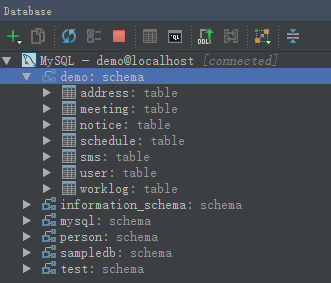


package com.yyq.dao;

import javax.persistence.*;

@Entity

@Table(name = "user", schema = "", catalog = "demo")

public class UserEntity {

    private int id;

    private String username;

    private String password;

    private String email;

    @Id

    @Column(name = "id", nullable = false, insertable = true, updatable = true, length = 10, precision = 0)

    public int getId() {

        return id;

    }

    public void setId(int id) {

        this.id = id;

    }

    @Basic

    @Column(name = "username", nullable = true, insertable = true, updatable = true, length = 50, precision = 0)

    public String getUsername() {

        return username;

    }

    public void setUsername(String username) {

        this.username = username;

    }

    @Basic

    @Column(name = "password", nullable = true, insertable = true, updatable = true, length = 50, precision = 0)

    public String getPassword() {

        return password;

    }

    public void setPassword(String password) {

        this.password = password;

    }

    @Basic

    @Column(name = "email", nullable = true, insertable = true, updatable = true, length = 50, precision = 0)

    public String getEmail() {

        return email;

    }

    public void setEmail(String email) {

        this.email = email;

    }

    @Override

    public boolean equals(Object o) {

        if (this == o) return true;

        if (o == null || getClass() != o.getClass()) return false;

        UserEntity that = (UserEntity) o;

        if (id != that.id) return false;

        if (email != null ? !email.equals(that.email) : that.email != null) return false;

        if (password != null ? !password.equals(that.password) : that.password != null) return false;

        if (username != null ? !username.equals(that.username) : that.username != null) return false;

        return true;

    }

    @Override

    public int hashCode() {

        int result = id;

        result = 31 * result + (username != null ? username.hashCode() : 0);

        result = 31 * result + (password != null ? password.hashCode() : 0);

        result = 31 * result + (email != null ? email.hashCode() : 0);

        return result;

    }

}
7)配置hibernate.cfg.xml 如下。
<?xml version='1.0' encoding='utf-8'?>

<!DOCTYPE hibernate-configuration PUBLIC

        "-//Hibernate/Hibernate Configuration DTD//EN"

        "http://www.hibernate.org/dtd/hibernate-configuration-3.0.dtd">

<hibernate-configuration>

    <session-factory>

        <property name="connection.url">jdbc:mysql://localhost:3306/demo</property>

        <property name="connection.driver_class">com.mysql.jdbc.Driver</property>

        <property name="connection.username">root</property>

        <property name="connection.password">123456</property>

        <property name="current_session_context_class">thread</property>

        <property name="show_sql">true</property>

        <property name="hbm2ddl.auto">update</property>

        <!-- DB schema will be updated if needed -->

        <!-- <property name="hbm2ddl.auto">update</property> -->

        <property name="dialect">org.hibernate.dialect.MySQLDialect</property>

        <mapping class="com.yyq.dao.UserEntity"/>

    </session-factory>

</hibernate-configuration>
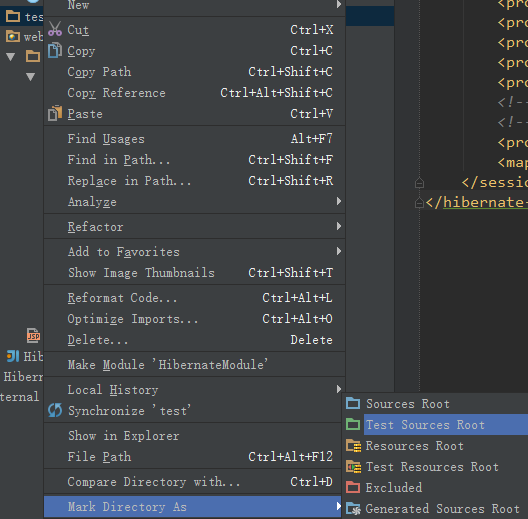
8)生成测试路径。在Module路径下生成一个文件夹,与src同级,名为test,点击文件夹test,右键,选择Mark Directory As - > Test Sources Root。
package com.yyq;

import com.yyq.dao.UserEntity;

import org.hibernate.Session;

import org.hibernate.SessionFactory;

import org.hibernate.Transaction;

import org.hibernate.cfg.Configuration;

import org.junit.Before;

import org.junit.Test;

public class DAOTest {

    Configuration config = null;

    SessionFactory sessionFactory = null;

    Session session = null;

    Transaction tx = null;

    @Before

    public void init() {

        config = new Configuration().configure("/hibernate.cfg.xml");

        sessionFactory = config.buildSessionFactory();

        session = sessionFactory.openSession();

        tx = session.beginTransaction();

    }

    //增加

    @Test

    public void insert() {

        UserEntity ue = new UserEntity();

        ue.setUsername("Anny");

        ue.setPassword("123");

        ue.setEmail("Anny@163.com");

        session.save(ue);

        tx.commit();

    }

    //修改

    @Test

    public void update() {

        UserEntity user = (UserEntity) session.get(UserEntity.class, new Integer(2));

        user.setUsername("Penny");

        session.update(user);

        tx.commit();

        session.close();

    }

    //查找

    @Test

    public void getById() {

        UserEntity user = (UserEntity) session.get(UserEntity.class, new Integer(8));

        tx.commit();

        session.close();

        System.out.println("ID号:" + user.getId() + ";用户名:" + user.getUsername() +

                ";密码:" + user.getPassword() + ";邮件:" + user.getEmail());

    }

    //删除

    @Test

    public void delete() {

        UserEntity user = (UserEntity) session.get(UserEntity.class, new Integer(6));

        session.delete(user);

        tx.commit();

        session.close();

    }

}
10)运行测试类,可以一个一个方法的进行运行,也可以在类名处将所有的测试方法都一起运行。全部运行成功!


<?xml version="1.0" encoding="UTF-8"?>

<web-app xmlns="http://java.sun.com/xml/ns/javaee"

           xmlns:xsi="http://www.w3.org/2001/XMLSchema-instance"

           xsi:schemaLocation="http://java.sun.com/xml/ns/javaee

          http://java.sun.com/xml/ns/javaee/web-app_3_0.xsd"

           version="3.0">

    <display-name>Struts2AndHibernate</display-name>

    <filter>

        <filter-name>struts2</filter-name>

        <filter-class>org.apache.struts2.dispatcher.ng.filter.StrutsPrepareAndExecuteFilter</filter-class>

    </filter>

    <filter-mapping>

        <filter-name>struts2</filter-name>

        <url-pattern>/*</url-pattern>

    </filter-mapping>

    <welcome-file-list>

        <welcome-file>index.jsp</welcome-file>

    </welcome-file-list>

</web-app>
2)将相关的Jar包复制到lib文件夹下。

3)创建一个名为ListAllAction.java文件。
package com.yyq.action;

import com.googlecode.s2hibernate.struts2.plugin.annotations.SessionTarget;

import com.googlecode.s2hibernate.struts2.plugin.annotations.TransactionTarget;

import com.opensymphony.xwork2.ActionSupport;

import com.yyq.dao.UserEntity;

import org.hibernate.Session;

import org.hibernate.Transaction;

import java.util.List;

public class ListAllAction extends ActionSupport {

    //使用@SessionTarget标注得到Hibernate Session

    @SessionTarget

    private Session session = null;

    //使用@TransactionTarget标注得到Hibernate Transaction

    @TransactionTarget

    private Transaction transaction = null;

    private List<UserEntity> users;

    public String list(){

        try{

            //得到user表中的所有记录

            users = session.createCriteria(UserEntity.class).list();

            transaction.commit();

            session.close();

            return SUCCESS;

        }catch (Exception e){

            e.printStackTrace();

            return ERROR;

        }

    }

    public List<UserEntity> getUsers(){

        return users;

    }

    public void setUsers(List<UserEntity> users){

        this.users = users;

    }

}
4)修改index.jsp文件以显示后台数据库的数据获取情况。
<%@ taglib prefix="s" uri="/struts-tags" %>

<%@ page contentType="text/html;charset=UTF-8" language="java" %>

<html>

<head>

    <title>显示数据</title>

</head>

<body>

<table>

    <tr>

        <th>ID</th>

        <th>用户名</th>

        <th>密码</th>

        <th>邮箱</th>

    </tr>

    <s:iterator value="users" var="obj">

        <tr>

            <td><s:property value="id"/></td>

            <td><s:property value="username"/></td>

            <td><s:property value="password"/></td>

            <td><s:property value="email"/></td>

        </tr>

    </s:iterator>

</table>

</body>

</html>
5)配置struts.xml文件。
<?xml version="1.0" encoding="UTF-8"?>

<!DOCTYPE struts PUBLIC

        "-//Apache Software Foundation//DTD Struts Configuration 2.1.7//EN"

        "http://struts.apache.org/dtds/struts-2.1.7.dtd">

<struts>

    <!--s2hibernate插件里面有一个叫hibernate-default的package,

    它里面的拦截器用于实现struts2+hibernate整合-->

    <package name="default" extends="hibernate-default">

        <!--defaultStackHibernate里面的拦截器会识别出@SessionTarget,@TransactionTarget等标注,

        然后将hibernate注入进去-->

        <default-interceptor-ref name="defaultStackHibernate"/>

        <default-class-ref class="com.yyq.action.ListAllAction"/>

        <action name="listAll" method="list">

            <result>index.jsp</result>

        </action>

    </package>

</struts>
6)启动Tomcat,输入:http://localhost:8080/listAll.action

7)项目结构图。

Intellij IDEA的Hibernate简单应用的更多相关文章
- 【转载】Intellij IDEA的Hibernate简单应用
转载自: https://www.cnblogs.com/yangyquin/p/5438248.html 1.创建数据库及其表 create database demo; use demo ...
- 菜鸟学习Hibernate——简单的增、删、改、查操作
上篇博客利用Hibernate搭建起一个简单的例子,把数据库的映射显示了出来在上一篇的博客基础上这篇博客讲述如何利用Hinbernate框架实现简单的数据库操作. 1.加入junit.jar 2.新建 ...
- *IntelliJ IDEA配置Hibernate
为IntelliJ IDEA安装Hibernate插件
- 新秀学习Hibernate——简单的增加、删、更改、检查操作
部分博客使用Hibernate单的样例,把数据库的映射显示了出来在上一篇的博客基础上这篇博客讲述怎样利用Hinbernate框架实现简单的数据库操作. 1.增加junit.jar 2.新建一个工具类H ...
- 【笔记】IntelliJ IDEA配置Hibernate
参考:imooc:http://www.imooc.com/video/7706 1.创建Hibernate的配置文件. 将依赖包导入项目.http://blog.csdn.net/a15337525 ...
- Hibernate二次学习一----------Hibernate简单搭建
因为博客园自带的markdown不太好用,因此所有markdown笔记都使用cmd_markdown发布 Hibernate二次学习一----------Hibernate简单搭建: https:// ...
- Spring+SpringMVC+Hibernate简单整合(转)
SpringMVC又一个漂亮的web框架,他与Struts2并驾齐驱,Struts出世早而占据了一定优势,下面同样做一个简单的应用实例,介绍SpringMVC的基本用法,接下来的博客也将梳理一下Str ...
- Intellij IDEA 配置最简单的maven-struts2环境的web项目
在idea里搭建maven项目 看着网上大神发的各种博客,然后自己搭建出来一个最简单的maven-strtus2项目,供初学者学习 新建project
- 【hibernate】<第一节>hibernate简单入门
所需工具: ide:eclipse or myeclipse jdk:1.7 jar包:hibernate-distribution-3.6.0.Final 和对应mysql的驱动类(对应jar包如图 ...
随机推荐
- 【每日scrum】NO.5
尝试采用自己的地图,绘点并计算路径,但是地图打开出现问题.
- 软件工程随堂小作业——(C++)
一.设计思路 本来我的思路是根据上楼的人数和上楼的层数来计算出平均值,但是我发现这个思路不对.于是我选择了最笨的方法,复杂度为O(n2). (1)输入坐电梯的人数和要去的楼层: (2)找到输入楼层里最 ...
- MyEclipse构建WebService案例
Hi,大家好! 今天主要和大家分享,如何搭建一个Web服务,做Android开发,不可避免会涉及到客户端开发,我们怎么样来实现一个服务端,怎么样来实现一个客户端,并相互传递数据.就算调用别人的服务时, ...
- android开发 获取父控件的高宽
@Override protected void onMeasure(int widthMeasureSpec, int heightMeasureSpec) { super.onMeasure(wi ...
- Netsharp快速入门(之6) 基础档案(创建导航菜单)
作者:秋时 杨昶 时间:2014-02-15 转载须说明出处 1.1 创建导航菜单 1.在Demo节点下,录入路径名称,并在下方录入两个导航页签名 2.建立分类,只要填路径名 3.双击基 ...
- Visual Studio 2013 各版本注册码
Visual Studio Ultimate 2013 KEY(密钥):BWG7X-J98B3-W34RT-33B3R-JVYW9 Visual Studio Premium 2013 KEY(密钥) ...
- android 自动化压力测试-monkey 3 命令参数
使用monkey help 命令查看命令参数,如下: C:\Users\chenfenping>adb shell monkey -help usage: monkey [-p ALLOWED_ ...
- gvim config
配置文件在根目录下 _vimrc set nocompatible source $VIMRUNTIME/vimrc_example.vim source $VIMRUNTIME/mswin.vim ...
- maven插件:tomcat插件和jetty插件的区别
在程序是多模块结构的时候,使用tomcat的maven插件和jetty的maven插件有细微差别: 1.tomcat7-maven-plugin 可以直接在parent的邮件直接运行:tomcat ...
- byte和hexstring,int,string等的转换类
public class HexConversion { /** * 16进制数的字符串转字节数组(16进制转字节数组) * * @param hexString * 16进制字符串 * @retur ...