
更新数据库中数据时出现: Error Code: 1175. You are using safe update mode and you tried to update a table without a WHERE that uses a KEY column To disable safe mode, toggle the option in Preferences 问题
使用workbench在数据库中更新数据时报错: You are using safe update mode and you tried to update a table without a WHERE that uses a KEY column To disable safe mode, toggle the option in Preferences(错误及操作见截图)
1.sql: update tableName set employee_detailed_status='xx', employee_status_code='xx' where employee_detailed_status='xx'
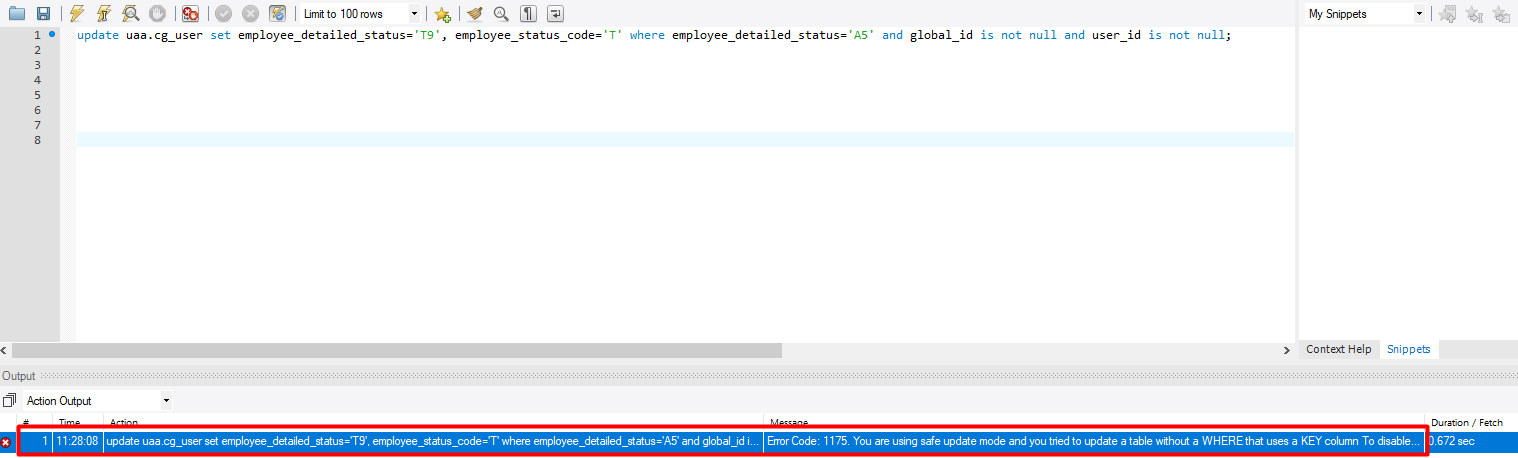
2.通过错误提示可以看出: 当前数据库使用的是 safe update mode(安全更新模式),并且在update时where 中没有把主键当做条件。因为在该模式会导致非主键条件下无法执行update或者delete命令,因此会报错。
3.如何解决这个问题呢?
第一种方法:
执行命令SET SQL_SAFE_UPDATES = 0 来修改下数据库模式,这样再去执行update语句或者delete语句即可成功。
参考地址: https://jingyan.baidu.com/article/6c67b1d6f0efca2787bb1eba.html
第二种方法:
(1) 在workbench的菜单栏点击“edit-->Preferences”,然后会弹出对话框“workbench preferences”。
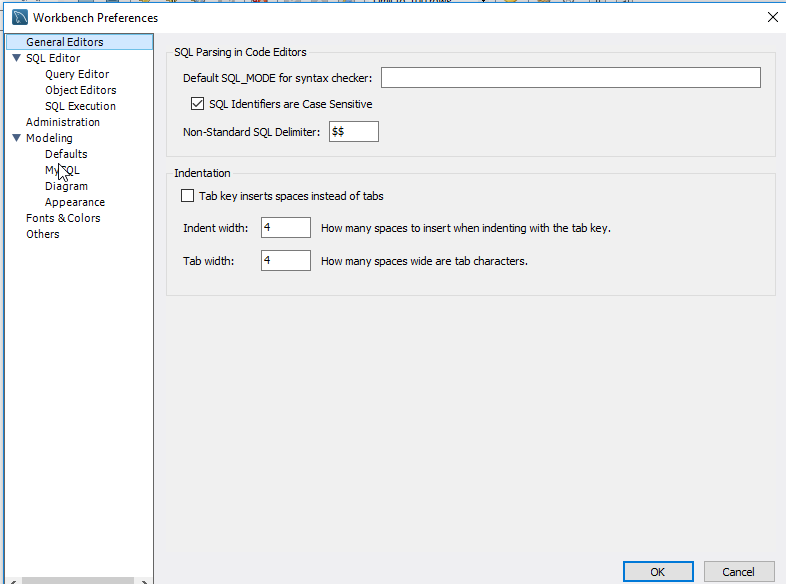
(2) 在“workbench”左边栏点击“SQL Editor”,会看到最后一行是“Safe Updates……”是打钩的,我们只要缺消打钩即可。
当缺消打钩之后,点击“OK”按钮,linux系统可能会出现“OK”按钮无法点击的情况,请在左边栏点击“General Editors”选项,这样就可以点击“OK”按钮了。
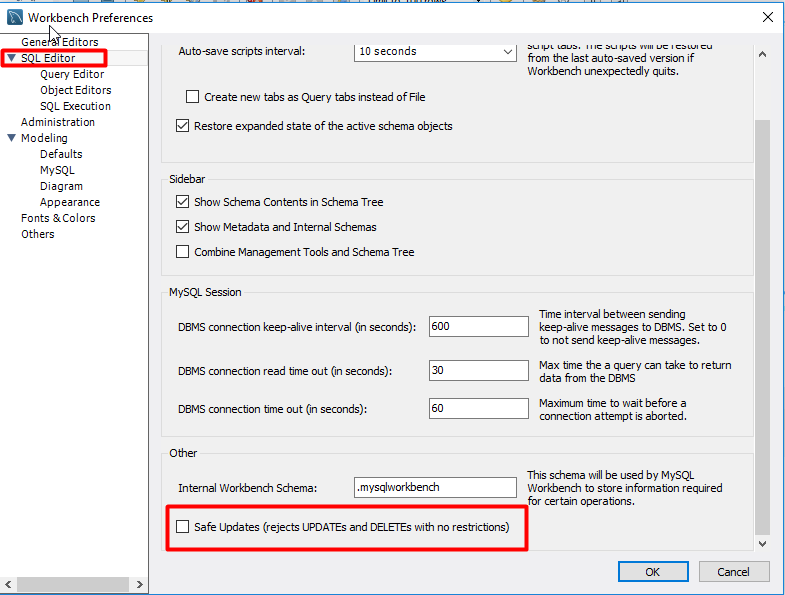
(3) 当上面设置好之后,请重启workbench。
参考地址: https://jingyan.baidu.com/article/6c67b1d6f0efca2787bb1eba.html
更新数据库中数据时出现: Error Code: 1175. You are using safe update mode and you tried to update a table without a WHERE that uses a KEY column To disable safe mode, toggle the option in Preferences 问题的更多相关文章
- Error Code: 1175. You are using safe update mode and you tried to update a table without a WHERE that uses a KEY column To disable safe mode, toggle the option in Preferences -> SQL Queries and reconn
使用MySQL执行update的时候报错: MySQL 在使用mysql执行update的时候,如果不是用主键当where语句,会报如下错误,使用主键用于where语句中正常. 异常内容: ...
- 【MySQL笔记】解除输入的安全模式,Error Code: 1175. You are using safe update mode and you tried to update a table without a WHERE that uses a KEY column To disable safe mode, toggle the option in Preferences -> SQL Queries and reconnect.
Error Code: 1175. You are using safe update mode and you tried to update a table without a WHERE tha ...
- MySQL错误:Error Code: 1175. You are using safe update mode and you tried to update a table without a WHERE that uses a KEY column To disable safe mode, toggle the option in Preferences -> SQL easonjim
错误: Error Code: . You are using safe update mode and you tried to update a table without a WHERE tha ...
- mysql 报错:Error Code: 1175. You are using safe update mode and you tried to update a table without a WHERE that uses a KEY column. To disable safe mode, toggle the option in Preferences
目录 #事故现场 #解决方法 #事故现场 mysql执行update操作报错: sql如下: update psmp.Users set name='Jack' where name='Lily'; ...
- Mysql Error Code: 1175. You are using safe update mode and you tried to update a table without a WHERE that uses a KEY column To disable safe mode
今天用mysql workbench在更新数据的时候,出现了下面错误:15:52:39 update wp_posts set post_content = replace(post_conte ...
- mysql更新字段值提示You are using safe update mode and you tried to update a table without a WHERE that uses a KEY column To disable safe mode
1 引言 当更新字段缺少where语句时,mysql会提示一下错误代码: Error Code: 1175. You are using safe update mode and you tried ...
- Mysql Workbench 执行sql语句删除数据时提示error code 1175
error code 1175是因为有安全模式限制 执行命令SET SQL_SAFE_UPDATES = 0;之后可以进行操作
- rror Code: 1175. You are using safe update mode and you tried to update a table without a WHERE that uses a KEY column To disable safe mode, toggle the option in Preferences -> SQL Editor and reconnec
在mysql5中,可以设置safe mode,比如在一个更新语句中 UPDATE table_name SET bDeleted=0; 执行时会错误,报: You are using safe upd ...
- Error Code: 1175. You are using safe update mode and you tried to update a table without a WHERE that uses a KEY column. To disable safe mode, toggle the option in Preferences -> SQL Editor and recon
数据库默认模式是主键不可进行修改操作,所以需要运行以下语句. SET SQL_SAFE_UPDATES = 0; -- 出现error1175使用.
随机推荐
- volley的框架安装与使用
最后一步非常重要 不然会报错: publish = project.has("release") 替换为: publish = project.hasProperty(&q ...
- 详解java中staitc关键字
一.static定义 static是静态修饰符意思,什么叫静态修饰符呢?大家都知道,在程序中任何变量或者代码都是在编译时由系统自动分配内存来存储的,而所谓静态就是指在编译后所分配的内存会一直存在,直到 ...
- 四则运算 来自 http://www.cnblogs.com/ys1101/p/4368103.html
#include<stdio.h> #include<math.h> #include<windows.h> ; ; void add() { int a,b,c, ...
- 使用JDBC创建出版社和书籍管理系统
1.需求 已知如下两个表: publisher id name(唯一) address book id isbn name publisher_id 欢迎进入书籍管理系统 1.出版社管理:增.删(na ...
- lua 之 三木运算符
在c语言中我三目运算符这么写: a?b:c 例如: max = a>b?a:b; 在lua中我们这么写 max = a>b and a or b 运行如下:
- 关于C/C++的一些思考(1)
C++的前世今生: C的结构化思想: Ada的模版思想: Fortran的运算符重载思想: Simula的OO思想:封装,继承,多态: C++类型描述了变量的三个特征: 该类型在内存中占用物理空间的大 ...
- tcpdump用于抓取tcp数据包
一.简单使用:-c监听次数.-v打印详情.host后接监听地址 1.1.监听 tcpdump -c -v host www.baidu.com 1.2.访问被监听的网址: 1.3.查看监听的数据:
- C++ string 转整数
使用 sstream 完成转换, #include <iostream> #include <string> #include <sstream> #include ...
- Qt 编写应用支持多语言版本--一个GUI应用示例
简介 上一篇博文已经说过如何编写支持多语言的Qt 命令行应用,这一篇说说Qt GUI 应用多语言支持的坑. 本人喜欢用代码来写布局,而不是用 Qt Designer 来设计布局,手写布局比 Qt De ...
- 牛客练习赛29 B 列队
[题解] 把某一行或某一列有4个1的都统计出来,然后首尾接上尽量长的,注意首尾不能选上同一个矩阵,要维护前缀.后缀1最大值和次大值. 还要注意维护矩阵内连续1的长度,因为可能有 0 0 0 0 这种情 ...