
Box Model,边距折叠,内联和块标签,CSSReset
一、盒子模型(Box Model)
盒子模型也有人称为框模型,HTML中的多数元素都会在浏览器中生成一个矩形的区域,每个区域包含四个组成部分,从外向内依次是:外边距(Margin)、边框(Border)、内边距(Padding)和内容(Content),其实盒子模型有两种,分别是 ie 盒子模型和标准 w3c 盒子模型,加上了doctype声明,让所有浏览器都会采用标准 w3c 盒子模型去解释你的盒子。当设置一个元素的样式如下:

<!DOCTYPE html>

<html>

    <head>

        <meta charset="UTF-8">

        <title>盒子模型</title>

        <style type="text/css">

            #box{

                width: 100px;

                height: 100px;

                margin: 20px;

                padding: 20px;

                border: 10px solid blue;

            }

        </style>

    </head>

    <body>

        <div id="box">

            Box Model

        </div>

    </body>

</html>
运行结果:
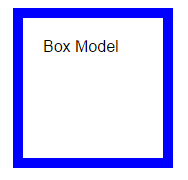
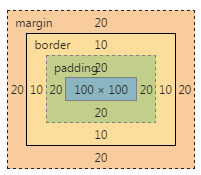
1.1、宽度测试
计算最大宽度,示例如下:
<!DOCTYPE html>

<html>

    <head>

        <meta charset="UTF-8">

        <title>盒子模型</title>

        <style type="text/css">

            #box{

                width: 800px;

                padding: 10px;

                border: 5px solid blue;

                margin: 10px;

            }

            .sbox{

                display: inline-block;

                padding: 10px;

                margin: 10px;

                border: solid 10px coral;

                background: lightblue;

                width: ?;

            }

        </style>

    </head>

    <body>

        <div id="box">

            <div class="sbox">Left</div><div class="sbox">Right</div>

        </div>

    </body>

</html>
要达到如下效果,请求?处最大可以设置为多少像素?

答案:
340px
1.2、溢出测试
代码如下:
<!DOCTYPE html>

<html>

    <head>

        <meta charset="UTF-8">

        <title>盒子模型</title>

        <style type="text/css">

            #box{

                width: 800px;

                padding: 10px;

                border: 5px solid blue;

                margin: 10px;

                height: 100px;

            }

            #box #innerBox{

                background: lightblue;

                height:50px ;

                width: 100%;

                padding: 10px;

                margin: 10px;

                border: 10px solid lightcoral;

            }

        </style>

    </head>

    <body>

        <div id="box">

            <div id="innerBox">

                innerBox

            </div>

        </div>

    </body>

</html>
请问运行时innerBox是否会超出box,如果会,超出多少?
可见部分=850-815=35,还有10个margin不可见,45px
如果不想让innerBox超出,则应该删除其100%的宽度设置,去掉width:100%,一般不要设置,多此一举。
1.3、box-sizing属性
设置或检索对象的盒模型组成模式
content-box: padding和border不被包含在定义的width和height之内。对象的实际宽度等于设置的width值和border、padding之和,即 ( Element width = width + border + padding,但占有页面位置还要加上margin ) 此属性表现为标准模式下的盒模型。
示例:
<!DOCTYPE html>

<html>

    <head>

        <meta charset="UTF-8">

        <title>盒子模型</title>

        <style type="text/css">

            #box{

                width: 100px;

                height: 100px;

                padding: 10px;

                border: 10px solid blue;

                margin: 10px;

            }

        </style>

    </head>

    <body>

        <div id="box">

            Box Model

        </div>

    </body>

</html>
运行结果:

因为默认就是为content-box所以这里没有直接设置,占用宽度为160px;
border-box: padding和border被包含在定义的width和height之内。对象的实际宽度就等于设置的width值,即使定义有border和padding也不会改变对象的实际宽度,即 ( Element width = width ) 此属性表现为怪异模式下的盒模型。
示例代码:
<!DOCTYPE html>

<html>

    <head>

        <meta charset="UTF-8">

        <title>盒子模型</title>

        <style type="text/css">

            #box{

                width: 100px;

                height: 100px;

                padding: 10px;

                border: 10px solid blue;

                margin: 10px;

                box-sizing: border-box;  /*在上一个例子中添加的*/

            }

        </style>

    </head>

    <body>

        <div id="box">

            Box Model

        </div>

    </body>

</html>
运行结果:

当box-sizing: border-box时的宽度设置会包含border与padding,但不包含margin,但margin也会占用位置。
1.4、利用CSS画图
示例代码:
<!DOCTYPE html>

<html>

    <head>

        <meta charset="UTF-8">

        <title>盒子模型 - 三角形</title>

        <style type="text/css">

            #box{

                width: 0;

                height: 0;

                border: 100px solid blue;

                border-color: blue transparent transparent transparent;

                /*设置边线的颜色,transparent表示透明的颜色,按上右下左的顺时钟方向*/

            }

        </style>

    </head>

    <body>

        <div id="box">

        </div>

    </body>

</html>
运行结果:

心形:
<!DOCTYPE html>

<html>

    <head>

        <meta charset="UTF-8">

        <title></title>

        <style>

            #heart {

                position: relative;

                width: 100px;

                height: 90px;

            }

            #heart:after,#heart:before {

                position: absolute;

                content: "";

                left: 50px;

                top: 0;

                width: 50px;

                height: 80px;

                background: red;

                border-radius: 50px 50px 0px 0px;

                transform: rotate(-45deg);

                transform-origin: 0 100%;

            }

            #heart:after {

                left: 0;

                transform: rotate(45deg);

                transform-origin: 100% 100%;

            }

        </style>

    </head>

    <body>

        <div id="heart">

        </div>

    </body>

</html>
运行结果:

二、边距折叠
2.1、概要
外边距折叠:相邻的两个或多个外边距 (margin) 在垂直方向会合并成一个外边距(margin)
相邻:没有被非空内容、padding、border 或 clear 分隔开的margin特性. 非空内容就是说这元素之间要么是兄弟关系或者父子关系,如:
示例代码:
<!DOCTYPE html>

<html>

    <head>

        <meta charset="UTF-8">

        <title></title>

        <style type="text/css">

            #div1{

                border: 3px solid blue;

                height: 200px;

                background: lightcoral;

            }

            #div2{

                height: 100px;

                background: lightgreen;

                margin-top: 20px;

            }

            #div3{

                height: 50px;

                width: 50%;

                background: lightblue;

                margin-top: 20px;

            }

        </style>

    </head>

    <body>

        <div id="div1">

            <div id="div2">

                <div id="div3">

                </div>

            </div>

        </div>

    </body>

</html>
运行结果:
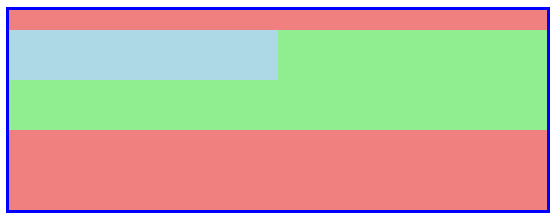
因为div2与div3的外边距是相邻的(是父子关系的相邻),当div2 margin-top为20,div3的margin-top也为20,此时div2与div3的外边距会合并,就是折叠。
如果想让div3的margin-top生效,可以破坏相邻的限制,示例:
<!DOCTYPE html>

<html>

    <head>

        <meta charset="UTF-8">

        <title></title>

        <style type="text/css">

            #div1{

                border: 3px solid blue;

                height: 200px;

                background: lightcoral;

            }

            #div2{

                height: 100px;

                background: lightgreen;

                margin-top: 20px;

                border: 1px solid green;

            }

            #div3{

                height: 50px;

                width: 50%;

                background: lightblue;

                margin-top: 20px;

            }

        </style>

    </head>

    <body>

        <div id="div1">

            <div id="div2">

                <div id="div3">

                </div>

            </div>

        </div>

    </body>

</html>
运行结果:

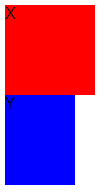
2.2、垂直方向外边距合并计算
a)、参加折叠的margin都是正值:取其中 margin 较大的值为最终 margin 值。
示例:
<!DOCTYPE html>

<html>

    <head>

        <meta charset="UTF-8">

        <title>边距折叠</title>

    </head>

    <body>

        <div style="height:90px; margin-bottom:99px; width:90px; ">X</div>

        <div style="height:90px; margin-top:100px; width:90px; ">Y</div>

    </body>

</html>
运行结果:

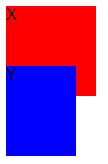
b)、参与折叠的 margin 都是负值:取的是其中绝对值较大的,然后,从 0 位置,负向位移。
示例:
<!DOCTYPE html>

<html>

    <head>

        <meta charset="UTF-8">

        <title>边距折叠</title>

    </head>

    <body>

        <div style="height:90px; margin-bottom:-10px; width:90px; ">X</div>

        <div style="height:90px; margin-top:-30px;width:70px; ">Y</div>

    </body>

</html>
结果:
c)、参与折叠的 margin 中有正值,有负值:先取出负 margin 中绝对值中最大的,然后,和正 margin 值中最大的 margin 相加。
示例:
<!DOCTYPE html>

<html>

    <head>

        <meta charset="UTF-8">

        <title>参与折叠的 margin 中有正值,有负值</title>

    </head>

    <body>

        <div style="height:90px; margin-bottom:-30px; width:90px; ">X</div>

        <div style="height:90px; margin-top:30px;width:70px; ">Y</div>

    </body>

</html>
运行结果:
三、内联与块级标签
3.1、行内标签与块标签区别
html中的标签默认主要分为两大类型,一类为块级元素,另一类是行内元素,许多人也把行内称为内联,所以叫内联元素,其实就是一个意思。为了很好的布局,必须理解它们间的区别,区别如下:
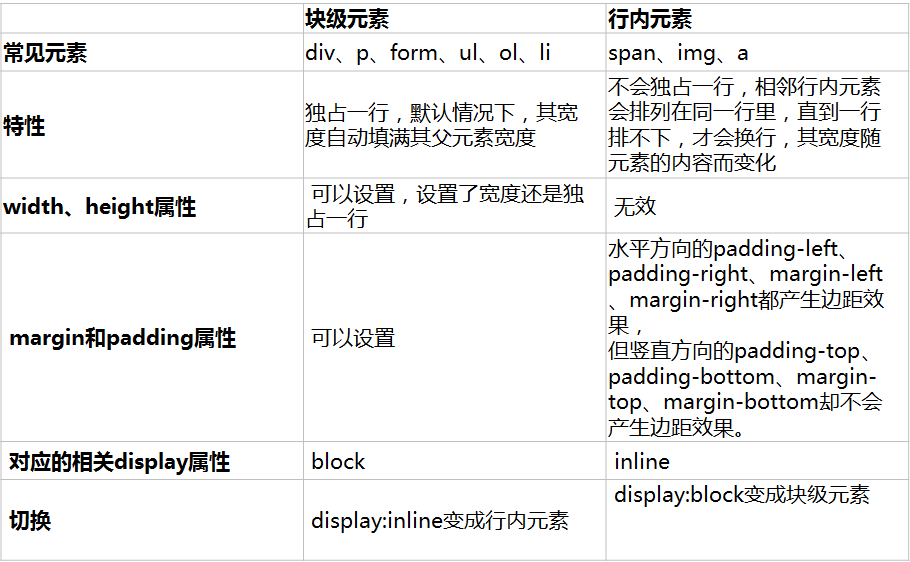
常用块级与内联元素:
内联元素(行内元素)内联元素(inline element)

 a - 超链接

 abbr - 缩写

 acronym - 首字

 bdo - bidi override

 big - 大字体

 br - 换行

 cite - 引用

 code - 计算机代码(在引用源码的时候需要)

 dfn - 定义字段

 em - 强调

 i - 斜体

 img - 图片

 input - 输入框

 kbd - 定义键盘文本

 label - 表格标签

 q - 短引用

 samp - 定义范例计算机代码

 select - 项目选择

 small - 小字体文本

 span - 常用内联容器,定义文本内区块

 strike - 中划线

 strong - 粗体强调

 sub - 下标

 sup - 上标

 textarea - 多行文本输入框

 tt - 电传文本

 u - 下划线

 var - 定义变量

块元素(block element)

 address - 地址

 blockquote - 块引用

 center - 举中对齐块

 dir - 目录列表

 div - 常用块级容易,也是css layout的主要标签

 dl - 定义列表

 fieldset - form控制组

 form - 交互表单

 h1 - 大标题

 h2 - 副标题

 h3 - 3级标题

 h4 - 4级标题

 h5 - 5级标题

 h6 - 6级标题

 hr - 水平分隔线

 isindex - input prompt

 menu - 菜单列表

 noframes - frames可选内容,(对于不支持frame的浏览器显示此区块内容

 noscript - )可选脚本内容(对于不支持script的浏览器显示此内容)

 ol - 排序表单

 p - 段落

 pre - 格式化文本

 table - 表格

 ul - 非排序列表

可变元素,可变元素为根据上下文语境决定该元素为块元素或者内联元素。

 applet - java applet

 button - 按钮

 del - 删除文本

 iframe - inline frame

 ins - 插入的文本

 map - 图片区块(map)

 object - object对象

 script - 客户端脚本
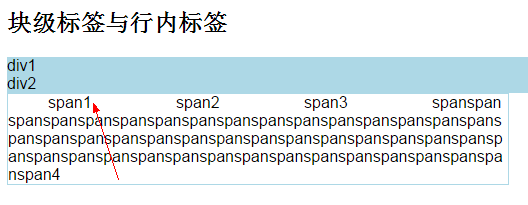
行内标签与块标签特性示例:
<!DOCTYPE html>

<html>

    <head>

        <meta charset="UTF-8">

        <title>块级标签与行内标签</title>

        <style type="text/css">

            #div1,

            #div2 {

                background: lightblue;

            }

            span {

                width: 100px;

                /*无效*/

                height: 20px;

                /*无效*/

                margin: 20px;

                /*水平方向有效,垂直方向无效*/

                padding: 20px;

                /*水平方向有效,垂直方向无效*/

            }

            #div3{

                width: 500px;

                border: 1px solid #ADD8E6;

                word-break: break-all;

            }

        </style>

    </head>

    <body>

        <h2>块级标签与行内标签</h2>

        <div id="div1">div1</div>

        <div id="div2">div2</div>

        <div id="div3">

            <span id="span1">span1</span>

            <span id="span2">span2</span>

            <span id="span3">span3</span>

            <span id="span4">spanspanspanspanspanspanspanspanspanspanspanspanspanspanspanspanspanspanspanspanspanspanspanspanspanspanspanspanspanspanspanspanspanspanspanspanspanspanspanspanspanspanspanspanspanspan4</span>

        </div>

    </body>

</html>
运行结果:
使用display设置元素的显示方式
语法如下:
display:none | inline | block | list-item | inline-block | table | inline-table | table-caption | table-cell | table-row | table-row-group | table-column | table-column-group | table-footer-group | table-header-group | run-in | box | inline-box | flexbox | inline-flexbox | flex | inline-flex
默认值:inline
none: 隐藏对象。与visibility属性的hidden值不同,其不为被隐藏的对象保留其物理空间
inline: 指定对象为内联元素。
block: 指定对象为块元素。
list-item: 指定对象为列表项目。
inline-block: 指定对象为内联块元素。(CSS2)
table: 指定对象作为块元素级的表格。类同于html标签<table>(CSS2)
inline-table: 指定对象作为内联元素级的表格。类同于html标签<table>(CSS2)
table-caption: 指定对象作为表格标题。类同于html标签<caption>(CSS2)
table-cell: 指定对象作为表格单元格。类同于html标签<td>(CSS2)
table-row: 指定对象作为表格行。类同于html标签<tr>(CSS2)
table-row-group: 指定对象作为表格行组。类同于html标签<tbody>(CSS2)
table-column: 指定对象作为表格列。类同于html标签<col>(CSS2)
table-column-group: 指定对象作为表格列组显示。类同于html标签<colgroup>(CSS2)
table-header-group: 指定对象作为表格标题组。类同于html标签<thead>(CSS2)
table-footer-group: 指定对象作为表格脚注组。类同于html标签<tfoot>(CSS2)
run-in: 根据上下文决定对象是内联对象还是块级对象。(CSS3)
box: 将对象作为弹性伸缩盒显示。(伸缩盒最老版本)(CSS3)
inline-box: 将对象作为内联块级弹性伸缩盒显示。(伸缩盒最老版本)(CSS3)
flexbox: 将对象作为弹性伸缩盒显示。(伸缩盒过渡版本)(CSS3)
inline-flexbox: 将对象作为内联块级弹性伸缩盒显示。(伸缩盒过渡版本)(CSS3)
flex: 将对象作为弹性伸缩盒显示。(伸缩盒最新版本)(CSS3)
inline-flex: 将对象作为内联块级弹性伸缩盒显示。(伸缩盒最新版本)(CSS3)
- 如果display设置为none,float及position属性定义将不生效;
- 如果position既不是static也不是relative或者float不是none或者元素是根元素,当display:inline-table时,display的计算值为table;当display:inline | inline-block | run-in | table-* 系时,display的计算值为block,其它情况为指定值;
IE6,7支持inline元素转换成inline-block,但不支持block元素转换成inline-block,所以非inline元素在IE6,7下要转换成inline-block,需先转换成inline,然后触发hasLayout,以此来获得和inline-block类似的效果;你可以这样:
全兼容的inline-block:
div {
display: inline-block;
*display: inline;
*zoom: 1;
}
Basic Support包含值:none | inline | block | list-item | inline-block
table系包含值:table | inline-table | table-caption | table-cell | table-row | table-row-group | table-column | table-column-group | table-footer-group | table-header-group
IE6,7只支持inline元素设置为inline-block,其它类型元素均不可以
3.2、隐藏
可以使用3种办法让元素隐藏:
a)、使用CSS的display:none,不会占有原来的位置
b)、使用CSS的visibility:hidden,会占有原来的位置
c)、使用HTML5中的新增属性hidden="hidden",不会占有原来的位置
示例:
<!DOCTYPE html>

<html>

    <head>

        <meta charset="UTF-8">

        <title>隐藏</title>

        <style type="text/css">

        div{

            width: 100px;

            height: 100px;

            border: 2px solid blue;

            margin: 10px;

            font-size: 30px;

        }

        #div1

        {

            display: none;

        }

        #div2{

            visibility: hidden;

        }

        </style>

    </head>

    <body>

        <div id="div0">div0</div>

        <div id="div1">div1</div>

        <div id="div2">div2</div>

        <div id="div3" hidden="hidden">div3</div>

        <div id="div4">div4</div>

    </body>

</html>
运行结果:

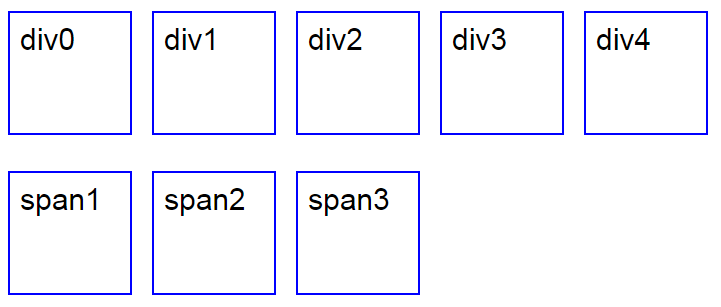
3.3、行内块标签
当元素的样式display为inline-block属性时就被设置成了行内块标签,同时拥有行内标签与块标签的特性,不再占整行;可以设置宽度,高度;padding与margin都有效。
示例:
<!DOCTYPE html>

<html>

    <head>

        <meta charset="UTF-8">

        <title>inline-block</title>

        <style type="text/css">

        div,span{

            width: 100px;

            height: 100px;

            border: 2px solid blue;

            font-size: 30px;

            display: inline-block;

            margin: 10px;

            padding: 10px;

        }

        </style>

    </head>

    <body>

        <div id="div0">div0</div><div id="div1">div1</div><div id="div2">div2</div><div id="div3">div3</div><div id="div4">div4</div>

        <p>

            <span>span1</span><span>span2</span><span>span3</span>

        </p>

    </body>

</html>
运行结果:
3.4、菜单示例
使用display属性结合图片实现网页中的图片菜单:
<!DOCTYPE html>

<html>

    <head>

        <meta charset="UTF-8">

        <title>menu</title>

        <style type="text/css">

            * {

                margin: 0;

                padding: 0;

            }

            #menu {

                width: 1004px;

                margin: 0 auto;

                margin: 10px;

                background: #348200;

                font-size: 0px;

                background: url(img/menubg.jpg) repeat-x;

                height: 49px;

                line-height: 49px;

            }

            #menu a {

                display: inline-block;

                width: 96px;

                height: 49px;

                line-height: 49px;

                background: url(img/menu.jpg) no-repeat;

                color: white;

                font-size: 13px;

                text-decoration: none;

                text-align: center;

                margin-right: 1px;

            }

            #menu a:hover {

                background-image: url(img/menunow.jpg);

            }

            #divLeft {

                width: 25px;

                height: 49px;

                line-height: 49px;

                background: url(img/menuleft.jpg) no-repeat;

                float: left;

            }

            #divRight {

                width: 25px;

                height: 49px;

                background: url(img/menuright.jpg) no-repeat;

                float: right;

            }

            #divTime {

                width: 260px;

                height: 49px;

                font-size: 14px;

                text-align: center;

                float: left;

            }

            #divMenu{

                float: right;

            }

        </style>

    </head>

    <body>

        <div id="menu">

            <div id="divLeft" class="iDiv"></div>

            <div id="divTime" class="iDiv">

                <div>

                时间:2016/11/24 下午2:49:56

                </div>

            </div>

            <div id="divRight" class="iDiv">

            </div>

            <div class="iDiv" id="divMenu">

                <a href='index.html'>网站首页</a>

                <a href='articleList/15.html'>公司简介</a>

                <a href='productList/11.html'>产品展示</a>

                <a href='articleList/17.html'>养殖技术</a>

                <a href='articleList/18.html'>娃娃鱼介绍</a>

                <a href='productList/18.html'>企业资质</a>

                <a href='productList/19.html'>友情链接</a>

            </div>

        </div>

    </body>

</html>
运行效果:

四、重置浏览器默认样式
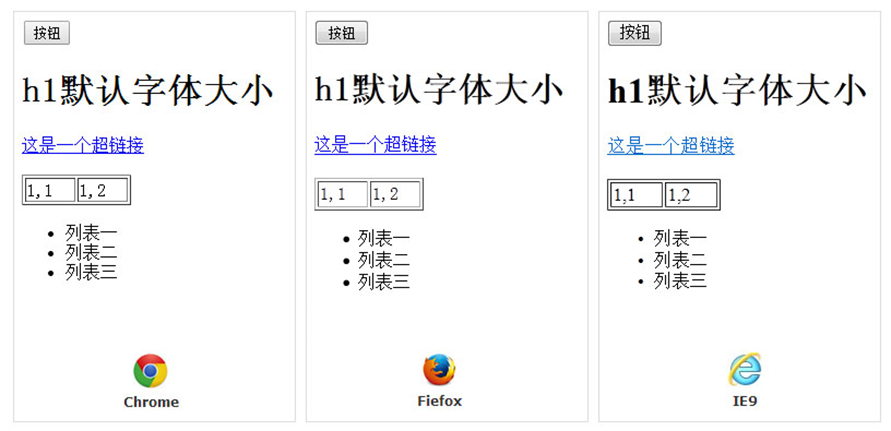
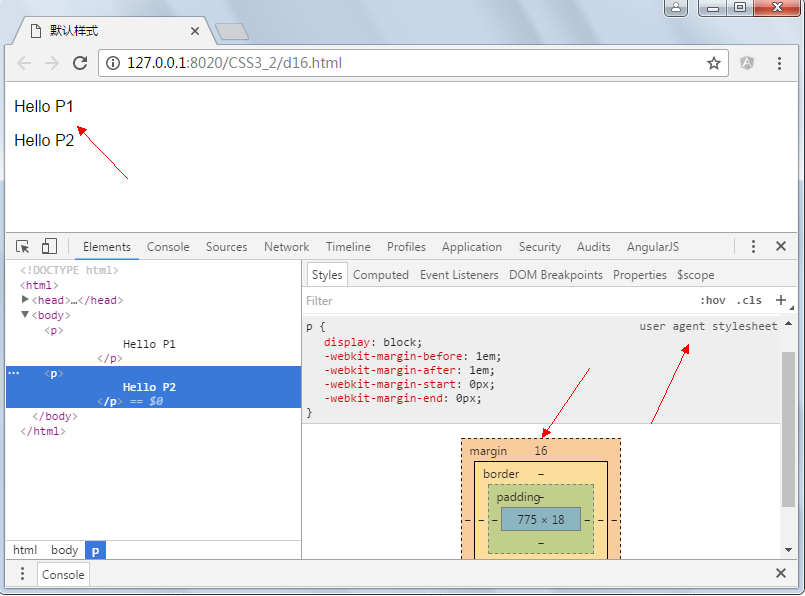
下图是同一段HTML在3个不同内核的浏览器中打开的效果,你发现有不一样吗?很明显有区别,这就是浏览器的默认样式,每一个浏览器会设置user agent stylesheet,比如默认字体大小为16px。浏览器的默认样式会给我们带一定的麻烦,比如在计算元素的大小时默认样式会设置padding与margin值,不同的浏览器可能设置的不一样,就会出现误差,重置浏览器样式就是让您可以在一张白纸上写字。
最开始会使用一个简单的办法,如 :
            *

            {

                margin: 0;

                padding: 0;

            }
虽然能全部重置,但由于性能较低,不推荐使用。因为*需要遍历整个DOM树,当页面节点较多时,会影响页面的渲染性能。
4.1、CSSReset
每种浏览器都有一套默认的样式表,即user agent stylesheet,网页在没有指定的样式时,按浏览器内置的样式表来渲染。这是合理的,像word中也有一些预留样式,可以让我们的排版更美观整齐。不同浏览器甚至同一浏览器不同版本的默认样式是不同的。但这样会有很多兼容问题,CSSReset可以将所有浏览器默认样式设置成一样。
4.1.1、MT css reset
/*MT css reset*/

body,dl,dd,p,h1,h2,h3,h4,h5,h6{margin:0;}

h1,h2,h3,h4,h5,h6{font-size:100%}   /*继承body设定的字体大小*/

/* 根据屏幕大小改变文字大小 */

html{font-size:20px;}  /*chorme下设置为10px无效,推荐设置为20px,1rem=20px*/

@media screen and (max-width:768px){    /*手机屏幕*/

html{font-size: 15px;}

}

@media screen and (min-width: 768px) and (max-width:992px){  /*平板屏幕*/

html{font-size: 20px;}

}

@media screen and (min-width: 992px){   /*电脑屏幕*/

html{font-size: 25px;}

}

body{font-family: "Droid Sans Fallback","Heiti SC","Droid Sans",Helvetica,"Helvetica Neue",sans-self; color:#555; background-color:#F7F7F7;}

.clearfix:after{content:"."; display:block; visibility:hidden; height:0; clear:both;}   /*除去浮动*/

a:hover{text-decoration: none;}

ul,ol{list-style: none;margin:0;padding:0;}

img {max-width: 100%;height: auto;} /* 图片自适应 */

em,i{font-style: normal}  /*如需默认样式可修改*/

button,input,select,textarea{vertical-align:middle;outline:none;}  /*出去获得焦点下的蓝色边框*/

input::-webkit-input-placeholder,textarea::-webkit-input-placeholder {color: #ccc;}  /*修改placeholder文字颜色*/
4.1.2、PC css reset
/*PC css reset*/

body,dl,dd,p,h1,h2,h3,h4,h5,h6{margin:0;}

h1,h2,h3,h4,h5,h6{font-size:100%}   /*继承body设定的字体大小*/

body{font-family: "Microsoft YaHei",Tahoma,Arial,Simsun,sans-self;}

.clearfix:after{content:"."; display:block; visibility:hidden; height:0; clear:both;} /*除去浮动*/

.clearfix{zoom:1;}

a:hover{text-decoration: none;}

ul,ol{list-style: none;margin:0;padding:0;}    /*当要添加小图标时可修改*/

img{vertical-align:middle;border:0;-ms-interpolation-mode:bicubic;} /*在IE下除去边框和底部空白*/

em,i{font-style: normal}  /*如需默认样式可修改*/

input,select,textarea{vertical-align:middle;outline:none;}  /*出去获得焦点下的蓝色边框*/

textarea{resize:none;}  /*禁止用户缩放文本框*/

table {border-collapse: collapse;border-spacing: 0;}

button,input[type="button"],input[type="reset"],input[type="submit"] {cursor:pointer;-webkit-appearance:button;-moz-appearance:button;} /*按钮初始化*/

input::-moz-placeholder,textarea::-moz-placeholder {color: #ccc;}   /*修改placeholder文字颜色*/

input:-ms-input-placeholder,textarea:-ms-input-placeholder {color: #ccc;}

input::-webkit-input-placeholder,textarea::-webkit-input-placeholder {color: #ccc;}
4.1.3、PPTV css reset
@charset "utf-8";

body,div,h1,h2,h3,h4,h5,h6,hr,p,blockquote,dl,dt,dd,ul,ol,li,pre,code,form,fieldset,legend,button,textarea,table,tbody,tfoot,thead,th,td,article,aside,dialog,figure,footer,header,hgroup,menu,nav,section,time,mark,audio,video{margin:0;padding:0;outline:0;background:transparent;}article,aside,dialog,figure,footer,header,hgroup,nav,section{display:block;}body,button,input,select,textarea{font:12px/1.5 arial,\5b8b\4f53,sans-serif;}h1,h2,h3,h4,h5,h6,button,input,select,textarea{font-size:100%;}address,cite,dfn,em,var{font-style:normal;}code,kbd,pre,samp{font-family:courier new,courier,monospace;}small{font-size:12px;}ul,ol,li{list-style:none;}img{border:none;}a{text-decoration:none;outline:thin none;}a:hover{text-decoration:underline;}table{border-collapse:collapse;border-spacing:0;}.clear{clear:both;}.clearfix:after{visibility:hidden;display:block;font-size:0;content:" ";clear:both;height:0;}html{-webkit-text-size-adjust: none;}

body{font:12px/1.5 \5FAE\8F6F\96C5\9ED1,tahoma,arial,\5b8b\4f53,sans-serif;}
4.1.4 YUI css reset
/*

YUI 3.4.1 (build 4118)

Copyright 2011 Yahoo! Inc. All rights reserved.

Licensed under the BSD License.

http://yuilibrary.com/license/

*/

html{color:#000;background:#FFF}

body,div,dl,dt,dd,ul,ol,li,h1,h2,h3,h4,h5,h6,pre,code,form,fieldset,legend,input,textarea,p,blockquote,th,td{margin:0;padding:0}

table{border-collapse:collapse;border-spacing:0}

fieldset,img{border:0}

address,caption,cite,code,dfn,em,strong,th,var{font-style:normal;font-weight:normal}

ol,ul{list-style:none}

caption,th{text-align:left}

h1,h2,h3,h4,h5,h6{font-size:100%;font-weight:normal}

q:before,q:after{content:''}

abbr,acronym{border:0;font-variant:normal}

sup{vertical-align:text-top}

sub{vertical-align:text-bottom}

input,textarea,select{font-family:inherit;font-size:inherit;font-weight:inherit}

input,textarea,select{*font-size:100%}

legend{color:#000}
4.1.5、marx css reset
/*! sanitize.css v3.3.0 | CC0 1.0 Public Domain | github.com/10up/sanitize.css */

/*

 * Normalization

 */

abbr[title] {

  text-decoration: underline;

  text-decoration: underline dotted; }

audio:not([controls]) {

  display: none; }

b,

strong {

  font-weight: bolder; }

button {

  -webkit-appearance: button;

  overflow: visible; }

button::-moz-focus-inner,

input::-moz-focus-inner {

  border: 0;

  padding: 0; }

button:-moz-focusring,

input:-moz-focusring {

  outline: 1px dotted ButtonText; }

button,

select {

  text-transform: none; }

details {

  display: block; }

hr {

  overflow: visible; }

html {

  -ms-overflow-style: -ms-autohiding-scrollbar;

  overflow-y: scroll;

  -webkit-text-size-adjust: 100%; }

input {

  -webkit-border-radius: 0; }

  input[type="button"], input[type="reset"], input[type="submit"] {

    -webkit-appearance: button; }

  input[type="number"] {

    width: auto; }

  input[type="search"] {

    -webkit-appearance: textfield; }

    input[type="search"]::-webkit-search-cancel-button, input[type="search"]::-webkit-search-decoration {

      -webkit-appearance: none; }

main {

  display: block; }

pre {

  overflow: auto; }

progress {

  display: inline-block; }

summary {

  display: block; }

svg:not(:root) {

  overflow: hidden; }

template {

  display: none; }

textarea {

  overflow: auto; }

[hidden] {

  display: none; }

/*

 * Universal inheritance

 */

*,

::before,

::after {

  box-sizing: inherit; }

* {

  font-size: inherit;

  line-height: inherit; }

::before,

::after {

  text-decoration: inherit;

  vertical-align: inherit; }

button,

input,

select,

textarea {

  font-family: inherit;

  font-style: inherit;

  font-weight: inherit; }

/*

 * Opinionated defaults

 */

* {

  margin: 0;

  padding: 0; }

*,

::before,

::after {

  border-style: solid;

  border-width: 0; }

a,

area,

button,

input,

label,

select,

textarea,

[tabindex] {

  -ms-touch-action: manipulation;

      touch-action: manipulation; }

select {

  -moz-appearance: none;

  -webkit-appearance: none; }

  select::-ms-expand {

    display: none; }

  select::-ms-value {

    color: currentColor; }

svg {

  fill: currentColor; }

[aria-busy="true"] {

  cursor: progress; }

[aria-controls] {

  cursor: pointer; }

[aria-disabled] {

  cursor: default; }

[hidden][aria-hidden="false"] {

  clip: rect(0 0 0 0);

  display: inherit;

  position: absolute; }

  [hidden][aria-hidden="false"]:focus {

    clip: auto; }

/*

 * Configurable defaults

 */

* {

  background-repeat: no-repeat; }

:root {

  background-color: #ffffff;

  box-sizing: border-box;

  color: #000000;

  cursor: default;

  font: 66.66667% sans-serif; }

a {

  text-decoration: none; }

audio,

canvas,

iframe,

img,

svg,

video {

  vertical-align: middle; }

button,

input,

select,

textarea {

  background-color: transparent;

  color: inherit; }

button,

[type="button"],

[type="date"],

[type="datetime"],

[type="datetime-local"],

[type="email"],

[type="month"],

[type="number"],

[type="password"],

[type="reset"],

[type="search"],

[type="submit"],

[type="tel"],

[type="text"],

[type="time"],

[type="url"],

[type="week"],

select,

textarea {

  min-height: 1.5em; }

code,

kbd,

pre,

samp {

  font-family: monospace, monospace; }

nav ol,

nav ul {

  list-style: none; }

small {

  font-size: 75%; }

table {

  border-collapse: collapse;

  border-spacing: 0; }

textarea {

  resize: vertical; }

::-moz-selection {

  background-color: #b3d4fc;

  color: #ffffff;

  text-shadow: none; }

::selection {

  background-color: #b3d4fc;

  color: #ffffff;

  text-shadow: none; }

main,

header,

footer,

article,

section,

aside,

details,

summary {

  margin: 0 auto;

  margin-bottom: 16px;

  width: 100%; }

main {

  display: block;

  margin: 0 auto;

  max-width: 768px;

  padding: 0 16px 16px; }

footer {

  border-top: 1px solid rgba(0, 0, 0, 0.12);

  clear: both;

  display: inline-block;

  float: left;

  max-width: 100%;

  padding: 16px 0;

  text-align: center; }

  footer p {

    margin-bottom: 0; }

hr {

  border-top: 1px solid rgba(0, 0, 0, 0.12);

  display: block;

  margin-bottom: 16px;

  width: 100%; }

img {

  height: auto;

  max-width: 100%;

  vertical-align: baseline; }

@media screen and (max-width: 400px) {

  article,

  section,

  aside {

    clear: both;

    display: block;

    max-width: 100%; }

  img {

    margin-right: 16px; } }

body {

  color: rgba(0, 0, 0, 0.8);

  font-family: "Helvetica Neue", Helvetica, "Lucida Grande", sans-serif;

  font-size: 16px;

  line-height: 1.4; }

p {

  margin: 0;

  margin-bottom: 16px; }

h1,

h2,

h3,

h4,

h5,

h6 {

  color: inherit;

  font-family: inherit;

  line-height: inherit; }

h1 {

  border-bottom: 1px solid rgba(0, 0, 0, 0.12);

  font-size: 36px;

  font-weight: 500;

  margin: 20px 0 16px; }

h2 {

  font-size: 30px;

  font-weight: 500;

  margin: 20px 0 16px; }

h3 {

  font-size: 24px;

  font-weight: 500;

  margin: 16px 0 4px; }

h4 {

  font-size: 18px;

  font-weight: 600;

  margin: 16px 0 4px; }

h5 {

  font-size: 16px;

  font-weight: 600;

  margin: 16px 0 4px; }

h6 {

  color: rgba(0, 0, 0, 0.54);

  font-size: 14px;

  font-weight: 600;

  margin: 16px 0 4px; }

small {

  color: rgba(0, 0, 0, 0.54);

  vertical-align: bottom; }

pre {

  background: #efefef;

  color: rgba(0, 0, 0, 0.8);

  display: block;

  font-family: Menlo, Monaco, Consolas, "Courier New", monospace;

  font-size: 16px;

  margin: 16px 0;

  padding: 16px;

  white-space: pre-wrap; }

code {

  color: rgba(0, 0, 0, 0.8);

  font-family: Menlo, Monaco, Consolas, "Courier New", monospace;

  font-size: 16px;

  line-height: inherit;

  margin: 0;

  padding: 0;

  vertical-align: baseline;

  word-break: break-all;

  word-wrap: break-word; }

a {

  color: #2196f3; }

  a:hover, a:focus {

    color: #2196f3;

    text-decoration: underline; }

dl {

  margin-bottom: 16px; }

dd {

  margin-left: 40px; }

ul,

ol {

  margin-bottom: 8px;

  padding-left: 40px;

  vertical-align: baseline; }

blockquote {

  border-left: 2px solid #2196f3;

  font-family: Georgia, Times, "Times New Roman", serif;

  font-style: italic;

  margin: 16px 0;

  padding-left: 16px; }

figcaption {

  font-family: Georgia, Times, "Times New Roman", serif; }

u {

  text-decoration: underline; }

s {

  text-decoration: line-through; }

sup {

  font-size: 14px;

  vertical-align: super; }

sub {

  font-size: 14px;

  vertical-align: sub; }

mark {

  background: #ffeb3b; }

input[type="text"],

input[type="password"],

input[type="email"],

input[type="url"],

input[type="date"],

input[type="month"],

input[type="time"],

input[type="datetime"],

input[type="datetime-local"],

input[type="week"],

input[type="number"],

input[type="search"],

input[type="tel"],

select {

  background: #fff;

  border: 1px solid rgba(0, 0, 0, 0.12);

  border-radius: 4px;

  color: rgba(0, 0, 0, 0.8);

  display: inline-block;

  padding: 4px;

  vertical-align: middle; }

input[type="color"] {

  background: #fff;

  border: 1px solid rgba(0, 0, 0, 0.12);

  border-radius: 4px;

  display: inline-block;

  vertical-align: middle; }

input:not([type]) {

  -webkit-appearance: none;

  background-clip: padding-box;

  border: 1px solid rgba(0, 0, 0, 0.12);

  border-radius: 4px;

  display: inline-block;

  padding: 8px;

  text-align: left; }

input[type="text"]:focus,

input[type="password"]:focus,

input[type="email"]:focus,

input[type="url"]:focus,

input[type="date"]:focus,

input[type="month"]:focus,

input[type="time"]:focus,

input[type="datetime"]:focus,

input[type="datetime-local"]:focus,

input[type="week"]:focus,

input[type="number"]:focus,

input[type="search"]:focus,

input[type="tel"]:focus,

input[type="color"]:focus,

select:focus,

textarea:focus {

  border-color: #2196f3; }

input:not([type]):focus {

  border-color: #2196f3; }

input[type="file"]:focus,

input[type="radio"]:focus,

input[type="checkbox"]:focus {

  outline: 1px thin rgba(0, 0, 0, 0.12); }

input[type="text"][disabled],

input[type="password"][disabled],

input[type="email"][disabled],

input[type="url"][disabled],

input[type="date"][disabled],

input[type="month"][disabled],

input[type="time"][disabled],

input[type="datetime"][disabled],

input[type="datetime-local"][disabled],

input[type="week"][disabled],

input[type="number"][disabled],

input[type="search"][disabled],

input[type="tel"][disabled],

input[type="color"][disabled],

select[disabled],

textarea[disabled] {

  background-color: rgba(0, 0, 0, 0.12);

  color: rgba(0, 0, 0, 0.54);

  cursor: not-allowed; }

input:not([type])[disabled] {

  background-color: rgba(0, 0, 0, 0.12);

  color: rgba(0, 0, 0, 0.54);

  cursor: not-allowed; }

input[readonly],

select[readonly],

textarea[readonly] {

  border-color: rgba(0, 0, 0, 0.12);

  color: rgba(0, 0, 0, 0.54); }

input:focus:invalid,

textarea:focus:invalid,

select:focus:invalid {

  border-color: #ea1c0d;

  color: #f44336; }

input[type="file"]:focus:invalid:focus,

input[type="radio"]:focus:invalid:focus,

input[type="checkbox"]:focus:invalid:focus {

  outline-color: #f44336; }

select {

  -webkit-appearance: menulist-button;

  border: 1px solid rgba(0, 0, 0, 0.12);

  vertical-align: sub; }

select[multiple] {

  height: auto; }

label {

  line-height: 2; }

fieldset {

  border: 0;

  margin: 0;

  padding: 8px 0; }

legend {

  border-bottom: 1px solid rgba(0, 0, 0, 0.12);

  color: rgba(0, 0, 0, 0.8);

  display: block;

  margin-bottom: 8px;

  padding: 8px 0;

  width: 100%; }

textarea {

  background: #fff;

  border: 1px solid rgba(0, 0, 0, 0.12);

  border-radius: 4px;

  display: block;

  margin-bottom: 8px;

  max-width: 100%;

  padding: 8px;

  vertical-align: middle; }

input[type=submit],

input[type=reset],

button {

  background: #2196f3;

  border: 1px solid rgba(0, 0, 0, 0.12);

  border-radius: 4px;

  color: #fff;

  cursor: pointer;

  display: inline-block;

  margin: 0;

  padding: 8px 16px;

  text-align: center;

  vertical-align: middle;

  white-space: nowrap; }

input[type=submit]::-moz-focus-inner,

input[type=reset]::-moz-focus-inner,

button::-moz-focus-inner {

  padding: 0; }

input[type=submit]:hover,

input[type=reset]:hover,

button:hover {

  background: #0c7cd5;

  border-color: 1px solid rgba(0, 0, 0, 0.54); }

input[type=submit]:active,

input[type=reset]:active,

button:active {

  background: #0c7cd5;

  border-color: 1px solid rgba(0, 0, 0, 0.54);

  box-shadow: inset 0 0 4px 0 rgba(0, 0, 0, 0.2);

  outline-offset: -2px; }

input[type=submit]:focus,

input[type=reset]:focus,

button:focus {

  background: #0c7cd5;

  border-color: 1px solid rgba(0, 0, 0, 0.54);

  box-shadow: inset 0 0 4px 0 rgba(0, 0, 0, 0.2);

  outline: 0; }

input[type=submit]:disabled,

button:disabled {

  background: rgba(0, 0, 0, 0.12);

  color: rgba(0, 0, 0, 0.38);

  cursor: not-allowed; }

table {

  border-top: 1px solid rgba(0, 0, 0, 0.12);

  margin-bottom: 16px; }

caption {

  padding: 8px 0; }

thead th {

  border: 0;

  border-bottom: 2px solid rgba(0, 0, 0, 0.12);

  text-align: left; }

tr {

  margin-bottom: 8px; }

th,

td {

  border-bottom: 1px solid rgba(0, 0, 0, 0.12);

  padding: 16px;

  vertical-align: inherit; }

tfoot tr {

  text-align: left; }

tfoot td {

  color: rgba(0, 0, 0, 0.54);

  font-size: 8px;

  font-style: italic;

  padding: 16px 4px; }
示例:
<!DOCTYPE html>
<html lang="en">
<head>
<meta charset="utf-8">
<meta http-equiv="X-UA-Compatible" content="IE=edge">
<meta name="viewport" content="width=device-width, initial-scale=1"> <title>Marx Template</title> <!-- Marx CSS -->
<link rel="stylesheet" type="text/css" href="css/marx_cssreset.css"/>
</head> <body>
<!-- main is the container -->
<main>
<!-- Navigation -->
<nav>
<ul>
<li><a href="#"><b>First</b></a></li>
<li><a href="#">Second</a></li>
<li><a href="#">Third</a></li>
<li><a href="#">Fourth</a></li>
</ul>
</nav> <p>
<button>Add Item</button>
</p> <!-- article -->
<article>
<h1>Article</h1>
</article> <!-- aside -->
<aside>
<h1>Aside</h1>
</aside> <!-- section -->
<section>
<h1>Section</h1>
</section> <!-- footer -->
<footer>
<p>© Matthew Blode 2016</p>
</footer>
</main> </body>
</html>
运行结果:

这一个是github上点赞最多的一个,github地址,它除了css reset还有一些base css内容。
4.1.6、EricMeyer css reset
/* http://meyerweb.com/eric/tools/css/reset/

   v2.0 | 20110126

   License: none (public domain)

*/

html, body, div, span, applet, object, iframe,

h1, h2, h3, h4, h5, h6, p, blockquote, pre,

a, abbr, acronym, address, big, cite, code,

del, dfn, em, img, ins, kbd, q, s, samp,

small, strike, strong, sub, sup, tt, var,

b, u, i, center,

dl, dt, dd, ol, ul, li,

fieldset, form, label, legend,

table, caption, tbody, tfoot, thead, tr, th, td,

article, aside, canvas, details, embed,

figure, figcaption, footer, header, hgroup,

menu, nav, output, ruby, section, summary,

time, mark, audio, video {

    margin: 0;

    padding: 0;

    border: 0;

    font-size: 100%;

    font: inherit;

    vertical-align: baseline;

}

/* HTML5 display-role reset for older browsers */

article, aside, details, figcaption, figure,

footer, header, hgroup, menu, nav, section {

    display: block;

}

body {

    line-height: 1;

}

ol, ul {

    list-style: none;

}

blockquote, q {

    quotes: none;

}

blockquote:before, blockquote:after,

q:before, q:after {

    content: '';

    content: none;

}

table {

    border-collapse: collapse;

    border-spacing: 0;

}
4.1.7、天猫 css reset
@charset "gb2312";

body, h1, h2, h3, h4, h5, h6, hr, p, blockquote, dl, dt, dd, ul, ol, li, pre, form, fieldset, legend, button, input, textarea, th, td {

margin: 0;

padding: 0

}

body, button, input, select, textarea {

font: 12px "microsoft yahei";

line-height: 1.5;

-ms-overflow-style: scrollbar

}

h1, h2, h3, h4, h5, h6 {

font-size: 100%

}

ul, ol {

list-style: none

}

a {

text-decoration: none;

cursor:pointer

}

a:hover {

text-decoration: underline

}

img {

border: 0

}

button, input, select, textarea {

font-size: 100%

}

table {

border-collapse: collapse;

border-spacing: 0

}

.clear {

clear:both

}

.fr {

float:right

}

.fl {

float:left

}

.block {

display:block;

text-indent:-999em

}
4.1.8、ress css reset
/*!

 * ress.css • v1.1.2

 * MIT License

 * github.com/filipelinhares/ress

 */

/* # =================================================================

   # Global selectors

   # ================================================================= */

html {

  box-sizing: border-box;

  overflow-y: scroll; /* All browsers without overlaying scrollbars */

  -webkit-text-size-adjust: 100%; /* iOS 8+ */

}

*,

::before,

::after {

  box-sizing: inherit;

}

::before,

::after {

  text-decoration: inherit; /* Inherit text-decoration and vertical align to ::before and ::after pseudo elements */

  vertical-align: inherit;

}

/* Remove margin, padding of all elements and set background-no-repeat as default */

* {

  background-repeat: no-repeat; /* Set `background-repeat: no-repeat` to all elements */

  padding: 0; /* Reset `padding` and `margin` of all elements */

  margin: 0;

}

/* # =================================================================

   # General elements

   # ================================================================= */

/* Add the correct display in iOS 4-7.*/

audio:not([controls]) {

  display: none;

  height: 0;

}

hr {

  overflow: visible; /* Show the overflow in Edge and IE */

}

/*

* Correct `block` display not defined for any HTML5 element in IE 8/9

* Correct `block` display not defined for `details` or `summary` in IE 10/11

* and Firefox

* Correct `block` display not defined for `main` in IE 11

*/

article,

aside,

details,

figcaption,

figure,

footer,

header,

main,

menu,

nav,

section,

summary {

  display: block;

}

summary {

  display: list-item; /* Add the correct display in all browsers */

}

small {

  font-size: 80%; /* Set font-size to 80% in `small` elements */

}

[hidden],

template {

  display: none; /* Add the correct display in IE */

}

abbr[title] {

  border-bottom: 1px dotted; /* Add a bordered underline effect in all browsers */

  text-decoration: none; /* Remove text decoration in Firefox 40+ */

}

a {

  background-color: transparent; /* Remove the gray background on active links in IE 10 */

  -webkit-text-decoration-skip: objects; /* Remove gaps in links underline in iOS 8+ and Safari 8+ */

}

a:active,

a:hover {

  outline-width: 0; /* Remove the outline when hovering in all browsers */

}

code,

kbd,

pre,

samp {

  font-family: monospace, monospace; /* Specify the font family of code elements */

}

b,

strong {

  font-weight: bolder; /* Correct style set to `bold` in Edge 12+, Safari 6.2+, and Chrome 18+ */

}

dfn {

  font-style: italic; /* Address styling not present in Safari and Chrome */

}

/* Address styling not present in IE 8/9 */

mark {

  background-color: #ff0;

  color: #000;

}

/* https://gist.github.com/unruthless/413930 */

sub,

sup {

  font-size: 75%;

  line-height: 0;

  position: relative;

  vertical-align: baseline;

}

sub {

  bottom: -0.25em;

}

sup {

  top: -0.5em;

}

/* # =================================================================

   # Forms

   # ================================================================= */

input {

  border-radius: 0;

}

/* Apply cursor pointer to button elements */

button,

[type="button"],

[type="reset"],

[type="submit"],

[role="button"] {

  cursor: pointer;

}

/* Replace pointer cursor in disabled elements */

[disabled] {

  cursor: default;

}

[type="number"] {

  width: auto; /* Firefox 36+ */

}

[type="search"] {

  -webkit-appearance: textfield; /* Safari 8+ */

}

[type="search"]::-webkit-search-cancel-button,

[type="search"]::-webkit-search-decoration {

  -webkit-appearance: none; /* Safari 8 */

}

textarea {

  overflow: auto; /* Internet Explorer 11+ */

  resize: vertical; /* Specify textarea resizability */

}

button,

input,

optgroup,

select,

textarea {

  font: inherit; /* Specify font inheritance of form elements */

}

optgroup {

  font-weight: bold; /* Restore the font weight unset by the previous rule. */

}

button {

  overflow: visible; /* Address `overflow` set to `hidden` in IE 8/9/10/11 */

}

/* Remove inner padding and border in Firefox 4+ */

button::-moz-focus-inner,

[type="button"]::-moz-focus-inner,

[type="reset"]::-moz-focus-inner,

[type="submit"]::-moz-focus-inner {

  border-style: 0;

  padding: 0;

}

/* Replace focus style removed in the border reset above */

button:-moz-focusring,

[type="button"]::-moz-focus-inner,

[type="reset"]::-moz-focus-inner,

[type="submit"]::-moz-focus-inner {

  outline: 1px dotted ButtonText;

}

button,

html [type="button"], /* Prevent a WebKit bug where (2) destroys native `audio` and `video`controls in Android 4 */

[type="reset"],

[type="submit"] {

  -webkit-appearance: button; /* Correct the inability to style clickable types in iOS */

}

button,

select {

  text-transform: none; /* Firefox 40+, Internet Explorer 11- */

}

/* Remove the default button styling in all browsers */

button,

input,

select,

textarea {

  background-color: transparent;

  border-style: none;

  color: inherit;

}

/* Style select like a standard input */

select {

  -moz-appearance: none; /* Firefox 36+ */

  -webkit-appearance: none; /* Chrome 41+ */

}

select::-ms-expand {

  display: none; /* Internet Explorer 11+ */

}

select::-ms-value {

  color: currentColor; /* Internet Explorer 11+ */

}

legend {

  border: 0; /* Correct `color` not being inherited in IE 8/9/10/11 */

  color: inherit; /* Correct the color inheritance from `fieldset` elements in IE */

  display: table; /* Correct the text wrapping in Edge and IE */

  max-width: 100%; /* Correct the text wrapping in Edge and IE */

  white-space: normal; /* Correct the text wrapping in Edge and IE */

}

::-webkit-file-upload-button {

  -webkit-appearance: button; /* Correct the inability to style clickable types in iOS and Safari */

  font: inherit; /* Change font properties to `inherit` in Chrome and Safari */

}

[type="search"] {

  -webkit-appearance: textfield; /* Correct the odd appearance in Chrome and Safari */

  outline-offset: -2px; /* Correct the outline style in Safari */

}

/* # =================================================================

   # Specify media element style

   # ================================================================= */

img {

  border-style: none; /* Remove border when inside `a` element in IE 8/9/10 */

}

/* Add the correct vertical alignment in Chrome, Firefox, and Opera */

progress {

  vertical-align: baseline;

}

svg:not(:root) {

  overflow: hidden; /* Internet Explorer 11- */

}

audio,

canvas,

progress,

video {

  display: inline-block; /* Internet Explorer 11+, Windows Phone 8.1+ */

}

/* # =================================================================

   # Accessibility

   # ================================================================= */

/* Hide content from screens but not screenreaders */

@media screen {

  [hidden~="screen"] {

    display: inherit;

  }

  [hidden~="screen"]:not(:active):not(:focus):not(:target) {

    position: absolute !important;

    clip: rect(0 0 0 0) !important;

  }

}

/* Specify the progress cursor of updating elements */

[aria-busy="true"] {

  cursor: progress;

}

/* Specify the pointer cursor of trigger elements */

[aria-controls] {

  cursor: pointer;

}

/* Specify the unstyled cursor of disabled, not-editable, or otherwise inoperable elements */

[aria-disabled] {

  cursor: default;

}

/* # =================================================================

   # Selection

   # ================================================================= */

/* Specify text selection background color and omit drop shadow */

::-moz-selection {

  background-color: #b3d4fc; /* Required when declaring ::selection */

  color: #000;

  text-shadow: none;

}

::selection {

  background-color: #b3d4fc; /* Required when declaring ::selection */

  color: #000;

  text-shadow: none;

}
github上css reset点赞排名第2
https://github.com/filipelinhares/ress/
4.2、normalize
也许有些cssreset过于简单粗暴,有点伤及无辜,normalize是另一个选择。bootstrap已经引用该css来重置浏览器默认样式,比普通的cssreset要精细一些,保留浏览器有用的默认样式,支持包括手机浏览器在内的超多浏览器,同时对HTML5元素、排版、列表、嵌入的内容、表单和表格都进行了一般化。
Normalize.css和传统Reset的区别:
a)、Normalize.css 保护了有价值的默认值
Reset通过为几乎所有的元素施加默认样式,强行使得元素有相同的视觉效果。相比之下,Normalize.css保持了许多默认的浏览器样式。这就意味着你不用再为所有公共的排版元素重新设置样式。当一个元素在不同的浏览器中有不同的默认值时,Normalize.css会力求让这些样式保持一致并尽可能与现代标准相符合。
b)、Normalize.css 修复了浏览器的bug
它修复了常见的桌面端和移动端浏览器的bug。这往往超出了Reset所能做到的范畴。关于这一点,Normalize.css修复的问题包含了HTML5元素的显示设置、预格式化文字的font-size问题、在IE9中SVG的溢出、许多出现在各浏览器和操作系统中的与表单相关的bug。
github的下载地址:https://github.com/necolas/normalize.css
/*! normalize.css v5.0.0 | MIT License | github.com/necolas/normalize.css */

/* Document

   ========================================================================== */

/**

 * 1. Change the default font family in all browsers (opinionated).

 * 2. Correct the line height in all browsers.

 * 3. Prevent adjustments of font size after orientation changes in

 *    IE on Windows Phone and in iOS.

 */

html {

  font-family: sans-serif; /* 1 */

  line-height: 1.15; /* 2 */

  -ms-text-size-adjust: 100%; /* 3 */

  -webkit-text-size-adjust: 100%; /* 3 */

}

/* Sections

   ========================================================================== */

/**

 * Remove the margin in all browsers (opinionated).

 */

body {

  margin: 0;

}

/**

 * Add the correct display in IE 9-.

 */

article,

aside,

footer,

header,

nav,

section {

  display: block;

}

/**

 * Correct the font size and margin on `h1` elements within `section` and

 * `article` contexts in Chrome, Firefox, and Safari.

 */

h1 {

  font-size: 2em;

  margin: 0.67em 0;

}

/* Grouping content

   ========================================================================== */

/**

 * Add the correct display in IE 9-.

 * 1. Add the correct display in IE.

 */

figcaption,

figure,

main { /* 1 */

  display: block;

}

/**

 * Add the correct margin in IE 8.

 */

figure {

  margin: 1em 40px;

}

/**

 * 1. Add the correct box sizing in Firefox.

 * 2. Show the overflow in Edge and IE.

 */

hr {

  box-sizing: content-box; /* 1 */

  height: 0; /* 1 */

  overflow: visible; /* 2 */

}

/**

 * 1. Correct the inheritance and scaling of font size in all browsers.

 * 2. Correct the odd `em` font sizing in all browsers.

 */

pre {

  font-family: monospace, monospace; /* 1 */

  font-size: 1em; /* 2 */

}

/* Text-level semantics

   ========================================================================== */

/**

 * 1. Remove the gray background on active links in IE 10.

 * 2. Remove gaps in links underline in iOS 8+ and Safari 8+.

 */

a {

  background-color: transparent; /* 1 */

  -webkit-text-decoration-skip: objects; /* 2 */

}

/**

 * Remove the outline on focused links when they are also active or hovered

 * in all browsers (opinionated).

 */

a:active,

a:hover {

  outline-width: 0;

}

/**

 * 1. Remove the bottom border in Firefox 39-.

 * 2. Add the correct text decoration in Chrome, Edge, IE, Opera, and Safari.

 */

abbr[title] {

  border-bottom: none; /* 1 */

  text-decoration: underline; /* 2 */

  text-decoration: underline dotted; /* 2 */

}

/**

 * Prevent the duplicate application of `bolder` by the next rule in Safari 6.

 */

b,

strong {

  font-weight: inherit;

}

/**

 * Add the correct font weight in Chrome, Edge, and Safari.

 */

b,

strong {

  font-weight: bolder;

}

/**

 * 1. Correct the inheritance and scaling of font size in all browsers.

 * 2. Correct the odd `em` font sizing in all browsers.

 */

code,

kbd,

samp {

  font-family: monospace, monospace; /* 1 */

  font-size: 1em; /* 2 */

}

/**

 * Add the correct font style in Android 4.3-.

 */

dfn {

  font-style: italic;

}

/**

 * Add the correct background and color in IE 9-.

 */

mark {

  background-color: #ff0;

  color: #000;

}

/**

 * Add the correct font size in all browsers.

 */

small {

  font-size: 80%;

}

/**

 * Prevent `sub` and `sup` elements from affecting the line height in

 * all browsers.

 */

sub,

sup {

  font-size: 75%;

  line-height: 0;

  position: relative;

  vertical-align: baseline;

}

sub {

  bottom: -0.25em;

}

sup {

  top: -0.5em;

}

/* Embedded content

   ========================================================================== */

/**

 * Add the correct display in IE 9-.

 */

audio,

video {

  display: inline-block;

}

/**

 * Add the correct display in iOS 4-7.

 */

audio:not([controls]) {

  display: none;

  height: 0;

}

/**

 * Remove the border on images inside links in IE 10-.

 */

img {

  border-style: none;

}

/**

 * Hide the overflow in IE.

 */

svg:not(:root) {

  overflow: hidden;

}

/* Forms

   ========================================================================== */

/**

 * 1. Change the font styles in all browsers (opinionated).

 * 2. Remove the margin in Firefox and Safari.

 */

button,

input,

optgroup,

select,

textarea {

  font-family: sans-serif; /* 1 */

  font-size: 100%; /* 1 */

  line-height: 1.15; /* 1 */

  margin: 0; /* 2 */

}

/**

 * Show the overflow in IE.

 * 1. Show the overflow in Edge.

 */

button,

input { /* 1 */

  overflow: visible;

}

/**

 * Remove the inheritance of text transform in Edge, Firefox, and IE.

 * 1. Remove the inheritance of text transform in Firefox.

 */

button,

select { /* 1 */

  text-transform: none;

}

/**

 * 1. Prevent a WebKit bug where (2) destroys native `audio` and `video`

 *    controls in Android 4.

 * 2. Correct the inability to style clickable types in iOS and Safari.

 */

button,

html [type="button"], /* 1 */

[type="reset"],

[type="submit"] {

  -webkit-appearance: button; /* 2 */

}

/**

 * Remove the inner border and padding in Firefox.

 */

button::-moz-focus-inner,

[type="button"]::-moz-focus-inner,

[type="reset"]::-moz-focus-inner,

[type="submit"]::-moz-focus-inner {

  border-style: none;

  padding: 0;

}

/**

 * Restore the focus styles unset by the previous rule.

 */

button:-moz-focusring,

[type="button"]:-moz-focusring,

[type="reset"]:-moz-focusring,

[type="submit"]:-moz-focusring {

  outline: 1px dotted ButtonText;

}

/**

 * Change the border, margin, and padding in all browsers (opinionated).

 */

fieldset {

  border: 1px solid #c0c0c0;

  margin: 0 2px;

  padding: 0.35em 0.625em 0.75em;

}

/**

 * 1. Correct the text wrapping in Edge and IE.

 * 2. Correct the color inheritance from `fieldset` elements in IE.

 * 3. Remove the padding so developers are not caught out when they zero out

 *    `fieldset` elements in all browsers.

 */

legend {

  box-sizing: border-box; /* 1 */

  color: inherit; /* 2 */

  display: table; /* 1 */

  max-width: 100%; /* 1 */

  padding: 0; /* 3 */

  white-space: normal; /* 1 */

}

/**

 * 1. Add the correct display in IE 9-.

 * 2. Add the correct vertical alignment in Chrome, Firefox, and Opera.

 */

progress {

  display: inline-block; /* 1 */

  vertical-align: baseline; /* 2 */

}

/**

 * Remove the default vertical scrollbar in IE.

 */

textarea {

  overflow: auto;

}

/**

 * 1. Add the correct box sizing in IE 10-.

 * 2. Remove the padding in IE 10-.

 */

[type="checkbox"],

[type="radio"] {

  box-sizing: border-box; /* 1 */

  padding: 0; /* 2 */

}

/**

 * Correct the cursor style of increment and decrement buttons in Chrome.

 */

[type="number"]::-webkit-inner-spin-button,

[type="number"]::-webkit-outer-spin-button {

  height: auto;

}

/**

 * 1. Correct the odd appearance in Chrome and Safari.

 * 2. Correct the outline style in Safari.

 */

[type="search"] {

  -webkit-appearance: textfield; /* 1 */

  outline-offset: -2px; /* 2 */

}

/**

 * Remove the inner padding and cancel buttons in Chrome and Safari on macOS.

 */

[type="search"]::-webkit-search-cancel-button,

[type="search"]::-webkit-search-decoration {

  -webkit-appearance: none;

}

/**

 * 1. Correct the inability to style clickable types in iOS and Safari.

 * 2. Change font properties to `inherit` in Safari.

 */

::-webkit-file-upload-button {

  -webkit-appearance: button; /* 1 */

  font: inherit; /* 2 */

}

/* Interactive

   ========================================================================== */

/*

 * Add the correct display in IE 9-.

 * 1. Add the correct display in Edge, IE, and Firefox.

 */

details, /* 1 */

menu {

  display: block;

}

/*

 * Add the correct display in all browsers.

 */

summary {

  display: list-item;

}

/* Scripting

   ========================================================================== */

/**

 * Add the correct display in IE 9-.

 */

canvas {

  display: inline-block;

}

/**

 * Add the correct display in IE.

 */

template {

  display: none;

}

/* Hidden

   ========================================================================== */

/**

 * Add the correct display in IE 10-.

 */

[hidden] {

  display: none;

}
4.3、base css
如果说css reset是为了重置浏览器的默认样式,则base css是准备一些通用的css提高开发效率,如.fl表示float left,左浮动,也有人移为common.css,也有把该部分内容与cssreset合并的,这样可以减少http请求,简单的示例如下:
.clear {

clear:both

}

.fr {

float:right

}

.fl {

float:left

}

.block {

display:block;

text-indent:-999em

}

.w100{width: 100px;};

.w200{width: 200px;};

.w300{width: 300px;};

.w400{width: 400px;};

.w500{width: 500px;};

/*....*/

.wp100{width: 100%;};

.wp50{width: 50%;};

.wp33{width: 33%;};

.wp25{width: 25%;};

.wp20{width: 20%;};
示例2:
@charset "utf-8";

/* 字体 */

.n{

    font-weight:normal;

    font-style:normal;

}

.b{font-weight:bold;}

.i{font-style:italic;}

.fa{font-family:Arial;}

.fs{font-family:'宋体';}

.fw{font-family:'microsoft yahei';}

.fg{font-family:Georgia;}

.ft{font-family:Tahoma;}

.fl{font-family:Lucida Console;}

.tdl{text-decoration:underline;}

.tdn, .tdn:hover, a.tdl:hover{text-decoration:none;}

/* 对齐 */

.tc{text-align:center;}

.tr{text-align:right;}

.tl{text-align:left;}

.auto{

    margin-left:auto;

    margin-right:auto;

}

.auto0{margin:0 auto;}

.vm{vertical-align:middle;}

.vtb{vertical-align:text-bottom;}

.vt{vertical-align:top;}

.vn{vertical-align:-4px;}

.vimg{margin-bottom:-3px;}

/* 大小颜色 */

.g0{color:#000;}

.g3{color:#333;}

.g6{color:#666;}

.g9{color:#999;}

.red{color:red;}

.wh{color:white;}

.f0{font-size:0;}

.f10{font-size:10px;}

.f12{font-size:12px;}

.f13{font-size:13px;}

.f14{font-size:14px;}

.f16{font-size:16px;}

.f20{font-size:20px;}

.f24{font-size:24px;}

/* 外边距 */

.m0{margin:0;}

.ml1{margin-left:1px;}

.ml2{margin-left:2px;}

.ml5{margin-left:5px;}

.ml10{margin-left:10px;}

.ml20{margin-left:20px;}

.mr1{margin-right:1px;}

.mr2{margin-right:2px;}

.mr5{margin-right:5px;}

.mr10{margin-right:10px;}

.mr20{margin-right:20px;}

.mt1{margin-top:1px;}

.mt2{margin-top:2px;}

.mt5{margin-top:5px;}

.mt10{margin-top:10px;}

.mt20{margin-top:20px;}

.mb1{margin-bottom:1px;}

.mb2{margin-bottom:2px;}

.mb5{margin-bottom:5px;}

.mb10{margin-bottom:10px;}

.mb20{margin-bottom:20px;}

.ml-1{margin-left:-1px;}

.mt-1{margin-top:-1px;}

/* 内边距 */

.p1{padding:1px;}

.pl1{padding-left:1px;}

.pt1{padding-top:1px;}

.pr1{padding-right:1px;}

.pb1{padding-bottom:1px;}

.p2{padding:2px;}

.pl2{padding-left:2px;}

.pt2{padding-top:2px;}

.pr2{padding-right:2px;}

.pb2{padding-bottom:2px;}

.pl5{padding-left:5px;}

.p5{padding:5px;}

.pt5{padding-top:5px;}

.pr5{padding-right:5px;}

.pb5{padding-bottom:5px;}

.p10{padding:10px;}

.pl10{padding-left:10px;}

.pt10{padding-top:10px;}

.pr10{padding-right:10px;}

.pb10{padding-bottom:10px;}

.p20{padding:20px;}

.pl20{padding-left:20px;}

.pt20{padding-top:20px;}

.pr20{padding-right:20px;}

.pb20{padding-bottom:20px;}

/* 位置 */

.l{float:left;}

.r{float:right;}

.cl{clear:both;}

.rel{position:relative;}

.abs{position:absolute;}

.zx1{z-index:1;}

.zx2{z-index:2;}

.dn{display:none;}

.db{display:block;}

.dib{-moz-inline-stack:inline-block; display:inline-block;}

.di{display:inline;}

.ovh{overflow:hidden;}

.ovs{overflow:scroll;}

.vh{visibility:hidden;}

.vv{visibility:visible;}

/* 高度 */

.lh14{line-height:14px;}

.lh16{line-height:16px;}

.lh18{line-height:18px;}

.lh20{line-height:20px;}

.lh22{line-height:22px;}

.lh24{line-height:24px;}

.h14{height:14px;}

.h16{height:16px;}

.h18{height:18px;}

.h20{height:20px;}

.h22{height:22px;}

.h24{height:24px;}

/* 缩放 */

.fix{*zoom:1;}

.fix:after{display:block; content:"clear"; height:0; clear:both; overflow:hidden; visibility:hidden;}

.z{_zoom:1;}

/* 样子 */

.poi{cursor:pointer;}

.def{cursor:default;}

.ln{list-style:none;}

.br4{-moz-border-radius:4px;-webkit-border-radius:4px;border-radius:4px;}

.br8{-moz-border-radius:8px;-webkit-border-radius:8px;border-radius:8px;}

/* 换行 */

.bk{word-wrap:break-word;}

/************************** Reset 样式类  酌情添加 ********************************************/

body, ul, form{margin:0;padding:0;}

a {margin:0;padding:0;border:0;vertical-align:baseline;}

a img{border:none;}

table {border-collapse:collapse;}

hr {display:block;height:1px;border:0;padding:0;border-top:1px solid #ccc;margin:1em 0;}

input, select,textarea {vertical-align:middle/9;letter-spacing:1px;color:#555;}
示例3:
/*base.css*/

/*CSS reset*/

body, div, dl, dt, dd,ul,ol,li,h1,h2,h3,h4,h5,h6,pre,form,fieldset,input,textarea,p,blockquoteth,td{margin:0;padding:0;}

table{border-collapse:collapse;border-spacing:0;}

fieldset,img {border:0;}

address,caption, cite,code,dfn,em,strong,th,var{font-style:normal;font-weight:normal;}

ol,ul {list-style:none;}

capation,th{text-align:left;}

h1,h2,h3,h4,h5,h6{font-size:100%;font-weight:normal;}

q:before, q:after{content:' '}

abbr,acronym{border:0;}

/*文字排版*/

.f12{font-size:12px;}

.f13{font-size:13px;}

.f14{font-size:14px;}

.f16{font-size:16px;}

.f20{font-size:20px;}

.fb{font-weight:bold;}

.fn{font-weight:normal;}

.t2{text-indent:2em;}

.lh150{line-height:150%}

.lh180{line-height:180%}

.lh200{line-height:200%}

.unl{text-decoration:underline;}

.no_unl{text-decoration:none;}

/*定位*/

.tl{text-align:left;}

.tc{text-align:center;}

.tr{text-align:right;}

.bc{margin-left:auto;margin-right:auto;}

.fl{float:left;display:inline;}

.fr{float:right;display:inline;}

.cb{clear:both;}

.cl{clear:left;}

.cr{clear:right;}

.clearfix:after{content:'.';display:block;height:0;clear:both;visibility:hidden}

.clearfix{display:inline-block;}

*html .clearfix{height:1%}

. Clearfix{display:block;}

.vm{vertical-align:center;}

.pr{position:relative;}

.pa{position:absolute;}

.abs-right{position:absolute;right:0;}

.zoom{zoom:1}

.hidden{visibility:hidden;}

.none{display:none;}

/*长度高度*/

.w10{width:10px;}

.w20{width:20px;}

.w30{width:30px;}

.w40{width:40px;}

.w50{width:50px;}

.w60{width:60px;}

.w70{width:70px;}

.w80{width:80px;}

.w90{width:90px;}

.w100{width:100px;}

.w200{width:200px;}

.w300{width:300px;}

.w400{width:400px;}

.w500{width:500px;}

.w600{width:600px;}

.w700{width:700px;}

.w800{width:800px;}

.w{width:100%}

.h50{width:50px;}

.h80{width:80px;}

.h100{width:100px;}

.h200{width:200px;}

.h{height:100%}

/*边距*/

.m10{margin:10px;}

.m15{margin:15px;}

.m30{margin:30px;}

.mt5{margin-top:5px;}

.mt10{margin-top:10px;}

.mt15{margin-top:15px;}

.mt20{margin-top:20px;}

.mt30{margin-top:30px;}

.mt50{margin-top:50px;}

.mt100{margin-top:100px;}

.mb5{margin-bottom:5px;}

.mb10{margin-bottom:10px;}

.mb15{margin-bottom:15px;}

.mb20{margin-bottom:20px;}

.mb30{margin-bottom:30px;}

.mb50{margin-bottom:50px;}

.mb100{margin-bottom:100px;}

.ml5{margin-left:5px;}

.ml10{margin-left:10px;}

.ml15{margin-left:15px;}

.ml20{margin-left:20px;}

.ml30{margin-left:30px;}

.ml50{margin-left:50px;}

.ml100{margin-left:100px;}

.mr5{margin-right:5px;}

.mr10{margin-right:10px;}

.mr15{margin-right:15px;}

.mr20{margin-right:20px;}

.mr30{margin-right:30px;}

.mr50{margin-right:50px;}

.mr100{margin-right:100px;}

.p10{padding:10px;}

.p15{padding:15px;}

.p30{padding:30px;}

.pt5{padding-top:5px;}

.pt10{padding-top:10px;}

.pt15{padding-top:15px;}

.pt20{padding-top:20px;}

.pt30{padding-top:30px;}

.pt50{padding-top:50px;}

.pt100{padding-top:100px;}

.pb5{padding-bottom:5px;}

.pb10{padding-bottom:10px;}

.pb15{padding-bottom:15px;}

.pb20{padding-bottom:20px;}

.pb30{padding-bottom:30px;}

.pb50{padding-bottom:50px;}

.pb100{padding-bottom:100px;}

.pl5{padding-left:5px;}

.pl10{padding-left:10px;}

.pl15{padding-left:15px;}

.pl20{padding-left:20px;}

.pl30{padding-left:30px;}

.pl50{padding-left:50px;}

.pl100{padding-left:100px;}

.pr5{padding-right:5px;}

.pr10{padding-right:10px;}

.pr15{padding-right:15px;}

.pr20{padding-right:20px;}

.pr30{padding-right:30px;}

.pr50{padding-right:50px;}

.pr100{padding-right:100px;}
示例4:
@charset "utf-8";

/*!

 * @名称:base.css

 * @功能:1、重设浏览器默认样式

 *       2、设置通用原子类

 */

/* 防止用户自定义背景颜色对网页的影响,添加让用户可以自定义字体 */

html {

    background:white;

    color:black;

}

/* 内外边距通常让各个浏览器样式的表现位置不同 */

body,div,dl,dt,dd,ul,ol,li,h1,h2,h3,h4,h5,h6,pre,code,form,fieldset,legend,input,textarea,p,blockquote,th,td,hr,button,article,aside,details,figcaption,figure,footer,header,hgroup,menu,nav,section {

    margin:0;

    padding:0;

}

/* 要注意表单元素并不继承父级 font 的问题 */

body,button,input,select,textarea {

    font:12px \5b8b\4f53,arial,sans-serif;

}

input,select,textarea {

    font-size:100%;

}

/* 去掉 table cell 的边距并让其边重合 */

table {

    border-collapse:collapse;

    border-spacing:0;

}

/* ie bug:th 不继承 text-align */

th {

    text-align:inherit;

}

/* 去除默认边框 */

fieldset,img {

    border:none;

}

/* ie6 7 8(q) bug 显示为行内表现 */

iframe {

    display:block;

}

/* 去掉 firefox 下此元素的边框 */

abbr,acronym {

    border:none;

    font-variant:normal;

}

/* 一致的 del 样式 */

del {

    text-decoration:line-through;

}

address,caption,cite,code,dfn,em,th,var {

    font-style:normal;

    font-weight:500;

}

/* 去掉列表前的标识,li 会继承 */

ol,ul {

    list-style:none;

}

/* 对齐是排版最重要的因素,别让什么都居中 */

caption,th {

    text-align:left;

}

/* 来自yahoo,让标题都自定义,适应多个系统应用 */

h1,h2,h3,h4,h5,h6 {

    font-size:100%;

    font-weight:500;

}

q:before,q:after {

    content:'';

}

/* 统一上标和下标 */

sub,sup {

    font-size:75%;

    line-height:0;

    position:relative;

    vertical-align:baseline;

}

sup {

    top:-0.5em;

}

sub {

    bottom:-0.25em;

}

/* 让链接在 hover 状态下显示下划线 */

a:hover {

    text-decoration:underline;

}

/* 默认不显示下划线,保持页面简洁 */

ins,a {

    text-decoration:none;

}

/* 去除 ie6 & ie7 焦点点状线 */

a:focus,*:focus {

    outline:none;

}

/* 清除浮动 */

.clearfix:before,.clearfix:after {

    content:"";

    display:table;

}

.clearfix:after {

    clear:both;

    overflow:hidden;

}

.clearfix {

    zoom:1; /* for ie6 & ie7 */

}

.clear {

    clear:both;

    display:block;

    font-size:0;

    height:0;

    line-height:0;

    overflow:hidden;

}

/* 设置显示和隐藏,通常用来与 js 配合 */

.hide {

    display:none;

}

.block {

    display:block;

}

/* 设置浮动,减少浮动带来的 bug */

.fl,.fr {

    display:inline;

}

.fl {

    float:left;

}

.fr {

    float:right;

}
示例5:
@charset "utf-8";

/* CSS Document */

/*

CSS reset

重置浏览器默认css设置

*/

htm_left{color:#000;background:#FFF;}

body,div,dl,dt,dd,ul,ol,li,h1,h2,h3,h4,h5,h6,pr,code,form,fieldset,legend,input,button,textarea,p,blockquote,th,td{margin:0;padding:0;}

table{border-collapse:collapse;border-spacing:0;}

fieldset,img{border:0;}

address,cap_topion,cite,code,dfn,em,strong,th,var,op_topgroup{font-style:inherit;font-weight:inherit;}

del,ins{text-decoration:none;}

li{list-style:none;}

cap_topion,th{text-align:left;}

h1,h2,h3,h4,h5,h6{font-size:100%;font-weight:normal;}

q:before,q:after{content:'';}

abbr,acronym{border:0;font-variant:normal;}

sup{vertical-align:baseline;}

sub{vertical-align:baseline;}

legend{color:#000;}

input,button,textarea,select,op_topgroup,op_topion{font-family:inherit;font-size:inherit;font-style:inherit;}

input,button,textarea,select{*font-size:100%;}

a{ text-decoration:none;}

a:hover{ text-decoration:underline;}

a:focus { outline: none; }

.float_l,float_r{ display:inline;}

/*

color

字体颜色取值

*/

.color_666{

    color:#666;

}

.write{

    color:write;

}

.red{

    color:red;

}

.green{

    color:green;

}

.blue{

    color:blue;

}

.gray{

    color:gray;

}

.yellow{

    color:yellow;

}

/*

font-size

字号取值

*/

.font_12{

    font-size:12px;

}

.font_14{

    font-size:14px;

}

.font_16{

    font-size:16px;

}

.font_18{

    font-size:18px;

}

.font_20{

    font-size:20px;

}

.font_24{

    font-size:24px;

}

/*

font-weight

字体宽度取值

*/

.f_bold{

    font-weight:bold;

}

/*

float

浮动取值

*/

float_l{

    float:left;

}

float_r{

    float:right;

}

/*

disp_leftay

区块取值

*/

.hidden{

    display:none;

}

.block{

    disp_leftay:block;

}

.inline{

    disp_leftay:inline;

}

.inline_block{

    disp_leftay:inline-block;

}

/*

position

定位取值

*/

.position_abs{

    position:absolute;

}

.position_rel{

    position:relative;

}

/*

background-color

背景颜色取值

*/

.bgc_gray_333{

    background-color:#333;

}

.bgc_gray_666{

    background-color:#666;

}

.bgc_gray_999{

    background-color:#999;

}

.bgc_gray_ccc{

    background-color:#ccc;

}

.bgc_blue{

    background-color:blue;

}

/*

list-style

列表风格取值

*/

.li_s_none{

    list-style:none;

}

/*

text-align

文本位置取值

*/

.text_center{

    text-align:center;

}

.text_left{

    text-align:left;

}

.text_right{

    text-align:right;

}

/*

text-decoration

下划线取值

*/

.text_d_none{

    text-decoration:none;

}

.text_d_under{

    text-decoration:underline;

}

/*

text-indent

首行缩进取值

*/

.indent_24px{

    text-indent:24px;

}

.indent_2em{

    text-indent:2em;

}

/*

line-height

行高取值

*/

.line_h_150{

    line-height:150%;

}

.line_h_180{

    line-height:180%;

}

.line_h_200{

    line-height:200%;

}

/*

clear

浮动清除取值

*/

.clear_b{

    clear:both;

}

.clear_l{

    clear:left;

}

.clear_r{

    clear:rigth;

}

/*

width

宽度取值

*/

.w10{width:10px;}

.w20{width:20px;}

.w30{width:30px;}

.w40{width:40px;}

.w50{width:50px;}

.w60{width:60px;}

.w70{width:70px;}

.w80{width:80px;}

.w90{width:90px;}

.w100{width:100px;}

.w200{width:200px;}

.w300{width:300px;}

.w400{width:400px;}

.w500{width:500px;}

.w600{width:600px;}

.w700{width:700px;}

.w800{width:800px;}

.w998{width:998px;}

.w1001{width:1001px;}

/*

margin

外边距取值

*/

.m_auto{margin:auto;}

.m10{margin:10px;}

.m15{margin:15px;}

.m30{margin:30px;}

.m_top5{margin-top:5px;}

.m_top10{margin-top:10px;}

.m_top_top15{margin-top:15px;}

.m_top20{margin-top:20px;}

.m_top30{margin-top:30px;}

.m_top50{margin-top:50px;}

.m_top100{margin-top:100px;}

.m_bottom5{margin-bottom:5px;}

.m_bottom10{margin-bottom:10px;}

.m_bottom15{margin-bottom:15px;}

.m_bottom20{margin-bottom:20px;}

.m_bottom30{margin-bottom:30px;}

.m_bottom50{margin-bottom:50px;}

.m_bottom100{margin-bottom:100px;}

.m_left5{margin-left:5px;}

.m_left10{margin-left:10px;}

.m_left15{margin-left:15px;}

.m_left20{margin-left:20px;}

.m_left30{margin-left:30px;}

.m_left50{margin-left:50px;}

.m_left100{margin-left:100px;}

.m_right5{margin-right:5px;}

.m_right10{margin-right:10px;}

.m_right15{margin-right:15px;}

.m_right20{margin-right:20px;}

.m_right30{margin-right:30px;}

.m_right50{margin-right:50px;}

.m_right100{margin-right:100px;}

/*

padding

内边距取值

*/

.p10{padding:10px;}

.p15{padding:15px;}

.p30{padding:30px;}

.p_top5{padding-top:5px;}

.p_top10{padding-top:10px;}

.p_top15{padding-top:15px;}

.p_top20{padding-top:20px;}

.p_top30{padding-top:30px;}

.p_top50{padding-top:50px;}

.p_top100{padding-top:100px;}

.p_bottom5{padding-bottom:5px;}

.p_bottom10{padding-bottom:10px;}

.p_bottom15{padding-bottom:15px;}

.p_bottom20{padding-bottom:20px;}

.p_bottom30{padding-bottom:30px;}

.p_bottom50{padding-bottom:50px;}

.p_bottom100{padding-bottom:100px;}

.p_left5{padding-left:5px;}

.p_left10{padding-left:10px;}

.p_left15{padding-left:15px;}

.p_left20{padding-left:20px;}

.p_left30{padding-left:30px;}

.p_left50{padding-left:50px;}

.p_left100{padding-left:100px;}

.p_right5{padding-right:5px;}

.p_right10{padding-right:10px;}

.p_right15{padding-right:15px;}

.p_right20{padding-right:20px;}

.p_right30{padding-right:30px;}

.p_right50{padding-right:50px;}

.p_right100{padding-right:100px;}
Box Model,边距折叠,内联和块标签,CSSReset的更多相关文章
- CSS3与页面布局学习总结(二)——Box Model、边距折叠、内联与块标签、CSSReset
一.盒子模型(Box Model) 盒子模型也有人称为框模型,HTML中的多数元素都会在浏览器中生成一个矩形的区域,每个区域包含四个组成部分,从外向内依次是:外边距(Margin).边框(Border ...
- CSS3与页面布局学习笔记(二)——盒子模型(Box Model)、边距折叠、内联与块标签、CSSReset
一.盒子模型(Box Model) 盒子模型也有人称为框模型,HTML中的多数元素都会在浏览器中生成一个矩形的区域,每个区域包含四个组成部分,从外向内依次是:外边距(Margin).边框(Border ...
- CSS3与页面布局学习总结——Box Model、边距折叠、内联与块标签、CSSReset
目录 一.盒子模型(Box Model) 1.1.宽度测试 1.2.溢出测试 1.3.box-sizing属性 1.4.利用CSS画图 二.边距折叠 2.1.概要 2.2.垂直方向外边距合并计算 三. ...
- css 内联与块
内联元素可以理解为不能直接设置宽度和高度元素,比如span,你为他设置宽度和高度没有效果,除非你把它设置成块级元素. 如下面的代码把display:block;属性值去掉的话,宽度和高度都不会起作用了 ...
- HTML&CSS基础-内联和块元素
HTML&CSS基础-内联和块元素 作者:尹正杰 版权声明:原创作品,谢绝转载!否则将追究法律责任. 一.html源代码 <!DOCTYPE html> <html> ...
- HTML元素分类 块级元素 内联元素 块级内联元素
概述 HTML中存在许多元素,如<h1>,<p>,<a>,<block>,<image>,这些元素可分为三类,依次是块级元素,内联元素,块级 ...
- CSS内联--与块级元素区别
内联元素:1.内联元素(inline)不会独占一行,相邻的内联元素会排在同一行.其宽度随内容的变化而变化. 2.内联元素不可以设置宽高 3.内联元素可以设置margin,padding,但只在水平方向 ...
- <%%>创建内联代码块(表达)
其实<%%>很早之前见过它,将一个小的功能仅.别人不理解.今天偶尔,我们看到它的真面目,今天,给大家分享. 语法 代码块呈现(<%%>)定义了当呈现页时运行的内联代码或内联表达 ...
- <%%>创建内联代码块(表达式)
其实<%%>很早之前就见过了,只是会用一点功能,其它的不甚了解.今天偶尔见到了它的庐山真面目,现在共享给大家. 语法 代码块呈现(<%%>)定义了当呈现页时执行的内联代码或内联 ...
随机推荐
- Angular动画(ng-class)
ng-class 同 触发的是 addClass//当给元素添加一个class时触发, removeClass //把元素的class移除时触发 <ul ng-style="ulWid ...
- Linux SHELL 命令入门题目答案(一)
1.如何使用shell 打印 “Hello World!” (1)如果你希望打印 !,那就不要将其放入双引号中,或者你可以通过转义字符转义(2)echo 'hello world!' 使用单引号ech ...
- 《转》Unity3D研究院之UGUI一个优化效率小技巧
无意间发现了一个小技巧.如下图所示,可以发现UGUI的Image组件的RaycastTarget勾选以后会消耗一些效率,为了节省效率就不要勾选它了,不仅Image组件Text组件也有这样的问题. 一般 ...
- Codeforces CF#628 Education 8 B. New Skateboard
B. New Skateboard time limit per test 1 second memory limit per test 256 megabytes input standard in ...
- ASP.NET图形验证码的生成
效果: 调用方法: int[] r = QAPI.VerifImage.RandomList();//取得随机数种子列 );//产生验证码字符 pictureBox1.Image = QAPI.Ver ...
- PHP用户注册与登录【1】
需求分析 主要功能分为 用户注册.用户登录.用户退出.用户中心 四个部分. 用户注册 用户注册主要功能有: 注册信息表单填写界面 javascript 脚本初步检测用户输入的注册信息. 注册处理模块检 ...
- Docker Volume 之权限管理(转)
Volume数据卷是Docker的一个重要概念.数据卷是可供一个或多个容器使用的特殊目录,可以为容器应用存储提供有价值的特性: 持久化数据与容器的生命周期解耦:在容器删除之后数据卷中的内容可以保持.D ...
- 【PostgreSQL】PostgreSQL的安装
到了新公司,新公司的数据库是使用PostgreSQL,第一次学习,第一次安装. 开始安装:
- 《一个操作系统的实现》学习笔记(一) bochs源码安装及配置
前言:本机环境ubuntu 14.04 bochs 2.4.5 一.下载 官网 http://bochs.sourceforge.net/ 二.安装 1.将下载好的压缩包解压并进入该目录 .tar.g ...
- 浏览器兼容性-JS篇
总结一下平时遇到的浏览器兼容性问题,本篇关于JS. 1.事件绑定 兼容写法: function add(obj,event){ if (obj.addEventListener) { obj.addE ...