
【译】x86程序员手册41-10.6 TLB(快表)测试
译注:本章基本未做翻译
10.6 TLB Testing TLB测试
The 80386 provides a mechanism for testing the Translation Lookaside Buffer (TLB), the cache used for translating linear addresses to physical addresses. Although failure of the TLB hardware is extremely unlikely, users may wish to include TLB confidence tests among other power-up confidence tests for the 80386.
80386提供一个测试转换旁路缓冲(TLB)的机制,这个缓冲用来将线性地址转换为物理地址。尽管TLB硬件失效是极端行为,用户还是希望能对80386进行包括TLB信任测试的其他加电信任测试。
Note
This TLB testing mechanism is unique to the 80386 and may not be continued in the same way in future processors. Sortware that uses this mechanism may be incompatible with future processors.
When testing the TLB it is recommended that paging be turned off (PG=0 in CR0) to avoid interference with the test data being written to the TLB.
10.6.1 Structure of the TLB
The TLB is a four-way set-associative memory. Figure 10-3 illustrates the structure of the TLB. There are four sets of eight entries each. Each entry consists of a tag and data. Tags are 24-bits wide. They contain the high-order 20 bits of the linear address, the valid bit, and three attribute bits. The data portion of each entry contains the high-order 20 bits of the physical address.

10.6.2 Test Registers
Two test registers, shown in Figure 10-4, are provided for the purpose of testing. TR6 is the test command register, and TR7 is the test data register. These registers are accessed by variants of the MOV instruction. A test register may be either the source operand or destination operand. The MOV instructions are defined in both real-address mode and protected mode. The test registers are privileged resources; in protected mode, the MOV instructions that access them can only be executed at privilege level 0. An attempt to read or write the test registers when executing at any other privilege level causes a general protection exception.
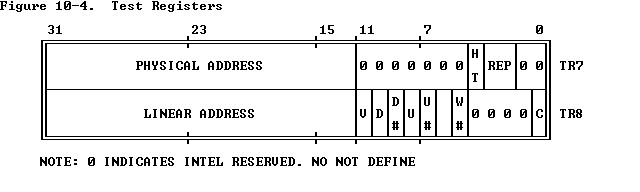
The test command register (TR6) contains a command and an address tag to use in performing the command:
C
This is the command bit. There are two TLB testing commands: write entries into the TLB, and perform TLB lookups. To cause an immediate write into the TLB entry, move a doubleword into TR6 that contains a 0 in this bit. To cause an immediate TLB lookup, move a doubleword into TR6 that contains a 1 in this bit.
Linear Address
On a TLB write, a TLB entry is allocated to this linear address; the rest of that TLB entry is set per the value of TR7 and the value just written into TR6. On a TLB lookup, the TLB is interrogated per this value; if one and only one TLB entry matches, the rest of the fields of TR6 and TR7 are set from the matching TLB entry.
V
The valid bit for this TLB entry. The TLB uses the valid bit to identify entries that contain valid data. Entries of the TLB that have not been assigned values have zero in the valid bit. All valid bits can be cleared by writing to CR3.
D, D#
The dirty bit (and its complement) for/from the TLB entry.
U, U#
The U/S bit (and its complement) for/from the TLB entry.
W, W#
The R/W bit (and its complement) for/from the TLB entry.
The meaning of these pairs of bits is given by Table 10-1, where X represents D, U, or W.
The test data register (TR7) holds data read from or data to be written to the TLB.
Physical Address
This is the data field of the TLB. On a write to the TLB, the TLB entry allocated to the linear address in TR6 is set to this value. On a TLB lookup, if HT is set, the data field (physical address) from the TLB is read out to this field. If HT is not set, this field is undefined.
HT
For a TLB lookup, the HT bit indicates whether the lookup was a hit (HT := 1) or a miss (HT := 0). For a TLB write, HT must be set to 1.
For a TLB write, selects which of four associative blocks of the TLB is to be written. For a TLB read, if HT is set, REP reports in which of the four associative blocks the tag was found; if HT is not set, REP is undefined.
Table 10-1. Meaning of D, U, and W Bit Pairs
X X# Effect during Value of bit X
TLB Lookup after TLB Write
0 0 (undefined) (undefined)
0 1 Match if X=0 Bit X becomes 0
1 0 Match if X=1 Bit X becomes 1
1 1 (undefined) (undefined)
10.6.3 Test Operations
To write a TLB entry:
- Move a doubleword to TR7 that contains the desired physical address, HT, and REP values. HT must contain 1. REP must point to the associative block in which to place the entry.
- Move a doubleword to TR6 that contains the appropriate linear address, and values for V, D, U, and W. Be sure C=0 for "write" command.
Be careful not to write duplicate tags; the results of doing so are undefined. To look up (read) a TLB entry:
- Move a doubleword to TR6 that contains the appropriate linear address and attributes. Be sure C=1 for "lookup" command.
- Store TR7. If the HT bit in TR7 indicates a hit, then the other values reveal the TLB contents. If HT indicates a miss, then the other values in TR7 are indeterminate.
For the purposes of testing, the V bit functions as another bit of addresss. The V bit for a lookup request should usually be set, so that uninitialized tags do not match. Lookups with V=0 are unpredictable if any tags are uninitialized.
【译】x86程序员手册41-10.6 TLB(快表)测试的更多相关文章
- 【译】x86程序员手册01
Intel 80386 Reference Programmer's Manual 80386程序员参考手册 Chapter 1 -- Introduction to the 80386 第1章 - ...
- 【译】x86程序员手册03 - 2.1内存组织和分段
2.1 Memory Organization and Segmentation 内存组织和分段 The physical memory of an 80386 system is organized ...
- 【译】x86程序员手册10 - 第4章系统架构
1.1.2 Part II -- Systems Programming 系统编程 This part presents those aspects of the architecture that ...
- 【译】x86程序员手册38-10.2实在址模式下的软件初始化
10.2 Software Initialization for Real-Address Mode 实地址模式的软件初始化 In real-address mode a few structur ...
- 【译】x86程序员手册11- 4.1系统寄存器
4.1 Systems Registers 系统寄存器 The registers designed for use by systems programmers fall into these cl ...
- 【译】x86程序员手册00 - 翻译起因
从上一次学习MIT的操作系统课程又过去了一年.上次学习并没有坚持下去.想来虽有种种原因,其还在自身无法坚持罢了.故此次再鼓起勇气重新学习,发现课程都已由2014改版为2016了.但大部分内容并没有改变 ...
- 【译】x86程序员手册40-10.5初始化的例子
10.5 Initialization Example初始化的例子 译注:本来想把这个例子全部注释完,但由于对intel汇编实不熟悉,有太多的伪指令,本人也是免强看懂,所以就不再做翻译了. $TITL ...
- 【译】x86程序员手册39-10.3切换到保护模式
10.3 Switching to Protected Mode 切换到保护模式 Setting the PE bit of the MSW in CR0 causes the 80386 to b ...
- 【译】x86程序员手册37-第10章 初始化
Chapter 10 Initialization 第10章 初始化 After a signal on the RESET pin, certain registers of the 80386 a ...
随机推荐
- ORA-09817
连接数据库的时候报:ORA-09817:write to audit file,在网上搜索了下,发现时oracle安装目录下面的磁盘空间不够,有不少人给出了解决办法,下面即是一例: 连接oracle ...
- XMU 1617 刘备闯三国之汉中之战 【BFS+染色】
1617: 刘备闯三国之汉中之战 Time Limit: 1000 MS Memory Limit: 128 MBSubmit: 6 Solved: 5[Submit][Status][Web B ...
- jackson实体为NULL或者为空不显示
1.实体上 @JsonInclude(JsonInclude.Include.NON_NULL) 将该注解放在属性上,如果该属性为null则不参与序列化: 如果放在类上边,那对这个类的全部属性起作用 ...
- jquery中的工具函数 Utilities
noConflict(deep) 释放$和Jquery的控制权 isFunction(obj) isArray(obj) isWindow(obj) isNumeric(obj) type(obj) ...
- HDU4612 Warm up —— 边双联通分量 + 重边 + 缩点 + 树上最长路
题目链接:http://acm.split.hdu.edu.cn/showproblem.php?pid=4612 Warm up Time Limit: 10000/5000 MS (Java/Ot ...
- Android沉浸式状态栏(透明状态栏)最佳实现
Android沉浸式状态栏(透明状态栏)最佳实现 在Android4.4之前,我们的应用没法改变手机的状态栏颜色,当我们打开应用时,会出现上图中左侧的画面,在屏幕的顶部有一条黑色的状态栏,和应用的风格 ...
- Spring Ioc容器核心类继承图
Spring IOC容器其实就是BeanFactory的实例,Spring中BeanFactory的类关系结构如下图: 从上图可以看出Beanfactory作为根接口又细化出三个二级接口,最后又有Co ...
- 【转】iOS笔记-自定义控件(OC)
原文网址:http://www.jianshu.com/p/f23862eb7b8a 导读: iOS开发中,很多时候系统提供的控件并不能很好的满足我们的需求,因此,自定义控件便成为搭建UI界面中必不可 ...
- bootstrap复选框和单选按钮
复选框和单选按钮标签包含在<Label>标签中<div class="checkbox"> <label><input type=&quo ...
- UVa 1363 Joseph's Problem (数论)
题意:给定 n,k,求 while(i <=n) k % i的和. 析:很明显是一个数论题,写几个样例你会发现规律,假设 p = k / i.那么k mod i = k - p*i,如果 k ...