
html5——多媒体(三)
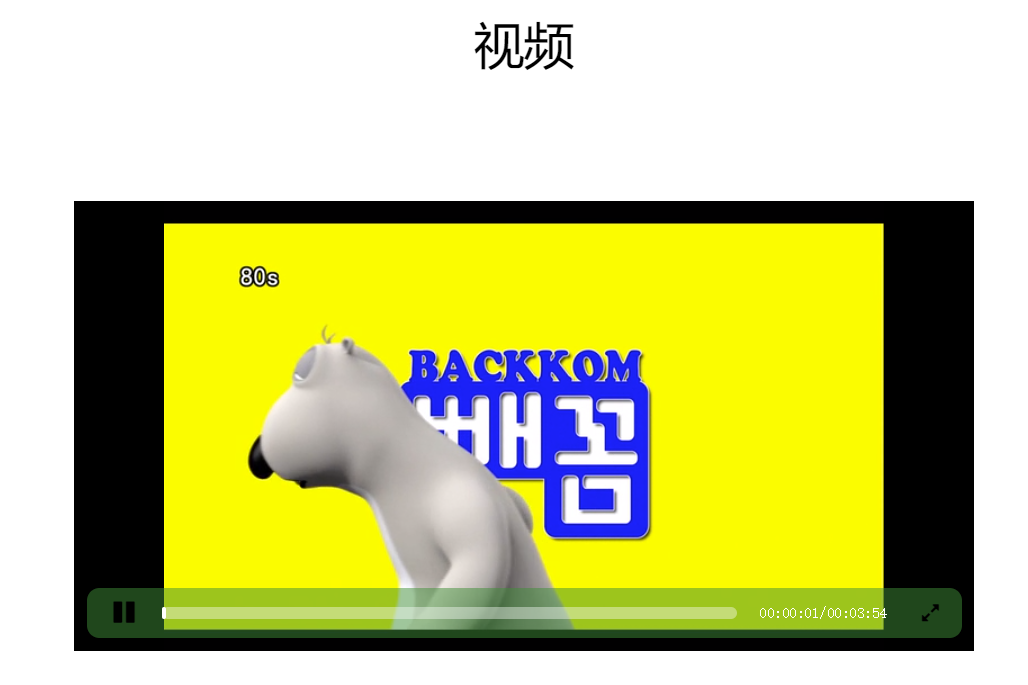
自定义进度条
1、video标签是内联块,可以设置宽高,但是需要用大盒子将其包裹起来进行定位
2、小盒子设计成进度条样式,并进行定位
3、进度条样式中的特殊按钮可以用web字体
4、通过点击实现视频的暂停/播放 改变按钮的样式
5、获取视频的总时长,放到totalTime中
6、当视频播放的时候, 动态谁知crrTime的值,并且改变进度条的样式
7、实现全屏效果
<!DOCTYPE html>

<html lang="en">

<head>

    <meta charset="UTF-8">

    <title>Title</title>

    <link rel="stylesheet" href="css/font-awesome.css">

    <style>

        * {

            padding: 0;

            margin: 0;

        }

        figcaption {

            text-align: center;

            font-size: 40px;

            margin: 50px auto;

        }

        .player {

            width: 720px;

            height: 360px;

            margin: 100px auto;

            background-color: #000;

            position: relative;

        }

        video {

            display: block;

            margin: 0 auto;

            height: 100%;

        }

        .control {

            width: 700px;

            height: 40px;

            position: absolute;

            background-color: rgba(63, 141, 56, 0.5);

            bottom: 10px;

            left: 10px;

            border-radius: 10px;

        }

        .switch {

            position: absolute;

            width: 40px;

            height: 40px;

            left: 10px;

            top: 0;

            font-size: 20px;

            line-height: 40px;

            text-align: center;

        }

        .progress {

            position: absolute;

            width: 460px;

            height: 10px;

            left: 60px;

            top: 15px;

            background-color: rgba(255, 255, 255, 0.4);

            border-radius: 5px;

        }

        .curr-progress {

            width: 0px;

            height: 100%;

            background-color: rgba(255, 255, 255, 1);

            border-radius: 10px;

        }

        .time {

            position: absolute;

            height: 40px;

            right: 60px;

            top: 0px;

            font: 400 12px/40px "simsun";

            text-align: center;

            color: white;

        }

        .extend {

            position: absolute;

            top: 0;

            right: 5px;

            width: 40px;

            height: 40px;

            text-align: center;

            line-height: 40px;

        }

    </style>

</head>

<body>

<figure>

    <figcaption>视频</figcaption>

    <div class="player">

        <video src="video/movie.mp4"></video>

        <div class="control">

            <span class="switch icon-play"></span>

            <div class="progress">

                <div class="curr-progress"></div>

            </div>

            <div class="time">

                <span class="curr-time">00:00:00</span>/<span class="total-time">00:00:00</span>

            </div>

            <!-- 全屏-->

            <span class="extend icon-resize-full"></span>

        </div>

    </div>

</figure>

<script>

    var player = document.querySelector(".player");

    var video = document.querySelector("video");

    var swt = document.querySelector(".switch");

    var extend = document.querySelector(".extend");

    //通过点击 实现 视频的暂停/播放 改变按钮的样式

    swt.onclick = function () {

        if (video.paused) {

            video.play();

            player.style.backgroundImage = "url()";

            swt.classList.remove("icon-play");

            swt.classList.add("icon-pause");

        }

        else {

            video.pause();

            swt.classList.remove("icon-pause");

            swt.classList.add("icon-play");

        }

    }

    var totalTime = 0;

    var currTime = 0;

    //获取视频的总时长,放到totalTime中

    video.oncanplay = function (ev) {

        totalTime = video.duration;

        var h = Math.floor(totalTime / 3600);

        var m = Math.floor(totalTime % 3600 / 60);

        var s = Math.floor(totalTime % 3600 % 60);

        h = h >= 10 ? h : "0" + h;

        m = m >= 10 ? h : "0" + m;

        s = s >= 10 ? s : "0" + s;

        document.querySelector(".total-time").innerHTML = h + ":" + m + ":" + s;

    }

    video.ontimeupdate = function (ev) {

        currTime = video.currentTime;

        var h = Math.floor(currTime / 3600);

        var m = Math.floor(currTime % 3600 / 60);

        var s = Math.floor(currTime % 3600 % 60);

        h = h >= 10 ? h : "0" + h;

        m = m >= 10 ? h : "0" + m;

        s = s >= 10 ? s : "0" + s;

        document.querySelector(".curr-time").innerHTML = h + ":" + m + ":" + s;

        var xishu = totalTime / currTime;

        document.querySelector(".curr-progress").style.width = (460 / xishu) + "px";

    }

    extend.onclick = function () {

        video.webkitRequestFullScreen();

    }

</script>

</body>

</html>
html5——多媒体(三)的更多相关文章
- Html5多媒体相关的API---video
Html5多媒体相关的API---video 在HTML5中,新增了两个元素---video元素与audio元素,其中video元素专门用来播放网络上的视频或电影,而audio元素专门用来播放网络上的 ...
- HTML5 多媒体音视频处理
HTML5 多媒体音视频处理 版权声明:未经博主授权,内容严禁转载 ! 音频处理 - audio HTML5 Audio 音频 目前大多数音频是通过哦插件的形式来播放的. 不同浏览器在网页上播放音频的 ...
- 三天学会HTML5 ——多媒体元素的使用
目录 1. HTML5 Media-Video 2. HTML5 Media-Audio 3. 拖拽操作 4. 获取位置信息 5. 使用Google 地图获取位置信息 多媒体是互联网中的最重要的一部分 ...
- HTML5 多媒体标签
一.多媒体 embed 标签 embed可以用来插入各种多媒体,格式可以是 Midi.Wav.AIFF.AU.MP3等等.url为音频或视频文件及其路径,可以是相对路径或绝对路径. 语法格式: < ...
- HTML5系列三(多媒体播放、本地存储、本地数据库、离线应用)
各浏览器对编码格式的支持情况 audio和video元素的属性介绍 1.src:媒体数据的URL地址 <video src="pr6.mp4"></video&g ...
- 从零开始学 Web 之 HTML5(三)网络监听,全屏,文件读取,地理定位接口,应用程序缓存
大家好,这里是「 从零开始学 Web 系列教程 」,并在下列地址同步更新...... github:https://github.com/Daotin/Web 微信公众号:Web前端之巅 博客园:ht ...
- html5多媒体Video/Audio
video: 1.常见的视频格式 视频的组成部分:画面.音频.编码格式 视频编码:H.264.theora.VP8(google开源) 2.常见的音频格式 编码:AAC.MP3 ...
- 用仿ActionScript的语法来编写html5——第三篇,鼠标事件与游戏人物移动
第三篇,鼠标事件与游戏人物移动 一,假设假设,所有可添加鼠标事件的对象,都有一个mouseEvent方法,添加的鼠标事件同过这个mouseEvent来调用.这样的话,添加鼠标事件,其实只需要给canv ...
- 初学HTML5系列三:事件
Window 事件属性 针对 window 对象触发的事件(应用到 <body> 标签): 属性 值 描述 onafterprint script 文档打印之后运行的脚本. onbefor ...
随机推荐
- Thread的方法join()使用
join()的作用:Waits for this thread to die.等待线程对象销毁.在Thread源码中可以看到join源码是使用了wait()方法来实现等待功能. 因为join()内部使 ...
- 在IIS6,7中部署ASP.NET网站[转]
阅读目录 开始 查看web.config文件 在IIS中创建网站 IIS6 添加扩展名映射 IIS6 无扩展名的映射 目录的写入权限 SQL SERVER的配置 在IIS7中部署ASP.NET程序 8 ...
- - > 并查集+路径压缩(详解)(第一节)
先举一个友爱的例子解释一下并查集: 话说江湖上散落着各式各样的大侠,有上千个之多. 他们没有什么正当职业,整天背着剑在外面走来走去,碰到和自己不是一路人的,就免不了要打一架.但大侠们有一个优点就是讲义 ...
- Ubuntu下的软件一般安装在哪个文件夹里
一般安装在/usr下,里面很多文件夹,根据文件的类型,分门别类,不是一个软件一个文件夹.以前老版本的Linux习惯放在/usr/local目录下. 部分软件放在/opt下,则是一个软件统一在一个文件夹 ...
- 美河LINUX 内核学习视频
Linux内核从原理到代码详解 培训视频 Linux内核源码研读与实战演练 [7.10][美河资料发布小组@aipepsi][linux内核分析视频教程] 炼数成金Linux内核探秘 [11.23][ ...
- Redis: Useful commands
SELECT X - Select database (the X must be int) CONFIG GET databases - Get databases number INFO keys ...
- Windows 注册表常用操作
1 添加一个主键(比如在HKEY_LOCAL_MACHINE\SOFTWARE\中添加一个ABCEDFGHIJKLMN主键) Windows Registry Editor Version 5.00 ...
- LeetCode 160. Intersection of Two Linked Lists (两个链表的交点)
Write a program to find the node at which the intersection of two singly linked lists begins. For ex ...
- ES6 一些常用使用
//1.解构数组 let arr1 = ['apple', 'coffee', 'cake']; let [fruit, drink, dessert] = arr1; console.log(fru ...
- 解析java中volatilekeyword
在java多线程编程中常常volatile,有时候这个keyword和synchronized 或者lock常常有人混淆.详细解析例如以下: 在多线程的环境中会存在成员变量可见性问题: java的每一 ...