
C# Task 多任务:C# 扩展TaskScheduler实现独立线程池,支持多任务批量处理,互不干扰,无缝兼容Task
先上源码:
https://gitee.com/s0611163/TaskSchedulerEx
为什么编写TaskSchedulerEx类?
因为.NET默认线程池只有一个线程池,如果某个批量任务一直占着大量线程,甚至耗尽默认线程池,则会严重影响应用程序域中其它任务或批量任务的性能。
特点:
1、使用独立线程池,线程池中线程分为核心线程和辅助线程,辅助线程会动态增加和释放,且总线程数不大于参数_maxThreadCount
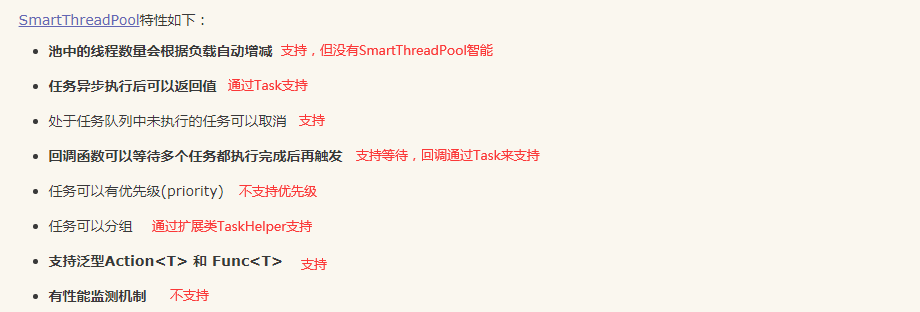
2、无缝兼容Task,使用上和Task一样,可以用它来实现异步,参见:C# async await 异步执行方法封装 替代 BackgroundWorker
3、队列中尚未执行的任务可以取消
4、通过扩展类TaskHelper实现任务分组
5、和SmartThreadPool对比,优点是无缝兼容Task类,和Task类使用没有区别,因为它本身就是对Task、TaskScheduler的扩展,所以Task类的ContinueWith、WaitAll等方法它都支持,以及兼容async、await异步编程
6、代码量相当精简,TaskSchedulerEx类只有260多行代码
7、池中的线程数量会根据负载自动增减,支持,但没有SmartThreadPool智能,为了性能,使用了比较笨的方式实现,不知道大家有没有既智能,性能又高的方案,我有一个思路,在定时器中计算每个任务执行平均耗时,然后使用公式(线程数 = CPU核心数 * ( 本地计算时间 + 等待时间 ) / 本地计算时间)来计算最佳线程数,然后按最佳线程数来动态创建线程,但这个计算过程可能会牺牲性能
对比SmartThreadPool:
TaskSchedulerEx类代码(使用Semaphore实现):


using System;

using System.Collections.Concurrent;

using System.Collections.Generic;

using System.Linq;

using System.Runtime.InteropServices;

using System.Text;

using System.Threading;

using System.Threading.Tasks;

namespace Utils

{

    /// <summary>

    /// TaskScheduler扩展

    /// 每个实例都是独立线程池

    /// </summary>

    public class TaskSchedulerEx : TaskScheduler, IDisposable

    {

        #region 外部方法

        [DllImport("kernel32.dll", EntryPoint = "SetProcessWorkingSetSize")]

        public static extern int SetProcessWorkingSetSize(IntPtr process, int minSize, int maxSize);

        #endregion

        #region 变量属性事件

        private ConcurrentQueue<Task> _tasks = new ConcurrentQueue<Task>();

        private int _coreThreadCount = 0;

        private int _maxThreadCount = 0;

        private int _auxiliaryThreadTimeOut = 20000; //辅助线程释放时间

        private int _activeThreadCount = 0;

        private System.Timers.Timer _timer;

        private object _lockCreateTimer = new object();

        private bool _run = true;

        private Semaphore _sem = null;

        private int _semMaxCount = int.MaxValue; //可以同时授予的信号量的最大请求数

        private int _semCount = 0; //可用信号量请求数

        private int _runCount = 0; //正在执行的和等待执行的任务数量

        /// <summary>

        /// 活跃线程数

        /// </summary>

        public int ActiveThreadCount

        {

            get { return _activeThreadCount; }

        }

        /// <summary>

        /// 核心线程数

        /// </summary>

        public int CoreThreadCount

        {

            get { return _coreThreadCount; }

        }

        /// <summary>

        /// 最大线程数

        /// </summary>

        public int MaxThreadCount

        {

            get { return _maxThreadCount; }

        }

        #endregion

        #region 构造函数

        /// <summary>

        /// TaskScheduler扩展

        /// 每个实例都是独立线程池

        /// </summary>

        /// <param name="coreThreadCount">核心线程数(大于或等于0,不宜过大)(如果是一次性使用,则设置为0比较合适)</param>

        /// <param name="maxThreadCount">最大线程数</param>

        public TaskSchedulerEx(int coreThreadCount = 10, int maxThreadCount = 20)

        {

            _sem = new Semaphore(0, _semMaxCount);

            _maxThreadCount = maxThreadCount;

            CreateCoreThreads(coreThreadCount);

        }

        #endregion

        #region override GetScheduledTasks

        protected override IEnumerable<Task> GetScheduledTasks()

        {

            return _tasks;

        }

        #endregion

        #region override TryExecuteTaskInline

        protected override bool TryExecuteTaskInline(Task task, bool taskWasPreviouslyQueued)

        {

            return false;

        }

        #endregion

        #region override QueueTask

        protected override void QueueTask(Task task)

        {

            _tasks.Enqueue(task);

            while (_semCount >= _semMaxCount) //信号量已满,等待

            {

                Thread.Sleep(1);

            }

            _sem.Release();

            Interlocked.Increment(ref _semCount);

            Interlocked.Increment(ref _runCount);

            if (_activeThreadCount < _maxThreadCount && _activeThreadCount < _runCount)

            {

                CreateThread();

            }

        }

        #endregion

        #region 资源释放

        /// <summary>

        /// 资源释放

        /// 队列中尚未执行的任务不再执行

        /// </summary>

        public void Dispose()

        {

            _run = false;

            if (_timer != null)

            {

                _timer.Stop();

                _timer.Dispose();

                _timer = null;

            }

            while (_activeThreadCount > 0)

            {

                _sem.Release();

                Interlocked.Increment(ref _semCount);

            }

        }

        #endregion

        #region 创建核心线程池

        /// <summary>

        /// 创建核心线程池

        /// </summary>

        private void CreateCoreThreads(int? coreThreadCount = null)

        {

            if (coreThreadCount != null) _coreThreadCount = coreThreadCount.Value;

            for (int i = 0; i < _coreThreadCount; i++)

            {

                Interlocked.Increment(ref _activeThreadCount);

                Thread thread = null;

                thread = new Thread(new ThreadStart(() =>

                {

                    Task task;

                    while (_run)

                    {

                        if (_tasks.TryDequeue(out task))

                        {

                            TryExecuteTask(task);

                            Interlocked.Decrement(ref _runCount);

                        }

                        else

                        {

                            _sem.WaitOne();

                            Interlocked.Decrement(ref _semCount);

                        }

                    }

                    Interlocked.Decrement(ref _activeThreadCount);

                    if (_activeThreadCount == 0)

                    {

                        GC.Collect();

                        GC.WaitForPendingFinalizers();

                        if (Environment.OSVersion.Platform == PlatformID.Win32NT)

                        {

                            SetProcessWorkingSetSize(System.Diagnostics.Process.GetCurrentProcess().Handle, -1, -1);

                        }

                    }

                }));

                thread.IsBackground = true;

                thread.Start();

            }

        }

        #endregion

        #region 创建辅助线程

        /// <summary>

        /// 创建辅助线程

        /// </summary>

        private void CreateThread()

        {

            Interlocked.Increment(ref _activeThreadCount);

            Thread thread = null;

            thread = new Thread(new ThreadStart(() =>

            {

                Task task;

                DateTime dt = DateTime.Now;

                while (_run && DateTime.Now.Subtract(dt).TotalMilliseconds < _auxiliaryThreadTimeOut)

                {

                    if (_tasks.TryDequeue(out task))

                    {

                        TryExecuteTask(task);

                        Interlocked.Decrement(ref _runCount);

                        dt = DateTime.Now;

                    }

                    else

                    {

                        _sem.WaitOne(_auxiliaryThreadTimeOut);

                        Interlocked.Decrement(ref _semCount);

                    }

                }

                Interlocked.Decrement(ref _activeThreadCount);

                if (_activeThreadCount == _coreThreadCount)

                {

                    GC.Collect();

                    GC.WaitForPendingFinalizers();

                    if (Environment.OSVersion.Platform == PlatformID.Win32NT)

                    {

                        SetProcessWorkingSetSize(System.Diagnostics.Process.GetCurrentProcess().Handle, -1, -1);

                    }

                }

            }));

            thread.IsBackground = true;

            thread.Start();

        }

        #endregion

        #region 全部取消

        /// <summary>

        /// 全部取消

        /// 取消队列中尚未执行的任务

        /// </summary>

        public void CancelAll()

        {

            Task tempTask;

            while (_tasks.TryDequeue(out tempTask))

            {

                Interlocked.Decrement(ref _runCount);

            }

        }

        #endregion

    }

}
TaskSchedulerEx类代码(使用AutoResetEvent实现):
using System;

using System.Collections.Concurrent;

using System.Collections.Generic;

using System.Linq;

using System.Runtime.InteropServices;

using System.Text;

using System.Threading;

using System.Threading.Tasks;

namespace Utils

{

    /// <summary>

    /// TaskScheduler扩展

    /// 每个实例都是独立线程池

    /// </summary>

    public class TaskSchedulerEx : TaskScheduler, IDisposable

    {

        #region 外部方法

        [DllImport("kernel32.dll", EntryPoint = "SetProcessWorkingSetSize")]

        public static extern int SetProcessWorkingSetSize(IntPtr process, int minSize, int maxSize);

        #endregion

        #region 变量属性事件

        private ConcurrentQueue<Task> _tasks = new ConcurrentQueue<Task>();

        private int _coreThreadCount = 0;

        private int _maxThreadCount = 0;

        private int _auxiliaryThreadTimeOut = 20000; //辅助线程释放时间

        private int _activeThreadCount = 0;

        private System.Timers.Timer _timer;

        private object _lockCreateTimer = new object();

        private bool _run = true;

        private AutoResetEvent _evt = new AutoResetEvent(false);

        /// <summary>

        /// 活跃线程数

        /// </summary>

        public int ActiveThreadCount

        {

            get { return _activeThreadCount; }

        }

        /// <summary>

        /// 核心线程数

        /// </summary>

        public int CoreThreadCount

        {

            get { return _coreThreadCount; }

        }

        /// <summary>

        /// 最大线程数

        /// </summary>

        public int MaxThreadCount

        {

            get { return _maxThreadCount; }

        }

        #endregion

        #region 构造函数

        /// <summary>

        /// TaskScheduler扩展

        /// 每个实例都是独立线程池

        /// </summary>

        /// <param name="coreThreadCount">核心线程数(大于或等于0,不宜过大)(如果是一次性使用,则设置为0比较合适)</param>

        /// <param name="maxThreadCount">最大线程数</param>

        public TaskSchedulerEx(int coreThreadCount = 10, int maxThreadCount = 20)

        {

            _maxThreadCount = maxThreadCount;

            CreateCoreThreads(coreThreadCount);

        }

        #endregion

        #region override GetScheduledTasks

        protected override IEnumerable<Task> GetScheduledTasks()

        {

            return _tasks;

        }

        #endregion

        #region override TryExecuteTaskInline

        protected override bool TryExecuteTaskInline(Task task, bool taskWasPreviouslyQueued)

        {

            return false;

        }

        #endregion

        #region override QueueTask

        protected override void QueueTask(Task task)

        {

            CreateTimer();

            _tasks.Enqueue(task);

            _evt.Set();

        }

        #endregion

        #region 资源释放

        /// <summary>

        /// 资源释放

        /// 队列中尚未执行的任务不再执行

        /// </summary>

        public void Dispose()

        {

            _run = false;

            if (_timer != null)

            {

                _timer.Stop();

                _timer.Dispose();

                _timer = null;

            }

            while (_activeThreadCount > 0)

            {

                _evt.Set();

            }

        }

        #endregion

        #region 创建核心线程池

        /// <summary>

        /// 创建核心线程池

        /// </summary>

        private void CreateCoreThreads(int? coreThreadCount = null)

        {

            if (coreThreadCount != null) _coreThreadCount = coreThreadCount.Value;

            for (int i = 0; i < _coreThreadCount; i++)

            {

                Interlocked.Increment(ref _activeThreadCount);

                Thread thread = null;

                thread = new Thread(new ThreadStart(() =>

                {

                    Task task;

                    while (_run)

                    {

                        if (_tasks.TryDequeue(out task))

                        {

                            TryExecuteTask(task);

                        }

                        else

                        {

                            _evt.WaitOne();

                        }

                    }

                    Interlocked.Decrement(ref _activeThreadCount);

                    if (_activeThreadCount == 0)

                    {

                        GC.Collect();

                        GC.WaitForPendingFinalizers();

                        if (Environment.OSVersion.Platform == PlatformID.Win32NT)

                        {

                            SetProcessWorkingSetSize(System.Diagnostics.Process.GetCurrentProcess().Handle, -1, -1);

                        }

                    }

                }));

                thread.IsBackground = true;

                thread.Start();

            }

        }

        #endregion

        #region 创建辅助线程

        /// <summary>

        /// 创建辅助线程

        /// </summary>

        private void CreateThread()

        {

            Interlocked.Increment(ref _activeThreadCount);

            Thread thread = null;

            thread = new Thread(new ThreadStart(() =>

            {

                Task task;

                DateTime dt = DateTime.Now;

                while (_run && DateTime.Now.Subtract(dt).TotalMilliseconds < _auxiliaryThreadTimeOut)

                {

                    if (_tasks.TryDequeue(out task))

                    {

                        TryExecuteTask(task);

                        dt = DateTime.Now;

                    }

                    else

                    {

                        _evt.WaitOne(_auxiliaryThreadTimeOut);

                    }

                }

                Interlocked.Decrement(ref _activeThreadCount);

                if (_activeThreadCount == _coreThreadCount)

                {

                    GC.Collect();

                    GC.WaitForPendingFinalizers();

                    if (Environment.OSVersion.Platform == PlatformID.Win32NT)

                    {

                        SetProcessWorkingSetSize(System.Diagnostics.Process.GetCurrentProcess().Handle, -1, -1);

                    }

                }

            }));

            thread.IsBackground = true;

            thread.Start();

        }

        #endregion

        #region 创建定时器

        private void CreateTimer()

        {

            if (_timer == null) //_timer不为空时,跳过,不走lock,提升性能

            {

                if (_activeThreadCount >= _coreThreadCount && _activeThreadCount < _maxThreadCount) //活跃线程数达到最大线程数时,跳过,不走lock,提升性能

                {

                    lock (_lockCreateTimer)

                    {

                        if (_timer == null)

                        {

                            _timer = new System.Timers.Timer();

                            _timer.Interval = _coreThreadCount == 0 ? 1 : 500;

                            _timer.Elapsed += (s, e) =>

                            {

                                if (_activeThreadCount >= _coreThreadCount && _activeThreadCount < _maxThreadCount)

                                {

                                    if (_tasks.Count > 0)

                                    {

                                        if (_timer.Interval != 20) _timer.Interval = 20;

                                        CreateThread();

                                    }

                                    else

                                    {

                                        if (_timer.Interval != 500) _timer.Interval = 500;

                                    }

                                }

                                else

                                {

                                    if (_timer != null)

                                    {

                                        _timer.Stop();

                                        _timer.Dispose();

                                        _timer = null;

                                    }

                                }

                            };

                            _timer.Start();

                        }

                    }

                }

            }

        }

        #endregion

        #region 全部取消

        /// <summary>

        /// 全部取消

        /// 取消队列中尚未执行的任务

        /// </summary>

        public void CancelAll()

        {

            Task tempTask;

            while (_tasks.TryDequeue(out tempTask)) { }

        }

        #endregion

    }

}
RunHelper类代码:
using System;

using System.Collections.Generic;

using System.Linq;

using System.Text;

using System.Threading;

using System.Threading.Tasks;

namespace Utils

{

    /// <summary>

    /// 线程工具类

    /// </summary>

    public static class RunHelper

    {

        #region 变量属性事件

        #endregion

        #region 线程中执行

        /// <summary>

        /// 线程中执行

        /// </summary>

        public static Task Run(this TaskScheduler scheduler, Action<object> doWork, object arg = null, Action<Exception> errorAction = null)

        {

            return Task.Factory.StartNew((obj) =>

            {

                try

                {

                    doWork(obj);

                }

                catch (Exception ex)

                {

                    if (errorAction != null) errorAction(ex);

                    LogUtil.Error(ex, "ThreadUtil.Run错误");

                }

            }, arg, CancellationToken.None, TaskCreationOptions.None, scheduler);

        }

        #endregion

        #region 线程中执行

        /// <summary>

        /// 线程中执行

        /// </summary>

        public static Task Run(this TaskScheduler scheduler, Action doWork, Action<Exception> errorAction = null)

        {

            return Task.Factory.StartNew(() =>

            {

                try

                {

                    doWork();

                }

                catch (Exception ex)

                {

                    if (errorAction != null) errorAction(ex);

                    LogUtil.Error(ex, "ThreadUtil.Run错误");

                }

            }, CancellationToken.None, TaskCreationOptions.None, scheduler);

        }

        #endregion

        #region 线程中执行

        /// <summary>

        /// 线程中执行

        /// </summary>

        public static Task<T> Run<T>(this TaskScheduler scheduler, Func<object, T> doWork, object arg = null, Action<Exception> errorAction = null)

        {

            return Task.Factory.StartNew<T>((obj) =>

            {

                try

                {

                    return doWork(obj);

                }

                catch (Exception ex)

                {

                    if (errorAction != null) errorAction(ex);

                    LogUtil.Error(ex, "ThreadUtil.Run错误");

                    return default(T);

                }

            }, arg, CancellationToken.None, TaskCreationOptions.None, scheduler);

        }

        #endregion

        #region 线程中执行

        /// <summary>

        /// 线程中执行

        /// </summary>

        public static Task<T> Run<T>(this TaskScheduler scheduler, Func<T> doWork, Action<Exception> errorAction = null)

        {

            return Task.Factory.StartNew<T>(() =>

            {

                try

                {

                    return doWork();

                }

                catch (Exception ex)

                {

                    if (errorAction != null) errorAction(ex);

                    LogUtil.Error(ex, "ThreadUtil.Run错误");

                    return default(T);

                }

            }, CancellationToken.None, TaskCreationOptions.None, scheduler);

        }

        #endregion

        #region 线程中执行

        /// <summary>

        /// 线程中执行

        /// </summary>

        public static async Task<T> RunAsync<T>(this TaskScheduler scheduler, Func<object, T> doWork, object arg = null, Action<Exception> errorAction = null)

        {

            return await Task.Factory.StartNew<T>((obj) =>

            {

                try

                {

                    return doWork(obj);

                }

                catch (Exception ex)

                {

                    if (errorAction != null) errorAction(ex);

                    LogUtil.Error(ex, "ThreadUtil.Run错误");

                    return default(T);

                }

            }, arg, CancellationToken.None, TaskCreationOptions.None, scheduler);

        }

        #endregion

        #region 线程中执行

        /// <summary>

        /// 线程中执行

        /// </summary>

        public static async Task<T> RunAsync<T>(this TaskScheduler scheduler, Func<T> doWork, Action<Exception> errorAction = null)

        {

            return await Task.Factory.StartNew<T>(() =>

            {

                try

                {

                    return doWork();

                }

                catch (Exception ex)

                {

                    if (errorAction != null) errorAction(ex);

                    LogUtil.Error(ex, "ThreadUtil.Run错误");

                    return default(T);

                }

            }, CancellationToken.None, TaskCreationOptions.None, scheduler);

        }

        #endregion

    }

}
TaskHelper扩展类:
using System;

using System.Collections.Generic;

using System.Linq;

using System.Text;

using System.Threading.Tasks;

namespace Utils

{

    /// <summary>

    /// Task帮助类基类

    /// </summary>

    public class TaskHelper

    {

        #region 变量

        /// <summary>

        /// 处理器数

        /// </summary>

        private static int _processorCount = Environment.ProcessorCount;

        #endregion

        #region UI任务

        private static TaskScheduler _UITask;

        /// <summary>

        /// UI任务(2-4个线程)

        /// </summary>

        public static TaskScheduler UITask

        {

            get

            {

                if (_UITask == null) _UITask = new TaskSchedulerEx(2, 4);

                return _UITask;

            }

        }

        #endregion

        #region 菜单任务

        private static TaskScheduler _MenuTask;

        /// <summary>

        /// 菜单任务(2-4个线程)

        /// </summary>

        public static TaskScheduler MenuTask

        {

            get

            {

                if (_MenuTask == null) _MenuTask = new TaskSchedulerEx(2, 4);

                return _MenuTask;

            }

        }

        #endregion

        #region 计算任务

        private static TaskScheduler _CalcTask;

        /// <summary>

        /// 计算任务(线程数:处理器数*2)

        /// </summary>

        public static TaskScheduler CalcTask

        {

            get

            {

                if (_CalcTask == null) _CalcTask = new LimitedTaskScheduler(_processorCount * 2);

                return _CalcTask;

            }

        }

        #endregion

        #region 网络请求

        private static TaskScheduler _RequestTask;

        /// <summary>

        /// 网络请求(8-32个线程)

        /// </summary>

        public static TaskScheduler RequestTask

        {

            get

            {

                if (_RequestTask == null) _RequestTask = new TaskSchedulerEx(8, 32);

                return _RequestTask;

            }

        }

        #endregion

        #region 数据库任务

        private static TaskScheduler _DBTask;

        /// <summary>

        /// 数据库任务(8-32个线程)

        /// </summary>

        public static TaskScheduler DBTask

        {

            get

            {

                if (_DBTask == null) _DBTask = new TaskSchedulerEx(8, 32);

                return _DBTask;

            }

        }

        #endregion

        #region IO任务

        private static TaskScheduler _IOTask;

        /// <summary>

        /// IO任务(8-32个线程)

        /// </summary>

        public static TaskScheduler IOTask

        {

            get

            {

                if (_IOTask == null) _IOTask = new TaskSchedulerEx(8, 32);

                return _IOTask;

            }

        }

        #endregion

        #region 首页任务

        private static TaskScheduler _MainPageTask;

        /// <summary>

        /// 首页任务(8-32个线程)

        /// </summary>

        public static TaskScheduler MainPageTask

        {

            get

            {

                if (_MainPageTask == null) _MainPageTask = new TaskSchedulerEx(8, 32);

                return _MainPageTask;

            }

        }

        #endregion

        #region 图片加载任务

        private static TaskScheduler _LoadImageTask;

        /// <summary>

        /// 图片加载任务(8-32个线程)

        /// </summary>

        public static TaskScheduler LoadImageTask

        {

            get

            {

                if (_LoadImageTask == null) _LoadImageTask = new TaskSchedulerEx(8, 32);

                return _LoadImageTask;

            }

        }

        #endregion

        #region 浏览器任务

        private static TaskScheduler _BrowserTask;

        /// <summary>

        /// 浏览器任务(2-4个线程)

        /// </summary>

        public static TaskScheduler BrowserTask

        {

            get

            {

                if (_BrowserTask == null) _BrowserTask = new TaskSchedulerEx(2, 4);

                return _BrowserTask;

            }

        }

        #endregion

    }

}
Form1.cs测试代码:
using System;

using System.Collections.Generic;

using System.ComponentModel;

using System.Data;

using System.Drawing;

using System.Linq;

using System.Management;

using System.Reflection;

using System.Runtime.InteropServices;

using System.Text;

using System.Threading;

using System.Threading.Tasks;

using System.Windows.Forms;

using Utils;

namespace test

{

    public partial class Form1 : Form

    {

        private TaskSchedulerEx _taskSchedulerEx = null;

        private TaskSchedulerEx _taskSchedulerExSmall = null;

        private TaskSchedulerEx _task = null;

        public Form1()

        {

            InitializeComponent();

            _taskSchedulerEx = new TaskSchedulerEx(50, 500);

            _taskSchedulerExSmall = new TaskSchedulerEx(5, 50);

            _task = new TaskSchedulerEx(2, 10);

        }

        private void Form1_Load(object sender, EventArgs e)

        {

        }

        /// <summary>

        /// 模拟大量网络请求任务

        /// </summary>

        private void button1_Click(object sender, EventArgs e)

        {

            DoTask(_taskSchedulerEx, 200000, 1000, 20);

        }

        /// <summary>

        /// 模拟CPU密集型任务

        /// </summary>

        private void button2_Click(object sender, EventArgs e)

        {

            DoTask(_taskSchedulerEx, 100000, 2000, 1);

        }

        /// <summary>

        /// 模拟大量网络请求任务

        /// </summary>

        private void button3_Click(object sender, EventArgs e)

        {

            DoTask(_taskSchedulerExSmall, 2000, 100, 20);

        }

        /// <summary>

        /// 模拟CPU密集型任务

        /// </summary>

        private void button4_Click(object sender, EventArgs e)

        {

            DoTask(_taskSchedulerExSmall, 2000, 100, 1);

        }

        /// <summary>

        /// 模拟任务

        /// </summary>

        /// <param name="scheduler">scheduler</param>

        /// <param name="taskCount">任务数量</param>

        /// <param name="logCount">每隔多少条数据打一个日志</param>

        /// <param name="delay">模拟延迟或耗时(毫秒)</param>

        private void DoTask(TaskSchedulerEx scheduler, int taskCount, int logCount, int delay)

        {

            _task.Run(() =>

            {

                Log("开始");

                DateTime dt = DateTime.Now;

                List<Task> taskList = new List<Task>();

                for (int i = 1; i <= taskCount; i++)

                {

                    Task task = scheduler.Run((obj) =>

                    {

                        var k = (int)obj;

                        Thread.Sleep(delay); //模拟延迟或耗时

                        if (k % logCount == 0)

                        {

                            Log("最大线程数:" + scheduler.MaxThreadCount + " 核心线程数:" + scheduler.CoreThreadCount + " 活跃线程数:" + scheduler.ActiveThreadCount.ToString().PadLeft(4, ' ') + " 处理数/总数:" + k + " / " + taskCount);

                        }

                    }, i, (ex) =>

                    {

                        Log(ex.Message);

                    });

                    taskList.Add(task);

                }

                Task.WaitAll(taskList.ToArray());

                double d = DateTime.Now.Subtract(dt).TotalSeconds;

                Log("完成,耗时:" + d + "秒");

            });

        }

        private void Form1_FormClosed(object sender, FormClosedEventArgs e)

        {

            if (_taskSchedulerEx != null)

            {

                _taskSchedulerEx.Dispose(); //释放资源

                _taskSchedulerEx = null;

            }

        }

    }

}
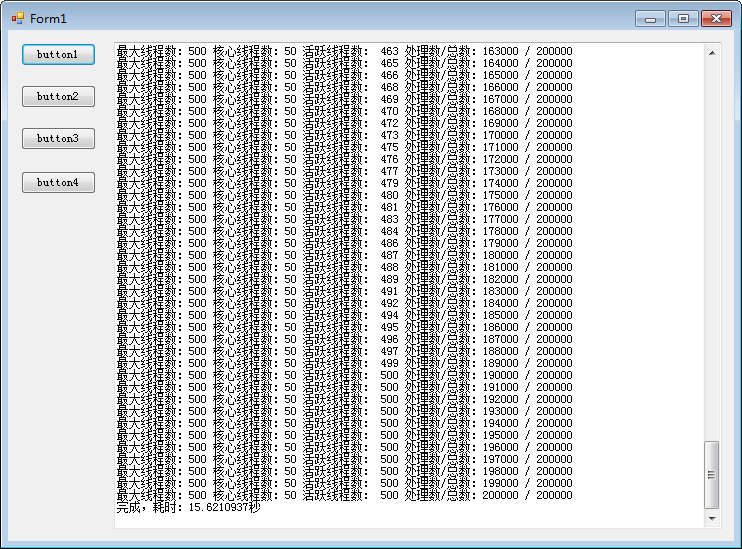
测试截图:
C# Task 多任务:C# 扩展TaskScheduler实现独立线程池,支持多任务批量处理,互不干扰,无缝兼容Task的更多相关文章
- 浅谈线程池(中):独立线程池的作用及IO线程池
原文地址:http://blog.zhaojie.me/2009/07/thread-pool-2-dedicate-pool-and-io-pool.html 在上一篇文章中,我们简单讨论了线程池的 ...
- 实现运行在独立线程池的调度功能,基于Spring和Annotation
使用Spring的注解(@Scheduled)声明多个调度的时候,由于其默认实现机制,将导致多个调度方法之间相互干扰(简单理解就是调度不按配置的时间点执行). 为了解决该问题尝试了修改线程池大小,但是 ...
- Dubbo扩展点应用之四线程池
线程池也是Dubbo自动自适应扩展点之一,也可以自定义线程池.Dubbo中已实现的线程池扩展点有: 其中框架提供的线程池都是通过创建真实的业务线程池进行操作的,目前线程池模型中有两个和Java中线程池 ...
- windows下利用线程池完成多任务的分配和运行
在做项目的过程中有时候为了提升效率,用了多线程的方法来对任务进行分割和应用,后来发现,采用线程池的方法能更好的利用线程资源来计算任务,网上有很多关于如何运行线程池的例子,msdn上也给出了对应的例子: ...
- 基于SmartThreadPool线程池技术实现多任务批量处理
一.多线程技术应用场景介绍 本期同样带给大家分享的是阿笨在实际工作中遇到的真实业务场景,请跟随阿笨的视角去如何采用基于开源组件SmartThreadPool线程池技术实现多任务批量处理.在工作中您是否 ...
- springboot线程池的使用和扩展(转)
springboot线程池的使用和扩展 我们常用ThreadPoolExecutor提供的线程池服务,springboot框架提供了@Async注解,帮助我们更方便的将业务逻辑提交到线程池中异步执行, ...
- springboot线程池的使用和扩展
我们常用ThreadPoolExecutor提供的线程池服务,springboot框架提供了@Async注解,帮助我们更方便的将业务逻辑提交到线程池中异步执行,今天我们就来实战体验这个线程池服务: 本 ...
- springboot线程池@Async的使用和扩展
我们常用ThreadPoolExecutor提供的线程池服务,springboot框架提供了@Async注解,帮助我们更方便的将业务逻辑提交到线程池中异步执行,今天我们就来实战体验这个线程池服务: 本 ...
- Task C# 多线程和异步模型 TPL模型 【C#】43. TPL基础——Task初步 22 C# 第十八章 TPL 并行编程 TPL 和传统 .NET 异步编程一 Task.Delay() 和 Thread.Sleep() 区别
Task C# 多线程和异步模型 TPL模型 Task,异步,多线程简单总结 1,如何把一个异步封装为Task异步 Task.Factory.FromAsync 对老的一些异步模型封装为Task ...
- Spring Boot 线程池的使用和扩展 - 转载
转载:http://blog.csdn.net/boling_cavalry/article/details/79120268 1.实战环境 windowns10: jdk1.8: springboo ...
随机推荐
- Ubuntu 20.04 使用 vlmscd 搭建 KMS 服务端
前言 为了内网系统激活需要,搭建此客户端. 1. 下载二进制文件 打开项目官网:https://github.com/Wind4/vlmcsd 下载项目二进制文件: 选择对应系统和架构 选择性能较好的 ...
- TPshop商城的安装流程(windows)----超详细版
提前准备 phpStudy下载:https://www.xp.cn/download.html 选择适合自己的版本下载 TPshop商城源文件下载链接:https://pan.baidu.com/s/ ...
- 自学day7 数组
typora-copy-images-to: media 数组 一.概念 对象中可以通过键值对存储多个数据,且数据的类型是没有限制的,所以通常会存储一个商品的信息或一个人的信息: var obj = ...
- mysql数据库数据同步几种通用方法?
MySQL数据库数据同步的几种通用方法包括以下几个方面: 一.基于主从同步 主从同步是 MySQL 数据库最为常见和基本的同步方式,即其中一台 MySQL 服务器作为主服务器(Master),另外一台 ...
- SpringCore完整学习教程3,入门级别
从第三章开始 3. Profiles Spring profile提供了一种方法来隔离应用程序配置的各个部分,并使其仅在某些环境中可用.任何@Component.@Configuration或@Con ...
- Tensorflow2.0实现VGG13
导入必要的库: import os import tensorflow as tf from tensorflow import keras from tensorflow.keras import ...
- Scrapy爬虫文件代码基本认识和细节解释
import scrapy from scrapy.http.request import Request from scrapy.http.response.html import HtmlResp ...
- selenium滚动加载数据解决方案
有些网站时一直滚动就会加载新数据的,在selenium中解决方法: def loaddata_by_scroll(self, driver): js = 'return document.body.s ...
- 2023"安洵杯"第六届网络安全挑战赛-Misc WP
dacongのsecret 题目 我的解答: 题目给出一张png图片和一个加密压缩包,压缩包里面还存在另一张jpg图片 看名字就知道是盲水印.由于压缩包里的图片提不出来,因此是单图盲水印,我们使用工具 ...
- NetSuite 开发日记 —— 库存详细信息记录更改数量问题
详细报错: "type":"error.SuiteScriptError","name":"USER_ERROR",&q ...