
ANDROID_MARS学习笔记_S02_011_ANIMATION_LayoutAnimationController
一、简介

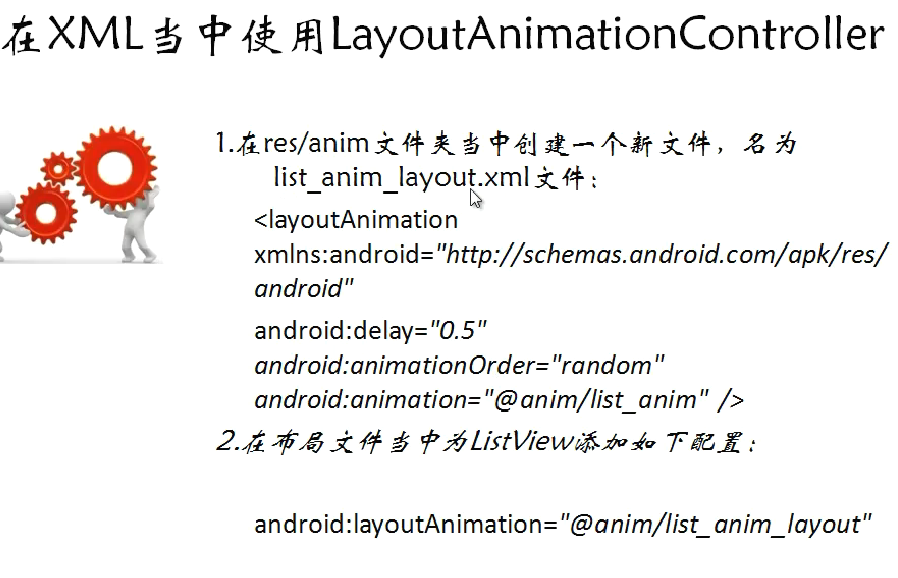
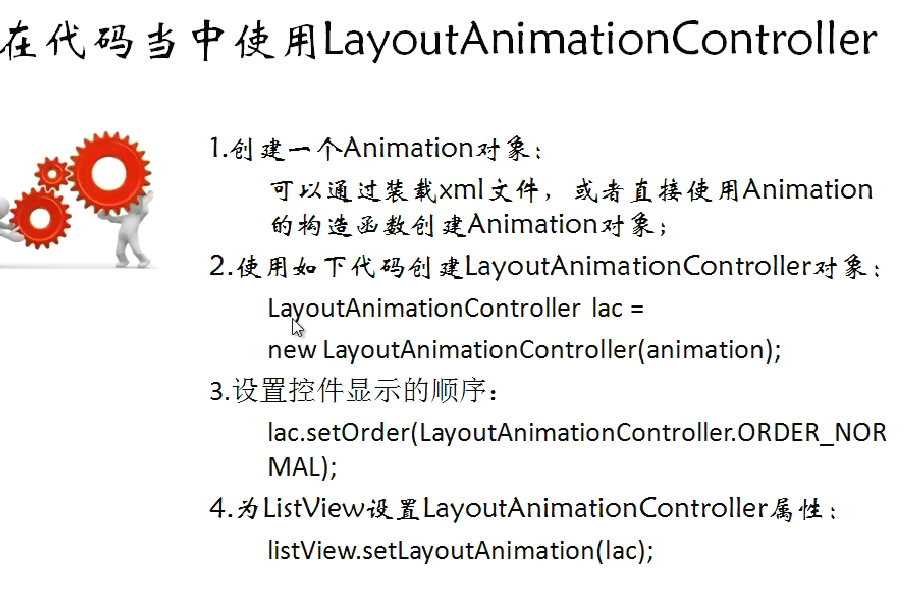
二、代码
1.xml
(1)activity_main.xml
 <ListView

         android:id="@id/android:list"

         android:layout_width="wrap_content"

         android:layout_height="wrap_content"

         android:scrollbars="vertical"

         />

         <!-- android:layoutAnimation="@anim/list_anim_layout" -->

        <Button

         android:id="@+id/buttonId"

         android:layout_width="fill_parent"

         android:layout_height="wrap_content"

         android:text="测试"

         />
(2)item.xml
 <?xml version="1.0" encoding="utf-8"?>

 <LinearLayout xmlns:android="http://schemas.android.com/apk/res/android"

     android:layout_width="fill_parent" android:layout_height="fill_parent"

     android:orientation="horizontal" android:paddingLeft="10dip"

     android:paddingRight="10dip" android:paddingTop="1dip"

     android:paddingBottom="1dip">

     <TextView android:id="@+id/user_name" android:layout_width="180dip"

         android:layout_height="30dip" android:textSize="5pt"

         android:singleLine="true"/>

     <TextView android:id="@+id/usr_gender" android:layout_width="fill_parent"

         android:layout_height="fill_parent" android:textSize="5pt"

         android:singleLine="true"/>

 </LinearLayout>
(3)res\anim\list_anim.xml
 <?xml version="1.0" encoding="utf-8"?>

 <set xmlns:android="http://schemas.android.com/apk/res/android"

     android:interpolator="@android:anim/accelerate_interpolator"

     android:shareInterpolator="true">

     <alpha android:fromAlpha="0.0" android:toAlpha="1.0" android:duration="2000" />

 </set>
(3)res\anim\list_anim_layout.xml
 <?xml version="1.0" encoding="utf-8"?>

 <layoutAnimation xmlns:android="http://schemas.android.com/apk/res/android"

     android:delay="2"

     android:animationOrder="normal"

     android:animation="@anim/list_anim" />
2.java
(1)MainActivity.java
 package com.layoutanimationcontroller;

 import java.util.ArrayList;

 import java.util.HashMap;

 import java.util.List;

 import android.app.ListActivity;

 import android.os.Bundle;

 import android.view.View;

 import android.view.View.OnClickListener;

 import android.view.animation.Animation;

 import android.view.animation.AnimationUtils;

 import android.view.animation.LayoutAnimationController;

 import android.widget.Button;

 import android.widget.ListAdapter;

 import android.widget.ListView;

 import android.widget.SimpleAdapter;

 public class MainActivity extends ListActivity {

     private Button button = null;

     private ListView listView = null;

     @Override

     protected void onCreate(Bundle savedInstanceState) {

         super.onCreate(savedInstanceState);

         setContentView(R.layout.activity_main);

         listView = getListView();

         button = (Button)findViewById(R.id.buttonId);

         button.setOnClickListener(new ButtonListener());

     }

     class ButtonListener implements OnClickListener {

         @Override

         public void onClick(View v) {

             listView.setAdapter(buidListAdapter());

             Animation animation = AnimationUtils.loadAnimation(MainActivity.this, R.anim.list_anim);

             LayoutAnimationController lac = new LayoutAnimationController(animation);

             lac.setOrder(LayoutAnimationController.ORDER_NORMAL);

             lac.setDelay(0.5f);

             listView.setLayoutAnimation(lac);

         }

     }

     private ListAdapter buidListAdapter() {

         List<HashMap<String,String>> list = new ArrayList<HashMap<String,String>>();

         HashMap<String, String> m1 = new HashMap<String,String>();

         m1.put("user_name", "张三");

         m1.put("user_gender", "女");

         HashMap<String, String> m2 = new HashMap<String, String>();

         m2.put("user_name", "李四");

         m2.put("user_gender", "女");

         HashMap<String, String> m3 = new HashMap<String, String>();

         m3.put("user_name", "王五");

         m3.put("user_gender", "男");

         list.add(m1);

         list.add(m2);

         list.add(m3);

         SimpleAdapter simpleAdapter = new SimpleAdapter(this, list, R.layout.item,

                 new String[] {"user_name", "user_gender"},

                 new int[] {R.id.user_name, R.id.usr_gender});

         return simpleAdapter;

     }

 }
ANDROID_MARS学习笔记_S02_011_ANIMATION_LayoutAnimationController的更多相关文章
- ANDROID_MARS学习笔记_S01_012_RatingBar
1.xml <RelativeLayout xmlns:android="http://schemas.android.com/apk/res/android" xmlns: ...
- ANDROID_MARS学习笔记_S01_012_SeekBar
1.xml <RelativeLayout xmlns:android="http://schemas.android.com/apk/res/android" xmlns: ...
- ANDROID_MARS学习笔记_S01_011ProgressBar
文档是这样来设置样式 <ProgressBar android:layout_width="wrap_content" android:layout_height=" ...
- ANDROID_MARS学习笔记_S01_010日期时间控件
1.xml <RelativeLayout xmlns:android="http://schemas.android.com/apk/res/android" xmlns: ...
- ANDROID_MARS学习笔记_S01_009Relative_LAYOUT例子
1. <?xml version="1.0" encoding="utf-8"?> <RelativeLayout xmlns:android ...
- ANDROID_MARS学习笔记_S01_008Linear_layout例子
1.netstone_layout.xml <?xml version="1.0" encoding="utf-8"?> <LinearLay ...
- ANDROID_MARS学习笔记_S01_007Linear_layout嵌套与layout_weight的设置
一.介绍 二.1.linear_layout.xml <?xml version="1.0" encoding="utf-8"?> <Line ...
- ANDROID_MARS学习笔记_S01_006ImageView
一.ImageView介绍 设置scalType Must be one of the following constant values. Constant Value Description ma ...
- ANDROID_MARS学习笔记_S01_005CheckBox
一. 1.checkbox_layout.xml <?xml version="1.0" encoding="utf-8"?> <Linear ...
随机推荐
- Innosetup打包自动下载.net framework 动态库及替换卸载程序图标.
在使用了一段时间微软自带的安装包打包工具后,总感觉不太顺利,于是便想着找一种更简单稳定的打包工具,这类工具其实还不少,最终经过各种考量,我们选择了 InnoSetup , 该工具是一个完全免费的Win ...
- SharePoint 学习记事(一)
记录背景: 随着公司业务的拓展,为拿到更多的项目,让原本不太信任我们的美国大佬相信我们的实力,让在美国的销售发挥他的能力,所以公司在13年下半年筹划收购了一家美国本土的公司.大约400人的规模,这个公 ...
- NetMQ(ZeroMQ)Client => Server => Client 模式的实现
ØMQ (也拼写作ZeroMQ,0MQ或ZMQ)是一个为可伸缩的分布式或并发应用程序设计的高性能异步消息库.它提供一个消息队列, 但是与面向消息的中间件不同,ZeroMQ的运行不需要专门的消息代理(m ...
- 全面认识网络诊断命令功能与参数——netsh diagnostic命令
netsh diagnostic是网络诊断命令,主要检测网络连接和服务器连接的状态. 注意:netsh不能在Window2000以下系统中使用.案例1:使用netsh diagnostic命令检 ...
- 你所不知道的Html5那些事(一)
文章简介: 关于html5相信大家早已经耳熟能详,但是他真正的意义在具体的开发中会有什么作用呢?相对于html,他又有怎样的新的定义与新理念在里面呢?为什么一些专家认为html5完全完成后 ...
- C#基础总复习02
继续更新第二篇: 1:一元运算符:++ -- ++:不管是前加加还是后加加,变量的值最终都会自身加一. 前加加和后加加的区别体现在参与运算的时候,如果是后加加,则首先拿原值参与运算, 运算完成后再自身 ...
- 划分分区GPT11
umount /dev/sda1 /data1umount /dev/sdb1 /data2mount /dev/sdb1 /data1umount /dev/sdb2 /data3umount /d ...
- ceilometer
控制节点: ceilometer-api: /etc/init.d/openstack-ceilometer-api status ceilometer-collector /etc/init.d/ ...
- linux下查看端口的连接数
linux下,可以通过natstat命令来查看端口的连接状况,比如连接数 例如,查看9090端口的连接状况: 查看某个端口的连接数netstat -nat | grep -iw "9090& ...
- Android_Json实例
概要: 最近由于自己的兴趣,想在Android开发一个自己的App,需要使用服务器,所以交换数据是逃不掉了的,但是学生党没有固定的服务器,因此使用的新浪的SAE,在学习的前期下可以尝试一下,挺不错的一 ...