
Unable to Rebuild JIRA Index
Symptoms
Accessing certain JIRA pages result in:
SEVERE: Internal server error
com.atlassian.jira.issue.index.SearchUnavailableException: com.atlassian.util.concurrent.LazyReference$InitializationException: com.atlassian.jira.util.RuntimeIOException: org.apache.lucene.index.CorruptIndexException: doc counts differ for segment _ow2: fieldsReader shows 1 but segmentInfo shows 50
at com.atlassian.jira.issue.index.DefaultIndexManager$1.get(DefaultIndexManager.java:85)
at com.atlassian.jira.issue.index.DefaultIndexManager$1.get(DefaultIndexManager.java:76)
at com.atlassian.jira.issue.index.SearcherCache.retrieveIssueSearcher(SearcherCache.java:38)
Filters are resulting in:
Caused by: java.io.FileNotFoundException: /local/jira/jira444/home/caches/indexes/entities/searchrequest/_o5.fnm (No such file or directory)at java.io.RandomAccessFile.open(Native Method)at java.io.RandomAccessFile.<init>(RandomAccessFile.java:212)at org.apache.lucene.store.SimpleFSDirectory$SimpleFSIndexInput$Descriptor.<init>(SimpleFSDirectory.java:78)at org.apache.lucene.store.SimpleFSDirectory$SimpleFSIndexInput.<init>(SimpleFSDirectory.java:108) |
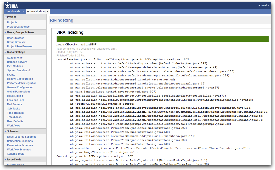
When trying to re-index JIRA, the following error will be thrown:
java.io.IOException: read past EOF
Task completed in 2 seconds with unexpected error.
Started Today 8:29 PM.
Finished Today 8:29 PM.
com.atlassian.jira.util.RuntimeIOException: java.io.IOException: read past EOF at com.atlassian.jira.index.DefaultIndexEngine.clean(DefaultIndexEngine.java:145) at com.atlassian.jira.index.DefaultManager.deleteIndexDirectory(DefaultManager.java:44) at com.atlassian.jira.issue.index.DefaultIssueIndexer.deleteIndexes(DefaultIssueIndexer.java:170) at com.atlassian.jira.issue.index.DefaultIndexManager.reIndexAll(DefaultIndexManager.java:219) ... at java.util.concurrent.FutureTask.run(FutureTask.java:138) at com.atlassian.jira.task.ForkedThreadExecutor$ForkedRunnableDecorator.run(ForkedThreadExecutor.java:249) at java.lang.Thread.run(Thread.java:619)
Caused by: java.io.IOException: read past EOF
This error can also be thrown during a re-index:
2012-11-25 16:21:36,897 JiraTaskExectionThread-1 ERROR admin 981x203x1 6slf04 10.1.250.116 /secure/admin/IndexReIndex.jspa [jira.util.index.CompositeIndexLifecycleManager] Reindex All FAILED.  Indexer: DefaultIndexManager: paths: [/var/atlassian/application-data/jira/caches/indexes/comments, /var/atlassian/application-data/jira/caches/indexes/issues, /var/atlassian/application-data/jira/caches/indexes/changes]

com.atlassian.jira.util.RuntimeIOException: java.io.IOException: directory '/var/atlassian/application-data/jira/caches/indexes/comments' exists and is a directory, but cannot be listed: list() returned null

	at com.atlassian.jira.index.DefaultIndexEngine.clean(DefaultIndexEngine.java:146)

	at com.atlassian.jira.index.DefaultManager.deleteIndexDirectory(DefaultManager.java:43)

	at com.atlassian.jira.issue.index.DefaultIssueIndexer.deleteIndexes(DefaultIssueIndexer.java:205)

	at com.atlassian.jira.issue.index.DefaultIndexManager.doStopTheWorldReindex(DefaultIndexManager.java:824)

	at com.atlassian.jira.issue.index.DefaultIndexManager.reIndexAll(DefaultIndexManager.java:335)

	at com.atlassian.jira.issue.index.DefaultIndexManager.reIndexAll(DefaultIndexManager.java:301)

Caused by: java.io.IOException: directory '/var/atlassian/application-data/jira/caches/indexes/comments' exists and is a directory, but cannot be listed: list() returned null
Cause
The re-indexing process fails when JIRA index file(s) is/are corrupted for any reason, for example the JIRA service may be terminated unexpectedly because of an power outage.
Resolution
- Stop JIRA.
Make a backup of the following directory and all its subdirectories:
$JIRA_HOME/caches/indexes
Remove the following directory and all its subdirectories:
$JIRA_HOME/caches/indexes
 This will be rebuilt when JIRA is next reindexed.
- Start JIRA.
Perform a re-index of JIRA through the Administration section.
Unable to Rebuild JIRA Index的更多相关文章
- EXCEPTION:FATAL: UNABLE TO CREATE ‘…GIT/INDEX.LOCK’ FILE EXISTS
FATAL: UNABLE TO CREATE ‘…GIT/INDEX.LOCK’ FILE EXISTS Hi, Today I will share you my other experience ...
- git error: unable to write file xxx,git fatal: unable to write new index file
执行git checkout -- . error: unable to write file mobile/manifest.jsonfatal: unable to write new index ...
- Git – fatal: Unable to create ‘/.git/index.lock’: File exists错误解决办法
有时候在提交的时候,中间提交出错,导致有文件被lock,所以会报下面的错误: fatal: Unable to create ‘/msg/.git/index.lock’: File exists. ...
- Oracle alter index rebuild 与 ORA-08104 说明
在ITPUB 论坛上看到的一个帖子,很不错.根据论坛的帖子重做整理了一下. 原文链接如下: alter index rebuild online引发的血案 http://www.itpub.net/t ...
- 重建索引:ALTER INDEX..REBUILD ONLINE vs ALTER INDEX..REBUILD
什么时候需要重建索引 1. 删除的空间没有重用,导致 索引出现碎片 2. 删除大量的表数据后,空间没有重用,导致 索引"虚高" 3.索引的 clustering_facto 和表不 ...
- ORACLE中index的rebuild(转)
Oracle里大量删除记录后,表和索引里占用的数据块空间并没有释放. table move可以释放已删除记录表占用的数据块空间,整理碎片.如果将表格用move方式整理碎片后,索引将失效,这时需要将索引 ...
- oracle alter index rebuild offline与online
oracle index build online与offline测试环境为oracle 11.2.0.4 --sql test SQL> conn test/test )); begin .. ...
- Eclipse使用Maven时出现:Index downloads are disabled, search results may be incomplete.问题解决
https://www.cnblogs.com/EasonJim/p/6674099.html 1.全局设置 [Windows]->[Preferences]->[Maven]->勾 ...
- [Hive - LanguageManual] Create/Drop/Alter -View、 Index 、 Function
Create/Drop/Alter View Create View Drop View Alter View Properties Alter View As Select Version info ...
随机推荐
- JavaScript高级程序设计(五): js的关键字instanceof和typeof使用
JavaScript中instanceof和typeof 常用来判断一个变量是否为空,或者是什么类型的.但它们之间还是有区别的: 一.typeof 1.含义:typeof返回一个表达式的数据类型的字符 ...
- javascript dom编程艺术笔记之图片库的改进
dom的操作要遵守的原则 1.平稳退化 2.分离javascript 3.向后兼容 4.性能考虑 改进后的显示图片方法 function showpic(whichpic){ if(!document ...
- Ambiguous handler methods mapped for HTTP path
一.问题:映射重复导致的错误 java代码如下: @RequestMapping(value = "/info/{remove}/{id}", method = RequestMe ...
- Java面向对象程序设计--与C++对比说明:系列3(Java 继承机制)
继承(inheritance)背后的核心思想是: bonus = b; } } Java没有像C++那样提供多继承机制,但提供了接口机制,在后面我们将详细探究接口机制的实现 ...
- 获取元素样式 currentStyle 和 getcomputedStyle
场景 你要获取某一元素的样式,可是没有获取到,返回的值为undefined,可是有时候又能成功? 为什么? 因为,xx.stly.xxx 可以获取的样式信息,是dom元素style属性里的样式,对于通 ...
- Linux文件权限学习总结
一.用户对文件或目录都有哪些权限? 四种:读.写.执行.没有权限 二.如何表示这四种权限? 如果用十进制数字表示,分别为:4.2.1.0:如果用字符表示,分别为:r.w.x.-.个人觉得,使用chmo ...
- Kivy中文显示
Win7系统 下载 DroidSansFallback.ttf字体(android设备上自带了) 源代码第一行增加#-*- coding:utf-8 -*- 创建widget值定font_name s ...
- 浅谈JavaScript词法分析步骤
JavaScript代码运行前有一个类似编译的过程即词法分析,词法分析主要有三个步骤: 分析参数 再分析变量的声明 分析函数声明 具体步骤如下: 函数在运行的瞬间,生成一个活动对象(Active Ob ...
- tpl demo
using System; using System.Collections.Concurrent; using System.Threading; using System.Threading.Ta ...
- Centos开启FTP及用户配置
vsftpd作为FTP服务器,在Linux系统中是非常常用的.下面我们介绍如何在centos系统上安装vsftp. 什么是vsftpd vsftpd是一款在Linux发行版中最受推崇的FTP服务器程序 ...