
ubuntu使用github
Ubuntu下安装Git
Ubuntu12.04 LTS默认是已经安装Git的,可以使用 git --version 测试是否安装。
如果没有安装,使用命令: sudo apt-get install git git-core 安装git
ssh认证
官网教程: https://help.github.com/articles/generating-ssh-keys/
创建公钥 ssh key
carloz@linux:~/Downloads/usr/bin$ ls -al ~/.ssh

total 16

drwx------  2 carloz carloz 4096 10月 29 17:06 .

drwxr-xr-x 42 carloz carloz 4096 10月 29 16:39 ..

-rw-------  1 carloz carloz 1679 10月 29 16:44 github

-rw-r--r--  1 carloz carloz  403 10月 29 16:44 github.pub

carloz@linux:~/Downloads/usr/bin$ ssh-keygen -t rsa -b 4096 -C "xiaoqing_work@163.com"

Generating public/private rsa key pair.

Enter file in which to save the key (/home/carloz/.ssh/id_rsa):

Enter passphrase (empty for no passphrase): xiaoqing

Enter same passphrase again:

Your identification has been saved in /home/carloz/.ssh/id_rsa.

Your public key has been saved in /home/carloz/.ssh/id_rsa.pub.

The key fingerprint is:

66:b5:f4:85:37:4c:c1:7e:bf:d3:bd:c1:7a:d7:2d:f5 xiaoqing_work@163.com

The key's randomart image is:

+--[ RSA 4096]----+

|             .o. |

|             +.  |

|          o ..=  |

|         o o o...|

|        S . .  ..|

|       o      . o|

|               +B|

|              o+E|

|             ..o+|

+-----------------+

carloz@linux:~/Downloads/usr/bin$
复制公钥
carloz@linux:~/Downloads/usr/bin$ ls -al ~/.ssh

total 24

drwx------  2 carloz carloz 4096 10月 29 17:12 .

drwxr-xr-x 42 carloz carloz 4096 10月 29 16:39 ..

-rw-------  1 carloz carloz 1679 10月 29 16:44 github

-rw-r--r--  1 carloz carloz  403 10月 29 16:44 github.pub

-rw-------  1 carloz carloz 3326 10月 29 17:12 id_rsa

-rw-r--r--  1 carloz carloz  747 10月 29 17:12 id_rsa.pub

carloz@linux:~/Downloads/usr/bin$ vi ~/.ssh/id_rsa.pub

carloz@linux:~/Downloads/usr/bin$ eval "$(ssh-agent -s)"

Agent pid 8644

carloz@linux:~/Downloads/usr/bin$ ssh-add ~/.ssh/id_rsa

Enter passphrase for /home/carloz/.ssh/id_rsa: xiaoqing

Identity added: /home/carloz/.ssh/id_rsa (/home/carloz/.ssh/id_rsa)

carloz@linux:~/Downloads/usr/bin$ sudo apt-get install xclip

carloz@linux:~/Downloads/usr/bin$ xclip -sel clip < ~/.ssh/id_rsa.pub
添加key到github

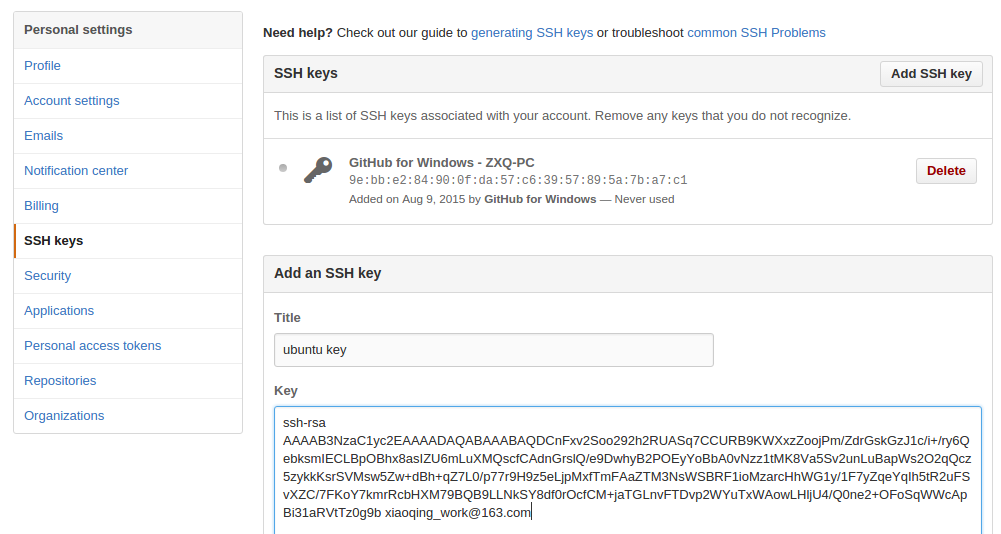
连接 github
carloz@linux:~/Downloads/usr/bin$ rm ~/.ssh/git*

carloz@linux:~/Downloads/usr/bin$ ls -al ~/.ssh

total 16

drwx------  2 carloz carloz 4096 10月 29 17:23 .

drwxr-xr-x 42 carloz carloz 4096 10月 29 16:39 ..

-rw-------  1 carloz carloz 3326 10月 29 17:12 id_rsa

-rw-r--r--  1 carloz carloz  747 10月 29 17:12 id_rsa.pub
carloz@linux:~/Downloads/usr/bin$ ssh -T git@github.com

The authenticity of host 'github.com (192.30.252.129)' can't be established.

RSA key fingerprint is 16:27:ac:a5:76:28:2d:36:63:1b:56:4d:eb:df:a6:48.

Are you sure you want to continue connecting (yes/no)? yes

Warning: Permanently added 'github.com,192.30.252.129' (RSA) to the list of known hosts.

Hi carlo-z! You've successfully authenticated, but GitHub does not provide shell access.

carloz@linux:~/Downloads/usr/bin$
提交代码至GitHub
cd carloz-lib-web/

carloz@linux:~/Python/carloz/carloz-lib-web$ git config --global user.name "carlo-z"

carloz@linux:~/Python/carloz/carloz-lib-web$ git config --global user.email xiaoqing_work@163.com

git init

git add .

git commit -m "add new files"

git remote add origin git@github.com:carlo-z/carloz-lib-web.git

git push -u origin master
carloz@linux:~/Python/carloz/carloz-lib-web$ git push origin master

To git@github.com:carlo-z/carloz-lib-web.git

 ! [rejected]        master -> master (fetch first)

error: failed to push some refs to 'git@github.com:carlo-z/carloz-lib-web.git'

hint: Updates were rejected because the remote contains work that you do

hint: not have locally. This is usually caused by another repository pushing

hint: to the same ref. You may want to first integrate the remote changes

hint: (e.g., 'git pull ...') before pushing again.

hint: See the 'Note about fast-forwards' in 'git push --help' for details.

carloz@linux:~/Python/carloz/carloz-lib-web$ git fetch

warning: no common commits

remote: Counting objects: 3, done.

remote: Total 3 (delta 0), reused 0 (delta 0), pack-reused 0

Unpacking objects: 100% (3/3), done.

From github.com:carlo-z/carloz-lib-web

 * [new branch]      master     -> origin/master

carloz@linux:~/Python/carloz/carloz-lib-web$
! [rejected] master -> master (non-fast-forward)
问题(Non-fast-forward)的出现原因在于:git仓库中已经有一部分代码,所以它不允许你直接把你的代码覆盖上去。于是你有2个选择方式:
1,强推,即利用强覆盖方式用你本地的代码替代git仓库内的内容
git push -f
carloz@linux:~/Python/carloz/carloz-lib-web$ git push -f origin master

Counting objects: 663, done.

Delta compression using up to 4 threads.

Compressing objects: 100% (636/636), done.

Writing objects: 100% (662/662), 3.00 MiB | 23.00 KiB/s, done.

Total 662 (delta 13), reused 0 (delta 0)

To git@github.com:carlo-z/carloz-lib-web.git

 + 04e543c...e29d7a9 master -> master (forced update)
2,先把git的东西fetch到你本地然后merge后再push
ubuntu使用github的更多相关文章
- [转]Ubuntu下GitHub的使用
转自Pythoner 本文将对Ubuntu下Git的安装,以及如何连接GitHub进行讲解. 1.环境 OS: Ubuntu13.04 64bitsGit: 1.8.1.2 2.Git安装 执行如下命 ...
- Ubuntu+Hexo+Github搭建个人博客
Ubuntu+Hexo+Github搭建个人博客 目录 目录 目录 1. 简介 环境 2. Git安装及配置 2.1 安装Git 2.2 创建Git仓库 2.3 配置git仓库 2.4 添加公钥 3. ...
- ubuntu 下 github 使用方法 以及异常修改
接触github很长时间了,github有windows 跟 mac 版本,恶心的是现在在linux 下没有可视化界面的版本.所以对于很多没有怎么接触过github的人带来很大困难.话不多说,彪重点: ...
- ubuntu 设置github秘钥
github的SSH配置如下: 一 . 设置Git的user name和email: $ git config --global user.name "AmyOrz" $ git ...
- Ubuntu下github pages+hexo搭建自己的博客
hexo 是一个基于Node.js的静态博客程序,可以方便的生成静态网页托管在github上.Hexo简单优雅, 而且风格多变, 适合搭建个人博客,而且支持多平台的搭建. 平台 Ubuntu14.04 ...
- ubuntu在github上传项目
GitHub是一个面向开源及私有软件项目的托管平台,因为只支持git 作为唯一的版本库格式进行托管,故名GitHub. 作为开源代码库以及版本控制系统,Github拥有超过900万开发者用户.随着越来 ...
- git常用指令
<a>github的提交方式 git status (1)git add .--------------------存储到本地 git add -u ...
- docker learning
Docker 配置文件位置 Docker 的配置文件可以设置大部分的后台进程参数,在各个操作系统中的存放位置不一致 在 ubuntu 中的位置是:/etc/default/docker 在 cento ...
- 需要熟记的git命令
需要熟记的github常用命令 总结一下ubuntu下github常用的命令,设置部分跳过,假设repository的名字叫hello-world: .创建一个新的repository: 先在gith ...
随机推荐
- hdoj 1200 To and Fro
To and Fro Time Limit: 2000/1000 MS (Java/Others) Memory Limit: 65536/32768 K (Java/Others)Total ...
- hihocoder 1077线段树
http://hihocoder.com/problemset/problem/1077 #include <bits/stdc++.h> using namespace std; #de ...
- Let's Encrypt+Apache+Tomcat实现免费HTTPS
Let's Encrypt是一个免费SSL证书发行项目,发行的证书已经获得主流浏览器的支持,亲测谷歌浏览器(桌面版).火狐浏览器(桌面版).UC浏览器(手机版).360浏览器(手机版)支持,其它的暂没 ...
- iOS UITextField 输入字数限制的实现
首先你的ViewController需要实现 UITextFieldDelegate 代理, 其次,需要字数限制的UITextField实例的代理要设置成 self(ViewController) 然 ...
- JavaScript网站设计实践(七)编写最后一个页面 改进表单
一.最后一个页面 contact.html.改进表单 在该页面实现的功能: 几乎所有的网站都会有表单填写,对于用户输入和填写的数据,首先我们一般现在前台验证,然后再去后台验证. 在前台最简单的验证:检 ...
- Gprinter Android SDK V2.1 使用说明
下载:http://download.csdn.net/download/abc564643122/8872249
- strcmp函数和strcpy函数
(一)strcmp函数 strcmp函数是比較两个字符串的大小,返回比較的结果.一般形式是: i=strcmp(字符串,字符串); 当中,字符串1.字符串2均可为字符串常量或变量:i 是用于存放比 ...
- Java的JDBC事务详解(转)
事务的特性: 1) 原子性(atomicity):事务是数据库的逻辑工作单位,而且是必须是原子工作单位,对于其数据修改,要么全部执行,要么全部不执行. 2) 一致性(consistency):事务在完 ...
- 字符集详解 ------------------------ UNICODE +UTF8
http://my.oschina.net/goldenshaw/blog?catalog=3294521 http://my.oschina.net/goldenshaw/blog?catalog= ...
- NDK开发之日志打印
要在NDK中打印日志,只需要以下三步: 一.在Android.mk中添加以下内容: LOCAL_LDLIBS := -lm -llog 或者 LOCAL_LDLIBS:=-L$(SYSROOT)/us ...