
Asp.net GridView 72般绝技
快速预览:
GridView无代码分页排序
GridView选中,编辑,取消,删除
GridView正反双向排序
GridView和下拉菜单DropDownList结合
GridView和CheckBox结合
鼠标移到GridView某一行时改变该行的背景色方法一
鼠标移到GridView某一行时改变该行的背景色方法二
GridView实现删除时弹出确认对话框
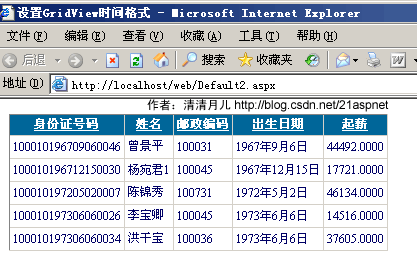
GridView实现自动编号
GridView实现自定义时间货币等字符串格式
GridView实现用“...”代替超长字符串
GridView一般换行与强制换行
GridView显示隐藏某一列
GridView弹出新页面/弹出新窗口
GridView固定表头(不用javascript只用CSS,2行代码,很好用)
GridView合并表头多重表头无错完美版(以合并3列3行举例)
GridView突出显示某一单元格(例如金额低于多少,分数不及格等)
GridView加入自动求和求平均值小计
GridView数据导入Excel/Excel数据读入GridView
1.GridView无代码分页排序:
效果图:
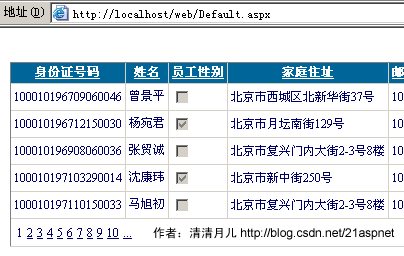
1.AllowSorting设为True,aspx代码中是AllowSorting="True";
2.默认1页10条,如果要修改每页条数,修改PageSize即可,在aspx代码中是PageSize="12"。
3.默认的是单向排序的,右击GridView弹出“属性”,选择AllowSorting为True即可。
2.GridView选中,编辑,取消,删除:
效果图:

后台代码:
你可以使用sqlhelper,本文没用。代码如下:
using System;
using System.Data;
using System.Configuration;
using System.Web;
using System.Web.Security;
using System.Web.UI;
using System.Web.UI.WebControls;
using System.Web.UI.WebControls.WebParts;
using System.Web.UI.HtmlControls;
using System.Data.SqlClient;
public partial class _Default : System.Web.UI.Page
{
SqlConnection sqlcon;
SqlCommand sqlcom;
string strCon = "Data Source=(local);Database=数据库名;Uid=帐号;Pwd=密码";
protected void Page_Load(object sender, EventArgs e)
{
if (!IsPostBack)
{
bind();
}
}
protected void GridView1_RowEditing(object sender, GridViewEditEventArgs e)
{
GridView1.EditIndex = e.NewEditIndex;
bind();
}
//删除
protected void GridView1_RowDeleting(object sender, GridViewDeleteEventArgs e)
{
string sqlstr = "delete from 表 where id='" + GridView1.DataKeys[e.RowIndex].Value.ToString() + "'";
sqlcon = new SqlConnection(strCon);
sqlcom = new SqlCommand(sqlstr,sqlcon);
sqlcon.Open();
sqlcom.ExecuteNonQuery();
sqlcon.Close();
bind();
}
//更新
protected void GridView1_RowUpdating(object sender, GridViewUpdateEventArgs e)
{
sqlcon = new SqlConnection(strCon);
string sqlstr = "update 表 set 字段1='"
+ ((TextBox)(GridView1.Rows[e.RowIndex].Cells[1].Controls[0])).Text.ToString().Trim() + "',字段2='"
+ ((TextBox)(GridView1.Rows[e.RowIndex].Cells[2].Controls[0])).Text.ToString().Trim() + "',字段3='"
+ ((TextBox)(GridView1.Rows[e.RowIndex].Cells[3].Controls[0])).Text.ToString().Trim() + "' where id='"
+ GridView1.DataKeys[e.RowIndex].Value.ToString() + "'";
sqlcom=new SqlCommand(sqlstr,sqlcon);
sqlcon.Open();
sqlcom.ExecuteNonQuery();
sqlcon.Close();
GridView1.EditIndex = -1;
bind();
}
//取消
protected void GridView1_RowCancelingEdit(object sender, GridViewCancelEditEventArgs e)
{
GridView1.EditIndex = -1;
bind();
}
//绑定
public void bind()
{
string sqlstr = "select * from 表";
sqlcon = new SqlConnection(strCon);
SqlDataAdapter myda = new SqlDataAdapter(sqlstr, sqlcon);
DataSet myds = new DataSet();
sqlcon.Open();
myda.Fill(myds, "表");
GridView1.DataSource = myds;
GridView1.DataKeyNames = new string[] { "id" };//主键
GridView1.DataBind();
sqlcon.Close();
}
}
前台主要代码:
... ...
<asp:GridView ID="GridView1" runat="server" AutoGenerateColumns="False" CellPadding="4"
ForeColor="#333333" GridLines="None"
OnRowDeleting="GridView1_RowDeleting"
OnRowEditing="GridView1_RowEditing"
OnRowUpdating="GridView1_RowUpdating" OnRowCancelingEdit="GridView1_RowCancelingEdit">
<FooterStyle BackColor="#990000" Font-Bold="True" ForeColor="White" />
<Columns>
<asp:BoundField DataField="身份证号码" HeaderText="用户ID" ReadOnly="True" />
<asp:BoundField DataField="姓名" HeaderText="用户姓名" />
<asp:BoundField DataField="员工性别" HeaderText="性别" />
<asp:BoundField DataField="家庭住址" HeaderText="家庭住址" />
<asp:CommandField HeaderText="选择" ShowSelectButton="True" />
<asp:CommandField HeaderText="编辑" ShowEditButton="True" />
<asp:CommandField HeaderText="删除" ShowDeleteButton="True" />
</Columns>
<RowStyle ForeColor="#000066" />
<SelectedRowStyle BackColor="#669999" Font-Bold="True" ForeColor="White" />
<PagerStyle BackColor="White" ForeColor="#000066" HorizontalAlign="Left" />
<HeaderStyle BackColor="#006699" Font-Bold="True" ForeColor="White" />
</asp:GridView>
3.GridView正反双向排序:
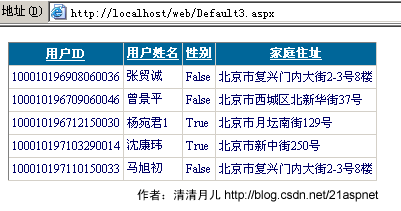
效果图:点姓名各2次的排序,点其他也一样可以。

后台代码:
using System;
using System.Data;
using System.Configuration;
using System.Collections;
using System.Web;
using System.Web.Security;
using System.Web.UI;
using System.Web.UI.WebControls;
using System.Web.UI.WebControls.WebParts;
using System.Web.UI.HtmlControls;
using System.Data.SqlClient;
public partial class Default3 : System.Web.UI.Page
{
SqlConnection sqlcon;
string strCon = "Data Source=(local);Database=北风贸易;Uid=sa;Pwd=";
protected void Page_Load(object sender, EventArgs e)
{
if (!IsPostBack)
{
ViewState["SortOrder"] = "身份证号码";
ViewState["OrderDire"] = "ASC";
bind();
}
}
protected void GridView1_Sorting(object sender, GridViewSortEventArgs e)
{
string sPage = e.SortExpression;
if (ViewState["SortOrder"].ToString() == sPage)
{
if (ViewState["OrderDire"].ToString() == "Desc")
ViewState["OrderDire"] = "ASC";
else
ViewState["OrderDire"] = "Desc";
}
else
{
ViewState["SortOrder"] = e.SortExpression;
}
bind();
}
public void bind()
{
string sqlstr = "select top 5 * from 飞狐工作室";
sqlcon = new SqlConnection(strCon);
SqlDataAdapter myda = new SqlDataAdapter(sqlstr, sqlcon);
DataSet myds = new DataSet();
sqlcon.Open();
myda.Fill(myds, "飞狐工作室");
DataView view = myds.Tables["飞狐工作室"].DefaultView;
string sort = (string)ViewState["SortOrder"] + " " + (string)ViewState["OrderDire"];
view.Sort = sort;
GridView1.DataSource = view;
GridView1.DataBind();
sqlcon.Close();
}
}
前台主要代码:
<asp:GridView ID="GridView1" runat="server" AllowSorting="True" AutoGenerateColumns="False"
CellPadding="3" Font-Size="9pt" OnSorting="GridView1_Sorting"
BackColor="White" BorderColor="#CCCCCC" BorderStyle="None"
BorderWidth="1px">
<FooterStyle BackColor="White" ForeColor="#000066" />
<Columns>
<asp:BoundField DataField="身份证号码" HeaderText="用户ID" SortExpression="身份证号码" />
<asp:BoundField DataField="姓名" HeaderText="用户姓名" SortExpression="姓名"/>
<asp:BoundField DataField="员工性别" HeaderText="性别" SortExpression="员工性别"/>
<asp:BoundField DataField="家庭住址" HeaderText="家庭住址" SortExpression="家庭住址"/>
</Columns>
<RowStyle ForeColor="#000066" />
<SelectedRowStyle BackColor="#669999" Font-Bold="True" ForeColor="White" />
<PagerStyle BackColor="White" ForeColor="#000066" HorizontalAlign="Left" />
<HeaderStyle BackColor="#006699" Font-Bold="True" ForeColor="White" />
</asp:GridView>
4.GridView和下拉菜单DropDownList结合:
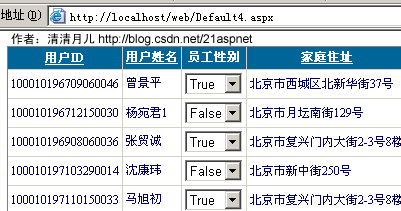
效果图:
后台代码:
using System;
using System.Data;
using System.Configuration;
using System.Collections;
using System.Web;
using System.Web.Security;
using System.Web.UI;
using System.Web.UI.WebControls;
using System.Web.UI.WebControls.WebParts;
using System.Web.UI.HtmlControls;
using System.Data.SqlClient;
public partial class Default4 : System.Web.UI.Page
{
SqlConnection sqlcon;
string strCon = "Data Source=(local);Database=北风贸易;Uid=sa;Pwd=sa";
protected void Page_Load(object sender, EventArgs e)
{
DropDownList ddl;
if (!IsPostBack)
{
string sqlstr = "select top 5 * from 飞狐工作室";
sqlcon = new SqlConnection(strCon);
SqlDataAdapter myda = new SqlDataAdapter(sqlstr, sqlcon);
DataSet myds = new DataSet();
sqlcon.Open();
myda.Fill(myds, "飞狐工作室");
GridView1.DataSource = myds;
GridView1.DataBind();
for (int i = 0; i <= GridView1.Rows.Count - 1; i++)
{
DataRowView mydrv = myds.Tables["飞狐工作室"].DefaultView[i];
if (Convert.ToString(mydrv["员工性别"]).Trim() == "True")
{
ddl = (DropDownList)GridView1.Rows[i].FindControl("DropDownList1");
ddl.SelectedIndex = 0;
}
if (Convert.ToString(mydrv["员工性别"]).Trim() == "False")
{
ddl = (DropDownList)GridView1.Rows[i].FindControl("DropDownList1");
ddl.SelectedIndex = 1;
}
}
sqlcon.Close();
}
}
public SqlDataReader ddlbind()
{
string sqlstr = "select distinct 员工性别 from 飞狐工作室";
sqlcon = new SqlConnection(strCon);
SqlCommand sqlcom = new SqlCommand(sqlstr, sqlcon);
sqlcon.Open();
return sqlcom.ExecuteReader();
}
前台主要代码:
<asp:GridView ID="GridView1" runat="server" AllowSorting="True" AutoGenerateColumns="False"
CellPadding="3" Font-Size="9pt" BackColor="White"
BorderColor="#CCCCCC" BorderStyle="None" BorderWidth="1px">
<FooterStyle BackColor="White" ForeColor="#000066" />
<Columns>
<asp:BoundField DataField="身份证号码" HeaderText="用户ID" SortExpression="身份证号码" />
<asp:BoundField DataField="姓名" HeaderText="用户姓名" SortExpression="姓名"/>
<asp:TemplateField HeaderText="员工性别">
<ItemTemplate>
<asp:DropDownList ID="DropDownList1" runat="server"
DataSource='<%# ddlbind()%>' DataValueField="员工性别"
DataTextField="员工性别">
</asp:DropDownList>
</ItemTemplate>
</asp:TemplateField>
<asp:BoundField DataField="家庭住址" HeaderText="家庭住址" SortExpression="家庭住址"/>
</Columns>
<RowStyle ForeColor="#000066" />
<SelectedRowStyle BackColor="#669999" Font-Bold="True" ForeColor="White" />
<PagerStyle BackColor="White" ForeColor="#000066" HorizontalAlign="Left" />
<HeaderStyle BackColor="#006699" Font-Bold="True" ForeColor="White" />
</asp:GridView>
5.GridView和CheckBox结合:
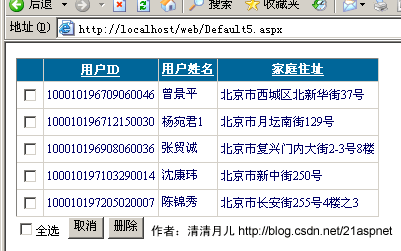
效果图:
后台代码:
using System;
using System.Data;
using System.Configuration;
using System.Web;
using System.Web.Security;
using System.Web.UI;
using System.Web.UI.WebControls;
using System.Web.UI.WebControls.WebParts;
using System.Web.UI.HtmlControls;
using System.Data.SqlClient;
public partial class Default5 : System.Web.UI.Page
{
SqlConnection sqlcon;
string strCon = "Data Source=(local);Database=北风贸易;Uid=sa;Pwd=sa";
protected void Page_Load(object sender, EventArgs e)
{
if (!IsPostBack)
{
bind();
}
}
protected void CheckBox2_CheckedChanged(object sender, EventArgs e)
{
for (int i = 0; i <= GridView1.Rows.Count - 1; i++)
{
CheckBox cbox = (CheckBox)GridView1.Rows[i].FindControl("CheckBox1");
if (CheckBox2.Checked == true)
{
cbox.Checked = true;
}
else
{
cbox.Checked = false;
}
}
}
protected void Button2_Click(object sender, EventArgs e)
{
sqlcon = new SqlConnection(strCon);
SqlCommand sqlcom;
for (int i = 0; i <= GridView1.Rows.Count - 1; i++)
{
CheckBox cbox = (CheckBox)GridView1.Rows[i].FindControl("CheckBox1");
if (cbox.Checked == true)
{
string sqlstr = "delete from 飞狐工作室 where 身份证号码='" + GridView1.DataKeys[i].Value + "'";
sqlcom = new SqlCommand(sqlstr, sqlcon);
sqlcon.Open();
sqlcom.ExecuteNonQuery();
sqlcon.Close();
}
}
bind();
}
protected void Button1_Click(object sender, EventArgs e)
{
CheckBox2.Checked = false;
for (int i = 0; i <= GridView1.Rows.Count - 1; i++)
{
CheckBox cbox = (CheckBox)GridView1.Rows[i].FindControl("CheckBox1");
cbox.Checked = false;
}
}
public void bind()
{
string sqlstr = "select top 5 * from 飞狐工作室";
sqlcon = new SqlConnection(strCon);
SqlDataAdapter myda = new SqlDataAdapter(sqlstr, sqlcon);
DataSet myds = new DataSet();
sqlcon.Open();
myda.Fill(myds, "tb_Member");
GridView1.DataSource = myds;
GridView1.DataKeyNames = new string[] { "身份证号码" };
GridView1.DataBind();
sqlcon.Close();
}
}
前台主要代码:
<asp:GridView ID="GridView1" runat="server" AllowSorting="True" AutoGenerateColumns="False"
CellPadding="3" Font-Size="9pt" BackColor="White"
BorderColor="#CCCCCC" BorderStyle="None" BorderWidth="1px">
<FooterStyle BackColor="White" ForeColor="#000066" />
<Columns>
<asp:TemplateField>
<ItemTemplate>
<asp:CheckBox ID="CheckBox1" runat="server" />
</ItemTemplate>
</asp:TemplateField>
<asp:BoundField DataField="身份证号码" HeaderText="用户ID" SortExpression="身份证号码" />
<asp:BoundField DataField="姓名" HeaderText="用户姓名" SortExpression="姓名"/>
<asp:BoundField DataField="家庭住址" HeaderText="家庭住址" SortExpression="家庭住址"/>
</Columns>
<RowStyle ForeColor="#000066" />
<SelectedRowStyle BackColor="#669999" Font-Bold="True" ForeColor="White" />
<PagerStyle BackColor="White" ForeColor="#000066" HorizontalAlign="Left" />
<HeaderStyle BackColor="#006699" Font-Bold="True" ForeColor="White" />
</asp:GridView>
<asp:CheckBox ID="CheckBox2" runat="server" AutoPostBack="True"
Font-Size="9pt" OnCheckedChanged="CheckBox2_CheckedChanged"
Text="全选" />
<asp:Button ID="Button1" runat="server" Font-Size="9pt" Text="取消" OnClick="Button1_Click" />
<asp:Button ID="Button2" runat="server" Font-Size="9pt" Text="删除" OnClick="Button2_Click" />
6.鼠标移到GridView某一行时改变该行的背景色方法一:
效果图:
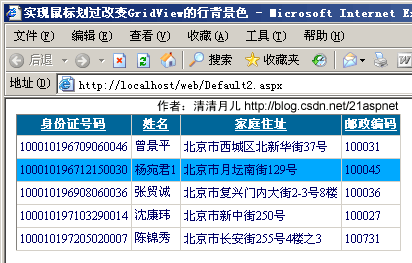
做法:
双击GridView的OnRowDataBound事件;
在后台的GridView1_RowDataBound()方法添加代码,最后代码如下所示:
protected void GridView1_RowDataBound(object sender, GridViewRowEventArgs e)
{
int i;
//执行循环,保证每条数据都可以更新
for (i = 0; i < GridView1.Rows.Count; i++)
{
//首先判断是否是数据行
if (e.Row.RowType == DataControlRowType.DataRow)
{
//当鼠标停留时更改背景色
e.Row.Attributes.Add("onmouseover", "c=this.style.backgroundColor;this.style.backgroundColor='#00A9FF'");
//当鼠标移开时还原背景色
e.Row.Attributes.Add("onmouseout", "this.style.backgroundColor=c");
}
}
}
前台代码:
<html xmlns="http://www.w3.org/1999/xhtml" >
<head runat="server">
<title>实现鼠标划过改变GridView的行背景色 清清月儿http://blog.csdn.net/21aspnet </title>
</head>
<body>
<form id="form1" runat="server">
<div>
<asp:GridView ID="GridView1" runat="server" AutoGenerateColumns="False" DataKeyNames="身份证号码"
DataSourceID="SqlDataSource1" AllowSorting="True" BackColor="White"
BorderColor="#CCCCCC" BorderStyle="None" BorderWidth="1px"
CellPadding="3" Font-Size="12px"
OnRowDataBound="GridView1_RowDataBound">
<Columns>
<asp:BoundField DataField="身份证号码" HeaderText="身份证号码" ReadOnly="True" SortExpression="身份证号码" />
<asp:BoundField DataField="姓名" HeaderText="姓名" SortExpression="姓名" />
<asp:BoundField DataField="家庭住址" HeaderText="家庭住址" SortExpression="家庭住址" />
<asp:BoundField DataField="邮政编码" HeaderText="邮政编码" SortExpression="邮政编码" />
</Columns>
<FooterStyle BackColor="White" ForeColor="#000066" />
<RowStyle ForeColor="#000066" />
<SelectedRowStyle BackColor="#669999" Font-Bold="True" ForeColor="White" />
<PagerStyle BackColor="White" ForeColor="#000066" HorizontalAlign="Left" />
<HeaderStyle BackColor="#006699" Font-Bold="True" ForeColor="White" />
</asp:GridView>
<asp:SqlDataSource ID="SqlDataSource1" runat="server"
ConnectionString="<%$ ConnectionStrings:北风贸易ConnectionString1 %>"
SelectCommand="SELECT top 5 [身份证号码], [姓名], [员工性别], [家庭住址], [邮政编码] FROM
[飞狐工作室]" DataSourceMode="DataReader"></asp:SqlDataSource>
</div>
</form>
</body>
</html>
7.鼠标移到GridView某一行时改变该行的背景色方法二:
效果图:
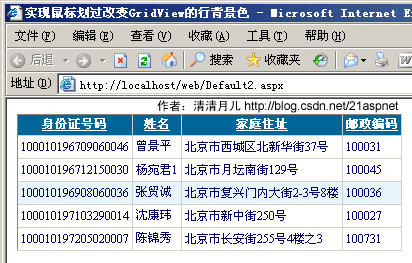
做法:和上面的一样就是代码不同
protected void GridView1_RowDataBound(object sender, GridViewRowEventArgs e)
{
//int i;
////执行循环,保证每条数据都可以更新
//for (i = 0; i < GridView1.Rows.Count; i++)
//{
// //首先判断是否是数据行
// if (e.Row.RowType == DataControlRowType.DataRow)
// {
// //当鼠标停留时更改背景色
// e.Row.Attributes.Add("onmouseover", "c=this.style.backgroundColor;this.style.backgroundColor='#00A9FF'");
// //当鼠标移开时还原背景色
// e.Row.Attributes.Add("onmouseout", "this.style.backgroundColor=c");
// }
//}
//如果是绑定数据行
if (e.Row.RowType == DataControlRowType.DataRow)
{
//鼠标经过时,行背景色变
e.Row.Attributes.Add("onmouseover", "this.style.backgroundColor='#E6F5FA'");
//鼠标移出时,行背景色变
e.Row.Attributes.Add("onmouseout", "this.style.backgroundColor='#FFFFFF'");
}
}
8.GridView实现删除时弹出确认对话框:
效果图:
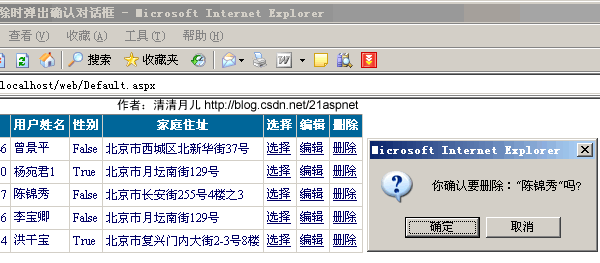
实现方法:
双击GridView的OnRowDataBound事件;
在后台的GridView1_RowDataBound()方法添加代码,最后代码如下所示:
protected void GridView1_RowDataBound(object sender, GridViewRowEventArgs e)
{
//如果是绑定数据行
if (e.Row.RowType == DataControlRowType.DataRow)
{
if (e.Row.RowState == DataControlRowState.Normal || e.Row.RowState == DataControlRowState.Alternate)
{
((LinkButton)e.Row.Cells[6].Controls[0]).Attributes.Add("onclick",
"javascript:return confirm('你确认要删除:\"" + e.Row.Cells[1].Text +
"\"吗?')");
}
}
}
9.GridView实现自动编号:
效果图:
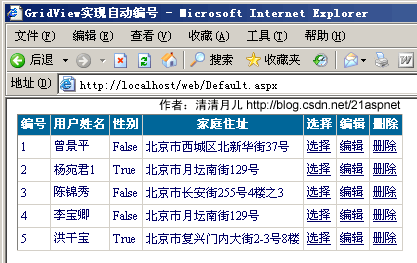
实现方法:
双击GridView的OnRowDataBound事件;
在后台的GridView1_RowDataBound()方法添加代码,最后代码如下所示:
protected void GridView1_RowDataBound(object sender, GridViewRowEventArgs e)
{
//如果是绑定数据行 //清清月儿http://blog.csdn.net/21aspnet
if (e.Row.RowType == DataControlRowType.DataRow)
{
////鼠标经过时,行背景色变
//e.Row.Attributes.Add("onmouseover", "this.style.backgroundColor='#E6F5FA'");
////鼠标移出时,行背景色变
//e.Row.Attributes.Add("onmouseout", "this.style.backgroundColor='#FFFFFF'");
////当有编辑列时,避免出错,要加的RowState判断
//if (e.Row.RowState == DataControlRowState.Normal || e.Row.RowState == DataControlRowState.Alternate)
//{
//
((LinkButton)e.Row.Cells[6].Controls[0]).Attributes.Add("onclick",
"javascript:return confirm('你确认要删除:\"" + e.Row.Cells[1].Text +
"\"吗?')");
//}
}
if (e.Row.RowIndex != -1)
{
int id = e.Row.RowIndex + 1;
e.Row.Cells[0].Text = id.ToString();
}
}
注意这时最好把前台的第一列的表头该为“编号”,因为以前的第一列被“吃掉”了。
<asp:GridView
ID="GridView1" runat="server" AutoGenerateColumns="False"
CellPadding="3" OnRowDeleting="GridView1_RowDeleting"
OnRowEditing="GridView1_RowEditing"
OnRowUpdating="GridView1_RowUpdating"
OnRowCancelingEdit="GridView1_RowCancelingEdit" BackColor="White"
BorderColor="#CCCCCC" BorderStyle="None" BorderWidth="1px"
Font-Size="12px" OnRowDataBound="GridView1_RowDataBound">
<FooterStyle BackColor="White" ForeColor="#000066" />
<Columns>
<asp:BoundField DataField="身份证号码" HeaderText="编号" ReadOnly="True" />
<asp:BoundField DataField="姓名" HeaderText="用户姓名" />
<asp:BoundField DataField="员工性别" HeaderText="性别" />
<asp:BoundField DataField="家庭住址" HeaderText="家庭住址" />
<asp:CommandField HeaderText="选择" ShowSelectButton="True" />
<asp:CommandField HeaderText="编辑" ShowEditButton="True" />
<asp:CommandField HeaderText="删除" ShowDeleteButton="True" />
</Columns>
<RowStyle ForeColor="#000066" />
<SelectedRowStyle BackColor="#669999" Font-Bold="True" ForeColor="White" />
<PagerStyle BackColor="White" ForeColor="#000066" HorizontalAlign="Left" />
<HeaderStyle BackColor="#006699" Font-Bold="True" ForeColor="White" />
</asp:GridView>
10.GridView实现自定义时间货币等字符串格式:
效果图:
图1-未格式化前
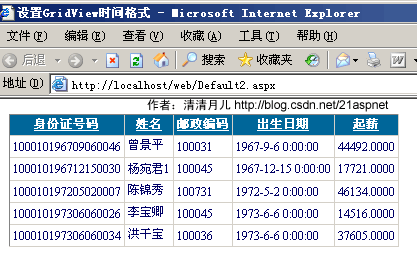
图2-格式化后
解决方法:
在asp.net 2.0中,如果要在绑定列中显示比如日期格式等,如果用下面的方法是显示不了的
<asp :BoundField DataField="CreationDate"
DataFormatString="{0:M-dd-yyyy}"
HeaderText="CreationDate" />
主要是由于htmlencode属性默认设置为true,已防止XSS攻击,安全起见而用的,所以,可以有以下两种方法解决
1、
<asp :GridView ID="GridView1" runat="server">
<columns>
<asp :BoundField DataField="CreationDate"
DataFormatString="{0:M-dd-yyyy}"
HtmlEncode="false"
HeaderText="CreationDate" />
</columns>
</asp>
将htmlencode设置为false即可
另外的解决方法为,使用模版列
<asp :GridView ID="GridView3" runat="server" >
<columns>
<asp :TemplateField HeaderText="CreationDate" >
<edititemtemplate>
<asp :Label ID="Label1" runat="server"
Text='<%# Eval("CreationDate", "{0:M-dd-yyyy}") %>'>
</asp>
</edititemtemplate>
<itemtemplate>
<asp :Label ID="Label1" runat="server"
Text=’<%# Bind("CreationDate", "{0:M-dd-yyyy}") %>'>
</asp>
</itemtemplate>
</asp>
</columns>
</asp>
前台代码:
<asp:GridView ID="GridView1" runat="server" AutoGenerateColumns="False" DataKeyNames="身份证号码"
DataSourceID="SqlDataSource1" AllowSorting="True" BackColor="White"
BorderColor="#CCCCCC" BorderStyle="None" BorderWidth="1px"
CellPadding="3" Font-Size="12px"
OnRowDataBound="GridView1_RowDataBound">
<Columns>
<asp:BoundField DataField="身份证号码" HeaderText="身份证号码" ReadOnly="True" SortExpression="身份证号码" />
<asp:BoundField DataField="姓名" HeaderText="姓名" SortExpression="姓名" />
<asp:BoundField DataField="邮政编码" HeaderText="邮政编码" SortExpression="邮政编码" />
<asp:BoundField DataField="出生日期" HeaderText="出生日期" SortExpression="出生日期" />
<asp:BoundField DataField="起薪" HeaderText="起薪" SortExpression="起薪" />
</Columns>
<FooterStyle BackColor="White" ForeColor="#000066" />
<RowStyle ForeColor="#000066" />
<SelectedRowStyle BackColor="#669999" Font-Bold="True" ForeColor="White" />
<PagerStyle BackColor="White" ForeColor="#000066" HorizontalAlign="Left" />
<HeaderStyle BackColor="#006699" Font-Bold="True" ForeColor="White" />
</asp:GridView>
<asp:SqlDataSource ID="SqlDataSource1" runat="server"
ConnectionString="<%$ ConnectionStrings:北风贸易ConnectionString1 %>"
SelectCommand="SELECT top 5 [出生日期], [起薪], [身份证号码], [姓名], [家庭住址], [邮政编码]
FROM [飞狐工作室]" DataSourceMode="DataReader"></asp:SqlDataSource>
附录-常用格式化公式:
{0:C} 货币;
{0:D4}由0填充的4个字符宽的字段中显示整数;
{0:000.0}四舍五入小数点保留第几位有效数字;
{0:N2}小数点保留2位有效数字;{0:N2}% 小数点保留2位有效数字加百分号;
{0:D}长日期;{0:d}短日期;{0:yy-MM-dd} 例如07-3-25;;{0:yyyy-MM-dd} 例如2007-3-25
11.GridView实现用“...”代替超长字符串:
效果图:
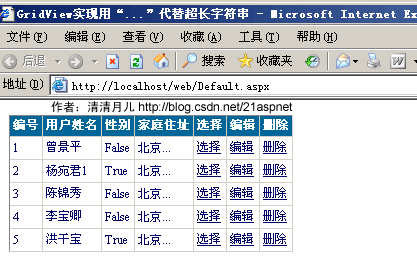
解决方法:数据绑定后过滤每一行即可
for (int i = 0; i <= GridView1.Rows.Count - 1; i++)
{
DataRowView mydrv;
string gIntro;
if (GridView1.PageIndex == 0)
{
mydrv = myds.Tables["飞狐工作室"].DefaultView[i];//表名
gIntro = Convert.ToString(mydrv["家庭住址"]);//所要处理的字段
GridView1.Rows[i].Cells[3].Text = SubStr(gIntro, 2);
}
else
{
mydrv = myds.Tables["飞狐工作室"].DefaultView[i + (5 * GridView1.PageIndex)];
gIntro = Convert.ToString(mydrv["家庭住址"]);
GridView1.Rows[i].Cells[3].Text = SubStr(gIntro, 2);
}
}
调用的方法:
public string SubStr(string sString, int nLeng)
{
if (sString.Length <= nLeng)
{
return sString;
}
string sNewStr = sString.Substring(0, nLeng);
sNewStr = sNewStr + "...";
return sNewStr;
}
后台全部代码:
using System;
using System.Data;
using System.Configuration;
using System.Web;
using System.Web.Security;
using System.Web.UI;
using System.Web.UI.WebControls;
using System.Web.UI.WebControls.WebParts;
using System.Web.UI.HtmlControls;
using System.Data.SqlClient;
public partial class _Default : System.Web.UI.Page
{
SqlConnection sqlcon;
SqlCommand sqlcom;
string strCon = "Data Source=(local);Database=北风贸易;Uid=sa;Pwd=sa";
protected void Page_Load(object sender, EventArgs e)
{
if (!IsPostBack)
{
ViewState["SortOrder"] = "身份证号码";
ViewState["OrderDire"] = "ASC";
bind();
}
}
protected void GridView1_RowEditing(object sender, GridViewEditEventArgs e)
{
GridView1.EditIndex = e.NewEditIndex;
bind();
}
protected void GridView1_RowDeleting(object sender, GridViewDeleteEventArgs e)
{
string sqlstr = "delete from 飞狐工作室 where 身份证号码='" + GridView1.DataKeys[e.RowIndex].Value.ToString() + "'";
sqlcon = new SqlConnection(strCon);
sqlcom = new SqlCommand(sqlstr,sqlcon);
sqlcon.Open();
sqlcom.ExecuteNonQuery();
sqlcon.Close();
bind();
}
protected void GridView1_RowUpdating(object sender, GridViewUpdateEventArgs e)
{
sqlcon = new SqlConnection(strCon);
string sqlstr = "update 飞狐工作室 set 姓名='"
+ ((TextBox)(GridView1.Rows[e.RowIndex].Cells[1].Controls[0])).Text.ToString().Trim() + "',家庭住址='"
+ ((TextBox)(GridView1.Rows[e.RowIndex].Cells[3].Controls[0])).Text.ToString().Trim() + "' where 身份证号码='"
+ GridView1.DataKeys[e.RowIndex].Value.ToString() + "'";
sqlcom=new SqlCommand(sqlstr,sqlcon);
sqlcon.Open();
sqlcom.ExecuteNonQuery();
sqlcon.Close();
GridView1.EditIndex = -1;
bind();
}
protected void GridView1_RowCancelingEdit(object sender, GridViewCancelEditEventArgs e)
{
GridView1.EditIndex = -1;
bind();
}
public void bind()
{
string sqlstr = "select top 5 * from 飞狐工作室";
sqlcon = new SqlConnection(strCon);
SqlDataAdapter myda = new SqlDataAdapter(sqlstr, sqlcon);
DataSet myds = new DataSet();
sqlcon.Open();
myda.Fill(myds, "飞狐工作室");
GridView1.DataSource = myds;
GridView1.DataKeyNames = new string[] { "身份证号码" };
GridView1.DataBind();
for (int i = 0; i <= GridView1.Rows.Count - 1; i++)
{
DataRowView mydrv;
string gIntro;
if (GridView1.PageIndex == 0)
{
mydrv = myds.Tables["飞狐工作室"].DefaultView[i];
gIntro = Convert.ToString(mydrv["家庭住址"]);
GridView1.Rows[i].Cells[3].Text = SubStr(gIntro, 2);
}
else
{
mydrv = myds.Tables["飞狐工作室"].DefaultView[i + (5 * GridView1.PageIndex)];
gIntro = Convert.ToString(mydrv["家庭住址"]);
GridView1.Rows[i].Cells[3].Text = SubStr(gIntro, 2);
}
}
sqlcon.Close();
}
public string SubStr(string sString, int nLeng)
{
if (sString.Length <= nLeng)
{
return sString;
}
string sNewStr = sString.Substring(0, nLeng);
sNewStr = sNewStr + "...";
return sNewStr;
}
protected void GridView1_RowDataBound(object sender, GridViewRowEventArgs e)
{
//如果是绑定数据行
if (e.Row.RowType == DataControlRowType.DataRow)
{
////鼠标经过时,行背景色变
//e.Row.Attributes.Add("onmouseover", "this.style.backgroundColor='#E6F5FA'");
////鼠标移出时,行背景色变
//e.Row.Attributes.Add("onmouseout", "this.style.backgroundColor='#FFFFFF'");
////当有编辑列时,避免出错,要加的RowState判断
//if (e.Row.RowState == DataControlRowState.Normal || e.Row.RowState == DataControlRowState.Alternate)
//{
//
((LinkButton)e.Row.Cells[6].Controls[0]).Attributes.Add("onclick",
"javascript:return confirm('你确认要删除:\"" + e.Row.Cells[1].Text +
"\"吗?')");
//}
}
if (e.Row.RowIndex != -1)
{
int id = e.Row.RowIndex + 1;
e.Row.Cells[0].Text = id.ToString();
}
}
}
11.GridView一般换行与强制换行:
效果图:

首先设置<asp:BoundField DataField="家庭住址" HeaderText="家庭住址" ItemStyle-Width="100" />
gridview里有一列绑定的数据很长,显示的时候在一行里面显示,页面拉得很宽。
原因是连续英文段为一个整体导致的,在RowDataBound中添加上了一句e.Row.Cells[2].Style.Add("word-break", "break-all")就可以。
如果要给所有的列增加此属性:
protected void Page_Load(object sender, EventArgs e)
{
//正常换行
GridView1.Attributes.Add("style", "word-break:keep-all;word-wrap:normal");
//下面这行是自动换行
GridView1.Attributes.Add("style", "word-break:break-all;word-wrap:break-word");
if (!IsPostBack)
{
bind();//调用数据绑定即可
}
}
总之:善用CSS的word-break:break-all;word-wrap:break-word属性即可,这个属性是通用的对于顽固的南换行问题都可以解决,不局限于GridView。
12.GridView显示隐藏某一列:
本方案为月儿独创,不同于网上其他方式,我觉得用一个CheckBox更人性化,这样可以隐藏不必要的列,让用户自己选择需要出现的列,在处理多列时这是一个很好的解决方案!
效果图:
图1-开始

图2-点击显示的CheckBox后

解决方案:
public void bind()
{
string sqlstr = "select top 5 * from 飞狐工作室";
sqlcon = new SqlConnection(strCon);
SqlDataAdapter myda = new SqlDataAdapter(sqlstr, sqlcon);
DataSet myds = new DataSet();
sqlcon.Open();
myda.Fill(myds, "飞狐工作室");
GridView1.DataSource = myds;
GridView1.DataKeyNames = new string[] { "身份证号码" };
GridView1.DataBind();
sqlcon.Close();
GridView1.Columns[3].Visible = false;//一开始隐藏
CheckBox1.Checked = false;//如果不这样后面的代码会把他True
}
双击CheckBox1,在CheckedChanged方法里写上代码,最后代码如下:
protected void CheckBox1_CheckedChanged(object sender, EventArgs e)
{
GridView1.Columns[3].Visible=! GridView1.Columns[3].Visible;
Response.Write("GridView1的第4列现在的显示隐藏状态是:"+GridView1.Columns[3].Visible.ToString());
}
注意:CheckBox1的AutoPostBack要True!
后台全部代码如下:
using System;
using System.Data;
using System.Configuration;
using System.Web;
using System.Web.Security;
using System.Web.UI;
using System.Web.UI.WebControls;
using System.Web.UI.WebControls.WebParts;
using System.Web.UI.HtmlControls;
using System.Data.SqlClient;
public partial class _Default : System.Web.UI.Page
{
SqlConnection sqlcon;
SqlCommand sqlcom;
string strCon = "Data Source=(local);Database=北风贸易;Uid=sa;Pwd=sa";
protected void Page_Load(object sender, EventArgs e)
{
if (!IsPostBack)
{
ViewState["SortOrder"] = "身份证号码";
ViewState["OrderDire"] = "ASC";
bind();
}
}
protected void GridView1_RowEditing(object sender, GridViewEditEventArgs e)
{
GridView1.EditIndex = e.NewEditIndex;
bind();
}
protected void GridView1_RowDeleting(object sender, GridViewDeleteEventArgs e)
{
string sqlstr = "delete from 飞狐工作室 where 身份证号码='" + GridView1.DataKeys[e.RowIndex].Value.ToString() + "'";
sqlcon = new SqlConnection(strCon);
sqlcom = new SqlCommand(sqlstr,sqlcon);
sqlcon.Open();
sqlcom.ExecuteNonQuery();
sqlcon.Close();
bind();
}
protected void GridView1_RowUpdating(object sender, GridViewUpdateEventArgs e)
{
sqlcon = new SqlConnection(strCon);
string sqlstr = "update 飞狐工作室 set 姓名='"
+ ((TextBox)(GridView1.Rows[e.RowIndex].Cells[1].Controls[0])).Text.ToString().Trim() + "',家庭住址='"
+ ((TextBox)(GridView1.Rows[e.RowIndex].Cells[3].Controls[0])).Text.ToString().Trim() + "' where 身份证号码='"
+ GridView1.DataKeys[e.RowIndex].Value.ToString() + "'";
sqlcom=new SqlCommand(sqlstr,sqlcon);
sqlcon.Open();
sqlcom.ExecuteNonQuery();
sqlcon.Close();
GridView1.EditIndex = -1;
bind();
}
protected void GridView1_RowCancelingEdit(object sender, GridViewCancelEditEventArgs e)
{
GridView1.EditIndex = -1;
bind();
}
public void bind()
{
string sqlstr = "select top 5 * from 飞狐工作室";
sqlcon = new SqlConnection(strCon);
SqlDataAdapter myda = new SqlDataAdapter(sqlstr, sqlcon);
DataSet myds = new DataSet();
sqlcon.Open();
myda.Fill(myds, "飞狐工作室");
GridView1.DataSource = myds;
GridView1.DataKeyNames = new string[] { "身份证号码" };
GridView1.DataBind();
sqlcon.Close();
GridView1.Columns[3].Visible = false;
CheckBox1.Checked = false;
}
protected void CheckBox1_CheckedChanged(object sender, EventArgs e)
{
GridView1.Columns[3].Visible=! GridView1.Columns[3].Visible;
Response.Write("GridView1的第4列现在的显示隐藏状态是:"+GridView1.Columns[3].Visible.ToString());
}
}
前台代码:
<!DOCTYPE html PUBLIC "-//W3C//DTD XHTML 1.0 Transitional//EN" "http://www.w3.org/TR/xhtml1/DTD/xhtml1-transitional.dtd">
<html xmlns="http://www.w3.org/1999/xhtml" >
<head runat="server">
<title>GridView显示隐藏列 清清月儿http://blog.csdn.net/21aspnet </title>
</head>
<body style="font-size=12px">
<form id="form1" runat="server">
<div>
<asp:GridView ID="GridView1" runat="server"
AutoGenerateColumns="False" CellPadding="3"
OnRowDeleting="GridView1_RowDeleting"
OnRowEditing="GridView1_RowEditing"
OnRowUpdating="GridView1_RowUpdating"
OnRowCancelingEdit="GridView1_RowCancelingEdit" BackColor="White"
BorderColor="#CCCCCC" BorderStyle="None" BorderWidth="1px"
Font-Size="12px" >
<FooterStyle BackColor="White" ForeColor="#000066" />
<Columns>
<asp:BoundField DataField="身份证号码" HeaderText="编号" ReadOnly="True" />
<asp:BoundField DataField="姓名" HeaderText="用户姓名" />
<asp:BoundField DataField="邮政编码" HeaderText="邮政编码" SortExpression="邮政编码" />
<asp:BoundField DataField="家庭住址" HeaderText="家庭住址" />
<asp:CommandField HeaderText="选择" ShowSelectButton="True" />
<asp:CommandField HeaderText="编辑" ShowEditButton="True" />
<asp:CommandField HeaderText="删除" ShowDeleteButton="True" />
</Columns>
<RowStyle ForeColor="#000066" />
<SelectedRowStyle BackColor="#669999" Font-Bold="True" ForeColor="White" />
<PagerStyle BackColor="White" ForeColor="#000066" HorizontalAlign="Left" />
<HeaderStyle BackColor="#006699" Font-Bold="True" ForeColor="White" />
</asp:GridView>
<asp:CheckBox ID="CheckBox1" runat="server" AutoPostBack="True" Font-Size="12px"
OnCheckedChanged="CheckBox1_CheckedChanged" Text="显示隐藏家庭住址" /></div>
</form>
</body>
</html>
13.GridView弹出新页面/弹出制定大小位置新窗口:
效果图:

方案一:简单的方法,新窗口不固定大小
<asp:GridView
ID="GridView1" runat="server" AutoGenerateColumns="False"
CellPadding="3" OnRowDeleting="GridView1_RowDeleting"
OnRowEditing="GridView1_RowEditing"
OnRowUpdating="GridView1_RowUpdating"
OnRowCancelingEdit="GridView1_RowCancelingEdit" BackColor="White"
BorderColor="#CCCCCC" BorderStyle="None" BorderWidth="1px"
Font-Size="12px" >
<FooterStyle BackColor="White" ForeColor="#000066" />
<Columns>
<asp:BoundField DataField="身份证号码" HeaderText="编号" ReadOnly="True" />
<asp:BoundField DataField="邮政编码" HeaderText="邮政编码" SortExpression="邮政编码" />
<asp:BoundField DataField="家庭住址" HeaderText="家庭住址" />
<asp:HyperLinkField HeaderText="姓名" Text="姓名"
DataNavigateUrlFields="姓名"
DataNavigateUrlFormatString="Default6.aspx?GoodsID={0}"
Target="mainframe" NavigateUrl="~/Default6.aspx" DataTextField="姓名" >
</asp:HyperLinkField>
<asp:CommandField HeaderText="选择" ShowSelectButton="True" />
<asp:CommandField HeaderText="编辑" ShowEditButton="True" />
<asp:CommandField HeaderText="删除" ShowDeleteButton="True" />
</Columns>
<RowStyle ForeColor="#000066" />
<SelectedRowStyle BackColor="#669999" Font-Bold="True" ForeColor="White" />
<PagerStyle BackColor="White" ForeColor="#000066" HorizontalAlign="Left" />
<HeaderStyle BackColor="#006699" Font-Bold="True" ForeColor="White" />
</asp:GridView>
DataNavigateUrlFields是链接的字段名,DataNavigateUrlFormatString是路径。
方案二:精确控制弹出窗口大小位置
<asp:HyperLinkColumn
DataNavigateUrlField="EmployeeID"
DataNavigateUrlFormatString="javascript:varwin=window.open('detail.aspx?ID={0}',null,'width=300,height=200');window.Close();"
DataTextField="LastName" HeaderText="LastName"></asp:HyperLinkColumn>
使用的是结合javascript的window.open方法,关于window.open的参数网上有很多帖子,本站也有许多参考
弹出窗口大全 http://blog.csdn.net/21aspnet/archive/2004/10/25/150231.aspx 即可!
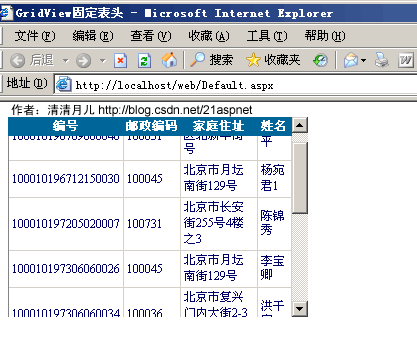
14.GridView固定表头(不用javascript只用CSS!,很好用):
效果图:
代码:
<!DOCTYPE html PUBLIC "-//W3C//DTD XHTML 1.0 Transitional//EN" "http://www.w3.org/TR/xhtml1/DTD/xhtml1-transitional.dtd">
<html xmlns="http://www.w3.org/1999/xhtml" >
<head runat="server">
<title>GridView固定表头 清清月儿http://blog.csdn.net/21aspnet </title>
<style>
.Freezing
{
position:relative ;
table-layout:fixed;
top:expression(this.offsetParent.scrollTop);
z-index: 10;
}
.Freezing th{text-overflow:ellipsis;overflow:hidden;white-space: nowrap;padding:2px;}
</style>
</head>
<body style="font-size=12px">
<form id="form1" runat="server">
<div style="overflow-y: scroll; height: 200px;width:300px" id="dvBody">
<asp:GridView ID="GridView1" runat="server"
AutoGenerateColumns="False" CellPadding="3"
OnRowDeleting="GridView1_RowDeleting"
OnRowEditing="GridView1_RowEditing"
OnRowUpdating="GridView1_RowUpdating"
OnRowCancelingEdit="GridView1_RowCancelingEdit" BackColor="White"
BorderColor="#CCCCCC" BorderStyle="None" BorderWidth="1px"
Font-Size="12px" OnRowCreated="GridView1_RowCreated" >
<FooterStyle BackColor="White" ForeColor="#000066" />
<Columns>
<asp:BoundField DataField="身份证号码" HeaderText="编号" ReadOnly="True" />
<asp:BoundField DataField="邮政编码" HeaderText="邮政编码" SortExpression="邮政编码" />
<asp:BoundField DataField="家庭住址" HeaderText="家庭住址" />
<asp:BoundField DataField="姓名" HeaderText="姓名" />
</Columns>
<RowStyle ForeColor="#000066" />
<SelectedRowStyle BackColor="#669999" Font-Bold="True" ForeColor="White" />
<PagerStyle BackColor="White" ForeColor="#000066"
HorizontalAlign="Left" CssClass="ms-formlabel DataGridFixedHeader"/>
<HeaderStyle BackColor="#006699" Font-Bold="True" ForeColor="White" CssClass="Freezing"/>
</asp:GridView>
</div>
</form>
</body>
</html>
用法:CSS设如上的样式,HeaderStyle加
CssClass="Freezing,套住GridView的Div设置高度宽度 <div style="overflow-y:
scroll; height: 200px;width:200px" >
15.GridView合并表头多重表头无错完美版(以合并3列3行举例)
效果图:
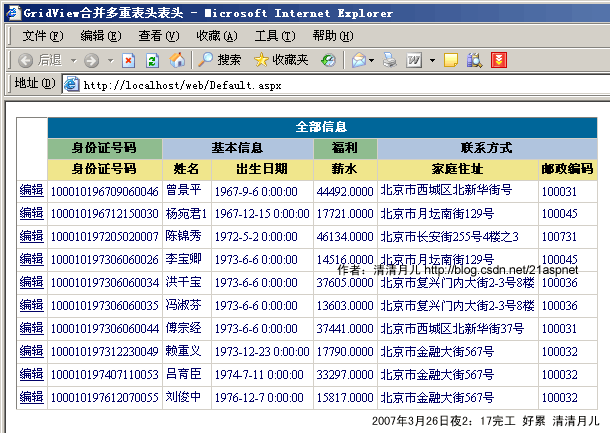
后台代码:
using System;
using System.Data;
using System.Configuration;
using System.Web;
using System.Web.Security;
using System.Web.UI;
using System.Web.UI.WebControls;
using System.Web.UI.WebControls.WebParts;
using System.Web.UI.HtmlControls;
using System.Data.SqlClient;
using System.Drawing;
public partial class _Default : System.Web.UI.Page
{
SqlConnection sqlcon;
SqlCommand sqlcom;
string strCon = "Data Source=(local);Database=北风贸易;Uid=sa;Pwd=sa";
protected void Page_Load(object sender, EventArgs e)
{
if (!IsPostBack)
{
bind();
}
}
protected void GridView1_RowEditing(object sender, GridViewEditEventArgs e)
{
GridView1.EditIndex = e.NewEditIndex;
bind();
}
protected void GridView1_RowUpdating(object sender, GridViewUpdateEventArgs e)
{
sqlcon = new SqlConnection(strCon);
string sqlstr = "update 飞狐工作室 set 姓名='"
+ ((TextBox)(GridView1.Rows[e.RowIndex].Cells[1].Controls[0])).Text.ToString().Trim() + "',家庭住址='"
+ ((TextBox)(GridView1.Rows[e.RowIndex].Cells[3].Controls[0])).Text.ToString().Trim() + "' where 身份证号码='"
+ GridView1.DataKeys[e.RowIndex].Value.ToString() + "'";
sqlcom=new SqlCommand(sqlstr,sqlcon);
sqlcon.Open();
sqlcom.ExecuteNonQuery();
sqlcon.Close();
GridView1.EditIndex = -1;
bind();
}
protected void GridView1_RowCancelingEdit(object sender, GridViewCancelEditEventArgs e)
{
GridView1.EditIndex = -1;
bind();
}
public void bind()
{
string sqlstr = "select top 10 * from 飞狐工作室";
sqlcon = new SqlConnection(strCon);
SqlDataAdapter myda = new SqlDataAdapter(sqlstr, sqlcon);
DataSet myds = new DataSet();
sqlcon.Open();
myda.Fill(myds, "飞狐工作室");
GridView1.DataSource = myds;
GridView1.DataKeyNames = new string[] { "身份证号码" };
GridView1.DataBind();
sqlcon.Close();
}
//这里就是解决方案
protected void GridView1_RowCreated(object sender, GridViewRowEventArgs e)
{
switch (e.Row.RowType)
{
case DataControlRowType.Header:
//第一行表头
TableCellCollection tcHeader = e.Row.Cells;
tcHeader.Clear();
tcHeader.Add(new TableHeaderCell());
tcHeader[0].Attributes.Add("rowspan", "3"); //跨Row
tcHeader[0].Attributes.Add("bgcolor", "white");
tcHeader[0].Text = "";
tcHeader.Add(new TableHeaderCell());
//tcHeader[1].Attributes.Add("bgcolor", "Red");
tcHeader[1].Attributes.Add("colspan", "6"); //跨Column
tcHeader[1].Text = "全部信息</th></tr><tr>";
//第二行表头
tcHeader.Add(new TableHeaderCell());
tcHeader[2].Attributes.Add("bgcolor", "DarkSeaGreen");
tcHeader[2].Text = "身份证号码";
tcHeader.Add(new TableHeaderCell());
tcHeader[3].Attributes.Add("bgcolor", "LightSteelBlue");
tcHeader[3].Attributes.Add("colspan", "2");
tcHeader[3].Text = "基本信息";
tcHeader.Add(new TableHeaderCell());
tcHeader[4].Attributes.Add("bgcolor", "DarkSeaGreen");
tcHeader[4].Text = "福利";
tcHeader.Add(new TableHeaderCell());
tcHeader[5].Attributes.Add("bgcolor", "LightSteelBlue");
tcHeader[5].Attributes.Add("colspan", "2");
tcHeader[5].Text = "联系方式</th></tr><tr>";
//第三行表头
tcHeader.Add(new TableHeaderCell());
tcHeader[6].Attributes.Add("bgcolor", "Khaki");
tcHeader[6].Text = "身份证号码";
tcHeader.Add(new TableHeaderCell());
tcHeader[7].Attributes.Add("bgcolor", "Khaki");
tcHeader[7].Text = "姓名";
tcHeader.Add(new TableHeaderCell());
tcHeader[8].Attributes.Add("bgcolor", "Khaki");
tcHeader[8].Text = "出生日期";
tcHeader.Add(new TableHeaderCell());
tcHeader[9].Attributes.Add("bgcolor", "Khaki");
tcHeader[9].Text = "薪水";
tcHeader.Add(new TableHeaderCell());
tcHeader[10].Attributes.Add("bgcolor", "Khaki");
tcHeader[10].Text = "家庭住址";
tcHeader.Add(new TableHeaderCell());
tcHeader[11].Attributes.Add("bgcolor", "Khaki");
tcHeader[11].Text = "邮政编码";
break;
}
}
}
前台:
<!DOCTYPE html PUBLIC "-//W3C//DTD XHTML 1.0 Transitional//EN" "http://www.w3.org/TR/xhtml1/DTD/xhtml1-transitional.dtd">
<html xmlns="http://www.w3.org/1999/xhtml" >
<head runat="server">
<title>GridView合并多重表头表头 清清月儿http://blog.csdn.net/21aspnet </title>
</head>
<body >
<form id="form1" runat="server">
<div >
<asp:GridView ID="GridView1" runat="server"
AutoGenerateColumns="False" CellPadding="3"
OnRowEditing="GridView1_RowEditing"
OnRowUpdating="GridView1_RowUpdating"
OnRowCancelingEdit="GridView1_RowCancelingEdit" BackColor="White"
BorderColor="#CCCCCC" BorderStyle="None" BorderWidth="1px"
Font-Size="12px" OnRowCreated="GridView1_RowCreated" >
<FooterStyle BackColor="White" ForeColor="#000066" />
<Columns>
<asp:CommandField HeaderText="编辑" ShowEditButton="True" />
<asp:BoundField DataField="身份证号码" HeaderText="编号" ReadOnly="True" />
<asp:BoundField DataField="姓名" HeaderText="姓名" />
<asp:BoundField DataField="出生日期" HeaderText="邮政编码" />
<asp:BoundField DataField="起薪" HeaderText="起薪" />
<asp:BoundField DataField="家庭住址" HeaderText="家庭住址" />
<asp:BoundField DataField="邮政编码" HeaderText="邮政编码" />
</Columns>
<RowStyle ForeColor="#000066" />
<SelectedRowStyle BackColor="#669999" Font-Bold="True" ForeColor="White" />
<PagerStyle BackColor="White" ForeColor="#000066"
HorizontalAlign="Left" CssClass="ms-formlabel DataGridFixedHeader"/>
<HeaderStyle BackColor="#006699" Font-Bold="True" ForeColor="White" />
</asp:GridView>
</div>
</form>
</body>
</html>
16.GridView突出显示某一单元格(例如金额低于多少,分数不及格等)
效果图:
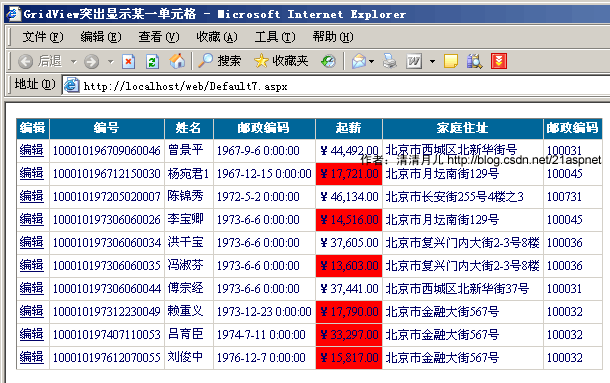
解决方案:主要是绑定后过滤
GridView1.DataBind();
for (int i = 0; i <= GridView1.Rows.Count - 1; i++)
{
DataRowView mydrv = myds.Tables["飞狐工作室"].DefaultView[i];
string score = Convert.ToString(mydrv["起薪"]);
if (Convert.ToDouble(score) < 34297.00)//大家这里根据具体情况设置可能ToInt32等等
{
GridView1.Rows[i].Cells[4].BackColor = System.Drawing.Color.Red;
}
}
sqlcon.Close();
全部后台代码:
using System;
using System.Data;
using System.Configuration;
using System.Web;
using System.Web.Security;
using System.Web.UI;
using System.Web.UI.WebControls;
using System.Web.UI.WebControls.WebParts;
using System.Web.UI.HtmlControls;
using System.Data.SqlClient;
using System.Drawing;
public partial class Default7 : System.Web.UI.Page
{
SqlConnection sqlcon;
SqlCommand sqlcom;
string strCon = "Data Source=(local);Database=北风贸易;Uid=sa;Pwd=sa";
protected void Page_Load(object sender, EventArgs e)
{
if (!IsPostBack)
{
bind();
}
}
protected void GridView1_RowEditing(object sender, GridViewEditEventArgs e)
{
GridView1.EditIndex = e.NewEditIndex;
bind();
}
protected void GridView1_RowUpdating(object sender, GridViewUpdateEventArgs e)
{
sqlcon = new SqlConnection(strCon);
string sqlstr = "update 飞狐工作室 set 姓名='"
+ ((TextBox)(GridView1.Rows[e.RowIndex].Cells[1].Controls[0])).Text.ToString().Trim() + "',家庭住址='"
+ ((TextBox)(GridView1.Rows[e.RowIndex].Cells[3].Controls[0])).Text.ToString().Trim() + "' where 身份证号码='"
+ GridView1.DataKeys[e.RowIndex].Value.ToString() + "'";
sqlcom = new SqlCommand(sqlstr, sqlcon);
sqlcon.Open();
sqlcom.ExecuteNonQuery();
sqlcon.Close();
GridView1.EditIndex = -1;
bind();
}
protected void GridView1_RowCancelingEdit(object sender, GridViewCancelEditEventArgs e)
{
GridView1.EditIndex = -1;
bind();
}
public void bind()
{
string sqlstr = "select top 10 * from 飞狐工作室";
sqlcon = new SqlConnection(strCon);
SqlDataAdapter myda = new SqlDataAdapter(sqlstr, sqlcon);
DataSet myds = new DataSet();
sqlcon.Open();
myda.Fill(myds, "飞狐工作室");
GridView1.DataSource = myds;
GridView1.DataKeyNames = new string[] { "身份证号码" };
GridView1.DataBind();
for (int i = 0; i <= GridView1.Rows.Count - 1; i++)
{
DataRowView mydrv = myds.Tables["飞狐工作室"].DefaultView[i];
string score = Convert.ToString(mydrv["起薪"]);
if (Convert.ToDouble(score) < 34297.00)//大家这里根据具体情况设置可能ToInt32等等
{
GridView1.Rows[i].Cells[4].BackColor = System.Drawing.Color.Red;
}
}
sqlcon.Close();
}
}
前台代码:
<!DOCTYPE html PUBLIC "-//W3C//DTD XHTML 1.0 Transitional//EN" "http://www.w3.org/TR/xhtml1/DTD/xhtml1-transitional.dtd">
<html xmlns="http://www.w3.org/1999/xhtml" >
<head id="Head1" runat="server">
<title>GridView突出显示某一单元格 清清月儿http://blog.csdn.net/21aspnet </title>
</head>
<body >
<form id="form1" runat="server">
<div >
<asp:GridView ID="GridView1" runat="server"
AutoGenerateColumns="False" CellPadding="3"
OnRowEditing="GridView1_RowEditing"
OnRowUpdating="GridView1_RowUpdating"
OnRowCancelingEdit="GridView1_RowCancelingEdit" BackColor="White"
BorderColor="#CCCCCC" BorderStyle="None" BorderWidth="1px"
Font-Size="12px" >
<FooterStyle BackColor="White" ForeColor="#000066" />
<Columns>
<asp:CommandField HeaderText="编辑" ShowEditButton="True" />
<asp:BoundField DataField="身份证号码" HeaderText="编号" ReadOnly="True" />
<asp:BoundField DataField="姓名" HeaderText="姓名" />
<asp:BoundField DataField="出生日期" HeaderText="邮政编码" />
<asp:BoundField DataField="起薪" HeaderText="起薪" DataFormatString="{0:C}" HtmlEncode="false"/>
<asp:BoundField DataField="家庭住址" HeaderText="家庭住址" />
<asp:BoundField DataField="邮政编码" HeaderText="邮政编码" />
</Columns>
<RowStyle ForeColor="#000066" />
<SelectedRowStyle BackColor="#669999" Font-Bold="True" ForeColor="White" />
<PagerStyle BackColor="White" ForeColor="#000066"
HorizontalAlign="Left" CssClass="ms-formlabel DataGridFixedHeader"/>
<HeaderStyle BackColor="#006699" Font-Bold="True" ForeColor="White" />
</asp:GridView>
</div>
</form>
</body>
</html>
17.GridView加入自动求和求平均值小计
效果图: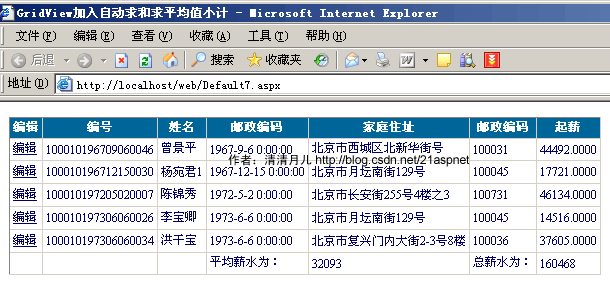
解决方案:
private double sum = 0;//取指定列的数据和,你要根据具体情况对待可能你要处理的是int
protected void GridView1_RowDataBound(object sender, GridViewRowEventArgs e)
{
if (e.Row.RowIndex >= 0)
{
sum += Convert.ToDouble(e.Row.Cells[6].Text);
}
else if (e.Row.RowType == DataControlRowType.Footer)
{
e.Row.Cells[5].Text = "总薪水为:";
e.Row.Cells[6].Text = sum.ToString();
e.Row.Cells[3].Text = "平均薪水为:";
e.Row.Cells[4].Text = ((int)(sum / GridView1.Rows.Count)).ToString();
}
}
后台全部代码:
using System;
using System.Data;
using System.Configuration;
using System.Web;
using System.Web.Security;
using System.Web.UI;
using System.Web.UI.WebControls;
using System.Web.UI.WebControls.WebParts;
using System.Web.UI.HtmlControls;
using System.Data.SqlClient;
using System.Drawing;
public partial class Default7 : System.Web.UI.Page
{
SqlConnection sqlcon;
SqlCommand sqlcom;
string strCon = "Data Source=(local);Database=北风贸易;Uid=sa;Pwd=sa";
protected void Page_Load(object sender, EventArgs e)
{
if (!IsPostBack)
{
bind();
}
}
protected void GridView1_RowEditing(object sender, GridViewEditEventArgs e)
{
GridView1.EditIndex = e.NewEditIndex;
bind();
}
protected void GridView1_RowUpdating(object sender, GridViewUpdateEventArgs e)
{
sqlcon = new SqlConnection(strCon);
string sqlstr = "update 飞狐工作室 set 姓名='"
+ ((TextBox)(GridView1.Rows[e.RowIndex].Cells[1].Controls[0])).Text.ToString().Trim() + "',家庭住址='"
+ ((TextBox)(GridView1.Rows[e.RowIndex].Cells[3].Controls[0])).Text.ToString().Trim() + "' where 身份证号码='"
+ GridView1.DataKeys[e.RowIndex].Value.ToString() + "'";
sqlcom = new SqlCommand(sqlstr, sqlcon);
sqlcon.Open();
sqlcom.ExecuteNonQuery();
sqlcon.Close();
GridView1.EditIndex = -1;
bind();
}
protected void GridView1_RowCancelingEdit(object sender, GridViewCancelEditEventArgs e)
{
GridView1.EditIndex = -1;
bind();
}
public void bind()
{
string sqlstr = "select top 5 * from 飞狐工作室";
sqlcon = new SqlConnection(strCon);
SqlDataAdapter myda = new SqlDataAdapter(sqlstr, sqlcon);
DataSet myds = new DataSet();
sqlcon.Open();
myda.Fill(myds, "飞狐工作室");
GridView1.DataSource = myds;
GridView1.DataKeyNames = new string[] { "身份证号码" };
GridView1.DataBind();
sqlcon.Close();
}
private double sum = 0;//取指定列的数据和
protected void GridView1_RowDataBound(object sender, GridViewRowEventArgs e)
{
if (e.Row.RowIndex >= 0)
{
sum += Convert.ToDouble(e.Row.Cells[6].Text);
}
else if (e.Row.RowType == DataControlRowType.Footer)
{
e.Row.Cells[5].Text = "总薪水为:";
e.Row.Cells[6].Text = sum.ToString();
e.Row.Cells[3].Text = "平均薪水为:";
e.Row.Cells[4].Text = ((int)(sum / GridView1.Rows.Count)).ToString();
}
}
}
前台:唯一的花头就是设置ShowFooter="True" ,否则默认表头为隐藏的!
<asp:GridView
ID="GridView1" runat="server" AutoGenerateColumns="False"
CellPadding="3" OnRowEditing="GridView1_RowEditing"
OnRowUpdating="GridView1_RowUpdating"
OnRowCancelingEdit="GridView1_RowCancelingEdit" BackColor="White"
BorderColor="#CCCCCC" BorderStyle="None" BorderWidth="1px"
Font-Size="12px" OnRowDataBound="GridView1_RowDataBound"
ShowFooter="True" >
<FooterStyle BackColor="White" ForeColor="#000066" />
<Columns>
<asp:CommandField HeaderText="编辑" ShowEditButton="True" />
<asp:BoundField DataField="身份证号码" HeaderText="编号" ReadOnly="True" />
<asp:BoundField DataField="姓名" HeaderText="姓名" />
<asp:BoundField DataField="出生日期" HeaderText="邮政编码" />
<asp:BoundField DataField="家庭住址" HeaderText="家庭住址" />
<asp:BoundField DataField="邮政编码" HeaderText="邮政编码" />
<asp:BoundField DataField="起薪" HeaderText="起薪" />
</Columns>
<RowStyle ForeColor="#000066" />
<SelectedRowStyle BackColor="#669999" Font-Bold="True" ForeColor="White" />
<PagerStyle BackColor="White" ForeColor="#000066"
HorizontalAlign="Left" CssClass="ms-formlabel DataGridFixedHeader"/>
<HeaderStyle BackColor="#006699" Font-Bold="True" ForeColor="White" />
</asp:GridView>
18.GridView数据导入Excel/Excel数据读入GridView
效果图:
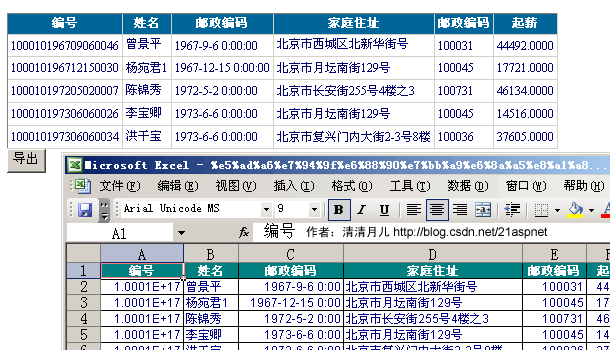
解决方案:
页面增加一个按钮,单击事件添加如下方法:
protected void Button1_Click(object sender, EventArgs e)
{
Export("application/ms-excel", "学生成绩报表.xls");
}
private void Export(string FileType, string FileName)
{
Response.Charset = "GB2312";
Response.ContentEncoding = System.Text.Encoding.UTF7;
Response.AppendHeader("Content-Disposition", "attachment;filename=" +
HttpUtility.UrlEncode(FileName, Encoding.UTF8).ToString());
Response.ContentType = FileType;
this.EnableViewState = false;
StringWriter tw = new StringWriter();
HtmlTextWriter hw = new HtmlTextWriter(tw);
GridView1.RenderControl(hw);
Response.Write(tw.ToString());
Response.End();
}
//如果没有下面方法会报错类型“GridView”的控件“GridView1”必须放在具有 runat=server 的窗体标记内
public override void VerifyRenderingInServerForm(Control control)
{
}
还有由于是文件操作所以要引入名称空间IO和Text
后台代码:
using System;
using System.Data;
using System.Configuration;
using System.Web;
using System.Web.Security;
using System.Web.UI;
using System.Web.UI.WebControls;
using System.Web.UI.WebControls.WebParts;
using System.Web.UI.HtmlControls;
using System.Data.SqlClient;
using System.Drawing;
using System.IO;
using System.Text;
public partial class Default7 : System.Web.UI.Page
{
SqlConnection sqlcon;
SqlCommand sqlcom;
string strCon = "Data Source=(local);Database=北风贸易;Uid=sa;Pwd=sa";
protected void Page_Load(object sender, EventArgs e)
{
if (!IsPostBack)
{
bind();
}
}
public void bind()
{
string sqlstr = "select top 5 * from 飞狐工作室";
sqlcon = new SqlConnection(strCon);
SqlDataAdapter myda = new SqlDataAdapter(sqlstr, sqlcon);
DataSet myds = new DataSet();
sqlcon.Open();
myda.Fill(myds, "飞狐工作室");
GridView1.DataSource = myds;
GridView1.DataKeyNames = new string[] { "身份证号码" };
GridView1.DataBind();
sqlcon.Close();
}
protected void Button1_Click(object sender, EventArgs e)
{
Export("application/ms-excel", "学生成绩报表.xls");
}
private void Export(string FileType, string FileName)
{
Response.Charset = "GB2312";
Response.ContentEncoding = System.Text.Encoding.UTF7;
Response.AppendHeader("Content-Disposition", "attachment;filename=" +
HttpUtility.UrlEncode(FileName, Encoding.UTF8).ToString());
Response.ContentType = FileType;
this.EnableViewState = false;
StringWriter tw = new StringWriter();
HtmlTextWriter hw = new HtmlTextWriter(tw);
GridView1.RenderControl(hw);
Response.Write(tw.ToString());
Response.End();
}
public override void VerifyRenderingInServerForm(Control control)
{
}
}
前台:
<asp:GridView ID="GridView1" runat="server" AutoGenerateColumns="False" CellPadding="3"
BackColor="White" BorderColor="#CCCCCC" BorderStyle="None" BorderWidth="1px" Font-Size="12px" >
<FooterStyle BackColor="White" ForeColor="#000066" />
<Columns>
<asp:BoundField DataField="身份证号码" HeaderText="编号" ReadOnly="True" />
<asp:BoundField DataField="姓名" HeaderText="姓名" />
<asp:BoundField DataField="出生日期" HeaderText="邮政编码" />
<asp:BoundField DataField="家庭住址" HeaderText="家庭住址" />
<asp:BoundField DataField="邮政编码" HeaderText="邮政编码" />
<asp:BoundField DataField="起薪" HeaderText="起薪" />
</Columns>
<RowStyle ForeColor="#000066" />
<SelectedRowStyle BackColor="#669999" Font-Bold="True" ForeColor="White" />
<PagerStyle BackColor="White" ForeColor="#000066"
HorizontalAlign="Left" CssClass="ms-formlabel DataGridFixedHeader"/>
<HeaderStyle BackColor="#006699" Font-Bold="True" ForeColor="White" />
</asp:GridView>
<asp:Button ID="Button1" runat="server" OnClick="Button1_Click" Text="导出" />
读取Excel数据的代码:这个很简单的
private DataSet CreateDataSource()
{
string strCon;
strCon = "Provider=Microsoft.Jet.OLEDB.4.0;Data Source=" +
Server.MapPath("excel.xls") + "; Extended Properties=Excel 8.0;";
OleDbConnection olecon = new OleDbConnection(strCon);
OleDbDataAdapter myda = new OleDbDataAdapter("SELECT * FROM [Sheet1$]", strCon);
DataSet myds = new DataSet();
myda.Fill(myds);
return myds;
}
protected void Button1_Click(object sender, EventArgs e)
{
GridView1.DataSource = CreateDataSource();
GridView1.DataBind();
}
Asp.net GridView 72般绝技的更多相关文章
- 【转】 GridView 72般绝技
说明:准备出一个系列,所谓精髓讲C#语言要点.这个系列没有先后顺序,不过尽量做到精.可能会不断增删整理,本系列最原始出处是csdn博客,谢谢关注. C#精髓 第四讲 GridView 72般绝技 作者 ...
- 转:C#精髓 第四讲 GridView 72般绝技
说明:准备出一个系列,所谓精髓讲C#语言要点.这个系列没有先后顺序,不过尽量做到精.可能会不断增删整理,本系列最原始出处是csdn博客,谢谢关注. C#精髓 第四讲 GridView 72般绝技 作者 ...
- GridView 72般绝技
GridView无代码分页排序 GridView选中,编辑,取消,删除 GridView正反双向排序 GridView和下拉菜单DropDownList结合 GridView和CheckBox结合 鼠 ...
- C#精髓第四讲 GridView 72般绝技
原文发布时间为:2008-08-03 -- 来源于本人的百度文章 [由搬家工具导入] 原文地址:http://blog.csdn.net/21aspnet/archive/2007/03/25/154 ...
- C#精髓 第四讲 GridView 72般绝技
http://blog.csdn.net/21aspnet/article/details/1540301
- 【DevExpress v17.2新功能预告】增强ASP.NET GridView的功能
在下一个主要版本v17.2中,我们将为DevExpress ASP.NET GridView添加一些优秀的新功能.在本文中为大家介绍的所有功能都可用于 GridView的ASP.NET WebForm ...
- Asp.net GridView控件使用纪要
1:数据绑定 GridView 支持数据绑定的数据源格式比较多,例如可以使用ObjectDataSource绑定数据源, Dataset,datatable,List<T>等 2:列绑定 ...
- asp.net gridview 鼠标悬浮提示信息
使用场景: gridview绑定数据,某列数据太多,故超过一定字符,隐藏起来,同时鼠标移到指定列显示其明细信息: 知识点: 1,oderListTbl_DataBound事件中,添加,oderList ...
- asp.net gridview动态添加列,并获取其数据;
1,绑定数据前先动态添加列,见方法CreateGridColumn(只在第一次加载动态添加): 2,gvlist_RowDataBound为对应列添加控件: 前台代码: <%@ Page Lan ...
随机推荐
- 安装完出现Deprecated: Function ereg_replace() is deprecated in
php5.3说明 先不要用php5.3吧,毕竟目前版本要修改这个工作量太大,而且可能会有很多未知错误,这只能在下一版全部改用perl的正则了,都不明白php官方发 什么神经,此外不支持应该是直接屏 ...
- vijosP1471 教主的游乐场
vijosP1471 教主的游乐场 链接:https://vijos.org/p/1471 [思路] 递推. 首先找到最左边的可以一步跳到后方的L, 那么L之后的点有两种情况:要么a足以跳到后方步数为 ...
- HashMap和Hashtable
HashTable 散列表(Hash table,也叫哈希表),是根据关键码值(Key value)而直接进行访问的数据结构.也就是说,它通过把关键码值映射到表中一个位置来访问记录,以加快查找的 速 ...
- centos6.5建立cloudera-cdh4.6本地源
1.准备: centos6.5系统,root用户 2.安装所需包: sudo yum install yum-utils createrepo 3.下载cdh4.6的repo: ...
- Navicat for MySQL之MySQL客户端的下载、安装和使用
前期工作 若需使用Navicat for MySQL,则需要先安装MySQL,在此就不叙述了.具体可见我的博客: mysql-5.7.11-winx64.zip 的下载.安装.配置和使用(window ...
- 【题解】警位安排( 树形 DP)
[题目描述]一个重要的基地被分成了 n 个连通的区域 , 出于某种原因 , 这个基地以某一个区域为核心,呈一树形分布.在每个区域里安排警卫的费用是不同的,而每个区域的警卫都可以望见其相邻的区域 .如果 ...
- c#基础语言编程-序列化
引言 程序员在编写应用程序的时候往往要将程序的某些数据存储在内存中,然后将其写入某个文件或是将它传输到网络中的另一台计算机上以实现通讯.这个将程序数据转化成能被存储并传输的格式的过程被称为" ...
- 【Android - V】之DrawerLayout的使用
DrawerLayout是Android V4包中的一个布局控件,用来实现一个抽屉样式的布局. DrawerLayout通过设置子视图的layout_gravity来决定子视图停靠在屏幕的哪个边缘外侧 ...
- 模拟dispatch_once
dispatch_once dispatch_once可以保证一段代码只被执行一次,因此出现之后使用最多的场景就是实现单例.本文来模拟实现dispatch_once的功能. 模拟dispatch_ ...
- Android开发:最详细的 Toolbar 开发实践总结
最详细的 Toolbar 开发实践总结 过年前发了一篇介绍 Translucent System Bar 特性的文章 Translucent System Bar 的最佳实践,收到很多开发者的关注和反 ...