
SQL2012之FileTable与C#的联合应用
关于FileTable是什么,请猛击如下链接:http://technet.microsoft.com/zh-cn/library/ff929144(v=SQL.110).aspx;如您已知道,请跳过。
关于如何启用FileTable功能,请猛击如下链接:http://technet.microsoft.com/zh-cn/library/gg509097.aspx;
关于如何创建、修改和删除FileTable,请猛击如下链接:http://technet.microsoft.com/zh-cn/library/gg509088.aspx。
欲了解更多FileTable特性及支持,请点击以上链接页面页底的相关任务部分(如图):
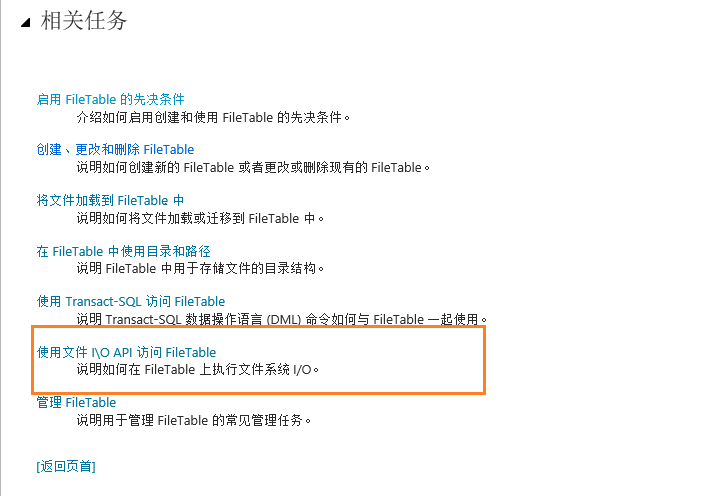
在上面的截图中用红色框框圈出的部分,将是本文的重点部分。在新建FileTable后,右击并选择“浏览FileTable目录”,如下图:
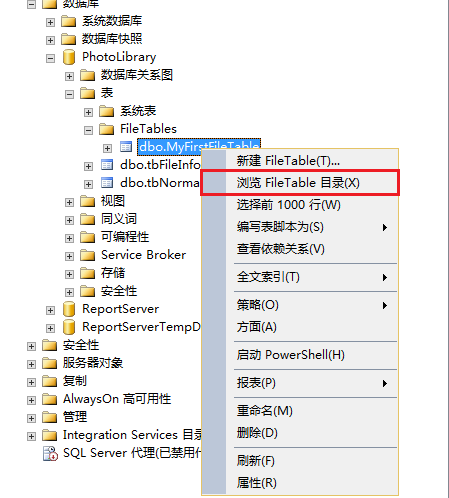
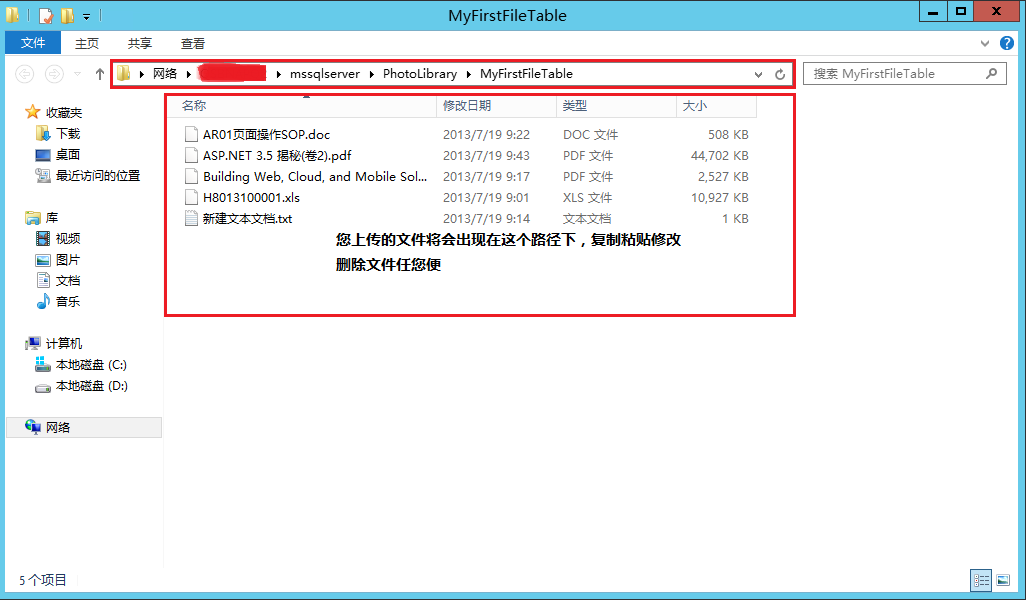
没错,也许您已想到,这就是所谓的FileTable支持Windows I/O API操作,这样我们就可以利用System.IO命名空间下的FileInfo类中的Move、Copyto等函数实现利用FileTable上传文件的功能。下面我们将实现如何在C#程序中实现这点:
1.首先要获取到FileTable表的RootPath(也就是上图中圈出的网络路径),就这一点我们可以T-SQL中的函数FileTableRootPath(),比如说我建的FileTable名为MyFirstFileTable,那么T-SQL如下便可获取其RootPath:
select FileTableRootPath('MyFirstFileTable') as Path
2.RootPath获取后我们就可以在C#程序中实现了,如下代码:
         /// <summary>

         /// Upload files by FileTable

         /// </summary>

         /// <param name="strFilePath">the path of target file</param>

         public void UploadbyFileTable(string strFilePath)

         {

             if (!File.Exists(strFilePath))

                 return;

             FileInfo file = new FileInfo(strFilePath);

             string strDBConnection = "Server=your server name/IP,initial catalog=your database name,User id=your id,passord=your password";

             string strFileTableName = "your FileTable's name";

             string strRootPath = GetFileTableRootPath(strDBConnection, strFileTableName);

             if (File.Exists(Path.Combine(strRootPath, file.Name)))

             {

                 return;

             }

             file.MoveTo(Path.Combine(strRootPath, file.Name));

         }

         /// <summary>

         /// Get your Filetable's RootPath

         /// </summary>

         /// <param name="strDBConnection">your DB connection string</param>

         /// <param name="strFileTableName">your FileTable name</param>

         /// <returns>your Filetable's RootPath</returns>

         public string GetFileTableRootPath(string strDBConnection,string strFileTableName)

         {

             string strRootPath = string.Empty;

             try

             {

                 SqlConnection sqlCon = new SqlConnection(strDBConnection);

                 sqlCon.Open();

                 StringBuilder sb = new StringBuilder();

                 sb.AppendFormat("select FileTableRootPath('{0}') as [path]", strFileTableName);

                 SqlCommand sqlCmd = new SqlCommand(sb.ToString(), sqlCon);

                 SqlDataAdapter sqlDa = new SqlDataAdapter(sqlCmd);

                 DataTable dt = new DataTable();

                 sqlDa.Fill(dt);

                 strRootPath = dt.Rows[][].ToString();

                 sqlDa.Dispose();

                 sqlCmd.Dispose();

                 sqlCon.Close();

             }

             catch(Exception e)

             {

                 throw e;

             }

             return strRootPath;

         }
这样就实现了利用FileTable上传文件的功能。到最后,您发现是不是很简单呢?
欢迎您积极提出建议和疑问,我会尽自己的力量给您满意的答复,O(∩_∩)O谢谢
SQL2012之FileTable与C#的联合应用的更多相关文章
- Dynamics CRM 之ADFS 使用 WID 的独立联合服务器
ADFS 的使用 WID 的独立联合服务器适用于自己的测试环境,常用的就是在虚机中使用. 拓扑图如下: wID:联合身份验证服务配置为使用 Windows 内部数据库
- Dynamics CRM 之ADFS 使用 WID 的联合服务器场
使用 WID 的联合服务器场 默认拓扑 Active Directory 联合身份验证服务 (AD FS) 是联合服务器场,使用 Windows 内部数据库 (WID). 在这种拓扑, AD FS 使 ...
- Hibernate(5)—— 联合主键 、一对一关联关系映射(xml和注解) 和 领域驱动设计
俗话说,自己写的代码,6个月后也是别人的代码……复习!复习!复习!涉及的知识点总结如下: One to One 映射关系 一对一单向外键(XML/Annotation) 一对一双向外键关联(XML/A ...
- Federated Identity Pattern 联合身份模式
Delegate authentication to an external identity provider. This pattern can simplify development, min ...
- [占位-未完成]scikit-learn一般实例之十一:异构数据源的特征联合
[占位-未完成]scikit-learn一般实例之十一:异构数据源的特征联合 Datasets can often contain components of that require differe ...
- SQL联合查询:子表任一记录与主表联合查询
今天有网友群里提了这样一个关于SQL联合查询的需求: 一.有热心网友的方案: 二.我的方案: select * from ( select a.*,(select top 1 Id from B as ...
- Dynamics CRM 之ADFS 使用 SQL Server 的联合服务器场
此拓扑用于 Active Directory 联合身份验证服务 (AD FS) 不同于使用 Windows 内部数据库 (WID) 部署拓扑,因为不会将数据复制到每台联合服务器场中的联合身份验证服务器 ...
- Dynamics CRM 之ADFS 使用 WID 和代理的联合服务器场
为此部署拓扑 Active Directory 联合身份验证服务 (AD FS) 等同于联合服务器场与 Windows 内部数据库 (WID) 拓扑中,但它将代理服务器计算机添加到外围网络,以支持外部 ...
- SQL Server 2012 新特性:FileTable
FileTable是基于FILESTREAM的一个特性.有以下一些功能: 一行表示一个文件或者目录. 每行包含以下信息: file_Stream流数据,stream_id标示符(GUID). 用户表示 ...
随机推荐
- DB2_001_MQT
MQT stands for Materialed Query Table.它的定义是建立在查询结果之上的,把动态查询的结果放到表中,表中的数据随着基础表中数据的变化而变化.当基础表中的数据变化时,M ...
- 折腾iPhone的生活——AirDrop的使用
AirDrop是iOS一个非常大的亮点,其实说是这么说了,但是事实上AirDrop并没有想象中那么好用. AirDrop就是一个用于无线传输文件的方式,实质性跟蓝牙没有太大区别,但是比蓝牙好用,有点像 ...
- FastDfs 说明、安装、配置
fastdfs是一个开源的,高性能的的分布式文件系统,他主要的功能包括:文件存储,同步和访问,设计基于高可用和负载均衡,fastfd非常适用于基于文件服务的站点,例如图片分享和视频分享网站 fastf ...
- uva1393 Highways
留坑(p.339) 已填(膜汪) 每条直线至少经过两个点,我们不妨在经过的所有点中的第二个点统计它 设f[i][j]表示i * j的答案,那么显然可以用f[i][j] = f[i - 1][j] + ...
- java 深clone和浅clone
1. clone类 public class Person implements Cloneable, Serializable{ /** * */ private static final long ...
- java工程项目里,在一个包里面,不能出现同名的类名,这问题是刚接触java才会遇到的,特别是新手一般都没有建立包,而是使用默认的,易出现同名的类名,导致eclipse提示错误
java工程项目里,在一个包里面,不能出现同名的类名,这问题是刚接触java才会遇到的,特别是新手一般都没有建立包,而是使用默认的,易出现同名的类名,导致eclipse提示错误. 问题: 创建了一个工 ...
- AnonymousType匿名类型和对象之间的转换
本文转载:http://www.cnblogs.com/dean-Wei/p/3150553.html 一.匿名对象转换为对象. 1.问题: 2.解决方案:强制指定类型. 解决之. 二. 对象转换为匿 ...
- ThinkPHP 中M方法和D方法的具体区别(转)
M方法和D方法的区别 ThinkPHP 中M方法和D方法都用于实例化一个模型类,M方法 用于高效实例化一个基础模型类,而 D方法 用于实例化一个用户定义模型类. 使用M方法 如果是如下情况,请考虑使用 ...
- PHP读取文件头(2字节)判断文件类型(转)
看到此标题或许你会说是否是多此一举,直接判断扩展名不就知道文件类型了吗,但是扩展名很容易伪造,这样就绕过了判断.大部分的文件都会将一个特殊的数字或字符存放在文件的特定位置里(开始处的2个字节) /** ...
- 使用vi是方向键变乱码 退格键不能使用的解决方法
一.编辑/etc/vim/vimrc.tiny 由于/etc/vim/vimrc.tiny的拥有者是root用户,所以要在root的权限下对这个文件进行修改.很简单,这个文件里面的倒数第二句话是“se ...