
How to Run Node.js with Express on Mobile Devices
We released a JXcore plugin for Apache Cordova recently and in this article I will show how to run a Node express application with Cordova.
At the time of writing the jxcore-cordova project on github has two samples prepared for running the express module.
The project contains an install_and_run script (documented here), which simplifies creating a Cordova application and running the samples. I’m going to use the script in this article.
Express on Android
The script assumes that Apache Cordova and the Android SDK is installed on your system. If they are not, please refer to individual documentation on how to do this.
Plug an android device into a USB socket (with USB Debugging enabled), unless you want to run the application on the Android Emulator.
Download the script and save it into an empty folder. Run it with a sample folder name as an argument, for example “express sample”:
$ ./install_and_run.sh "express sample"Shortly, you should see the following screen:
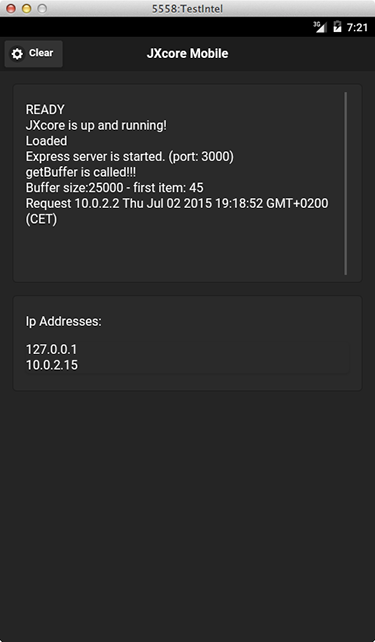
The application displays the IP addresses that the device is using and which port the express server is running on (3000 in our case). Take that URL and use it in your browser, i.e.:
http://10.0.2.15:3000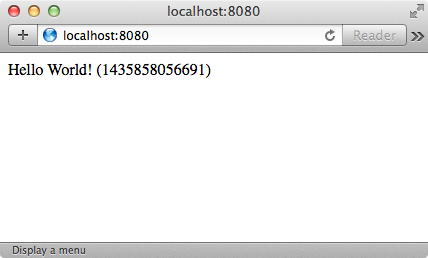
We can see that the browser was able to connect to our Express server running on the device and receive the proper answer for the request.
A note for emulator users: As you might have noticed on the screen above, I did not use the IP and port mentioned before, but http://localhost:8080 instead. This is because I was running the sample on an AVD (Android Virtual Device), and the IP is not reachable outside the emulator’s internal router (seeEmulator Networking for more details). Thus my solution was to establish a simple port redirection:
telnet localhost 5558

redir add tcp:8080:3000
Which redirects all http requests from my localhost:8080 into the emulator’s 3000 port. The 5558number is the port on which my AVD was running (visible at AVD’s title bar).
Express on iOS
We can run the same sample on iOS devices. The install_and_run.sh script can handle it, but the iOS support is currently commented out, run those commands:
# or run on ios

$ cordova platforms add ios

$ cordova run ios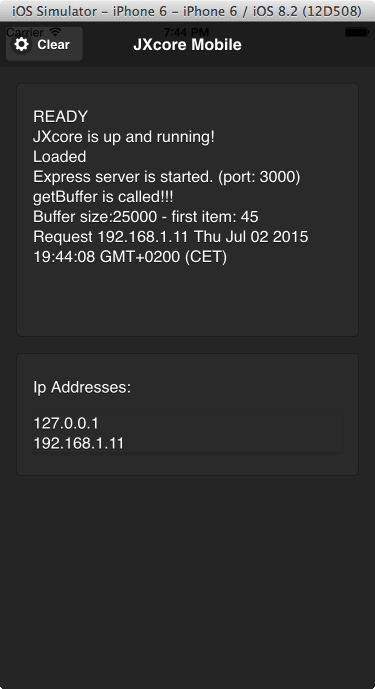
This time accessing the Express server from the browser is more straightforward, for example,http://192.168.1.11:3000.
Looking at the code
Looking at the app.js file located in the www/jxcore folder of the express sample, the Express server is implemented in the same way as a regular Node.js application:
var express = require('express');

var app = express();

app.get('/', function (req, res) {

  res.send('Hello World! (' + Date.now() + ")");

});

var server = app.listen(3000, function () {

  clog("Express server is started. (port: 3000)");

});
Express server running on another thread
Let’s look at the other example:
$ ./install_and_run.sh "express performance sample"This example performs similarly, but there is one major difference. It runs the express server in a separate thread unblocking the main thread. This is easy with JXcore as it offers multitasking, before it even arrived on mobile platforms.
This is the code:
jxcore.tasks.addTask(function() {

  var clog = require('./utilities').log;

  var express = require('express');

  var app = express();

  app.get('/', function (req, res) {

    res.send('Hello World! (' + Date.now() + ")");

  });

  var server = app.listen(3000, function () {

    clog("Express server is started. (port: 3000)");

  });

});
Note: The code is similar to the previous example. But is wrapped in a jxcore.tasks.addTask()invocation which handles the logic related to running the block in a separate instance.
Conclusion
The Express web framework is one of the most popular and important modules in the Node.JS ecosystem. With JXcore it is possible to make it run on mobile devices and it brings a range of features (including multithreading/multitasking and packaging) that can be used in the mobile world.
How to Run Node.js with Express on Mobile Devices的更多相关文章
- Code Your First API With Node.js and Express: Set Up the Server
How to Set Up an Express API Server in Node.js In the previous tutorial, we learned what the REST ar ...
- Node.js、express、mongodb 实现分页查询、条件搜索
前言 在上一篇Node.js.express.mongodb 入门(基于easyui datagrid增删改查) 的基础上实现了分页查询.带条件搜索. 实现效果 1.列表第一页. 2.列表第二页 3. ...
- Node.js、express、mongodb 入门(基于easyui datagrid增删改查)
前言 从在本机(win8.1)环境安装相关环境到做完这个demo大概不到两周时间,刚开始只是在本机安装环境并没有敲个Demo,从周末开始断断续续的想写一个,按照惯性思维就写一个增删改查吧,一方面是体验 ...
- node.js和express.js安装和使用步骤 [windows]
PS: NODEJS:https://nodejs.org NPM:https://www.npmjs.com/ 一.node.js安装与配置 到https://nodejs.org/en/downl ...
- Node.js基于Express框架搭建一个简单的注册登录Web功能
这个小应用使用到了node.js bootstrap express 以及数据库的操作 :使用mongoose对象模型来操作 mongodb 如果没了解过的可以先去基本了解一下相关概念~ 首先注 ...
- node.js框架express的安装
node.js框架express的安装 首先假定你已经安装了 Node.js,接下来为你的应用创建一个目录,然后进入此目录并将其作为当前工作目录. $ mkdir myapp $ cd myapp 通 ...
- Node.js系列-express(上)
前言 Node.js系列的第一篇:http,大概描述了通过使用node.js内置的api创建一个服务并监听request实现简单的增删改查.现在,我们就通过通读express官网及使用express框 ...
- node.js,express入门看详细篇
先最简单的代码 安装 npm install express app.js 代码内容 const express = require('express') const app = express() ...
- node.js使用express框架进行文件上传
关于node.js使用express框架进行文件上传,主要来自于最近对Settings-Sync插件做的研究.目前的研究算是取得的比较好的进展.Settings-Sync中通过快捷键上传文件,其实主要 ...
随机推荐
- 关于常用的git命令列表
我博客园中所写的git内容几乎都是看的蒋鑫老师的<git权威指南>这本书实在太好了. 常用的Git命令. git add 添加到暂存区 git add interactive 交互式添 ...
- Html5 audio stop
//html5 stop audio play function stopPlay(el){ el.pause(); el.currentTime = 0; } 使用: var el = docume ...
- js运动
一.offsetWidth / offsetHeight 获取整个块的宽度/高度,包括border 二.clientWidth / clientHeight 获取块的宽度/高度,不包括border 三 ...
- ASP.NET Web Forms 4.5的新特性
作者:Parry出处:http://www.cnblogs.com/parry/ 一.强类型数据控件 在出现强类型数据控件前,我们绑定数据控件时,前台一般使用Eval或者DataBinder.Eval ...
- TCP/IP三次握手
题目: TCP建立连接的过程采用三次握手,已知第三次握手报文的发送序列号为1000,确认序列号为2000,请问第二次握手报文的发送序列号和确认序列号分别为 1999,999 1999,1000 999 ...
- [01] Oracle数据库简介
Oracle关系型数据库:建立在关系模型上. Oracle10g:g(grid)网格技术,网格计算(Grid Computing)通过网络共享,将大量的计算机连接起来,联合各个计算机的多余处理能力,产 ...
- Android--LowMemoryKiller知识点补充
Android在内存管理上与linux有些小的区别.其中一个就是引入了Low memory killer . 1.引入原因: Android是一个多任务系统,也就是说可以同时运行多个程序,这个大家应该 ...
- .net链接Oracle数据操作类库
public abstract class OracleHelper { public OracleHelper() { } /// <summary> /// 数据库连接字符串 /// ...
- 05_XML的解析_02_dom4j 解析将信息封装到对象中
[person.xml]要解析的内容 <?xml version="1.0" encoding="UTF-8"?> <students> ...
- Java标准输入输出流的重定向及恢复
在Java中输入输出数据一般(图形化界面例外)要用到标准输入输出流System.in和System.out,System.in,System.out默认指向控制台,但有时程序从文件中输入数据并将结果输 ...