
Flink 中的事件时间触发器和处理时间触发器
EventTimeTrigger
EventTimeTrigger 的触发完全依赖 watermark,换言之,如果 stream 中没有 watermark,就不会触发 EventTimeTrigger。
watermark 之于事件时间就是如此重要,来看一下 watermark 的定义先~
Watermarks 是某个 event time 窗口中所有数据都到齐的标志。
Watermarks 作为数据流的一部分流动并携带时间戳 t,Watermark(t) 断言数据流中不会再有小于时间戳 t 的事件出现。
换言之,当 Watermark(t) 到达时,标志着所有小于时间戳 t 的事件都已到齐,可放心地对时间戳 t 之前的所有事件执行聚合、窗口关闭等动作。
来看一下 《Streaming Systems》书中关于 Watermark 原汁原味的定义:
Watermarks are temporal notions of input completeness in the event-time domain. Worded differently, they are the way the system measures progress and completeness relative to the event times of the records being processed in a stream of events.
That point in event time, E, is the point up to which the system believes all inputs with event times less than E have been observed. In other words, it’s an assertion that no more data with event times less than E will ever be seen again.
如下图所示,watermark 和 event 一样在 pipeline 中流动,并且都携带时间戳,W(4) 表示在此之后不会再收到事件时间小于 4 的事件,W(9) 表示在此之后不会再接收到事件时间小于 9 的事件。
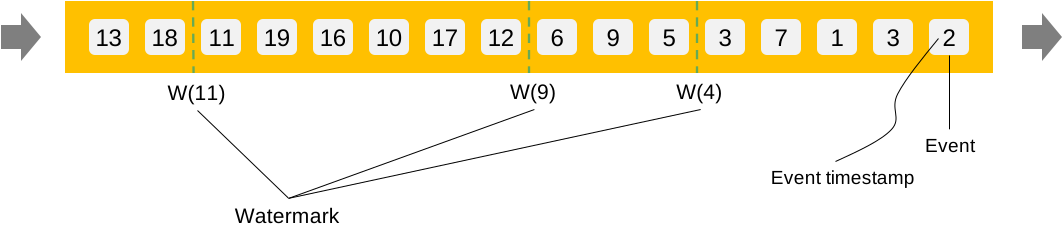
假设我们准备对这个数据流做窗口聚合操作,时间窗口大小为 4 个时间单位,窗口内元素做求和聚合操作。示例代码如下:
input.window(TumblingEventTimeWindows.of(Time.minutes(4L)))

     .trigger(EventTimeTrigger.create())

     .reduce(new SumReduceFunction());
我们跟踪 Flink 源码看看 EventTimeTrigger 的实现逻辑:
/**

 * A Trigger that fires once the watermark passes the end of the window to which a pane belongs.

 */

public class EventTimeTrigger extends Trigger<Object, TimeWindow> {

    private static final long serialVersionUID = 1L;

    private EventTimeTrigger() {}

    @Override

    public TriggerResult onElement(

            Object element, long timestamp, TimeWindow window, TriggerContext ctx)

            throws Exception {

        if (window.maxTimestamp() <= ctx.getCurrentWatermark()) {

            // if the watermark is already past the window fire immediately

            return TriggerResult.FIRE;

        } else {

            ctx.registerEventTimeTimer(window.maxTimestamp());

            return TriggerResult.CONTINUE;

        }

    }

    @Override

    public TriggerResult onEventTime(long time, TimeWindow window, TriggerContext ctx) {

        return time == window.maxTimestamp() ? TriggerResult.FIRE : TriggerResult.CONTINUE;

    }

    public static EventTimeTrigger create() {

        return new EventTimeTrigger();

    }

}
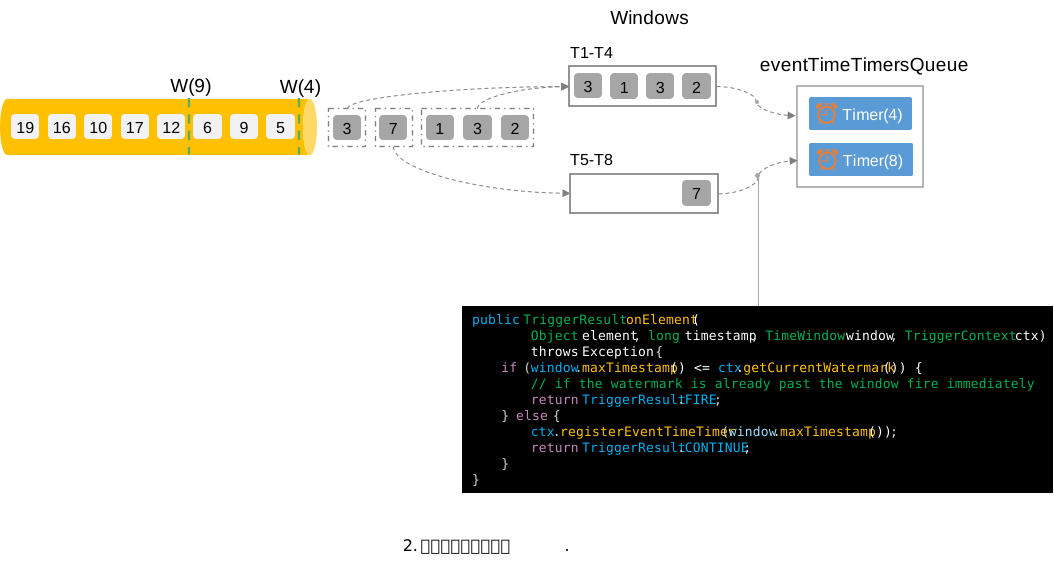
onElement 方法在每次数据进入该 window 时都会触发:首先判断当前的 watermark 是否已经超过了 window 的最大时间(窗口右界时间),如果已经超过,返回触发结果 FIRE;如果尚未超过,则根据窗口右界时间注册一个事件时间定时器,标记触发结果为 CONTINUE。
继续跟踪 registerEventTimeTimer 的动作,发现原来是将定时器放到了一个优先队列 eventTimeTimersQueue 中。优先队列的权重为定时器的时间戳,时间越小越希望先被触发,自然排在队列的前面。
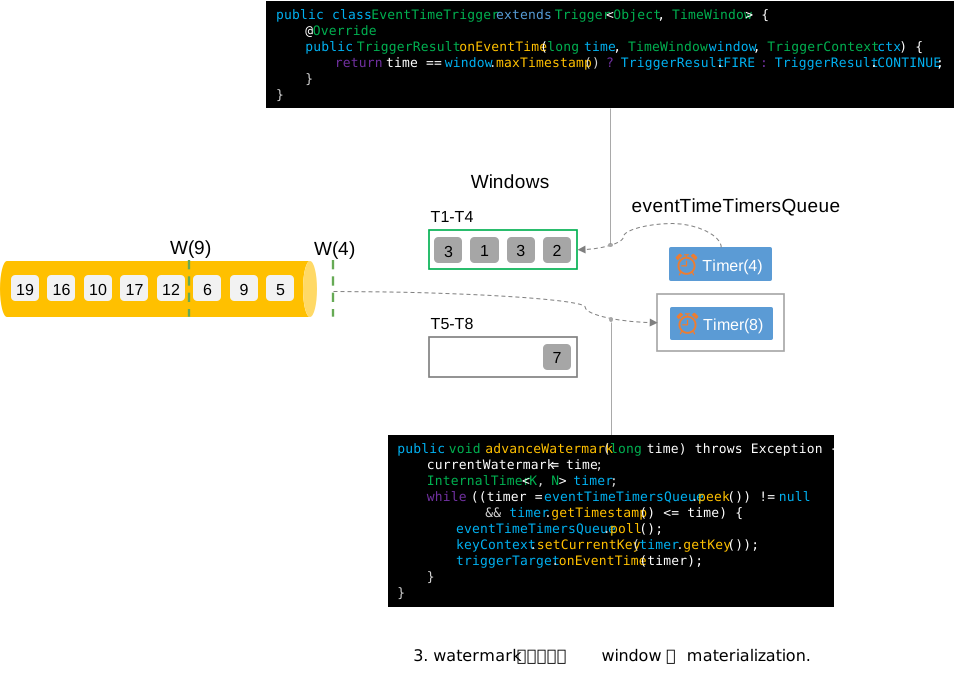
onEventTime 方法是在什么时候被调用呢,一路跟踪来到了 InternalTimerServiceImpl 类,发现只有在 advanceWatermark 的时候会触发 onEventTime,具体逻辑是:当 watermark 到来时,根据 watermark 携带的时间戳 t,从事件时间定时器队列中出队所有时间戳小于 t 的定时器,然后触发 onEventTime。onEventTime 方法的具体实现中,首先比较触发时间是否是自己当前窗口的结束时间,是则 FIRE,否则继续 CONTINUE。
public class InternalTimerServiceImpl<K, N> implements InternalTimerService<N> {

    /** Event time timers that are currently in-flight. */

    private final KeyGroupedInternalPriorityQueue<TimerHeapInternalTimer<K, N>>

            eventTimeTimersQueue;

    @Override

    public void registerEventTimeTimer(N namespace, long time) {

        eventTimeTimersQueue.add(

                new TimerHeapInternalTimer<>(time, (K) keyContext.getCurrentKey(), namespace));

    }

    public void advanceWatermark(long time) throws Exception {

        currentWatermark = time;

        InternalTimer<K, N> timer;

        while ((timer = eventTimeTimersQueue.peek()) != null && timer.getTimestamp() <= time) {

            eventTimeTimersQueue.poll();

            keyContext.setCurrentKey(timer.getKey());

            triggerTarget.onEventTime(timer);

        }

    }

}
我们以上述示例数据为例,看一下具体的执行过程:
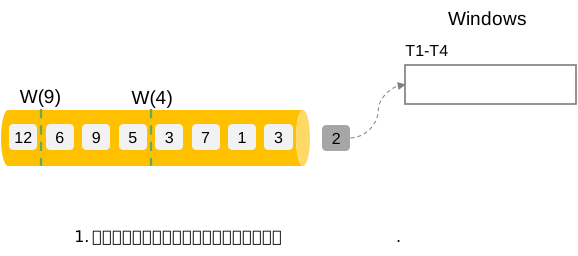
- 当事件到达时,根据事件时间将事件分配到相应的窗口中,事件 '2' 被分配到时间窗口 T1-T4 中,如下图所示:
- 后续时间陆续到达,事件 '2','3','1','3' 都陆续被分配到时间窗口 T1-T4 中,由于 currentWatermark 未超过窗口结束时间 4 ,因此注册事件时间定时器 Timer(4);事件 '7' 被分配到窗口 T5-T8 中,也因为 currentWatermark 未超过窗口结束时间 8,因此注册事件时间定时器 Timer(8)。目前为止事件时间定时器队列中有 2 个定时器。
- 重点来了,接下来到达的是 watermark(4),那么就去事件时间定时器队列中找到所有定时时间小于等于 4 的定时器,Timer(4) 出队,触发 onEventTime 方法,窗口 T1-T4 的结束时间和 Timer(4) 的时间戳相等,FIRE 窗口 T1-T4(图中标记为绿色表示 FIRE)。此时定时器队列中只剩下 1 个定时器。
- 重复同样过程,事件 '5','9','6' 接踵而至,'5', '6' 被分配到窗口 T5-T8 中,'9' 则被分配到新窗口 T9-T12 中。'5','6' 对应的注册定时器为 Timer(8),'9' 注册了一个新定时器 Timer(12)。此时定时器队列中剩下 2 个定时器。
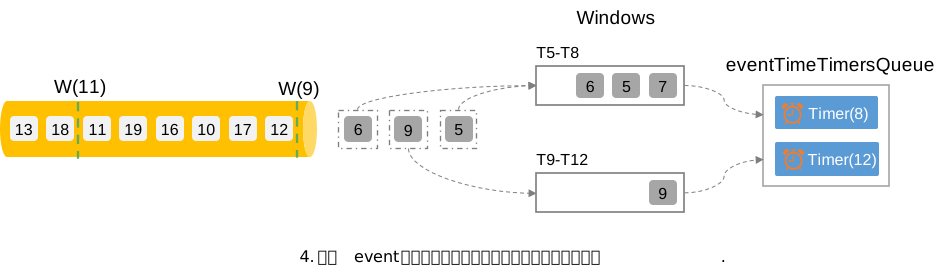
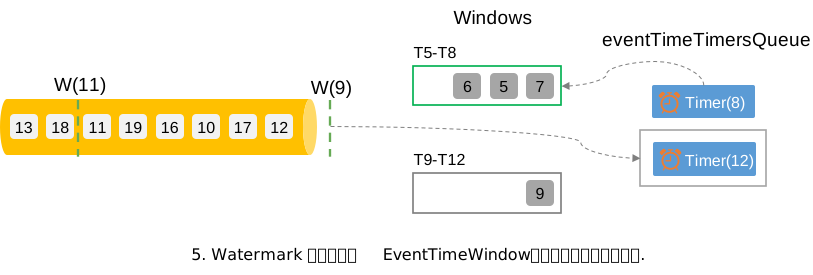
watermark(9) 的到达会促使定时器 Timer(8) 出队,进而 FIRE 窗口 T5-T8。以此类推。
ProcessingTimeTrigger
与 EventTimeTrigger 相比,ProcessingTimeTrigger 就相对简单了,它的触发只依赖系统时间。我们跟踪 Flink 源码看看 ProcessingTimeTrigger 的实现逻辑:
/**

 * A Trigger that fires once the current system time passes the end of the window to which a pane belongs.

 */

public class ProcessingTimeTrigger extends Trigger<Object, TimeWindow> {

    private static final long serialVersionUID = 1L;

    private ProcessingTimeTrigger() {}

    @Override

    public TriggerResult onElement(

            Object element, long timestamp, TimeWindow window, TriggerContext ctx) {

        ctx.registerProcessingTimeTimer(window.maxTimestamp());

        return TriggerResult.CONTINUE;

    }

    @Override

    public TriggerResult onProcessingTime(long time, TimeWindow window, TriggerContext ctx) {

        return TriggerResult.FIRE;

    }

    /** Creates a new trigger that fires once system time passes the end of the window. */

    public static ProcessingTimeTrigger create() {

        return new ProcessingTimeTrigger();

    }

}
onElement 方法在每次数据进入该 window 时都会触发:直接根据窗口结束时间注册一个处理时间定时器。同样是放到一个处理时间定时器优先队列中。
系统根据系统时间定时地从处理时间定时器队列中取出小于当前系统时间的定时器,然后调用 onProcessingTime 方法,FIRE 窗口。
public class InternalTimerServiceImpl<K, N> implements InternalTimerService<N> {

    /** Processing time timers that are currently in-flight. */

    private final KeyGroupedInternalPriorityQueue<TimerHeapInternalTimer<K, N>>

    @Override

    public void registerProcessingTimeTimer(N namespace, long time) {

        InternalTimer<K, N> oldHead = processingTimeTimersQueue.peek();

        if (processingTimeTimersQueue.add(

                new TimerHeapInternalTimer<>(time, (K) keyContext.getCurrentKey(), namespace))) {

            long nextTriggerTime = oldHead != null ? oldHead.getTimestamp() : Long.MAX_VALUE;

            // check if we need to re-schedule our timer to earlier

            if (time < nextTriggerTime) {

                if (nextTimer != null) {

                    nextTimer.cancel(false);

                }

                nextTimer = processingTimeService.registerTimer(time, this::onProcessingTime);

            }

        }

    }

    private void onProcessingTime(long time) throws Exception {

        // null out the timer in case the Triggerable calls registerProcessingTimeTimer()

        // inside the callback.

        nextTimer = null;

        InternalTimer<K, N> timer;

        while ((timer = processingTimeTimersQueue.peek()) != null && timer.getTimestamp() <= time) {

            processingTimeTimersQueue.poll();

            keyContext.setCurrentKey(timer.getKey());

            triggerTarget.onProcessingTime(timer);

        }

        if (timer != null && nextTimer == null) {

            nextTimer =

                    processingTimeService.registerTimer(

                            timer.getTimestamp(), this::onProcessingTime);

        }

    }

}
欢迎留言、讨论,转载请注明出处。
Flink 中的事件时间触发器和处理时间触发器的更多相关文章
- 「Flink」Flink中的时间类型
Flink中的时间类型和窗口是非常重要概念,是学习Flink必须要掌握的两个知识点. Flink中的时间类型 时间类型介绍 Flink流式处理中支持不同类型的时间.分为以下几种: 处理时间 Flink ...
- Flink Streaming基于滚动窗口的事件时间分析
使用flink-1.9.0进行的测试,在不同的并行度下,Flink对事件时间的处理逻辑不同.包括1.1在并行度为1的本地模式分析和1.2在多并行度的本地模式分析两部分.通过理论结合源码进行验证,得到具 ...
- 【源码解析】Flink 是如何基于事件时间生成Timestamp和Watermark
生成Timestamp和Watermark 的三个重载方法介绍可参见上一篇博客: Flink assignAscendingTimestamps 生成水印的三个重载方法 之前想研究下Flink是怎么处 ...
- 「Flink」事件时间与水印
我们先来以滚动时间窗口为例,来看一下窗口的几个时间参数与Flink流处理系统时间特性的关系. 获取窗口开始时间Flink源代码 获取窗口的开始时间为以下代码: org.apache.flink.str ...
- Flink架构(三)- 事件-时间(Event-Time)处理
3. 事件-时间(Event-Time)处理 在“时间语义”中,我们强调了在流处理应用中时间语义的重要性,并解释了处理时间与事件时间的不同点.处理时间较好理解,因为它基于本地机器的时间,它产生的是有点 ...
- Flink Application Development DataStream API Event Time--Flink应用开发DataStream API事件时间
目录 概览 事件时间 接下来去哪儿 水印生成 水印策略简介 使用水印策略 处理空闲源 写水印生成代码 写周期WatermarkGenerator代码 写符号形式的WatermarkGenerator代 ...
- Flink学习(二)Flink中的时间
摘自Apache Flink官网 最早的streaming 架构是storm的lambda架构 分为三个layer batch layer serving layer speed layer 一.在s ...
- C#中在多个地方调用同一个触发器从而触发同一个自定义委托的事件
场景 在Winfom中可以在页面上多个按钮或者右键的点击事件中触发同一个自定义的委托事件. 实现 在位置一按钮点击事件中触发 string parentPath = System.IO.Directo ...
- Flink中的window、watermark和ProcessFunction
一.Flink中的window 1,window简述 window 是一种切割无限数据为有限块进行处理的手段.Window 是无限数据流处理的核心,Window 将一个无限的 stream 拆分成有 ...
- 彻底搞清Flink中的Window
窗口 在流处理应用中,数据是连续不断的,因此我们不可能等到所有数据都到了才开始处理.当然我们可以每来一个消息就处理一次,但是有时我们需要做一些聚合类的处理,例如:在过去的1分钟内有多少用户点击了我们的 ...
随机推荐
- Linux下错误解决方案
错误 "E: Unable to correct problems, you have held broken packages."这种问题包破坏问题,可能是由于镜像源与系统版本不 ...
- k8s新版本使用container而不是docker
使用 Harbor 仓库作为 Kubernetes 集群私有仓库 Harbor 仓库信息 内网地址:hub.rainsc.com IP 地址:192.168.66.100 问题背景 在许多版本的教程中 ...
- Devexpress GridView 单元格输入检验
实现效果 打开设计器 找到CellValueChanged事件 编写代码 private void gvmain_CellValueChanged(object sender, DevExpress. ...
- 常见 URI 协议
mailto mailto 是一种 URI(统一资源标识符)协议,主要用于在 Web 页面中创建电子邮件链接.当用户点击使用 mailto 协议的链接时,系统会自动打开默认的电子邮件客户端,并在新邮件 ...
- 使用JDBC查询数据库会一次性加载所有数据吗
前几天有个小伙伴说他有个疑问:当我们发起一个查询的时候,数据库服务器是把所有结果集都准备好,然后一次性返回给应用程序服务吗(因为他们生产有个服务因为一个报表查询搞宕机了). 这样想的原因很简单,假设那 ...
- Redis高可用方案:使用Keepalived实现主备双活
注意:请确保已经安装Redis和keepalived,本文不在介绍如何安装. 1.使用版本说明 Redis版本:5.0.2 Keepalived版本:1.3.5 Linux 版本:Centos7.9 ...
- win11(含win10)自带的一键镜像备份与还原方法
winxp和win7时代小伙伴们备份或恢复系统时大都采用类似一键ghost类的软件制作系统盘的映像,当遇到故障时再恢复,但win10和win11其实自带有这种映像制作和还原功能,我们就再也不需要额外安 ...
- 一文搞懂 == 、equals和hashCode
面试的时候,经常会被问到==和equals()的区别是什么?以及我们也知道重写equals()时候必须重新hashCode().这是为什么?既然有了hashCode()方法了,JDK又为什么要提供eq ...
- 如何高效的阅读paper--三遍阅读法
第一遍 1.阅读文章的标题.摘要和介绍 2.阅读每一节的标题和副标题 3.阅读总结 4.浏览参考文献,看看是否有曾经读过的文章 在完成第一遍后,应该做到: 1.能够说出该篇论文的类型 2.能够说出文章 ...
- Java怎么把多个对象的list的数据合并
1.示例一:创建几个包含Person对象的List,并将它们合并成一个新的List 在Java中,将多个对象的List合并通常涉及到遍历这些List并将它们的元素添加到一个新的List中.这里,我将给 ...