
根据UIScrollView的contentOffset值精确控制动画
根据UIScrollView的contentOffset值精确控制动画
效果

原理

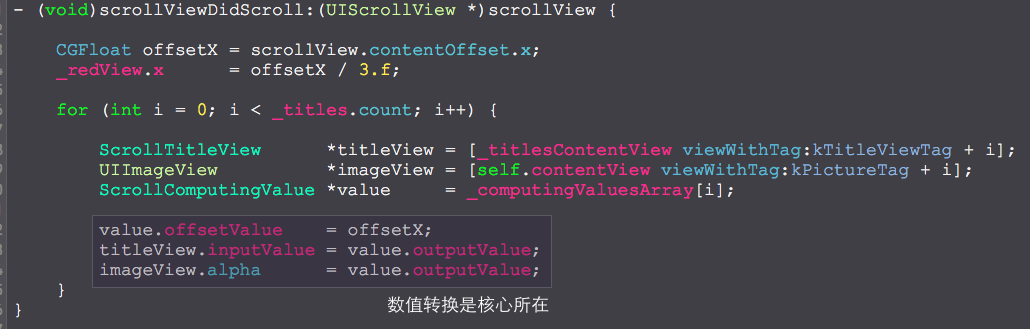
根据方程精确计算每一个view在位移值x变化的时候的输出值,并根据这个值实现各种逻辑。
源码
https://github.com/YouXianMing/Animations
//

//  ScrollViewAnimationController.m

//  Animations

//

//  Created by YouXianMing on 16/3/13.

//  Copyright © 2016年 YouXianMing. All rights reserved.

//

#import "ScrollViewAnimationController.h"

#import "UIView+SetRect.h"

#import "ScrollComputingValue.h"

#import "ScrollTitleView.h"

typedef enum : NSUInteger {

    kTitleViewTag = ,

    kPictureTag   = ,

} EScrollViewAnimationControllerValue;

@interface ScrollViewAnimationController () <UIScrollViewDelegate>

@property (nonatomic, strong) UIScrollView         *scrollView;

@property (nonatomic, strong) UIView               *redView;

@property (nonatomic, strong) UIView               *titlesContentView;

@property (nonatomic, strong) NSMutableArray       *computingValuesArray;

@property (nonatomic, strong) NSArray              *titles;

@property (nonatomic, strong) NSArray              *pictures;

@end

@implementation ScrollViewAnimationController

- (void)setup {

    [super setup];

    self.scrollView                                = [[UIScrollView alloc] initWithFrame:self.contentView.bounds];

    self.scrollView.contentSize                    = CGSizeMake(self.contentView.width * , self.contentView.height);

    self.scrollView.pagingEnabled                  = YES;

    self.scrollView.bounces                        = NO;

    self.scrollView.showsHorizontalScrollIndicator = NO;

    self.scrollView.delegate                       = self;

    [self.contentView addSubview:self.scrollView];

    self.titlesContentView                        = [[UIView alloc] initWithFrame:CGRectMake(, , Width, TabbarHeight)];

    self.titlesContentView.backgroundColor        = [[UIColor blackColor] colorWithAlphaComponent:0.65f];

    self.titlesContentView.userInteractionEnabled = NO;

    self.titlesContentView.bottom                 = self.contentView.height;

    [self.contentView addSubview:self.titlesContentView];

    self.redView                 = [[UIView alloc] initWithFrame:CGRectMake(, , Width / .f, .f)];

    self.redView.backgroundColor = [UIColor redColor];

    [self.titlesContentView addSubview:self.redView];

    self.computingValuesArray = [NSMutableArray array];

    self.titles               = @[@"Google", @"DeepMind", @"AlphaGo"];

    self.pictures             = @[@"", @"", @""];

    for (int i = ; i < self.titles.count; i++) {

        // Setup pictures.

        UIImageView *imageView        = [[UIImageView alloc] initWithFrame:CGRectMake(, , self.contentView.width, self.contentView.height)];

        imageView.image               = [UIImage imageNamed:_pictures[i]];

        imageView.contentMode         = UIViewContentModeScaleAspectFill;

        imageView.tag                 = kPictureTag + i;

        imageView.layer.masksToBounds = YES;

        [self.contentView addSubview:imageView];

        // Setup TitleViews.

        ScrollTitleView *titleView = [[ScrollTitleView alloc] initWithFrame:CGRectMake(i * Width / .f, , Width / .f, self.titlesContentView.height)];

        titleView.title            = self.titles[i];

        titleView.tag              = kTitleViewTag + i;

        [titleView buildSubViews];

        [self.titlesContentView addSubview:titleView];

        // Init values.

        if (i == ) {

            titleView.inputValue = .f;

            imageView.alpha      = .f;

        } else {

            titleView.inputValue = .f;

            imageView.alpha      = .f;

        }

        // Setup ScrollComputingValues.

        ScrollComputingValue *value = [ScrollComputingValue new];

        value.startValue            = -Width + i * Width;

        value.midValue              =       + i * Width;

        value.endValue              = +Width + i * Width;

        [value makeTheSetupEffective];

        [self.computingValuesArray addObject:value];

    }

    [self.contentView bringSubviewToFront:self.titlesContentView];

}

- (void)scrollViewDidScroll:(UIScrollView *)scrollView {

    CGFloat offsetX = scrollView.contentOffset.x;

    _redView.x      = offsetX / .f;

    for (int i = ; i < _titles.count; i++) {

        ScrollTitleView      *titleView = [_titlesContentView viewWithTag:kTitleViewTag + i];

        UIImageView          *imageView = [self.contentView viewWithTag:kPictureTag + i];

        ScrollComputingValue *value     = _computingValuesArray[i];

        value.offsetValue    = offsetX;

        titleView.inputValue = value.outputValue;

        imageView.alpha      = value.outputValue;

    }

}

@end
细节
根据UIScrollView的contentOffset值精确控制动画的更多相关文章
- 【WPF学习笔记】之如何设置下拉框读取SqlServer数据库的值:动画系列之(一)
先前条件:设置好数据库,需要三个文件CommandInfo.cs.DbHelperSQL.cs.myHelper.cs,需要修改命名空间,参照之前随笔http://www.cnblogs.com/Ow ...
- UIScrollView 原理详解
转载此文章原因:web页面在ipad的app中总是有橡皮筋效果,使用iscroll虽然能解决橡皮筋想过,但是滚动层内的元素事件都无法触发.故同安卓和ios一样使用后台解决...红色的为解决方案.. S ...
- iOS - UIScrollView
前言 NS_CLASS_AVAILABLE_IOS(2_0) @interface UIScrollView : UIView <NSCoding> @available(iOS 2.0, ...
- iOS开发UIScrollView的底层实现
起始 做开发也有一段时间了,经历了第一次完成项目的激动,也经历了天天调用系统的API的枯燥,于是就有了探索底层实现的想法. 关于scrollView的思考 在iOS开发中我们会大量用到scrollVi ...
- 第二、UIScrollView的使用大全
UIScrollView UIPageControl 的使用 2011-11-19 16:48 4690人阅读 评论(0) 收藏 举报 imagescrollspringiphone // // ...
- [转]IOS 学习笔记(8) 滚动视图(UIScrollView)的使用方法
下面介绍pageControl结合ScrollView实现连续滑动翻页的效果,ScrollView我们在应用开发中经常用到,以g这种翻页效果还是很好看的,如下图所示: 通过这个例子,我们重点学习UIS ...
- iOS基础 - UIScrollView
一.UIScrollView使用引导思路. 1.之前我们所学的显示图片是用UIImageView 2.将UIImageView添加到根视图中,不显示的原因:没有设置位置 3.当图片比屏幕大时,直接放在 ...
- 【iOS系列】-UIScrollView的介绍及结合UIPageControl实现图片播放的实例
[iOS系列]-UIScrollView的介绍及结合UIPageControl实现图片播放的实例 第一:UIScrollView的常用属性 //表示UIScrollView内容的尺寸,滚动范围 @pr ...
- 学习笔记之-------UIScrollView 基本用法 代理使用
//contentSize.contentInset和contentOffset 是 scrollView三个基本的属性. // 滚动 self.ScrollView.contentSize =sel ...
随机推荐
- 16.网络《果壳中的c#》
16.1 网络体系结构 System.Net.* 命名空间包含各种支持标准网络协议的通信. WebClient 外观类:支持通信HTTP或FTP执行简单的下载/上传操作. WebRequest 和 W ...
- Authentication(Spring Security 认证笔记)
这篇文章是对Spring Security的Authentication模块进行一个初步的概念了解,知道它是如何进行用户认证的 考虑一个大家比较熟悉的标准认证过程: 1.用户使用username和pa ...
- js单元测试框架
js单元测试框架 前端测试框架对比(js单元测试框架对比) 本文主要目的在于横评业界主流的几款前端框架,顺带说下相关的一些内容. 测试分类 通常应用会有 单元测试(Unit tests) 和 功能测试 ...
- 【LOJ】#2509. 「AHOI / HNOI2018」排列
题解 虽然要求一个dfs序,但是不是从根开始贪心 从最小的点开始贪心,最小的点显然是父亲选了之后马上就选它 那么我们每次把最小的点和父亲合并,两个联通块之间也是如此 对于两个联通块,他们合并的顺序应该 ...
- 【LOJ】#2265. 「CTSC2017」最长上升子序列
题解 点了一个新技能叫杨表(事实上集训的时候听过,但是一直不会 这道题就是让我们找到k个不上升子序列,要求长度加和最大 我们用杨表去维护,但是由于杨表的行数可能是n的,复杂度会炸 我们只维护前\(\s ...
- Spring中AOP实现
1.什么是SpringAOP 什么是aop:Aspect Oriented Programming的缩写,面向切面编程,通过预编译和动态代理实现程序功能的 统一维护的一种技术 主要功能:日志记录,性能 ...
- 【Java】 子字符串的比较(substring的==与equal()使用)
public class Test { public static void main(String[] args) { String str1="good"; System.ou ...
- java okhttp 发送图片
@RequestMapping(value="/demo2", method=RequestMethod.POST) @ResponseBody public String dem ...
- JAVA 类和对象基础知识详解
/*文章中用到的代码只是一部分,需要源码的可通过邮箱联系我 1978702969@qq.com*/ 和C++一样,JAVA也是一门面向对象的语言,其基础和核心是类和对象.而面向对象的思想是来源与显示生 ...
- 表达式括号匹配(stack.cpp)
[问题描述] 假设一个表达式有英文字母(小写).运算符(+,—,*,/)和左右小(圆)括号构成,以“@”作为表达式的结束符.请编写一个程序检查表达式中的左右圆括号是否匹配,若匹配,则返回 ...