
转载:gulp文件
这是我的文件目录结构图
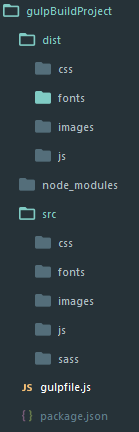 下面是我gulpfile.js的配置

'use strict'

var gulp=require('gulp');

var gutil=require('gulp-util');

var uglify=require('gulp-uglify');

var watchPath=require('gulp-watch-path');

var combiner=require('stream-combiner2');

var sourcemaps=require('gulp-sourcemaps');

var minifycss=require('gulp-minify-css');

var autoprefixer=require('gulp-autoprefixer');

var sass=require('gulp-sass');

var imagemin=require('gulp-imagemin');

var handleError=function(err){

    var colors=gutil.colors;

    console.log('\n')

    gutil.log(colors.red('Error!'))

    gutil.log('fileName: ' + colors.red(err.fileName))

    gutil.log('lineNumber: ' + colors.red(err.lineNumber))

    gutil.log('message: ' + err.message)

    gutil.log('plugin: ' + colors.yellow(err.plugin))

}

var combiner=require('stream-combiner2')

gulp.task('gutil',function(){

    gutil.log('message');

    gutil.log(gutil.colors.red('error'))

    gutil.log(gutil.colors.green('message:')+"some")

})

//压缩js

gulp.task('uglifyjs',function(){

    var combined=combiner.obj([

        gulp.src('src/js/**/*.js'),

        sourcemaps.init(),

        uglify(),

        sourcemaps.write('./'),

        gulp.dest('dist/js/')

    ])

    combined.on('error',handleError)

})

//压缩css

gulp.task('minifycss',function(){

    gulp.src('src/css/**/*.css')

        .pipe(sourcemaps.init())

        .pipe(autoprefixer({

                browsers: 'last 2 versions'

        }))

        .pipe(minifycss())

        .pipe(sourcemaps.write('./'))

        .pipe(gulp.dest('dist/css'));

})

//编译scss

gulp.task('sass',function(){

            gulp.src('src/sass/**/*.scss')

            .on('error',function(err){

                console.error('Error!',err.message)

            })

            .pipe(sourcemaps.init())

            .pipe(autoprefixer({

                browsers: 'last 2 versions'

            }))

            .pipe(sass({outputStyle: 'compact'}))

            .pipe(minifycss())

            .pipe(sourcemaps.write('./'))

            .pipe(gulp.dest('dist/css'))

})

//压缩图片

gulp.task('image', function () {

    gulp.src('src/images/**/*')

        .pipe(imagemin({

            progressive: true

        }))

        .pipe(gulp.dest('dist/images'))

})

// gulp.watch('src/js/**/*.js',function(event){

//     console.log(event);

//     当修改 src/js/log.js 文件时

//     event {

//         // 发生改变的类型,不管是添加,改变或是删除

//         type: 'changed',

//         // 触发事件的文件路径

//         path: 'D:/wamp/www/gulpBuildProject/src/js/log.js'

//     }

// })

//捕获错误信息

var handleError=function(err){

    var colors=gutil.colors;

    console.log('\n');

    gutil.log(colors.red('Error!'))

    gutil.log('filename: '+colors.red(err.filename))

    gutil.log('lineNumber: '+ colors.red(err.lineNumber))

    gutil.log('message: ' + err.message)

    gutil.log('plugin: ' + colors.yellow(err.plugin))

}

//监听js修改

gulp.task('watchjs',function(){

    gulp.watch('src/js/**/*.js',function(event){

        var paths=watchPath(event,'src/','dist/')

        paths={

            srcPath: 'src/js/log.js',

            srcdir:'src/js/',

            distPath:'dist/js/log.js',

            distDir:'dist/js',

            srcFilename:'log.js',

            distFilename:'log.js'

        }

        gutil.log(gutil.colors.green(event.type)+ ' ' + paths.srcPath)

        gutil.log('Dist '+ paths.distPath)

        var combined=combiner.obj([

            gulp.src(paths.srcPath),

            uglify(),

            gulp.dest(paths.distDir)

        ])

        // gulp.src(paths.srcPath)

        //     .pipe(uglify())

        //     .pipe(gulp.dest(paths.distDir))

        combined.on('error',handleError);

    })

})

//监听css修改

gulp.task('watchcss',function(){

    gulp.watch('src/css/**/*.css',function(event){

        var paths=watchPath(event,'src/','dist/');

        gutil.log(gutil.colors.green(event.type) + ' ' + paths.srcPath)

        gutil.log('Dist ' +paths.distPath)

        gulp.src(paths.srcPath)

            .pipe(sourcemaps.init())

            .pipe(autoprefixer({

                browsers: 'last 2 versions'

            }))

            .pipe(minifycss())

            .pipe(sourcemaps.write('./'))

            .pipe(gulp.dest(paths.distDir));

    })

})

//监听编译sass

gulp.task('watchsass',function(){

    gulp.watch('src/sass/**/*',function(event){

        var paths=watchPath(event,'src/sass/','dist/css/')

        gulp.log(gutil.colors.green(event.type)+ ' ' + paths.srcPath)

        gulp.log('Dist ' + paths.distPath)

        sass(paths.srcPath)

            .on('error',function(err){

                console.error('Error!', err.message);

            })

            .pipe(sourcemaps.init())

            .pipe(sass())

            .pipe(minifycss())

            .pipe(autoprefixer({

                browsers:'last 2 versions'

            }))

            .pipe(sourcemaps.write('./'))

            pipe(gulp.dest(paths.distDir))

    })

})

//监听压缩图片

gulp.task('watchimage', function () {

    gulp.watch('src/images/**/*', function (event) {

        var paths = watchPath(event,'src/','dist/')

        gutil.log(gutil.colors.green(event.type) + ' ' + paths.srcPath)

        gutil.log('Dist ' + paths.distPath)

        gulp.src(paths.srcPath)

            .pipe(imagemin({

                progressive: true

            }))

            .pipe(gulp.dest(paths.distDir))

    })

})

//配置文件复制任务

gulp.task('watchcopy',function(){

    gulp.watch('src/fonts/**/*',function(event){

        var paths=watchPath(event)

        gulp.log(gutil.colors.green(event.type)+ ' ' + paths.srcPath)

        gulp.log('Dist ' + paths.distPath)

        gulp.src(paths.srcPath)

            .pipe(gulp.dest(paths.distDir))

    })

})

gulp.task('copy',function(){

    gulp.src('src/fonts/**/*')

        .pipe(gulp.dest('dist/fonts/'))

})

gulp.task('default',['watchjs','watchcss','watchsass','watchimage','watchcopy'])
另外以下插件有需要也可以用得上
【gulp-plumber】例外處理
【gulp-livereload】自動重新載入頁面
【gulp-notify】gulp 處理通知
【browser-sync】瀏覽器同步檢視
转载:gulp文件的更多相关文章
- [转载]DriverStore文件夹特别大,能删除吗?
[转载]DriverStore文件夹特别大,能删除吗? 转自博客园https://www.cnblogs.com/lovebing/p/6951833.html 这篇文章,清理完C盘多了20G!不要太 ...
- [转载]config文件的一个很好的实现
以下是转载于网上的一个很好的config文件的实现,留存以备案 //Config.h #pragma once #include <string> #include <map> ...
- 【转载】文件上传那些事儿,文件ajax无刷上传
导语 正好新人导师让我看看能否把产品目前使用的FileUploader从老的组件库分离出来的,自己也查阅了相关的各种资料,对文件上传的这些事有了更进一步的了解.把这些知识点总结一下,供自己日后回顾,也 ...
- 转载--gulp入门
关于gulp的入门文章,先转载了 http://markpop.github.io/2014/09/17/Gulp%E5%85%A5%E9%97%A8%E6%95%99%E7%A8%8B/
- (转载)C++文件读写函数之——fopen、fread和fwrite、fgetc和fputc、fgets和fputs、ftellf和fseek、rewind
http://blog.sina.com.cn/s/blog_61437b3b0102v0bt.html http://blog.csdn.net/chenwk891/article/details/ ...
- [转载]CAD文件版本
http://blog.sina.com.cn/s/blog_4c9fa4dd0101il1v.html 在工作中会遇到打开一张图纸时出现“图形文件无效”的提示,大部都是因为用低版本软件打开了高版本的 ...
- [转载] Linux 文件系统结构介绍
原文: https://linux.cn/article-6132-weibo.html Linux中的文件是什么?它的文件系统又是什么?那些配置文件又在哪里?我下载好的程序保存在哪里了?在 Linu ...
- 转载:python文件打开方式详解——a、a+、r+、w+区别
第一步 排除文件打开方式错误: r只读,r+读写,不创建 ###f.readline()是读取第一行,f.readlines()是读取全部并返回一个列表 w新建只写,w+新建读写,会将文件内 ...
- 转载 .htaccess文件RewriteRule语法规则
详见: http://blog.csdn.net/scchary/article/details/40045807 # -- 位于行首时表示注释. [F] -- Forbidden( ...
随机推荐
- [LeetCode] Valid Word Abbreviation 验证单词缩写
Given a non-empty string s and an abbreviation abbr, return whether the string matches with the give ...
- 通过源码了解ASP.NET MVC 几种Filter的执行过程
一.前言 之前也阅读过MVC的源码,并了解过各个模块的运行原理和执行过程,但都没有形成文章(所以也忘得特别快),总感觉分析源码是大神的工作,而且很多人觉得平时根本不需要知道这些,会用就行了.其实阅读源 ...
- 在 sublime 中运行 JavaScript 代码
安装 Node 环境,参考 Node.js入门 打开 Sublime,选择 Tools > Build System > New Build System... 会打开一个新的文件,粘贴以 ...
- windows中LNK文件打开方式恢复(每日一修(1))
相信有些用户曾试过错误地把LNK文件的打开方式更改其他文件,导致系统所有的快捷方式都失效.在vista与Windows7系统还不普遍使用的时候,相信大家会有点惊慌失措,不要紧,下面只要大家进行如下操作 ...
- 通过iMindMap改善你的工作方式的教程
对于iMindMap 10,已经介绍了很多新增与改进的功能,你以为已经结束了?其实不然,本文,小编还会继续和你分享它的一个新功能与一个更新功能.这两个功能将在不经意间改善你的工作方式. 多媒体支持 在 ...
- ThinkPhp 3.2 数据的连贯操作
ThinkPHP模型基础类提供的连贯操作方法(也有些框架称之为链式操作),可以有效的提高数据存取的代码清晰度和开发效率,并且支持所有的CURD操作. 使用也比较简单, 假如我们现在要查询一个User表 ...
- CCS应用中常见的一些小技巧
在单片机开发中,通常需要精确估算代码运行时间,用于对算法优化以及对项目平台选择提供参考,通常算法如果用汇编编写,可以人工计算出运行时间,用C语言编写也可以通过反汇编代码而计算到较为精确的运行时间,但当 ...
- web前端基础知识-(六)web框架
一.web框架本质 众所周知,对于所有的Web应用,本质上其实就是一个socket服务端,用户的浏览器其实就是一个socket客户端. #!/usr/bin/env python #coding:ut ...
- PHPCMS导航栏当前栏目选中方法
{if $top_parentid==0}<!--判断首页显示的是不是首页--> <li><a href="{siteurl($siteid)}" s ...
- Quartz.NET总结(四)Quartz 远程调度
前面篇已经介绍了Quartz.NET的配置,使用和Cron表达式表达式的写法.基本上后台的定时任务的定时执行已经完成,并能正确的按照执行计划,执行相关的job . 然后,如果任务需要更新,停止某个任务 ...