
【代码笔记】iOS-键盘自适应弹出
一,效果图。

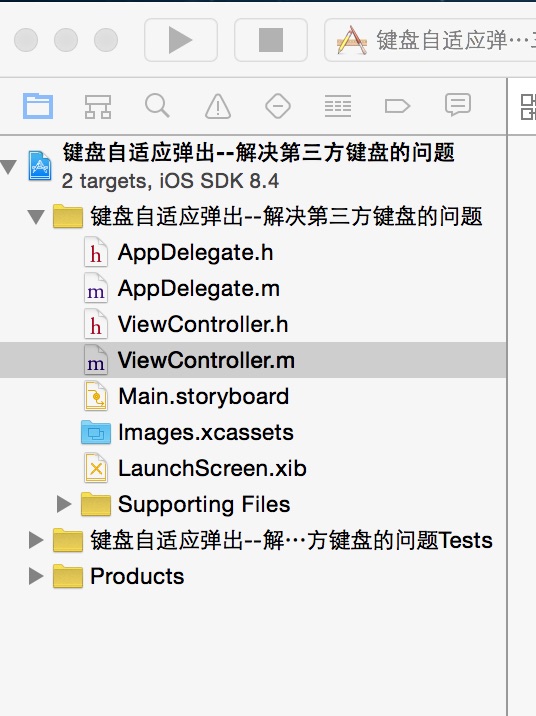
二,工程图。
三,代码。
ViewController.h

#import <UIKit/UIKit.h>

@interface ViewController : UIViewController

<UITextFieldDelegate>

@end
ViewController.m
#import "ViewController.h"

@interface ViewController ()

@end

@implementation ViewController

- (void)viewDidLoad {

    [super viewDidLoad];

    // Do any additional setup after loading the view, typically from a nib.

    UITextField *field=[[UITextField alloc]initWithFrame:CGRectMake(100, 300, 50, 50)];

    field.backgroundColor=[UIColor redColor];

    field.delegate=self;

    [self.view addSubview:field];

    [[NSNotificationCenter defaultCenter] addObserver:self selector:@selector(keyboardWillShow:) name:UIKeyboardWillShowNotification object:nil];

    [[NSNotificationCenter defaultCenter] addObserver:self selector:@selector(keyboardWillHide:) name:UIKeyboardWillHideNotification object:nil];

}

#pragma -mark -keyboard notificatin

- (void)keyboardWillShow:(NSNotification *)notification {

    NSDictionary *info = [notification userInfo];

    // keyboardHeight 为键盘高度

    CGSize keyboardSize = [[info objectForKey:UIKeyboardFrameEndUserInfoKey] CGRectValue].size;

    [self animateViewWithKeyboardHeight:keyboardSize.height];

}

- (void)keyboardWillHide:(NSNotification *)notification {

    [self animateViewWithKeyboardHeight:0.0];

}

- (void)animateViewWithKeyboardHeight:(CGFloat)keyboardHeight {

    NSTimeInterval animationDuration = 0.3f;

    CGFloat height = self.view.bounds.size.height;

    CGFloat width = self.view.bounds.size.width;

    CGFloat topSize = 0.0;

    CGFloat viewH = self.view.frame.size.height-64;

    CGFloat deviceHeight = [UIScreen mainScreen].bounds.size.height;

    CGFloat animateH = deviceHeight - viewH - keyboardHeight;

    if (animateH >= 0) {

        topSize = 0;

        CGRect toRect = CGRectMake(0, topSize, width, height);

        self.view.frame = toRect;

    } else {

        topSize = animateH;

        CGRect toRect = CGRectMake(0, topSize, width, height);

        [UIView animateWithDuration:animationDuration animations:^{

            self.view.frame = toRect;

        }];

    }

}

#pragma -mark -UITextFieldDelegate

-(BOOL)textFieldShouldReturn:(UITextField *)textField

{

    [textField resignFirstResponder];

    return YES;

}

- (void)didReceiveMemoryWarning {

    [super didReceiveMemoryWarning];

    // Dispose of any resources that can be recreated.

}

@end
【代码笔记】iOS-键盘自适应弹出的更多相关文章
- 【代码笔记】iOS-自定义弹出框
代码: - (void)viewDidLoad { [super viewDidLoad]; // Do any additional setup after loading the view. [s ...
- 【代码笔记】iOS-轮询弹出框
一,效果图. 二,工程图. 三,代码. RootViewController.m #import "RootViewController.h" //加入弹出框的头文件 #impor ...
- Android中检测软键盘的弹出和关闭
Android系统并没有提供明显的API来监听软键盘的弹出和关闭,但是在某些情况下我们还是有办法来检测软键盘的弹出和关闭. 从StackOverflow找到了一个不错的方法.但是这种只适用于在mani ...
- vue 监听手机键盘是否弹出及input是否聚焦成功
//定义移动端类型 function pageStats() { let u = navigator.userAgent, app = navigator.appVersion; let obj = ...
- iOS 键盘自适应(IQKeyboardManager)使用小结
IQKeyboardManager Github地址 经常在开发一个应用程序,我们遇到了一个问题,iPhone的键盘上滑覆盖的UITextField / UITextView.IQKeyboardMa ...
- 关于Android 打开新的Activity 虚拟键盘的弹出与不弹出
关于Android 打开新的Activity 虚拟键盘的弹出与不弹出 打开Activity 时 在相应的情况 弹出虚拟键盘 或者 隐藏虚拟键盘 会给用户非常好的用户体验 , 实现起来也比较简单 只需 ...
- 关于ios8模拟器不能输入中文问题以及软键盘不弹出问题
在Xcode菜单栏中 Product->scheme->Edit Scheme->Options->Application Region改为中国,就可以输入中文了, 如果软 ...
- Android 另类方法监听软键盘的弹出收起事件
http://www.cnblogs.com/csonezp/p/5065624.html 最近做的项目碰到个问题,a界面是fragment+recyclerview,b界面带个edittext,并且 ...
- Android: View换切后,无法正常设置焦点或切换后TextView的虚拟键盘不弹出
边学.边测试,花了三天时间完工一个小应用. 遇到很多问题,但最终还是解决了. 我的手机是Android2.2版,所以我也在是2.2版环境下学习,开发. 1. 在同一个Activity中的不同View( ...
- IOS项目之弹出动画终结篇
在之前写过IOS项目之弹出动画一.IOS项目之弹出动画二.IOS项目之弹出动画三,今天来一个终极封装已经上传到Github上弹出动画总结篇UIPopoverTableView. UIPopoverTa ...
随机推荐
- spring-boot集成mybatis,用redis做缓存
网上有很多例子了,执行源码起码有3个,都是各种各样的小问题. 现在做了个小demo,实现spring-boot 用redis做缓存的实例,简单记录下思路,分享下源码. 缓存的实现,分担了数据库的压力, ...
- 上下文相关的GMM-HMM声学模型
一.上下文对音素发音的语谱轨迹的影响 受到上下文的影响,同一个音素的发音语谱轨迹不同 为提高识别准确率,对音素建模时应将这种上下文影响考虑在内 二.基于上下文相关的音素建模 注意,非单音素建模中,每个 ...
- SQL 一对多联表查询最大值
有两个数据表City表和Price表,CIty表的结构如下: Price表的结构如下: 查询每个城市最大的销售价格,并以最大价格进行降序排列,选取前5条记录,SQL语句的代码如下: * from (s ...
- Oracle SQL Developer连接报错以及链接oracle的sqlplus出现协议适配器错误
之前用的好好的Oracle SQL Developer,不知道是不是匆忙关闭软件啥东西没保存或是删了什么东西,今天突然用不了的. 大清早的,打开Oracle SQL Developer,就给我一个惊喜 ...
- Apache JMeter的基本使用
安装 安装地址:http://jmeter.apache.org/download_jmeter.cgi 解压后运行jmeter.bat的批处理文件就可以了 JMeter测试脚本编写: 1,创建线程组 ...
- 关于并发用户数的思考-通过PV量换算并发
首先介绍一下pv量:PV(访问量):即Page View, 即页面浏览量或点击量,用户每次刷新即被计算一次.UV(独立访客):即Unique Visitor,访问您网站的一台电脑客户端为一个访客.00 ...
- [umbraco] 数据结构
我想此图就能说明一切了,不需要再废话了
- 解决 在 WINDOWS 下 同时安装 python2 python3 后 pip 错误
再之前同时安装 python 后 只需把环境变量PATH 里面改为 PATH=C:\Python36-32\Scripts\;C:\Python36-32\;C:\Python27\;C:\Pytho ...
- linux 下 etc常用配置信息
这些都是比较有实用性的系统配置,收藏下,以备不时之需!以下是etc下重要配置文件解释: 1./etc/hosts #文件格式: IPaddress hostname aliases #文件功能: 提 ...
- Visual Studio自带的的Developer Command Prompt对话框
简单了解Visual Studio的Developer Command Prompt VS2008的命令为:Visual Studio 2008 Command Prompt 目录是: 其详细信息如下 ...