
delphi Style TBitmapLink
New Bitmap Links Editor
http://docwiki.appmethod.com/appmethod/1.17/topics/en/What's_New
A new editor allows graphic edition for TBitmapLink properties on styled-objects, directly inside the IDE.
TBitmapLink properties can be edited now in an easy and visual way using the BitmapLinks Editor.
For more information, see BitmapLinks Editor and Tutorial: Using the BitmapLinks Editor.
Create Custom Button Styles For Firemonkey In #Delphi 10 Seattle On Android And IOS
http://www.fmxexpress.com/create-custom-button-styles-for-firemonkey-in-delphi-10-seattle-on-android-and-ios/
Developer Sarina DuPont from Embarcadero has a tutorial up on how to create a custom button using styles for Firemonkey in Delphi 10 Seattle. Styles in Firemonkey are bitmap based and this tutorial shows how to load a custom button image and set it up on a button. You can use these custom styles in your apps on Android, IOS, OSX, and Windows. You access the style editor by right clicking on the object and selecting Edit Custom Style. The style editor supports having different images for the different resolutions of the different devices. For buttons it uses a 9 grid to handle the button resizing dynamically. The image is segmented into 9 pieces with one piece in each corner, one piece on each side, and one piece in the middle. The button states (up, down, etc.) are handled in a BitmapLinks editor. In the case of a button it has NormalLink, HotLink, PressedLink, and FocusedLink. This basically means that each “link” is a specific image for the state of the button during that kind of event. You should be able to following this tutorial for Appmethod and C++Builder as well. Don’t have time to create your own styles? Check out the free premium styles.
Tutorial: Using the BitmapLinks Editor
http://docwiki.embarcadero.com/RADStudio/Berlin/en/Tutorial:_Using_the_BitmapLinks_Editor
This tutorial explains how to edit the TBitmapLink properties of a TButton component using the BitmapLinks Editor.
Let us consider a one-button multi-device application. The button has different background colors for each of the possible link types listed in the following table:
-
Link type Definition The default status.
A focused link. In our scenario, when the button takes the focus, for example, while hovering the mouse over the button.
A clicked link. In our scenario, while clicking the button.
A visited link. In our scenario, after clicking the button.
Customizing BitmapLink Properties for a Button
This section illustrates how to customize the button background. Perform the following steps:
- Create a new Multi-Device Application, either Delphi or C++Builder.
- On the Form Designer, drop a TButton component.
- To open the FireMonkey Style Designer, right-click the button, and on the context menu, select Edit Custom Style.
- In the Structure pane, select the background node.
- In the Object Inspector, select the NormalLink property and double-click its value to open the BitmapLinks Editor.
- In the BitmapLinks Editor, click
 to load the image file that you want to use to customize the button.
- In our example, we use the following image file:
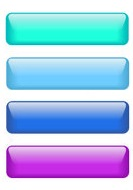
- Select NormalLink from the Links panel.
- Select the resolution from the Resolutions panel.
-
Note: For Windows style the only available resolution is Scale 1,00x.
-
- In the bitmap, select an area to use as the button background.
-
Note: The selection appears on the Previsualization panel. In our scenario, for NormalLink, we have selected the blue rectangle.
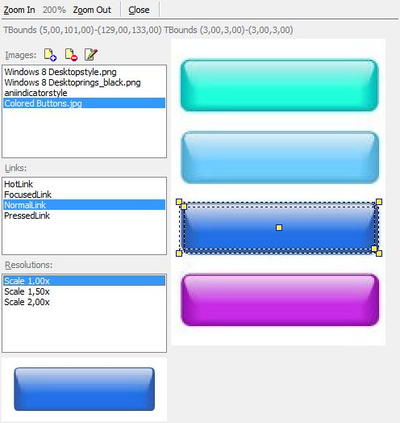
-
- Perform steps 7 to 9 for each of the links: HotLink, FocusedLink and PressedLink.
- Click Close to exit from the BitmapLinks Editor.
- Apply changes in the FireMonkey Style Designer, click Apply and Close.
- Run the application to see the results.
delphi Style TBitmapLink的更多相关文章
- DateTimePicker如何与Delphi自带Style同步
Delphi 的 DateTimePicker 组件有一个CalColors属性,可以设置 DropDown 打开的日历节目的风格.但如果不使用 Delphi 自带的 Style,在这里设置属性看不到 ...
- Delphi 完全时尚手册之 Visual Style 篇 (界面不错) 转自http://blog.csdn.net/iseekcode/article/details/4733229
这里先说说两个概念:Theme(主题)和 Visual Style .Theme 最早出现在 Microsoft Plus! for Windows 95 中,是 Windows 中 Wallpape ...
- Delphi 完全时尚手册之 Visual Style 篇
这里先说说两个概念:Theme(主题)和 Visual Style .Theme 最早出现在 Microsoft Plus! for Windows 95 中,是 Windows 中 Wallpape ...
- Delphi XE5 for android 使用 BITMAP STYLE DESIGNER 改变控件背景
一.BITMAP STYLE DESIGNER 工具集成在IDE开发工具的TOOLS菜单. 使用NEW 新建一个安卓样式.NEW—NEW ANDROID STYLE FOR FIREMONKEY. 这 ...
- Delphi ComboBox组件 style=csDropDownlist 的赋值方法
赋值方法: ComboBox1.Items.Add( '文本 '); ComboBox1.ItemIndex := ComboBox1.Items.IndexOf( '文本 '); 清空: Combo ...
- 转:Delphi 6 实用函数
来自: daocaoren0824, 时间: -- ::, ID: 再给你一份 程序员实用函数 {▎▎▎▎▎▎▎▎▎▎▎▎▎▎▎▎▎▎▎▎▎▎▎▎▎▎▎▎▎▎▎▎▎▎▎▎▎▎▎} {▎ ▎} {▎ 大 ...
- 转:Delphi 函数大全
Delphi 函数大全 - xiucaiyao的专栏 - 博客频道 - CSDN.NEThttp://blog.csdn.net/xiucaiyao/article/details/4544039 名 ...
- 转:看看 Delphi XE2 为 VCL 提供的 14 种样式
http://www.linuxso.com/linuxbiancheng/8889.html 其实只提供了 个 vsf 样式文件, 还有默认的 Windows 样式, 共 种. 在空白窗体上添加 L ...
- [工具] Firemonkey Style 调色工具(可另存 Style 文件)
版本:2016.12.21 (新增可取代颜色) 下载:[工具]OneStylePalette_调色工具_20161221.zip 版本:2016.12.09 (新增可导出全平台的 Style) 下载: ...
随机推荐
- Three.js开发指南---使用构建three.js的基本组件(第二章)
.gui本章的主要内容 1 场景中使用哪些组件 2 几何图形和材质如何关联 3 正投影相机和透视相机的区别 一,Three所需要的基本元素 场景scene:一个容器,用来保存并跟踪所有我们想渲染的物体 ...
- LeetCode "Is Subsequence"
There are 3 possible approaches: DP, divide&conquer and greedy. And apparently, DP has O(n^2) co ...
- 【学】AngularJS日记(2)
数组循环放到新生成的li中 <ul ng-init="arr=[12,5,6,394,344]"> <li ng-repeat="item in arr ...
- Error #2044: 未处理的 IOErrorEvent:。 text=Error #2035: 找不到 URL这是flash加载外部资源时有时会遇到的问题,对于此问题解决如下
导致这个错误的主要原因是未添加IOErrorEvent事件监听,或者添加了监听,但是加载时使用了unload() 参考资料: http://blog.csdn.net/chjh0540237/arti ...
- 解析JDK 7的动态类型语言支持
http://www.infoq.com/cn/articles/jdk-dynamically-typed-language
- win7(64位)php5.5-Apache2.4-mysql5.6环境安装
原文链接http://jingyan.baidu.com/article/9faa723152c5d6473d28cb47.html 工具/原料 php-5.5.10-Win32-VC11-x64.z ...
- PHP中include和require的区别详解
1.概要 require()语句的性能与include()相类似,都是包括并运行指定文件.不同之处在于:对include()语句来说,在执行文件时每次都要进行读取和评估:而对于require()来说, ...
- unity3d android 优化
最近项目进入收尾阶段,之前对项目做了很多优化,mesh合并 ,减少DrawCall和模型骨骼以及物理计算,合并材质球,优化代码等等,在IOS上还好,但是android上,试过几款手机,从低端到高端,发 ...
- win32+ apache2.2 + tomcat7配置
首先已安装了apache2.2.22与tomcat7,并下载了相应的连接器文件mod_jk.so,存放于apache目录的modules下.我的电脑的安装路径如下:1.D:\server\Apache ...
- 问题解决_(转载)VS2015无法启动 IIS Express Web解决办法
将“重写应用程序根URL”的勾选去掉,然后就可正常运行 参考资料:http://www.qi88.com/edu/os/2015/0103/87648.html