
Android 4.4沉浸式状态栏的实现
要实现Android 4.4上面的沉浸式状态栏要用到开源项目SystemBarTint(https://github.com/hexiaochun/SystemBarTint)
public class MainActivity extends Activity {

    @Override

    protected void onCreate(Bundle savedInstanceState) {

        super.onCreate(savedInstanceState);

        setContentView(R.layout.activity_main);

       if (Build.VERSION.SDK_INT >= Build.VERSION_CODES.KITKAT) {

            setTranslucentStatus(true);

        }

        SystemBarTintManager tintManager = new SystemBarTintManager(this);

        tintManager.setStatusBarTintEnabled(true);

        tintManager.setStatusBarTintResource(R.drawable.back);

    }

    @TargetApi(19)

    public void setTranslucentStatus(boolean on) {

        Window win = getWindow();

        WindowManager.LayoutParams winParams = win.getAttributes();

        final int bits = WindowManager.LayoutParams.FLAG_TRANSLUCENT_STATUS;

        if (on) {

            winParams.flags |= bits;

        } else {

            winParams.flags &= ~bits;

        }

        win.setAttributes(winParams);

    }
<LinearLayout xmlns:android="http://schemas.android.com/apk/res/android"

    xmlns:tools="http://schemas.android.com/tools"

    android:layout_width="match_parent"

    android:layout_height="match_parent"

    android:fitsSystemWindows="true"

    android:clipToPadding="true"

    android:background="#ffffff"

    android:orientation="vertical"

>

    <TextView

        android:layout_width="match_parent"

        android:layout_height="100dp"

        android:background="#009959" />

    <Button

        android:layout_width="100dp"

        android:layout_height="50dp"

        android:background="#ff669d"/>

</LinearLayout>
android:fitsSystemWindows="true" :设置应用布局时是否考虑系统窗口布局;如果为true,将调整系统窗口布局以适应你自定义的布局。比如系统有状态栏,应用也有状态栏时。
android:clipToPadding="true"  : 属性定义了是否允许ViewGroup在padding中绘制,该值默认为true,即不允许。

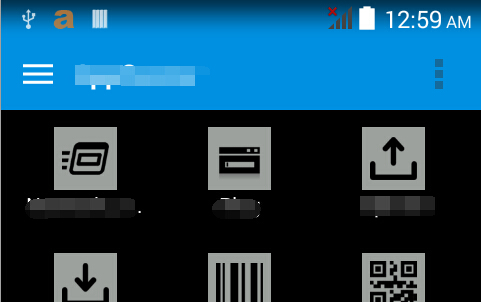
效果如下:
Android 4.4沉浸式状态栏的实现的更多相关文章
- Android中的沉浸式状态栏效果
无意间了解到沉浸式状态栏,感觉贼拉的高大上,于是就是试着去了解一下,就有了这篇文章.下面就来了解一下啥叫沉浸式状态栏.传统的手机状态栏是呈现出黑色条状的,有的和手机主界面有很明显的区别.这一样就在一定 ...
- Android Studio 关于沉浸式状态栏
values-v19/style.xml <style name="AppTheme" parent="Theme.AppCompat.Light.NoAction ...
- [置顶]
Xamarin android沉浸式状态栏
虽然关于android "沉浸式"状态栏有很多博客介绍过,从小菜到大神无一例外.我第一次看到这种"沉浸"式的效果我也以为真的是这么叫,然而根本不是这么回事,完全 ...
- 81.Android之沉浸式状态栏攻略
转载:http://blog.csdn.net/lmj623565791/article/details/48649563/ 一.概述 近期注意到QQ新版使用了沉浸式状态栏,ok,先声明一下:本篇博客 ...
- android沉浸式状态栏设置(4.4以上版本)
其实设置比较简单,我用了小米和htc的几款机型都可以用. 主要代码就是这个(注意要在Activity的setContentView之前调用才行) /** * 开启沉浸式状态栏 * */ public ...
- Android 沉浸式状态栏 实现方式二 ( 更简单 )
以前写过一个沉浸式状态栏 的实现方式 Android 沉浸式状态栏 实现方式一 现在有个更为简单的实现方式 . 相关链接 http://www.apkbus.com/forum.php?mod=vie ...
- Android 中沉浸式状态栏实现
Android 中沉浸式状态栏实现方式如下 计算状态栏高度及调用沉浸式状态栏的相关API方法 package com.example.status; import android.annotation ...
- Android一体式(沉浸式)状态栏的实现
注:公司开发任务适配是在4.4版本之上进行,所以此适配仅在4.4之上进行测试. 1.主要使用了第三方的开源项目SystemBarTint,github:https://github.com/jgilf ...
- Android 沉浸式状态栏
1,传统的手机状态栏是呈现出黑色或者白色条状的,有的和手机主界面有很明显的区别.这样就在一定程度上牺牲了视觉宽度,界面面积变小.看一下QQ的应用 2,实现起来也挺简单的,来一起看一下吧 MainAct ...
随机推荐
- 在Springmvc中获取properties属性
一些关键的属性一般都会拿出来作为配置,比如数据库连接等.在springmvc中也提供了获取property的类,比如@Value来获取.我接触spring很浅,基本上都是百度的问题解决方法,百度到@v ...
- JS魔法堂:IMG元素加载行为详解
一.前言 在<JS魔法堂:jsDeferred源码剖析>中我们了解到img元素加载失败可以作为函数异步执行的优化方案,本文打算对img元素的加载行为进行更深入的探讨. 二.资源加载的相关属 ...
- 搭建CnetOS6.5x64最小系统及在线yum源的配置
CentOS系统作为红帽系列的一款linux系统,因为其免费.开源,在中小企业中得到了广泛应用,生产上为了更好的利用资源,都采用最小系统安装,因为一个图形界面都会占去系统资源的30%到40%,生产上一 ...
- php的<?php ?>标签匹配
在公司实习了没有多久就开始和同事发现了一个问题,就是之前的人写过的项目经常莫名其妙的出错,仔细的看项目的源代码的时候发现项目中并没有逻辑上的错误,而且各种关系以及数据都没有问题,这是为什么呢.再次认真 ...
- ROS 多台电脑间进行通信
版权声明:本文为博主原创文章,转载请标明出处: http://www.cnblogs.com/liu-fa/p/5773822.html 在我看来,ROS最牛逼的地方就是它的通信机制了,不仅仅是进程间 ...
- C#密封类
密封类 密封类使用sealed修饰符声明. 密封类中不可能有抽象方法[因为:抽象方法必须在抽象类中,而抽象类不能是密封的或者是静态的,也就是说abstract 和sealed不能同时修饰一个类] ...
- JavaScript基础—闭包,事件
Js基础-闭包,事件 1:js中的闭包 概念:在一个函数内部又定义了一个函数,内部函数能访问到外部函数作用域范围内的变量,这时这个内部函数就叫做闭包,无论这个内部函数在哪里被调用都能访问到外部函数作用 ...
- 做贴吧系统,偶然发现使用iframe的弊端
个人拙见 常听人说起现在不建议使用iframe框架,而我却一再使用,也许是能力有限,一直没在意有什么弊端. 我这此使用的事左右iframe框架,并且只在主页中定义了大背景,每个页面并没有分别定义背景, ...
- MVC之前的那点事儿系列(2):HttpRuntime详解分析(上)
文章内容 从上章文章都知道,asp.net是运行在HttpRuntime里的,但是从CLR如何进入HttpRuntime的,可能大家都不太清晰.本章节就是通过深入分析.Net4的源码来展示其中的重要步 ...
- 不可或缺 Windows Native (22) - C++: 多重继承, 虚基类
[源码下载] 不可或缺 Windows Native (22) - C++: 多重继承, 虚基类 作者:webabcd 介绍不可或缺 Windows Native 之 C++ 多重继承 虚基类 示例1 ...