
[Spring MVC] - JSON
Spring MVC中使用JSON,先必需引用两个包:jackson-core-asl-1.9.13.jar、jackson-mapper-asl-1.9.13.jar
因为需要使用到jquery测试,如果在项目中的web.xml配置Spring MVC是“/”,比如:
    <servlet-mapping>

        <servlet-name>dispatcher</servlet-name>

        <url-pattern>/</url-pattern>

    </servlet-mapping>
意思匹配所有的路径使用Spring MVC做解释的话,那么需要在Spring MVC的配置文件中加入:
<mvc:resources location="/js/" mapping="/js/**" />
用于过滤对指定路径不使用Spring MVC解释器。
先看这个model entity:
package com.my.controller.bean;

import org.hibernate.validator.constraints.NotEmpty;

public class Account {

    @NotEmpty(message="{valid.required}")

    private String userName;

    @NotEmpty(message="{valid.required}")

    private String password;

    public String getUserName() {

        return userName;

    }

    public void setUserName(String userName) {

        this.userName = userName;

    }

    public String getPassword() {

        return password;

    }

    public void setPassword(String password) {

        this.password = password;

    }

}
这是一个简单的model,使用了annotation做数据验证。
Controller:
package com.my.controller;

import java.util.ArrayList;

import java.util.HashMap;

import java.util.LinkedHashMap;

import java.util.List;

import java.util.Map;

import javax.validation.Valid;

import org.springframework.stereotype.Controller;

import org.springframework.ui.Model;

import org.springframework.validation.BindingResult;

import org.springframework.validation.FieldError;

import org.springframework.web.bind.annotation.RequestBody;

import org.springframework.web.bind.annotation.RequestMapping;

import org.springframework.web.bind.annotation.RequestMethod;

import org.springframework.web.bind.annotation.ResponseBody;

import org.springframework.web.servlet.ModelAndView;

import com.my.controller.bean.Account;

@Controller

@RequestMapping(value="json")

public class TestJsonController {

    /**

     * 静态accounts

     */

    private List<Account> accounts = new ArrayList<Account>();

    {

        Account acc1 = new Account();

        Account acc2 = new Account();

        acc1.setUserName("Robin");

        acc1.setPassword("password");

        acc2.setUserName("Lucy");

        acc2.setPassword("123456");

        accounts.add(acc1);

        accounts.add(acc2);

    }

    /**

     * 默认地址

     * @return

     */

    @RequestMapping(method=RequestMethod.GET)

    public ModelAndView index() {

        ModelAndView view = new ModelAndView("TestJson/index");

        view.addObject("accounts", accounts);

        return view;

    }

    /**

     * 新增account

     * @param account

     * @param model

     * @return

     */

    @RequestMapping(value="add", method=RequestMethod.POST)

    @ResponseBody

    public Map<String, Object> add(@RequestBody @Valid Account account, BindingResult bindingResult) {

        Map<String, Object> result = new HashMap<String, Object>();

        if(bindingResult.hasErrors()) {

            List<FieldError> errs = bindingResult.getFieldErrors();

            Map<String, String> mapErrors = new LinkedHashMap<String, String>();

            for(FieldError err : errs) {

                mapErrors.put(err.getField(), err.getDefaultMessage());

            }

            result.put("success", false);

            result.put("errors", mapErrors);

            return result;

        }

        accounts.add(account);

        result.put("success", true);

        result.put("data", accounts);

        return result;

    }

    /**

     * 取得所有accounts

     * @return

     */

    @RequestMapping(value="accounts", method=RequestMethod.GET)

    @ResponseBody

    public List<Account> findAccounts() {

        return accounts;

    }

}
1、初始了一个static的accounts
2、默认index中有一个view
3、add(...) 方法:
- @ResponseBody这个annotation,意思是直接输出
- 在参数中@RequestBody @Valid这两个annotation是json提交时的需要的,@RequestBody是必需的,@Valid是数据验证必需的
- BindingResult,必需要紧跟实体model之后,否则取不到验证结果
- 本例使用了一个Map做数据返回,Spring MVC会直接对这个Map转换成JSON结果字符串
- 如果验证失败,使用一个map加入错误信息返回
4、findAccounts()方法可以直接返回json。注意@ResponseBody
View:
<%@ page language="java" contentType="text/html; charset=UTF-8" pageEncoding="UTF-8"%>

<%@ taglib uri="http://java.sun.com/jsp/jstl/core" prefix="c" %>

<%@ taglib uri="http://java.sun.com/jsp/jstl/fmt" prefix="fmt"%>

<%@ taglib uri="http://java.sun.com/jsp/jstl/functions" prefix="fn" %>

<%@ taglib prefix="st" uri="http://www.springframework.org/tags" %>

<%@ taglib prefix="form" uri="http://www.springframework.org/tags/form"%>

<!DOCTYPE html PUBLIC "-//W3C//DTD HTML 4.01 Transitional//EN" "http://www.w3.org/TR/html4/loose.dtd">

<html>

<head>

<meta http-equiv="Content-Type" content="text/html; charset=UTF-8">

<script type="text/javascript" src="${pageContext.request.contextPath}/js/jquery.json.js"></script>

<script type="text/javascript" src="${pageContext.request.contextPath}/js/jquery-1.8.3.js"></script>

<title>Test Json</title>

<script type="text/javascript">

    $(document).ready(function() {

        getData();

    });

    //-------------------------------------------------

    // 取得JSON数据

    //-------------------------------------------------

    function getData() {

        var url = "${pageContext.request.contextPath}/json/accounts";

        $.get(url).success(function(data, status, xhr) {

            setData(data);

        });

    }

    //-------------------------------------------------

    // 设置JSON数据

    //-------------------------------------------------

    function setData(data) {

        var div = $("#divJson");

        div.html("");

        $(data).each(function(index, row) {

            div.append("User_" + index + ":" + row.userName + "<br/>");

        });

    }

    //-------------------------------------------------

    // Add按钮事件

    //-------------------------------------------------

    function addClick() {

        var url = "${pageContext.request.contextPath}/json/add";

        var data = {

            userName: $("#userName").val(),

            password: "pass"

        };

        // POST JSON数据到服务器

        $.ajax({

            url: url,

            dataType: "json",

            contentType: "application/json",

            type: "POST",

            data: JSON.stringify(data),

            success: function (data) {

                if(data.success) {

                    setData(data.data);

                }

                else {

                    var text = "";

                    $(data.errors).each(function(index, row) {

                        text += "<font color='red'>" + row.userName + "</font><br/>";

                    });

                    $("#divJson").html(text);

                }

            },

            error: function () {

            }

        });

    }

</script>

</head>

<body>

    <b>HTML:</b><hr/>

    <c:set scope="page" var="index" value="0"></c:set>

    <c:forEach items="${accounts}" var="item">

        User_<c:set scope="page" value="${index+1}" var="index"></c:set>${index}:

        <c:out value="${item.userName}"></c:out><br/>

    </c:forEach>

    <hr/>

    <b>Json:</b><hr/>

    <div id="divJson"></div>

    <hr/>

    User name:<input type="text" id="userName" name="userName" value="" />

    <input type="button" id="btnAdd" name="btnAdd" value="Call Ajax add account" onclick="addClick()" />

</body>

</html>
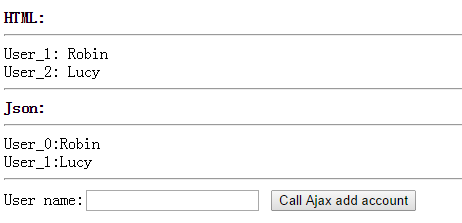
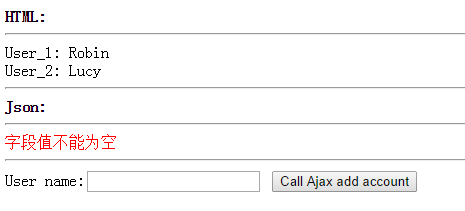
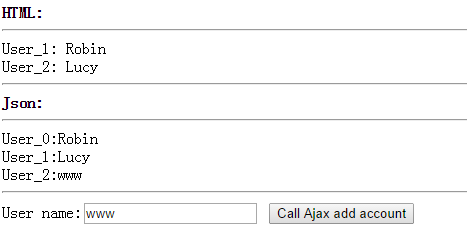
这里使用正常输出和json输出两种方式。
运行结果:
不输入user name时:
正确输入时:
[Spring MVC] - JSON的更多相关文章
- spring mvc json 返回乱码问题解决(vestion:3.x.x)
本文是转载文章,感觉比较好,如有侵权,请联系本人,我将及时删除. 原文网址:<spring mvc json 返回乱码问题解决(vestion:3.x.x)> 工程中用springmvc返 ...
- spring mvc: json练习
spring mvc: json练习 本例需要用到的json包: 如下: jackson-databind jackson-core jackson-annotations <!-- https ...
- Spring MVC JSON自己定义类型转换(续)
前面提到了两种转换类型的方法(Spring MVC JSON自己定义类型转换),这里针对Json转换提供一种更简便的方法. 通过配置全局的日期转换来避免使用麻烦的注解. 首先用到了一个简单的日期工具类 ...
- Spring MVC JSON 实现JsonSerializer Date类型转换
转载至:http://blog.csdn.net/lantianzhange/article/details/40920933 在Spring MVC中存在两大类的类型转换,一类是Json,一个是Sp ...
- Spring mvc Json 的正确返回姿势
我们经常都需要封装统一JSON格式 例如以下形式 { “data”:“输出的数据”, “code”:“响应代码”, “msg”:“响应信息” } /** * Created by linli on 2 ...
- Spring MVC JSON自己定义类型转换
版权声明:版权归博主全部.转载请带上本文链接.联系方式:abel533@gmail.com https://blog.csdn.net/isea533/article/details/28625071 ...
- spring mvc json返回防止乱码
乱码问题 乱码一直是编程的常见问题,spring mvc 返回json数据时可能导致乱码,需要在controller中添加如下代码: @RequestMapping("/test" ...
- Spring MVC json配置
接口类的Controller,一般返回的是json数据,而Spring MVC中默认返回的string,而jsp页面的话,会按配置中自己行匹配转义字符串为对应的jsp文件. @Controller @ ...
- spring Mvc json返回json的日期格式问题
(一)输出json数据 springmvc中使用jackson-mapper-asl即可进行json输出,在配置上有几点: 1.使用mvc:annotation-driven 2.在依赖管理中添加ja ...
随机推荐
- 【汇总】Android 常用方法整理
1.解决ActionBar OverFlow按钮不显示.(在oncreate中调用即可) private void setOverflowShowingAlways() { try { ViewCon ...
- windows下scrapy安装
C:\users\XXXX>easy_install scrapy 出现错误 fatal error C1083: Cannot open include file: 'openssl/aes. ...
- SqlServer类库(自定义)
1,引用System.Configuration; 2,新建应用程序配置文件 读取SqlDataReader中的数据用where (read.Read()){//DoSomeThings()}
- OpenSuse 中目录中文路径改为英文路径
在很多发行版中可以通过: export LANG=en_US xdg-user-dirs-gtk-update 将主目录的英文路径名改为中文,然后恢复: export LANG=zh_CN 但是Ope ...
- NOIP2016 模拟赛
7.10 T1:求出一个矩阵中平均数大于0的子矩阵的最大面积. T2:给出一个N行的,第I行有n+1-i的倒三角形,从中选取m个数,只有当前数的左上角和右上角都被选是才能选当前数,求选的数字的最大和 ...
- “-webkit-appearance: none”按钮样式作用!
-webkit-appearance: none,可以去除浏览器默认样式.
- IntelliJ怎么读?
原来IntelliJ 的正确发音是 Intel li J. 周知.
- MVC 架构
MVC 模式是一种严格实现应用程序个部分隔离的框架模式.这种"隔离"也叫"分离关注点" 通俗名称:"松耦合" 松耦合的应用程序价格设计方式, ...
- git常见错误
一.如果输: $ git remote add origin git@github.com:djqiang(github帐号名)/gitdemo(项目名).git 提示出错信息:fat ...
- 29 个你必须知道的 Linux 命令
虽然Linux发行版支持各种各样的饿GUI(graphical user interfaces),但在某些情况下,Linux的命令行接口(bash)仍然是简单快速的.Bash和 Linux Shell ...