
关于asyncio知识(四)
一、使用 asyncio 总结
最近在公司的一些项目中开始慢慢使用python 的asyncio, 使用的过程中也是各种踩坑,遇到的问题也不少,其中有一次是内存的问题,自己也整理了遇到的问题以及解决方法详细内容看:https://www.syncd.cn/article/memory_trouble
在前面整理的三篇asyncio文章中,也都是使用asyncio的一些方法,但是在实际项目中使用还是避免不了碰到问题, 在这周的工作中遇到之前碰见过的问题,一个初学asyncio写代码中经常会碰到的问题,我的业务代码在运行一段时间后提示如下错误提示:
Task was destroyed but it is pending!task: <Task pending coro=<HandleMsg.get_msg() done, defined at ex10.py:17> wait_for=<Future cancelled>>
这个错误我在前面几篇关于asyncio的系列文章中也反复说过这个问题,我也认为自己不会在出现这种问题,但是意外的是,我的程序还是出现了这个错误。
我将我的业务代码通过一个demo代码进行模拟复现以及解决这个问题,下面整理的就是这个过程
二、“Task was destroyed but it is pending!”
我通过下面这张图先描述一下demo程序的逻辑:
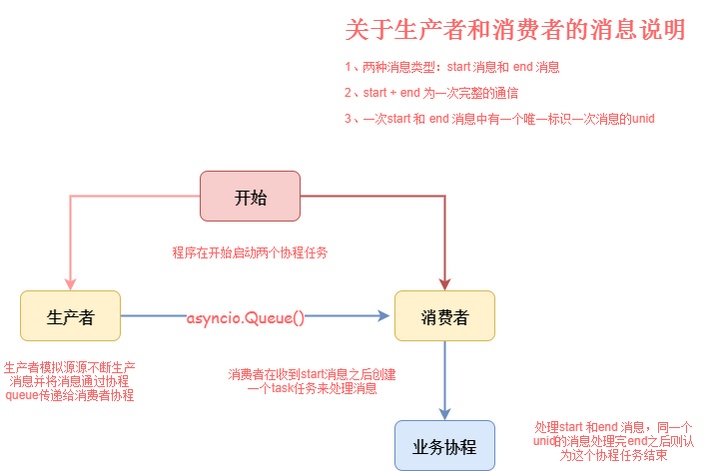
import asyncio

from asyncio import Queue

import uuid

from asyncio import Lock

from asyncio import CancelledError

queue = Queue()

class HandleMsg(object):

    def __init__(self, unid, coroutine_queue, handle_manager):

        self.unid = unid

        self.coroutine_queue = coroutine_queue

        self.handle_manager = handle_manager

    async def get_msg(self):

        while True:

            coroutine_msg = await self.coroutine_queue.get()

            msg_type = coroutine_msg.get("msg")

            if msg_type == "start":

                print("recv unid [%s] is start" % self.unid)

            else:

                print("recv unid [%s] is end" % self.unid)

                # 每个当一个unid收到end消息为结束

                await self.handle_manager.del_unid(self.unid)

class HandleManager(object):

    """

    用于unid和queue的关系的处理

    """

    def __init__(self):

        self.loop = asyncio.get_event_loop()

        self.lock = Lock(loop=self.loop)

        self.handle_dict = dict()

    async def unid_bind(self, unid, coroutine_queue):

        async with self.lock:

            self.handle_dict[unid] = coroutine_queue

    async def get_queue(self, unid):

        async with self.lock:

            if unid in self.handle_dict:

                return self.handle_dict[unid]

    async def del_unid(self, unid):

        async with self.lock:

            if unid in self.handle_dict:

                self.handle_dict.pop(unid)

def make_uniqueid():

    """

    生成unid

    """

    uniqueid = str(uuid.uuid1())

    uniqueid = uniqueid.split("-")

    uniqueid.reverse()

    uniqueid = "".join(uniqueid)

    return uniqueid

async def product_msg():

    """

    生产者

    """

    while True:

        unid = make_uniqueid()

        msg_start = {"unid": unid, "msg": "start"}

        await queue.put(msg_start)

        msg_end = {"unid": unid, "msg": "end"}

        await queue.put(msg_end)

        loop = asyncio.get_event_loop()

        await asyncio.sleep(0.2, loop=loop)

async def consumer_from_queue(handle_manager):

    """

    消费者

    """

    while True:

        msg = await queue.get()

        print("consumer recv %s" % msg)

        msg_type = msg.get("msg")

        unid = msg.get("unid")

        if msg_type == "start":

            coroutine_queue = Queue()  # 用于和handle_msg协程进行数据传递

            handle_msg = HandleMsg(unid, coroutine_queue, handle_manager)

            await handle_manager.unid_bind(unid, coroutine_queue)

            await coroutine_queue.put(msg)

            loop = asyncio.get_event_loop()

            # 每次的start消息创建一个task 去处理消息

            loop.create_task(handle_msg.get_msg())

        else:

            coroutine_queue = await handle_manager.get_queue(unid)

            await coroutine_queue.put(msg)

if __name__ == "__main__":

    loop = asyncio.get_event_loop()

    handle_manager = HandleManager()

    #  在最开始创建了两个task 分别是生产者和消费者

    loop.create_task(product_msg())

    loop.create_task(consumer_from_queue(handle_manager))

    loop.run_forever()
上面的代码表面上看没啥问题,我们先看看运行效果:
consumer recv {'unid': '784f436cfaf388f611e94ca974e1ffbe', 'msg': 'start'}

consumer recv {'unid': '784f436cfaf388f611e94ca974e1ffbe', 'msg': 'end'}

Task was destroyed but it is pending!

task: <Task pending coro=<HandleMsg.get_msg() done, defined at demo.py:17> wait_for=<Future cancelled>>

Task was destroyed but it is pending!

task: <Task pending coro=<HandleMsg.get_msg() done, defined at demo.py:17> wait_for=<Future cancelled>>

Task was destroyed but it is pending!

task: <Task pending coro=<HandleMsg.get_msg() done, defined at demo.py:17> wait_for=<Future cancelled>>

Task was destroyed but it is pending!

task: <Task pending coro=<HandleMsg.get_msg() done, defined at demo.py:17> wait_for=<Future cancelled>>

Task was destroyed but it is pending!

task: <Task pending coro=<HandleMsg.get_msg() done, defined at demo.py:17> wait_for=<Future cancelled>>

Task was destroyed but it is pending!

task: <Task pending coro=<HandleMsg.get_msg() done, defined at demo.py:17> wait_for=<Future cancelled>>

..........
程序没运行一段时间都会出现上面显示的错误提示,我先看看错误提示的信息:
Task was destroyed but it is pending!task: <Task pending coro=<HandleMsg.get_msg() done, defined at demo.py:17> wait_for=<Future cancelled>>
上面提示的其实就是我的task 是在pendding状态的时候被destroyed了,代码行数以及调用方法都告诉我们了是在:HandleMsg.get_msg() done, defined at demo.py:17
其实问题也比较好找,我们为每个unid创建了一个task来处理消息,但是当我们收到每个unid消息的end消息之后其实这个task任务对于我们来说就已经完成了,同时我们删除了我的unid和queue的绑定,但是我们并没有手动去取消这个task。
注意:这里我其实也有一个不理解的地方:关于这个task为什么会会destroyed,这个协程里是一个死循环一直在收消息,当queue里面没有消息协程也应该一直在await 地方在等待才对,但是如果我们把收到end消息的那个地方的删除unid和queue的绑定关系不删除,那么这个任务是不会被descroyed。所以没有完全明白这里的机制,如果明白的同学欢迎留言讨论
但是即使上面的机制我们有点不是特别明白,我们其实也应该把这个task手动进行cancel的,我们们将上面的代码稍微进行改动如下:
async def get_msg(self):

        try:

            while True:

                coroutine_msg = await self.coroutine_queue.get()

                msg_type = coroutine_msg.get("msg")

                if msg_type == "start":

                    print("recv unid [%s] is start" % self.unid)

                else:

                    print("recv unid [%s] is end" % self.unid)

                    # 每个当一个unid收到end消息为结束

                    await self.handle_manager.del_unid(self.unid)

                    current_task = asyncio.Task.current_task()

                    current_task.cancel()   # 手动cancel 当前的当前的task

        except CancelledError as e:

            print("unid [%s] cancelled success" %self.unid)
这里有个问题需要注意就是当我们对task进行cancel的时候会抛出cancelledError异常,我们需要对异常进行处理。官网也对此进行专门说明:
https://docs.python.org/3.6/library/asyncio-task.html#coroutine
内容如下:
cancel()

Request that this task cancel itself.

This arranges for a CancelledError to be thrown into the wrapped coroutine on the next cycle through the event loop. The coroutine then has a chance to clean up or even deny the request using try/except/finally.

Unlike Future.cancel(), this does not guarantee that the task will be cancelled: the exception might be caught and acted upon, delaying cancellation of the task or preventing cancellation completely. The task may also return a value or raise a different exception.

Immediately after this method is called, cancelled() will not return True (unless the task was already cancelled). A task will be marked as cancelled when the wrapped coroutine terminates with a CancelledError exception (even if cancel() was not called).
三、小结
虽然还有一些地方不太明白,但是随着用的越多,碰到的问题越多,一个一个解决,可能现在对某些知识还有点模糊,但是至少比刚开始使用asyncio的时候清晰了好多,之前整理的三篇文章的连接如下:
https://www.syncd.cn/article/asyncio_article_01
https://www.syncd.cn/article/asyncio_article_02
https://www.syncd.cn/article/asyncio_article_03
也欢迎加入交流群一起讨论相关内容:948510543
关于asyncio知识(四)的更多相关文章
- Python基础知识(四)
Python基础知识(四) 一丶列表 定义格式: 是一个容器,由 [ ]表示,元素与元素之间用逗号隔开. 如:name=["张三","李四"] 作用: 存储任意 ...
- 关于asyncio知识(二)
一.asyncio之—-入门初探 通过上一篇关于asyncio的整体介绍,看过之后基本对asyncio就有一个基本认识,如果是感兴趣的小伙伴相信也会尝试写一些小代码尝试用了,那么这篇文章会通过一个简单 ...
- 关于asyncio知识(一)
一.介绍 asyncio 是python3.4 引入的一个新的并发模块,主要通过使用coroutines 和 futures 来让我们更容易的去实现异步的功能,并且几乎和写同步代码一样的写代码,还没有 ...
- C# 基础知识 (四).C#简单介绍及托管代码
暑假转瞬即逝,从10天的支教生活到1周的江浙沪旅游,在这个漫长的暑假中我经历了非常多东西,也学到了非常多东西,也认识到了非常多不足之处!闲暇之余我准备又一次进一步巩固C#相关知识,包含 ...
- 关于asyncio知识一
一.介绍 asyncio 是python3.4 引入的一个新的并发模块,主要通过使用coroutines 和 futures 来让我们更容易的去实现异步的功能,并且几乎和写同步代码一样的写代码,还没有 ...
- Javascript知识四(DOM)
[箴 10:4] 手懒的,要受贫穷:手勤的,却要富足. He becometh poor that dealeth with a slack hand: but the hand of the di ...
- Java的基础知识四
一.Java 流(Stream).文件(File)和IO Java.io 包几乎包含了所有操作输入.输出需要的类.所有这些流类代表了输入源和输出目标. Java.io 包中的流支持很多种格式,比如:基 ...
- liunx 运维知识四部分
一. 权限介绍及文件权限测试 二. 目录权限测试 三. 默认控制权限umask 四. chown修改属性和属组 五. 网站安全权限介绍 六. 隐藏属性介绍 七. 特殊权限s 八. 特殊权限t 九. 用 ...
- Android学习之基础知识四-Activity活动7讲(活动的启动模式)
在实际的项目开发中,我们需要根据特定的需求为每个活动指定恰当的启动模式.Activity的启动模式一共有4种:standard.singleTop.singleTask.singleInstance. ...
随机推荐
- Springmvc借助SimpleUrlHandlerMapping实现接口开关功能
一.接口开关功能 1.可配置化,依赖配置中心 2.接口访问权限可控 3.springmvc不会扫描到,即不会直接的将接口暴露出去 二.接口开关使用场景 和业务没什么关系,主要方便查询系统中的一些状态信 ...
- 解决和排查 "必须使用适当的属性和方法修改 User-Agent" 错误时遇到的一些坑
解决 必须使用适当的属性和方法修改 User-Agent 错误 问题描述:近在项目中有一个需求为需要在 Http 的Header里面添加一个User-Agent参数,当请求时.项目本身的目标框架是 . ...
- webpack打包之无依赖模块
一.入口文件main.js // main.js console.log('webpack'); 二.出口文件bundle.js 1.浏览代码 2.本质 // 实际就是一个自执行函数 (functio ...
- Eclipse更新慢、插件安装慢解决方案zz
步骤 Eclipse -> Help -> Install New Software... 在出现的窗口点击Available Software Sites链接 将所有URL中的" ...
- 1046 Gridland
题目:http://acm.hdu.edu.cn/showproblem.php?pid=1046 难点在于读懂题意 题意:输入一个n*m的点阵,间距为1,问你遍历完所有点阵并回到起点的最短路径是多少 ...
- Centos 安装lnmp完整版
1.使用putty或类似的SSH工具登录服务器: 登录后运行 screen -S lnmp 2.下载并安装LNMP一键安装包: 我是CentOS系统,所以运行: wget -c http://soft ...
- Python3从零开始爬取今日头条的新闻【二、首页热点新闻抓取】
Python3从零开始爬取今日头条的新闻[一.开发环境搭建] Python3从零开始爬取今日头条的新闻[二.首页热点新闻抓取] Python3从零开始爬取今日头条的新闻[三.滚动到底自动加载] Pyt ...
- BZOJ1423 : Optimus Prime
设$f[x]$表示为了保证自己可以取到质数$x$,第一步在$[0,n]$中可以选的数是多少. 这个数是唯一的,因为如果存在两个$f[x]=a,b(a<b)$,那么如果先手取了$a$,后手就能取$ ...
- VueJs初步学习,一个表格的增删改查
<!DOCTYPE html> <html lang="en"> <head> <meta charset="UTF-8&quo ...
- es6学习笔记一:迭代器和for-of循环
我们如何遍历一个数组呢?在20年前,我们是这样遍历一个数组的: var myArr = []; for (var i = 0; i < arr.length; i++) { console.lo ...