
python 全局变量的import机制
在之前学习python设计模式(工厂模式实践篇),希望使用全局变量代替c++的宏完成服务自动注册功能时,遇到过一个问题,全局变量的定义和使用放在同一个可执行脚本中的问题。先把有问题的代码晒一下:
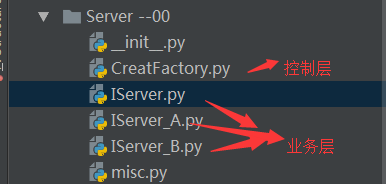
IServer.py
from abc import ABCMeta, abstractmethod

print __name__

class IServer:

    def __init__(self):

        pass

    @abstractmethod

    def DoWithA(self):

        pass

    @abstractmethod

    def DoWithB(self):

        pass
IServer_A.py
import IServer

serverType =''

print __name__
dir()

from CreatFactory import GLOBAL_class_dic

dir()

class IServer_A(IServer.IServer):

    def __init__(self):

        pass

    def DoWithA(self):

        print 'Server_A do with interface A'

    def DoWithB(self):

        print 'Server_A do with interface B'

global GLOBAL_class_dic

print 'the id of GLOBAL_class_dic in A is:',id(GLOBAL_class_dic)

GLOBAL_class_dic[serverType] = IServer_A

print 'GLOBAL_class_dic in a is:', GLOBAL_class_dic
IServer_B.py
import IServer

serverType =''from CreatFactory import GLOBAL_class_dic

print __name__

class IServer_B(IServer.IServer):

    def __init__(self):

        pass

    def DoWithA(self):

        print 'Server_B do with interface A'

    def DoWithB(self):

        print 'Server_B do with interface B'

print 'the id of GLOBAL_class_dic in B is:',id(GLOBAL_class_dic)

GLOBAL_class_dic[serverType] = IServer_B

print 'GLOBAL_class_dic in b is:', GLOBAL_class_dic
CreatFactory.py
#coding:UTF-

import os;

import sys;

import threading

from misc import *

global GLOBAL_class_dic

GLOBAL_class_dic ={:}

print 'GLOBAL_class_dic in define is:', GLOBAL_class_dic

print 'the id of GLOBAL_class_dic in define is:', id(GLOBAL_class_dic)


dir()

import IServer_A

import IServer_B

def CreateServer(serverType):

    global GLOBAL_class_dic

    print 'GLOBAL_class_dic in use is:', GLOBAL_class_dic

    print 'the id of GLOBAL_class_dic in USE is:', id(GLOBAL_class_dic)

    if GLOBAL_class_dic.has_key(serverType):

        return GLOBAL_class_dic[serverType]

    else:

        return 'no'

if __name__ == '__main__':

    pass

    # 接收到报文后,根据报文的内容,从db中获取到serverType,假设获取到的serverType=

    print 'main'

    print 'GLOBAL_class_dic in main A is:', GLOBAL_class_dic

    serverType = ''

    server = CreateServer(serverType)

    print 'GLOBAL_class_dic in main B is:', GLOBAL_class_dic

    print 'server :',server

    server.DoWithA(server())
代码内已经加了调试的部分信息, 运行CreatFactory.py。调用DoWithA失败,提示AttributeError: 'str' object has no attribute 'DoWithA'。运行结果如下:
D:\Python27\python.exe "D:/DesignMode/Server --00/CreatFactory.py"
GLOBAL_class_dic in define is: {1: 1}
the id of GLOBAL_class_dic in define is: 36230176
['GLOBAL_class_dic', 'Misc', '__builtins__', '__doc__', '__file__', '__name__', '__package__', 'binascii', 'inspect', 'minidom', 'os', 'struct', 'sys', 'threading']
IServer
IServer_A
['IServer', '__builtins__', '__doc__', '__file__', '__name__', '__package__', 'serverType']
GLOBAL_class_dic in define is: {1: 1}
the id of GLOBAL_class_dic in define is: 36230032
['GLOBAL_class_dic', 'Misc', '__builtins__', '__doc__', '__file__', '__name__', '__package__', 'binascii', 'inspect', 'minidom', 'os', 'struct', 'sys', 'threading']
1
['IServer', '__builtins__', '__doc__', '__file__', '__name__', '__package__', 'serverType']
['GLOBAL_class_dic', 'IServer', '__builtins__', '__doc__', '__file__', '__name__', '__package__', 'serverType']
IServer_B
the id of GLOBAL_class_dic in B is: 36230032
GLOBAL_class_dic in b is: {1: 1, '1002': <class IServer_B.IServer_B at 0x022C2ED8>}
['GLOBAL_class_dic', 'IServer', '__builtins__', '__doc__', '__file__', '__name__', '__package__', 'serverType']
the id of GLOBAL_class_dic in A is: 36230032
GLOBAL_class_dic in a is: {1: 1, '1002': <class IServer_B.IServer_B at 0x022C2ED8>, '1001': <class IServer_A.IServer_A at 0x02273420>}
main
GLOBAL_class_dic in main A is: {1: 1}
GLOBAL_class_dic in use is: {1: 1}
the id of GLOBAL_class_dic in USE is: 36230176
GLOBAL_class_dic in main B is: {1: 1}
server : no
Traceback (most recent call last):
File "D:/DesignMode/Server --00/CreatFactory.py", line 38, in <module>
server.DoWithA(server())
AttributeError: 'str' object has no attribute 'DoWithA'
Process finished with exit code 1
从运行的结果,可以看到:GLOBAL_class_dic 被定义了2次。有两个不同的id,第一次定义分配了一块内存,第二次不明原因的又重新分配了一块内存,然后服务的自动注册全部注册在这块内存中,等到main函数使用的使用,又使用的是第一次申请的内存,所以导致程序运行失败。那问题就来了,为什么会被重新又分配了一次?
之所以会被重新定义一次全局变量,是因为在执行CreatFactory.py时,最开始定义了全局变量,此时该命名空间可使用的函数和变量打印:['GLOBAL_class_dic', 'Misc', '__builtins__', '__doc__', '__file__', '__name__', '__package__', 'binascii', 'inspect', 'minidom', 'os', 'struct', 'sys', 'threading',然后在import IServer_A,在IServer_A.py中,import IServer后,在from CreatFactory import GLOBAL_class_dic打印出可使用的函数和变量时,['IServer', '__builtins__', '__doc__', '__file__', '__name__', '__package__', 'serverType'],就没有GLOBAL_class_dic,程序发现没有,就又重新声明了一遍。似乎问题原因已经找到了。
python在导入的时候,有2种场景,一种就是在文件前普通的import语句,还有一种就是特殊的场景:__main__模块是相对于Python的导入系统。在最开始运行CreatFactory.py文件时,__name__打印的值是__main__,而再子类再次导入时,会在当前命名空间查找是否已经导入__name__=CreatFactory,发现这个模块不存在,故此又导入了一遍,全局变量由此又被重新定义分配了内存,后期全局变量在子类业务的使用就都使用该值,而在main函数里,使用的又是当前的作用域内的第一次定义的全局变量。
python 全局变量的import机制的更多相关文章
- python 的 from import 机制
[A.py] from B import D class C:pass [B.py] from A import C class D:pass 为什么执行A的时候不能加载D呢? 如果将A.py改为:i ...
- 深入探讨 Python 的 import 机制:实现远程导入模块
深入探讨 Python 的 import 机制:实现远程导入模块 所谓的模块导入( import ),是指在一个模块中使用另一个模块的代码的操作,它有利于代码的复用. 在 Python 中使用 ...
- python 的import机制2
http://blog.csdn.net/sirodeng/article/details/17095591 python 的import机制,以备忘: python中,每个py文件被称之为模块, ...
- 关于Python的import机制原理
很多人用过python,不假思索地在脚本前面加上import module_name,但是关于import的原理和机制,恐怕没有多少人真正的理解.本文整理了Python的import机制,一方面自己总 ...
- python 全局变量与局部变量 垃圾回收机制
掌握L.E.G.B(作用域) 掌握局部作用域修改全局变量 步骤- 1.命名空间和作用域 命名空间:变量名称与值的映射关系作用域:变量作用的区域,即范围. 注意:class/def/模块会产生作用域:分 ...
- 初窥 Python 的 import 机制
本文适合有 Python 基础的小伙伴进阶学习 作者:pwwang 一.前言 本文基于开源项目: https://github.com/pwwang/python-import-system 补充扩展 ...
- Python中import机制
Python语言中import的使用很简单,直接使用import module_name语句导入即可.这里我主要写一下"import"的本质. Python官方定义:Python ...
- python中垃圾回收机制
Python垃圾回收机制详解 一.垃圾回收机制 Python中的垃圾回收是以引用计数为主,分代收集为辅.引用计数的缺陷是循环引用的问题.在Python中,如果一个对象的引用数为0,Python虚拟 ...
- Python核心技术与实战——二十|Python的垃圾回收机制
今天要讲的是Python的垃圾回收机制 众所周知,我们现在的计算机都是图灵架构.图灵架构的本质,就是一条无限长的纸带,对应着我们的存储器.随着寄存器.异失性存储器(内存)和永久性存储器(硬盘)的出现, ...
随机推荐
- python数据分析及展示(三)
一.Pandas库入门 1. Pandas库的介绍 http://pandas.pydata.org Pandas是Python第三方库,提供高性能易用数据类型和分析工具 import pandas ...
- STM32终端优先级,看过很多感觉这个写的直白易懂
转自野火<零死角玩转STM32> 一.抢占优先级和响应优先级 STM32 的中断向量具有两个属性,一个为抢占属性,另一个为响应属性,其属性编号 越小,表明它的优先级别越高. 抢占,是 ...
- Linux下的搜索查找命令的详解(whereis)
2.whereis 和find相比,whereis查找的速度非常快,这是因为linux系统会将 系统内的所有文件都记录在一个数据库文件中,当使用whereis和下面即将介绍的locate时,会从数据 ...
- springboot的工作原理之配置文件的加载
有一个非常底层的类SpringFactoriesLoader,顾名思义,就是加载工厂的类,没有办法,spring中工厂太多了,加载工厂类也需要一个类,参考博文: https://blog.csdn.n ...
- python基础类型—数字(Number)
Python3 支持 int.float.bool.complex(复数). 在Python 3里,只有一种整数类型 int,表示为长整型,没有 python2 中的 Long. 像大多数语言一样,数 ...
- react 路由导航栏 withRouter
codesandbox https://codesandbox.io/s/9l6prnyxjy app.js import React, { Component, Fragment } from &q ...
- js 日期排序(sort)
按创建时间日期排序 例如 eg 1.升序 2.降序 返回的结果: 注: 支持IE和Chrome其他的浏览器可自行测试
- ExecuteExcel4Macro (宏函数)使用说明
用ExecuteExcel4Macro从未打开的Excel工作簿中读取数据(转载) 从另外一个未打开的Excel文件中读取数据的函数 下面这个函数调用XLM宏从未打开的工作簿中读取数据. *注意: ...
- Gym 101981G - Pyramid - [打表找规律][2018-2019 ACM-ICPC Asia Nanjing Regional Contest Problem G]
题目链接:http://codeforces.com/gym/101981/attachments The use of the triangle in the New Age practices s ...
- redis分布式锁的具体应用
1.关于redis分布式锁,有个setIfAbsent: 即如果没有设置,会添加分布式锁,并返回true; 2.redis分布式锁有个轮询过程: / * @param key redis键 * @pa ...