
第八篇——Struts2的处理结果类型
Struts2处理结果类型
1、SUCCESS:表示Action正确的执行完成,返回相应的视图,success是name属性的默认值;
2、ERROR:表示Action执行失败,返回到错误处理视图;
3、NONE:表示Action正确的执行完成,但是不返回任何视图;
4、LOGIN:Action因为用户没有登录的原因没有正确执行,将返回登录视图,要求用户进行登录验证;
5、INPUT:Action执行,需要从前端页面获取参数,input就是代表这个参数输入的界面,一般应用中会对这些参数进行验证,如果验证没有通过,将自动返回该视图。
项目实例:
1、项目结构

2、pom.xml
<project xmlns="http://maven.apache.org/POM/4.0.0" xmlns:xsi="http://www.w3.org/2001/XMLSchema-instance"
  xsi:schemaLocation="http://maven.apache.org/POM/4.0.0 http://maven.apache.org/maven-v4_0_0.xsd">
  <modelVersion>4.0.0</modelVersion>
  <groupId>com.ray</groupId>
  <artifactId>struts2Test</artifactId>
  <packaging>war</packaging>
  <version>1.0-SNAPSHOT</version>
  <name>struts2Test Maven Webapp</name>
  <url>http://maven.apache.org</url>

  <dependencies>

    <dependency>
      <groupId>junit</groupId>
      <artifactId>junit</artifactId>
      <version>3.8.1</version>
      <scope>test</scope>
    </dependency>

    <!-- https://mvnrepository.com/artifact/org.apache.struts/struts2-core -->
    <dependency>
      <groupId>org.apache.struts</groupId>
      <artifactId>struts2-core</artifactId>
      <version>2.5.16</version>
    </dependency>

  </dependencies>

  <build>
    <finalName>struts2Test</finalName>
  </build>

</project>
3、web.xml
<web-app xmlns="http://java.sun.com/xml/ns/javaee"
         xmlns:xsi="http://www.w3.org/2001/XMLSchema-instance"
         xsi:schemaLocation="http://java.sun.com/xml/ns/javaee
                      http://java.sun.com/xml/ns/javaee/web-app_3_0.xsd"
         version="3.0" metadata-complete="true">
  <display-name>Archetype Created Web Application</display-name>

  <!-- 过滤所有请求交给Struts2处理 -->
  <filter>
    <filter-name>struts2</filter-name>
    <filter-class>
      org.apache.struts2.dispatcher.filter.StrutsPrepareAndExecuteFilter
    </filter-class>

     <!--action后缀(方法二)-->
    <!--<init-param>-->
      <!--<param-name>struts.action.extension</param-name>-->
      <!--<param-value>ray</param-value>-->
    <!--</init-param>-->
  </filter>

  <filter-mapping>
    <filter-name>struts2</filter-name>
    <url-pattern>/*</url-pattern>
  </filter-mapping>

</web-app>
4、UserAction.java
package com.ray.action;

import com.opensymphony.xwork2.ActionSupport;

/**
 * Created by Ray on 2018/3/26 0026.
 **/
public class UserAction extends ActionSupport {

    private String username;
    private int age;

    public String getUsername() {
        return username;
    }

    public void setUsername(String username) {
        this.username = username;
    }

    public int getAge() {
        return age;
    }

    public void setAge(int age) {
        this.age = age;
    }

    public String save(){
        return SUCCESS;
    }

    @Override
    public void validate() {

        if(username == null || "".equals(username)){
            this.addFieldError("username","用户名不能为空");
        }
    }
}
5、eighth-struts.xml
<?xml version="1.0" encoding="UTF-8"?>

<!DOCTYPE struts PUBLIC
        "-//Apache Software Foundation//DTD Struts Configuration 2.5//EN"
        "http://struts.apache.org/dtds/struts-2.5.dtd">

<struts>

    <package name="default" extends="struts-default" namespace="/">

        <action name="user" class="com.ray.action.UserAction" method="save">
            <result>/loginSuccess.jsp</result>
            <result name="input">/user.jsp</result>
        </action>
    </package>

    <constant name="struts.custom.i18n.resources" value="messageResource"/>
</struts>
6、struts.xml
<?xml version="1.0" encoding="UTF-8"?>

<!DOCTYPE struts PUBLIC
        "-//Apache Software Foundation//DTD Struts Configuration 2.5//EN"
        "http://struts.apache.org/dtds/struts-2.5.dtd">

<struts>

    <!-- action后缀(方法一) -->
    <!--<constant name="struts.action.extension" value="ra"/>-->

    <package name="default" namespace="/" extends="struts-default">
        <!-- 默认action -->
        <default-action-ref name="404"/>
        <action name="404">
            <result>/404.jsp</result>
        </action>

        <action name="helloWorld" class="com.ray.action.HelloWorldAction">
            <result name="success">/success.jsp</result>
        </action>

    </package>

    <include file="second-struts.xml"/>
    <include file="third-struts.xml"/>
    <include file="fourth-struts.xml"/>
    <include file="seventh-struts.xml"/>
    <include file="eighth-struts.xml"/>
</struts>
7、messageResource.properties
# 方式一:统一指定类型转换失败的错误提示信息 {0}表示输入框的name值
#xwork.default.invalid.fieldvalue={0} failure
# 方式二:单独指定某个输入框类型转换失败的提示信息,中文需转换为对应的ASCII码,否则页面会乱码
invalid.fieldvalue.age = \u5e74\u9f84\u8f93\u5165\u683c\u5f0f\u6709\u8bef
8、user.jsp
<%@ taglib prefix="s" uri="/struts-tags" %>
<%@ page language="java" import="java.util.*" pageEncoding="UTF-8" %>
<%
    String path = request.getContextPath();
    String basePath = request.getScheme() + "://" + request.getServerName() + ":" + request.getServerPort() + path + "/";
%>

<!DOCTYPE HTML PUBLIC "-//W3C//DTD HTML 4.01 Transitional//EN">
<html>
<head>
    <base href="<%=basePath%>">

    <title>用户信息</title>

    <meta http-equiv="pragma" content="no-cache">
    <meta http-equiv="cache-control" content="no-cache">
    <meta http-equiv="expires" content="0">
    <meta http-equiv="keywords" content="keyword1,keyword2,keyword3">
    <meta http-equiv="description" content="This is my page">
    <!--
	<link rel="stylesheet" type="text/css" href="styles.css">
	-->

</head>

<body>
    <s:form action="user" method="POST">
        <s:textfield label="姓名:" name="username"/>
        <s:fielderror fieldName="username"/>
        <br>

        <s:textfield label="年龄:" name="age"/>
        <s:fielderror fieldName="age"/>
        <br>

        <s:submit label="提交"/>
    </s:form>
</body>
</html>
9、loginSuccess.jsp
<%@ page language="java" import="java.util.*" pageEncoding="UTF-8" %>
<%
    String path = request.getContextPath();
    String basePath = request.getScheme() + "://" + request.getServerName() + ":" + request.getServerPort() + path + "/";
%>

<!DOCTYPE HTML PUBLIC "-//W3C//DTD HTML 4.01 Transitional//EN">
<html>
<head>
    <base href="<%=basePath%>">

    <title成功页面</title>

    <meta http-equiv="pragma" content="no-cache">
    <meta http-equiv="cache-control" content="no-cache">
    <meta http-equiv="expires" content="0">
    <meta http-equiv="keywords" content="keyword1,keyword2,keyword3">
    <meta http-equiv="description" content="This is my page">
    <!--
	<link rel="stylesheet" type="text/css" href="styles.css">
	-->

</head>

<body>
    保存成功!
</body>
</html>
10、页面效果
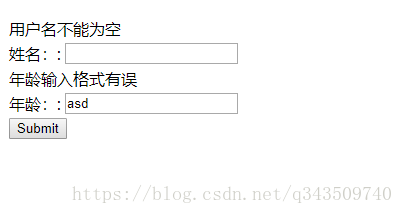
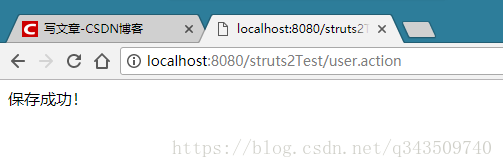
ok!
第八篇——Struts2的处理结果类型的更多相关文章
- Python之路【第十八篇】:Web框架们
Python之路[第十八篇]:Web框架们 Python的WEB框架 Bottle Bottle是一个快速.简洁.轻量级的基于WSIG的微型Web框架,此框架只由一个 .py 文件,除了Pytho ...
- 第八篇 :微信公众平台开发实战Java版之如何网页授权获取用户基本信息
第一部分:微信授权获取基本信息的介绍 我们首先来看看官方的文档怎么说: 如果用户在微信客户端中访问第三方网页,公众号可以通过微信网页授权机制,来获取用户基本信息,进而实现业务逻辑. 关于网页授权回调域 ...
- struts2支持的结果类型
在struts2-core.jar/struts-default.xml中,我们可以找到关于result-type的一些配置信息,从中可以看出struts2组件默认为我们提供了这 些result-ty ...
- 第八篇 Replication:合并复制-How it works
本篇文章是SQL Server Replication系列的第八篇,详细内容请参考原文. 在这一系列的前几篇你已经学习了如何在多服务器环境中配置合并复制.这一篇将介绍合并代理并解释它在复制过程中扮演的 ...
- 第八篇 Integration Services:高级工作流管理
本篇文章是Integration Services系列的第八篇,详细内容请参考原文. 简介在前面两篇文章,我们创建了一个新的SSIS包,学习了SSIS中的脚本任务和优先约束,并检查包的MaxConcu ...
- 第八篇 SQL Server安全数据加密
本篇文章是SQL Server安全系列的第八篇,详细内容请参考原文. Relational databases are used in an amazing variety of applicatio ...
- 第八篇 SQL Server代理使用外部程序
本篇文章是SQL Server代理系列的第八篇,详细内容请参考原文 在这一系列的上一篇,学习了如何用SQL Server代理作业活动监视器监控作业活动和查看作业历史记录.在实时监控和管理SQL Ser ...
- 【强烈强烈推荐】《ORACLE PL/SQL编程详解》全原创(共八篇)--系列文章导航
原文:[强烈强烈推荐]<ORACLE PL/SQL编程详解>全原创(共八篇)--系列文章导航 <ORACLE PL/SQL编程详解> 系列文章目录导航 ——通过知识共享树立个人 ...
- 【译】第八篇 SQL Server安全数据加密
本篇文章是SQL Server安全系列的第八篇,详细内容请参考原文. Relational databases are used in an amazing variety of applicatio ...
随机推荐
- springboot 工程启动报错之Consider defining a bean of type ‘XXX’ in your configuration.
一.前言: 使用springboot自动注入的方式搭建好了工程,结果启动的时候报错了!!!,错误如下图: Description: Field userEntityMapper in com.xxx. ...
- 在windows 上自动重启 tomcat 的方法
在windows 上自动重启 tomcat 的方法 实现思路: Windows 上监控tomcat 进程并且自动重启的脚本 一类是 定时重启 tomcat 一类是 监控并重启 写一个守护tomcat进 ...
- Qt编写自定义控件10-云台仪表盘
前言 做过安防视频监控的同学都清楚,在视频监控系统软件上都可以看到一个云台控制区域,可以对球机进行下下左右等八个方位的运动控制,还可以进行复位,一般都是美工作图好,然后贴图的形式加入到软件中,好处是程 ...
- Java9之HashMap与ConcurrentHashMap
HashMap在Java8之后就不再用link data bins了,而是转为用Treeify的bins,和之前相比,最大的不同就是利用了红黑树,所以其由 数组+链表+红黑树 组成.: * This ...
- windows服务安装 System.IO.FileLoadException
报错如下: System.IO.FileLoadException: 未能加载文件或程序集“file:///D:\WindowsService\bin\Debug\WindowsService.exe ...
- eclipse测试链接sql server2008 数据库
注:在测试连接数据库之前必须保证SQL Server 2008是采用SQL Server身份验证方式而不是windows身份验证方式.如果在安装时选用了后者,则需要重新进行配置. 首先 使用命令行测试 ...
- mysql limit 性能问题分析
问题重现 // todo 参考文章: MySQL 单表分页 Limit 性能优化 Scalable MySQL: Avoid offset for large tables 证明为什么用limit时, ...
- 切分 拆分集合list的方式
一般有两种,第一是sublist(),代码冗余效率低: 第二种: 引包自 com.google.common.collect.Lists 话不多说直接上实例: List<ContractMode ...
- winform中按钮透明的方法
把Button设为透明的方法:1.修改 FlatAppearance属性下的BorderSize 为0 修改 FlatStyle 的属性为 Flat 2. /// <summary>// ...
- 基于 redis 的分布式锁实现 Distributed locks with Redis debug 排查错误
小结: 1. 锁的实现方式,按照应用的实现架构,可能会有以下几种类型: 如果处理程序是单进程多线程的,在 python下,就可以使用 threading 模块的 Lock 对象来限制对共享变量的同步访 ...