
ASP.NET Core 2.0系列学习笔记-NLog日志配置文件
一、新建ASP.NET Core 2.0 MVC项目,使用NuGet在浏览中搜索:NLog.Web.AspNetCore,如下图所示:
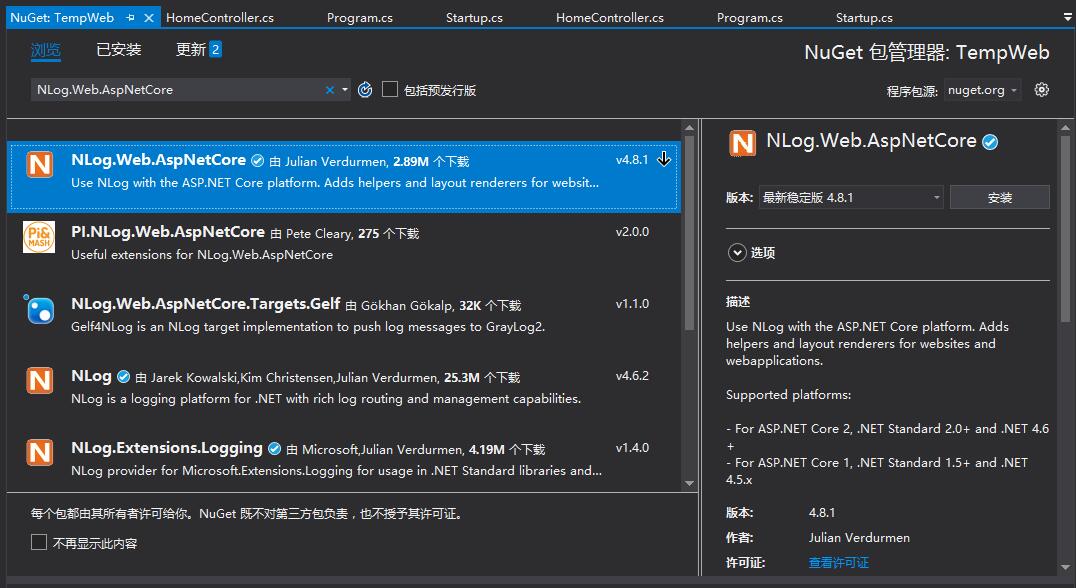
二、在项目的根目录下新建一个xml类型的nlog.config文件
nlog.config文件内容如下:
<?xml version="1.0" encoding="utf-8" ?>

<nlog xmlns="http://www.nlog-project.org/schemas/NLog.xsd"

      xmlns:xsi="http://www.w3.org/2001/XMLSchema-instance"

      autoReload="true"

      internalLogLevel="Warn"

      internalLogFile="internal-nlog.txt">

  <!--define various log targets-->

  <targets>

    <!--write logs to file-->

    <target xsi:type="File" name="allfile" fileName="nlog-all-${shortdate}.log"

                 layout="${longdate}|${logger}|${uppercase:${level}}|${message} ${exception}" />

    <target xsi:type="File" name="ownFile-web" fileName="nlog-my-${shortdate}.log"

                 layout="${longdate}|${logger}|${uppercase:${level}}|${message} ${exception}" />

    <target xsi:type="Null" name="blackhole" />

  </targets>

  <rules>

    <!--All logs, including from Microsoft-->

    <logger name="*" minlevel="Trace" writeTo="allfile" />

    <!--Skip Microsoft logs and so log only own logs-->

    <logger name="Microsoft.*" minlevel="Trace" writeTo="blackhole" final="true" />

    <logger name="*" minlevel="Trace" writeTo="ownFile-web" />

  </rules>

</nlog>
三、在Startup类中添加配置
在Configure方法中增加ILoggerFactory loggerFactory参数,然后添加2行代码, 如下所示:
        public void Configure(IApplicationBuilder app, IHostingEnvironment env, ILoggerFactory loggerFactory)

        {

            if (env.IsDevelopment())

            {

                app.UseDeveloperExceptionPage();

            }

            else

            {

                app.UseExceptionHandler("/Home/Error");

                app.UseHsts();

            }

            app.UseHttpsRedirection();

            app.UseStaticFiles();

            app.UseCookiePolicy();

            app.UseAuthentication();

            loggerFactory.AddNLog();//*****使用NLog作为日志记录工具

            env.ConfigureNLog("Nlog.config");//*****引入Nlog配置文件

            app.UseMvc(routes =>

            {

                routes.MapRoute(

                    name: "default",

                    template: "{controller=Home}/{action=Index}/{id?}");

            });

        }
四、Program.cs中绑定
 public static IWebHostBuilder CreateWebHostBuilder(string[] args) =>

            WebHost.CreateDefaultBuilder(args)

                .UseStartup<Startup>()

                .UseNLog();//使用Nlog日志
五、在控制器IActionResult中使用Nlog
//获得日志的实例

public static Logger nlog = LogManager.GetCurrentClassLogger();

public IActionResult Index()

{

     nlog.Info("普通信息日志-----------");

     nlog.Debug("调试日志-----------");

     nlog.Error("错误日志-----------");

     nlog.Fatal("异常日志-----------");

     nlog.Warn("警告日志-----------");

     nlog.Trace("跟踪日志-----------");

     nlog.Log(LogLevel.Warn, "Log日志------------------");

     return View();

 }
注:NLog日志的位置默认是在bin\Debug下面。
参考:http://www.voidcn.com/article/p-hukbuiwx-bch.html
其他参考的nlog.config配置文件
<?xml version="1.0" encoding="utf-8" ?>

<nlog xmlns="http://www.nlog-project.org/schemas/NLog.xsd"

      xmlns:xsi="http://www.w3.org/2001/XMLSchema-instance"

      autoReload="true"

      throwConfigExceptions="true"

      internalLogLevel="info"

      internalLogFile="d:\log\internal-nlog.txt">

  <!-- the targets to write to -->

  <targets>

    <!-- write logs to file  -->

    <target xsi:type="File" name="allfile" fileName="d:\log\nlog-all-${shortdate}.log"

            layout="${longdate}|${event-properties:item=EventId_Id:whenEmpty=0}|${uppercase:${level}}|${logger}|${message} ${exception:format=tostring}" />

    <!-- another file log, only own logs. Uses some ASP.NET core renderers -->

    <target xsi:type="File" name="ownFile-web" fileName="d:\log\nlog-own-${shortdate}.log"

            layout="${longdate}|${event-properties:item=EventId_Id:whenEmpty=0}|${uppercase:${level}}|${logger}|${message} ${exception:format=tostring}|url: ${aspnet-request-url}|action: ${aspnet-mvc-action}|${callsite}" />

  </targets>

  <!-- rules to map from logger name to target -->

  <rules>

    <!--All logs, including from Microsoft-->

    <logger name="*" minlevel="Trace" writeTo="allfile" />

    <!--Skip non-critical Microsoft logs and so log only own logs-->

    <logger name="Microsoft.*" maxlevel="Info" final="true" />

    <!-- BlackHole -->

    <logger name="*" minlevel="Trace" writeTo="ownFile-web" />

  </rules>

</nlog>
ASP.NET Core 2.0系列学习笔记-NLog日志配置文件的更多相关文章
- 一起学ASP.NET Core 2.0学习笔记(二): ef core2.0 及mysql provider 、Fluent API相关配置及迁移
不得不说微软的技术迭代还是很快的,上了微软的船就得跟着她走下去,前文一起学ASP.NET Core 2.0学习笔记(一): CentOS下 .net core2 sdk nginx.superviso ...
- ASP.NET Core 1.0 中使用 Log 日志配置
https://github.com/aspnet/Logging https://docs.asp.net/en/latest/fundamentals/logging.html ASP.NET C ...
- 一起学ASP.NET Core 2.0学习笔记(一): CentOS下 .net core2 sdk nginx、supervisor、mysql环境搭建
作为.neter,看到.net core 2.0的正式发布,心里是有点小激动的,迫不及待的体验了一把,发现速度确实是快了很多,其中也遇到一些小问题,所以整理了一些学习笔记: 阅读目录 环境说明 安装C ...
- Asp.Net Core 开发之旅之NLog日志
NLog已是日志库的一员大佬,使用也简单方便,本文介绍的环境是居于.NET CORE 3.0 1.安装 Install-Package NLog.Web.AspNetCore 2.创建配置文件 在we ...
- Asp.net core 2.0.1 Razor 的使用学习笔记(五)
按说这里应该写关于Role角色类的笔记,但是我还没时间实验这块,所以等以后我搞定了再来分享.现在先写其他部分. Asp.net core 2.0.1 Razor 的使用学习笔记——建立模型 按照微软官 ...
- Asp.Net Core 2.0 项目实战(9) 日志记录,基于Nlog或Microsoft.Extensions.Logging的实现及调用实例
本文目录 1. Net下日志记录 2. NLog的使用 2.1 添加nuget引用NLog.Web.AspNetCore 2.2 配置文件设置 2.3 依赖配置及调用 ...
- Asp.net core 2.0.1 Razor 的使用学习笔记(六)
Asp.net core 2.0.1 Razor 的使用学习笔记——基本页面的建立 VS这版(vs版本:15.5.6 .net版本:4.7.02558)的Razor页面自动生成就是坑爹货,它自动生成 ...
- EF Core使用SQL调用返回其他类型的查询 ASP.NET Core 2.0 使用NLog实现日志记录 CSS 3D transforms cSharp:use Activator.CreateInstance with an Interface? SqlHelper DBHelper C# Thread.Abort方法真的让线程停止了吗? 注意!你的Thread.Abort方法真
EF Core使用SQL调用返回其他类型的查询 假设你想要 SQL 本身编写,而不使用 LINQ. 需要运行 SQL 查询中返回实体对象之外的内容. 在 EF Core 中,执行该操作的另一种方法 ...
- Asp.net core 2.0.1 Razor 的使用学习笔记(三)
ASP.net core 2.0.0 中 asp.net identity 2.0.0 的基本使用(二)—用户账户及cookie配置 修改用户账户及cookie配置 一.修改密码强度和用户邮箱验证规则 ...
随机推荐
- leecode第二百零六题(反转链表)
/** * Definition for singly-linked list. * struct ListNode { * int val; * ListNode *next; * ListNode ...
- Asp.net core 学习笔记 (AutoMapper)
参考 : http://www.cnblogs.com/xishuai/p/3700052.html http://www.cnblogs.com/xishuai/p/3704435.html htt ...
- 为django项目创建虚拟环境
1. 先创建一个存放虚拟环境的目录 /opt/venl mkdir /opt/venl 2. cd 到该存放虚拟环境的目录下,并创建一个虚拟环境 virtualenv是如何创建“独立”的Python ...
- windows service 2008 R2 安装net4.6环境失败,windows service 2008 R2 升级sp1问题
一.错误 1.因为我的程序是以vs2017开发的,在windows service 2008 R2 IIS部署项目文件报出错误,因此要安装net4.6的环境. 2.windows service 2 ...
- 第一次作业——WorkCount
项目地址:https://gitee.com/yangfj/wordcount_project 1.软件需求分析: 撰写PSP表格: PSP2.1 PSP阶段 预估耗时 (分钟) 实际耗时 (分钟) ...
- linux是什么,有什么特点
(1)Linux是一套免费使用和自由传播的类Unix操作系统,是一个基于POSIX和UNIX的多用户.多任务.支持多线程和多CPU的操作系统.它能运行主要的UNIX工具软件.应用程序和网络协议.它支持 ...
- XSS理解与防御
一.说明 我说我不理解为什么别人做得出来我做不出来,比如这里要说的XSS我觉得很多人就不了解其定义和原理的,在不了解定义和原理的背景下他们可以拿站,这让人怎么理解呢.那时我最怕两个问题,第一个是题目做 ...
- learning makefile multiple target
- 跟随我在oracle学习php(9)
三目运算符:表达式? 表达式: 表达式: 自增在前在后没有影响 参与表达式需要注意 在前先计算,在后最后加1. + 字符串拼接. 字符串转数字:从左到右第一个不是数字的位置结束 取整 parseInt ...
- LeetCode 总结,二叉树各种类型问题小结
三大遍历 前序遍历 中序遍历 后序遍历 关于三大基础遍历,必须要条件反射式的记住:三种遍历的迭代方式使用的都是栈,后序遍历必须使用了 两个栈,其余乱七八糟的解决方式统统就不要再记了. 广度遍历: 分析 ...