
Csharp: read Sybase SQL anywhere5.5 using c#
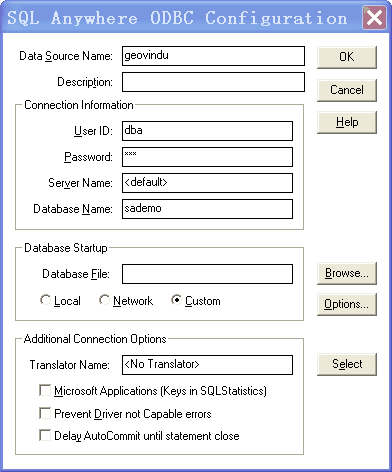
  private void button1_Click(object sender, EventArgs e)

        {

            try

            {

                //OdbcConnection conn = new OdbcConnection();

                //conn.ConnectionString =

                //         "ODBC;" +

                //         "Driver={Sybase SQL Anywhere 5.0};" +

                //         "DefaultDir=c:\myfolder\;" +

                //         "Dbf=c:\mypath\dbname.db;" +

                //         "Uid=UserName;" +

                //         "Pwd=Secret;" +

                //         "Dsn="""";";     // Must be included!

                //conn.Open();   geovindu

                connectionString = "DSN=geovindu;UID=dba;PWD=sql;"; //Data Source=sademo

                using (OdbcConnection connection = new OdbcConnection(connectionString))

                {

                    connection.Open();

                    DataTable dt = new DataTable();// connection.GetSchema();

                    DataSet ds = new DataSet();

                   OdbcDataAdapter da = new OdbcDataAdapter("SELECT * FROM employee", connection);

                   da.Fill(ds);

                   dt = ds.Tables[0];

                    // Do work here.

                   this.dataGridView1.DataSource = dt;

                }

            }

            catch (OdbcException ex)

            {

                MessageBox.Show(ex.Message.ToString());

            }

        }
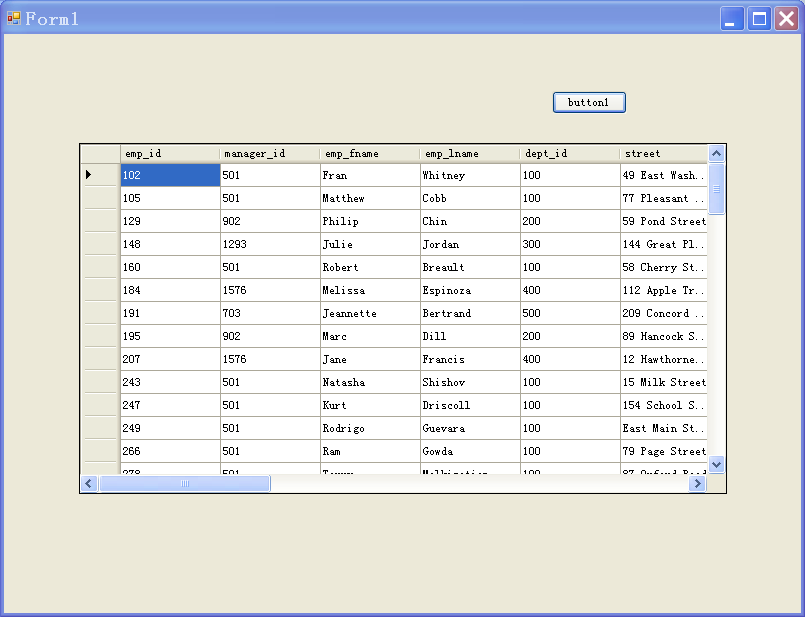
讀取數据如下:
http://www.dofactory.com/reference/connection-strings
using System;

using System.Collections.Generic;

using System.ComponentModel;

using System.Data;

using System.Drawing;

using System.Text;

using System.Windows.Forms;

using Microsoft.Win32;

using System.Data.Odbc;

using System.Data.SqlClient;

/*

https://msdn.microsoft.com/en-us/library/system.data.odbc.odbcconnection.connectionstring%28v=vs.110%29.aspx

 *

 * "Driver={SQL Server};Server=(local);Trusted_Connection=Yes;Database=AdventureWorks;"

"Driver={Microsoft ODBC for Oracle};Server=ORACLE8i7;Persist Security Info=False;Trusted_Connection=Yes"

"Driver={Microsoft Access Driver (*.mdb)};DBQ=c:\bin\Northwind.mdb"

"Driver={Microsoft Excel Driver (*.xls)};DBQ=c:\bin\book1.xls"

"Driver={Microsoft Text Driver (*.txt; *.csv)};DBQ=c:\bin"

"DSN=dsnname"

 *

 DSN类型有以下三种:

用户DSN:该数据源只能对建立数据源的用户可见.

ODBC用户数据源存贮了如何与指定数据库提供者连接的信息.只对当前用户可见,而且只能用于当前机器上.这里的当前机器是只这个配置只对当前的机器有效,而不是说只能配置本机上的数据库.它可以配置局域网中另一台机器上的数据库.

系统DSN:该数据源对当前机器上所有的用户可见.

ODBC系统数据源存贮了如何指定数据库提供者连接的信息,系统数据对当前机器上的所有用户都是可见的,包括NT服务.也就是说在这里配置的数据源,只要是这台机器的用户都可以访问 .

文件DSN:该数据源对安装了相同驱动的用户可见

用户DSN只被用户直接使用,它只能用于当前机器中,ASP不能使用它.系统DSN允许所有的用户登陆到特定服务器上去访问数据库,任何具有权限有用户都可以访问系统DSN.在WEB应用程序中访问数据库时,通常都是建立系统DSN. 文件DSN将信息存储在后缀为.dsn的文本文件中,优点是便于移动.

用户DSN只是针对当前用户或者特定用户;系统DSN是底层的,针对全部用户。一般没有特殊情况时,建议使用使用系统DSN,通用性好。

 */

namespace SQLanyWhereDemo

{

    /// <summary>

    /// 塗聚文 涂聚文

    /// </summary>

    public partial class Form4 : Form

    {

        RegistryKey regRootKey;

        RegistryKey regSubKey;

        /// <summary>

        ///

        /// </summary>

        public Form4()

        {

            InitializeComponent();

        }

        /// <summary>

        ///

        /// </summary>

        /// <param name="sender"></param>

        /// <param name="e"></param>

        private void Form4_Load(object sender, EventArgs e)

        {

            List<string> dsnList = new List<string>();

            ///定义Root指向注册表HKEY_LOCAL_MACHINE节点,

            ///如果是需要获取用户DSN则需要使用 Registry.CurrentUser;

            regRootKey = Registry.LocalMachine;

            ///定义注册表子Path

            string strRegPath = @"SOFTWARE\ODBC\ODBC.INI\ODBC Data Sources";

            regSubKey = regRootKey.OpenSubKey(strRegPath);

            string[] strDSNList = regSubKey.GetValueNames();

            foreach (string s in strDSNList)

            {

                dsnList.Add(s);

            }

            ///关闭

            regSubKey.Close();

            regRootKey.Close();

            this.comboBox1.DataSource = dsnList;

        }

        /// <summary>

        /// is_archive

        /// is_archive

        /// </summary>

        /// <param name="sender"></param>

        /// <param name="e"></param>

        private void button1_Click(object sender, EventArgs e)

        {

            try

            {

                string conStr = "DSN=LocalServer";

                SqlConnection mCn = new SqlConnection(conStr);

                mCn.Open();

            }

            catch (SqlException ex)

            {

                MessageBox.Show(ex.Message.ToString());

            }

        }

        /// <summary>

        ///

        /// </summary>

        /// <param name="sender"></param>

        /// <param name="e"></param>

        private void button2_Click(object sender, EventArgs e)

        {

            try

            {

                string conStr = "DSN=geovindu";//uid=dba;PWD=geovindu" Driver={Sybase SQL Anywhere 5.0};

                OdbcConnection conn = new OdbcConnection(conStr);

                conn.Open();

                //OdbcConnection mCn = new OdbcConnection();

                //mCn.ConnectionString = "DSN=" + this.comboBox1.Text.Trim();

                //mCn.Open();

            }

            catch (OdbcException ex)

            {

                MessageBox.Show(ex.Message.ToString());

            }

        }

        private const string ODBC_INI_REG_PATH = "SOFTWARE\\ODBC\\ODBC.INI\\";

        private const string ODBCINST_INI_REG_PATH = "SOFTWARE\\ODBC\\ODBCINST.INI\\";

        /// <summary>

        /// Creates a new System-DSN entry with the specified values. If the DSN exists, the values are updated.

        /// </summary>

        /// <param name="dsnName">Name of the DSN for use by client applications</param>

        /// <param name="description">Description of the DSN that appears in the ODBC control panel applet</param>

        /// <param name="server">Network name or IP address of database server</param>

        /// <param name="driverName">Name of the driver to use</param>

        /// <param name="trustedConnection">True to use NT authentication, false to require applications to supply username/password in the connection string</param>

        /// <param name="database">Name of the datbase to connect to</param>

        public static void CreateDSN2(string dsnName, string description, string server, string driverName, bool trustedConnection, string database, string user, string password, string port)

        {

            // Lookup driver path from driver name

            var driverKey = Registry.LocalMachine.CreateSubKey(ODBCINST_INI_REG_PATH + driverName);

            if (driverKey == null) throw new Exception(string.Format("ODBC Registry key for driver '{0}' does not exist", driverName));

            string driverPath = driverKey.GetValue("Driver").ToString();

            // Add value to odbc data sources

            var datasourcesKey = Registry.LocalMachine.CreateSubKey(ODBC_INI_REG_PATH + "ODBC Data Sources");

            if (datasourcesKey == null) throw new Exception("ODBC Registry key for datasources does not exist");

            datasourcesKey.SetValue(dsnName, driverName);

            // Create new key in odbc.ini with dsn name and add values

            var dsnKey = Registry.LocalMachine.CreateSubKey(ODBC_INI_REG_PATH + dsnName);

            //MessageBox.Show(dsnKey.ToString());

            if (dsnKey == null) throw new Exception("ODBC Registry key for DSN was not created");

            dsnKey.SetValue("Data Source", dsnName);

            dsnKey.SetValue("Database", database);

            dsnKey.SetValue("Description", description);

            dsnKey.SetValue("Driver", driverPath);

            dsnKey.SetValue("Server", server);

            dsnKey.SetValue("User name", user);

            dsnKey.SetValue("Password", password);

            dsnKey.SetValue("Port", port);

            dsnKey.SetValue("Trusted_Connection", trustedConnection ? "Yes" : "No");

        }

    }

}
ARSoft.Tools.Net2.2.dll https://github.com/alexreinert/ARSoft.Tools.Net
Csharp: read Sybase SQL anywhere5.5 using c#的更多相关文章
- Sybase SQL anywhere5.5
https://github.com/mono/old-code https://wiki.scn.sap.com/wiki/display/SQLANY/SQL+Anywhere+and+Micro ...
- SUP (SAP Mobile SDK 2.2) 连接 Sybase SQL Anywhere sample 数据库
安装了 SAP Mobile SDK 2.2 后发现,这个版本没有自带Sybase SQL Anywhere 数据库. 解决办法: 1. 免费下载 SQL Anywhere Develope ...
- SQL Anywhere5.5: Metadata
http://dcx.sybase.com/1101/en/dbprogramming_en11/ianywhere-data-sqlanywhere-saconnection-getschem633 ...
- csharp:SMO run sql script
using System; using System.Collections.Generic; using System.ComponentModel; using System.Data; usin ...
- SQL 教程数据库包括:Oracle, Sybase, SQL Server, DB2, Access 等等,您将学到如何使用 SQL 访问和处理数据系统中的数据
SQL 基础教程 SQL 教程 SQL 简介 SQL 语法 SQL select SQL distinct SQL where SQL AND & OR SQL Order By SQL in ...
- sybase sql anywhere 5.0 安装后sybase central中无法打开视图等的解决办法
无法打开的原因初步分析要用英文版的xp,后来在如下处发现问题,是sql anywhere的版本太旧了, 可能没有使用Unicode编码,设置一下如下选项可以解决问题.
- sybase SQL记录
在一个表中复制一行,主键是MLID ';
- [译]流言终结者 —— SQL Server 是Sybase的产品而不是微软的
http://www.cnblogs.com/xxxtech/archive/2011/12/30/2307859.html by Euan Garden 这些年来我听说过关于这个流言的许多版本,其中 ...
- sql: MySQL and Microsoft SQL Server Stored Procedures IN, OUT using csharp code
MySQL存储过程: #插入一条返回值涂聚文注 DELIMITER $$ DROP PROCEDURE IF EXISTS `geovindu`.`proc_Insert_BookKindOut` $ ...
随机推荐
- samba服务配置(一)
samba是一个实现不同操作系统之间文件共享和打印机共享的一种SMB协议的免费软件. samba软件结构: /etc/samba/smb.conf #samba服务的主要配置文件 /etc/sa ...
- sku 和 spu
https://www.jianshu.com/p/867429702d5a 里面的图片挺好的
- 2.SlidingMenu(侧边栏效果)
> 使用步骤库:别的程序可以用它的方法.图片. 下载的其中一个框架的例子是没有actionBar的,example_update 引入出错可能是俩个v4包冲突了,删掉工程里的一个,不要删了库里的 ...
- SpringBoot swagger-ui.html 配置类继承 WebMvcConfigurationSupport 类后 请求404
1 .SpringBoot启动类加上 注解 @EnableWebMvc @SpringBootApplication@EnableWebMvc public class Application { ...
- 《机器学习实战(基于scikit-learn和TensorFlow)》第四章内容的学习心得
本章主要讲训练模型的方法. 线性回归模型 闭式方程:直接计算最适合训练集的模型参数 梯度下降:逐渐调整模型参数直到训练集上的成本函数调至最低,最终趋同与第一种方法计算出的参数 首先,给出线性回归模型的 ...
- 惊艳,Dubbo域名已改,也不再局限于Java!
今天作者想去 Dubbo 官网查下相关资料,发现官方域名由 dubbo.io 直接跳转至 dubbo.apache.org 下了,然后突然回想起 Dubbo 已经在 2 月份正式进入了 Apache ...
- jsp-EL表达式简介
表达式语言(Expression Language,EL),EL表达式是用"${}"括起来的脚本,用来更方便的读取对象! EL表达式主要用来读取数据,进行内容的显示! 使用EL表达 ...
- 测试工具之RobotFramework安装
Robot Framework很多公司再用,图形化界面,类表格填写关键字和参数,几乎不需要编码知识,上手很快 最近看到某满公司使用的就是这个工具,特地看了下,确实很简单,对于初入测试行业的人来说是个很 ...
- python之getpass模块使用
我们登入linux时,输入密码是什么都不显示的,在python中也可以这样做,那就是getpass模块(在pycharm中无法使用) getpass模块中包含几个比较实用的功能: 1.getpass ...
- Django--自定义 Command 命令
Django 对于命令的添加有一套规范,你可以为每个app 指定命令.通俗一点讲,比如在使用manage.py文件执行命令的时候,可以自定制自己的命令,来实现命令的扩充. commands的创建 1. ...