
[转]Configure logging in SSIS packages
本文转自:http://learnsqlwithbru.com/2009/11/26/configure-logging-in-ssis-packages/
n this article we will look at the steps to enable logging in SSIS packages. Each control flow task in a package have multiple events and logging enables you to look the execution details of these events.
Steps to configure logging
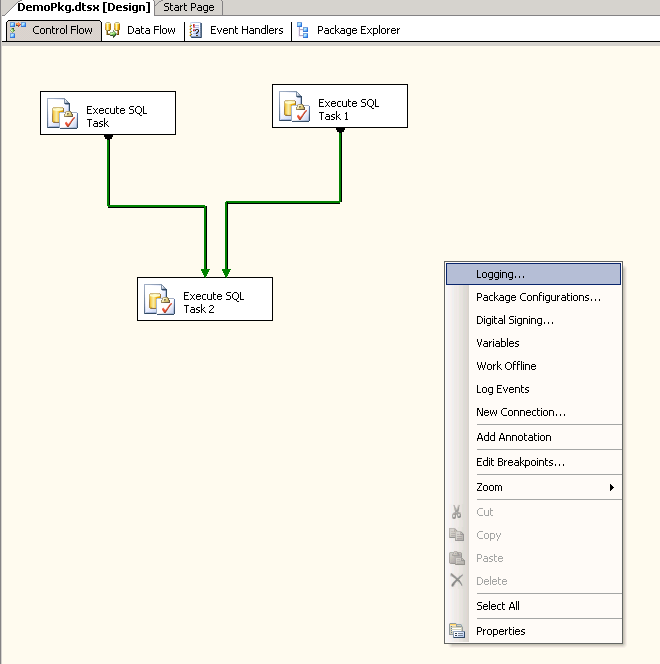
Open the package in Business Intelligence Development Studio (BIDS), see that you are in the design mode. When you are in the Control Flow, right click (do not right click on the control flow tasks) and select Logging from the drop menu displayed (picture below).
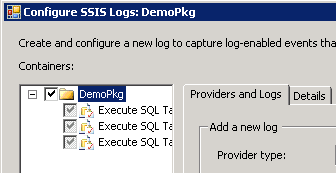
A dialog box Configure SSIS Logs is displayed. In the left hand pane, there is a tree view is displayed. Select the package by selecting the check box corresponding to it (picture below). You can check individual tasks also.
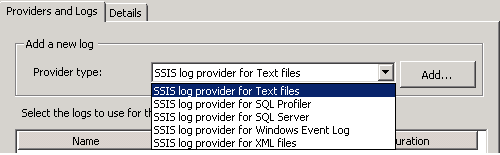
Upon selecting the package or task, you can then configure logging through the available logging providers from the drop down list as shown below. You can add multiple logs of the same type and/or another type. In our example we will look at selecting only one log provider and that is SSIS log provider for Text Files. After selecting the log provider, click on Add button.
Once the Log type is selected and added, the dialog box looks like the picture below. Choose the log file by selecting the check box to the left of it and go to configuration column to configure the location of the log file in our example it is a text file.

There would be a drop down list when you go to the configuration column, under which you would get a <new connection> listed, choose that and it will open a small window which would be similar to the one shown below.

Choose create file in the usage type and click browse button.. It would open a dialog box and we need to navigate to the directory where the SSIS package log file will be created. I am choosing the default Log directory of that instance here. (picture below)
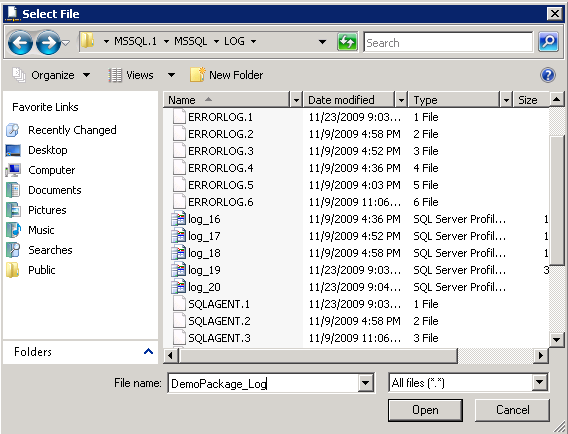
After choosing the location and the name of the file to be used, select Open button in the current dialog box that would take back to the previous dialog, select OK to configure the file location. Now we are all set, except the events that would be logging into this log file. To select the events, switch to the details tab as show below. Choose the events which needs to be logged into the log file. Choosing the events selectively is important, since we do not want too much of information is written into the log file, making it difficult to find information when needed. I always choose OnError and OnTaskFailed events for every task and some additional events in case of Data Flow tasks.
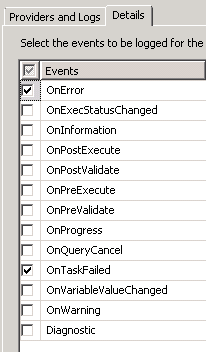
Continue to click a series of OK buttons to have the logging configured.
[转]Configure logging in SSIS packages的更多相关文章
- How To Configure Logging And Log Rotation In Apache On An Ubuntu VPS
Introduction The Apache web server can be configured to give the server administrator important info ...
- How to Configure YUM to Install Packages From Installation ISO (RHEL)
1. Mount RHEL Installation ISO mkdir /media/dvd mount /dev/cdrom /media/dvd 2. Get Media ID with the ...
- [转]Getting started with SSIS - Part 10: Event Handling and Logging
本文转自:http://beyondrelational.com/modules/12/tutorials/24/tutorials/9686/getting-started-with-ssis-pa ...
- How to Configure an SSIS Package to Access a Web Service using WCF
This information is from:http://blogs.msdn.com/b/dbrowne/archive/2010/07/08/how-to-configure-an-ssis ...
- SSIS ->> Logging
SSIS提供了Event Handler之外的另一种方法捕捉Event和获取需要的信息,这种方法是Logging.SSIS的Logging针对不同的组件可以提供比Event Handler更多的Eve ...
- SSIS Data Flow 的 Execution Tree 和 Data Pipeline
一,Execution Tree 执行树是数据流组件(转换和适配器)基于同步关系所建立的逻辑分组,每一个分组都是一个执行树的开始和结束,也可以将执行树理解为一个缓冲区的开始和结束,即缓冲区的整个生命周 ...
- SSIS 增量更新
本文转自 http://sqlblog.com/blogs/andy_leonard/archive/2007/07/09/ssis-design-pattern-incremental-loads. ...
- SSIS Parameter用法
今天学习SSISParameter的用法,记录学习的过程. Parameters能够在Project Deployment Model下使用,不能在Package Deployment Model使用 ...
- 如何在 ETL 项目中统一管理上百个 SSIS 包的日志和包配置框架
一直准备写这么一篇有关 SSIS 日志系统的文章,但是发现很难一次写的很完整.因为这篇文章的内容可扩展的性太强,每多扩展一部分就意味着需要更多代码,示例和理论支撑.因此,我选择我觉得比较通用的 LOG ...
随机推荐
- 3:django models Making queries 高级进阶--聚合运算
在前一遍文章django models Making queries里面我们提到了django常用的一些检索数据库的内容, 下面我们来看一下更为高级的检索聚合运算 这是我们要用到的模型 class A ...
- [译]怎样用HTML5 Canvas制作一个简单的游戏
这是我翻译自LostDecadeGames主页的一篇文章,原文地址:How To Make A Simple HTML5 Canvas Game. 下面是正文: 自从我制作了一些HTML5游戏(例如C ...
- MySQL 的数据存储引擎
MySQL的存储引擎 InnoDB: MySQL5.5之后的默认存储引擎. 采用MVCC来支持高并发,并且实现了四个标准的隔离级别(默认可重复读). 支持事务,支持外键.支持行锁.非锁定读(默认读取操 ...
- Partial Views
@Html.Partial("MyPartial") @Html.Partial("MyStronglyTypedPartial", new [] {&qu ...
- slice切割数组arr=[[0,1],[2,3]]
for (var i = 0; i < 10; i++) { arr.push(i) } function arrSlice(arr, num) { var arr1 = []; for (va ...
- 345. Reverse Vowels of a String【Easy】【双指针-反转字符串中的元音字符】
Write a function that takes a string as input and reverse only the vowels of a string. Example 1: In ...
- Keras 训练时出现 CUDA_ERROR_OUT_OF_MEMORY 错误
不用惊慌,再试一次.估计当时GPU内存可分配不足,可手动结束所有python程序后释放相关GPU内存,或者重新运行一次终端
- Flask实战第46天:完成前台登录功能
后台逻辑 首先进行表单验证, 编辑front.froms.py ... class SignInForm(BaseForm): telephone = StringField(validators=[ ...
- 使用html+css实现三角标示符号
我们平常打开某个网站的时候,常常会发现网页上很多导航或者指示条会使用一个三角符号去指向内容,效果简洁美观,甚至很多前端面试中也会提及如何在网页上实现一个三角符号,这里给出一个很简单使用的实现方式. 首 ...
- Redux 洋葱模型理解
下面的代码会输出: A middleware1 开始C middleware2 开始E middleware3 开始======= G =======F middleware3 结束D middlew ...