
MyBatis(10)逆向工程
- From the command prompt with an XML configuration
- As an Ant task with an XML configuration
- As a Maven Plugin
- From another Java program with an XML configuration
- From another Java program with a Java based configuration

官方文档在解压后的doc文件中点击index.html
简单的讲解一下:
MyBatis GeneratorXML Configuration File Reference

<?xml version="1.0" encoding="UTF-8"?>

<!DOCTYPE generatorConfiguration

  PUBLIC "-//mybatis.org//DTD MyBatis Generator Configuration 1.0//EN"

  "http://mybatis.org/dtd/mybatis-generator-config_1_0.dtd">

<generatorConfiguration>

     <context id="testTables" targetRuntime="MyBatis3">

           <commentGenerator>

<!-- 是否去除自动生成的注释 true:是 : false:否 -->

                <property name="suppressAllComments" value="true" />

           </commentGenerator>

<!--数据库连接的信息:驱动类、连接地址、用户名、密码 -->

           <jdbcConnection driverClass="com.mysql.jdbc.Driver"

                connectionURL="jdbc:mysql://localhost:3307/shopping"

                userId="root"

                password="1234">

           </jdbcConnection>

<!-- 默认false,把JDBC DECIMAL 和 NUMERIC 类型解析为 Integer,为 true时把JDBC DECIMAL 和

NUMERIC 类型解析为java.math.BigDecimal -->

           <javaTypeResolver>

                <property name="forceBigDecimals" value="false" />

           </javaTypeResolver>

<!-- targetProject:生成PO类的位置 -->

           <javaModelGenerator targetPackage="com.MrChengs.po"

                targetProject=".\src">

<!-- enableSubPackages:是否让schema作为包的后缀 -->

                <property name="enableSubPackages" value="false" />

<!-- 从数据库返回的值被清理前后的空格 -->

                <property name="trimStrings" value="true" />

           </javaModelGenerator>

        <!-- targetProject:mapper映射文件生成的位置 -->

           <sqlMapGenerator targetPackage="com.MrChengs.mapper"

                targetProject=".\src">

<!-- enableSubPackages:是否让schema作为包的后缀 -->

                <property name="enableSubPackages" value="false" />

           </sqlMapGenerator>

<!-- targetPackage:mapper接口生成的位置 -->

           <javaClientGenerator type="XMLMAPPER"

                targetPackage="com.MrChengs.mapper"

                targetProject=".\src">

<!-- enableSubPackages:是否让schema作为包的后缀 -->

                <property name="enableSubPackages" value="false" />

           </javaClientGenerator>

<!-- 指定数据库表 -->

           <table tableName="items"></table>

           <table tableName="orders"></table>

           <table tableName="orderdetail"></table>

           <table tableName="user"></table>

     </context>

</generatorConfiguration>
public class GeneratorSqlmap {

     public void generator() throws Exception{

           List<String> warnings = new ArrayList<String>();

           boolean overwrite = true;

           //指定 逆向工程配置文件

           File configFile = new File("config/generatorConfig.xml");

           ConfigurationParser cp = new ConfigurationParser(warnings);

           Configuration config = cp.parseConfiguration(configFile);

           DefaultShellCallback callback = new DefaultShellCallback(overwrite);

           MyBatisGenerator myBatisGenerator = new MyBatisGenerator(config,

                     callback, warnings);

           myBatisGenerator.generate(null);

     }

     public static void main(String[] args) throws Exception {

           try {

                GeneratorSqlmap generatorSqlmap = new GeneratorSqlmap();

                generatorSqlmap.generator();

           } catch (Exception e) {

                e.printStackTrace();

           }

     }

}
2018-10-25 16:04:22,837 [main] DEBUG [org.mybatis.generator.internal.db.DatabaseIntrospector] - Retrieving column information for table "items"

2018-10-25 16:04:22,848 [main] DEBUG [org.mybatis.generator.internal.db.DatabaseIntrospector] - Found column "id", data type 4, in table "shopping..items"

2018-10-25 16:04:22,849 [main] DEBUG [org.mybatis.generator.internal.db.DatabaseIntrospector] - Found column "name", data type 12, in table "shopping..items"

2018-10-25 16:04:22,849 [main] DEBUG [org.mybatis.generator.internal.db.DatabaseIntrospector] - Found column "price", data type 7, in table "shopping..items"

2018-10-25 16:04:22,849 [main] DEBUG [org.mybatis.generator.internal.db.DatabaseIntrospector] - Found column "detail", data type -1, in table "shopping..items"

2018-10-25 16:04:22,849 [main] DEBUG [org.mybatis.generator.internal.db.DatabaseIntrospector] - Found column "pic", data type 12, in table "shopping..items"

2018-10-25 16:04:22,849 [main] DEBUG [org.mybatis.generator.internal.db.DatabaseIntrospector] - Found column "createtime", data type 93, in table "shopping..items"

2018-10-25 16:04:22,855 [main] DEBUG [org.mybatis.generator.internal.db.DatabaseIntrospector] - Retrieving column information for table "orders"

2018-10-25 16:04:22,859 [main] DEBUG [org.mybatis.generator.internal.db.DatabaseIntrospector] - Found column "id", data type 4, in table "shopping..orders"

2018-10-25 16:04:22,859 [main] DEBUG [org.mybatis.generator.internal.db.DatabaseIntrospector] - Found column "user_id", data type 4, in table "shopping..orders"

2018-10-25 16:04:22,859 [main] DEBUG [org.mybatis.generator.internal.db.DatabaseIntrospector] - Found column "number", data type 12, in table "shopping..orders"

2018-10-25 16:04:22,859 [main] DEBUG [org.mybatis.generator.internal.db.DatabaseIntrospector] - Found column "createtime", data type 93, in table "shopping..orders"

2018-10-25 16:04:22,859 [main] DEBUG [org.mybatis.generator.internal.db.DatabaseIntrospector] - Found column "note", data type 12, in table "shopping..orders"

2018-10-25 16:04:22,864 [main] DEBUG [org.mybatis.generator.internal.db.DatabaseIntrospector] - Retrieving column information for table "orderdetail"

2018-10-25 16:04:22,868 [main] DEBUG [org.mybatis.generator.internal.db.DatabaseIntrospector] - Found column "id", data type 4, in table "shopping..orderdetail"

2018-10-25 16:04:22,868 [main] DEBUG [org.mybatis.generator.internal.db.DatabaseIntrospector] - Found column "orders_id", data type 4, in table "shopping..orderdetail"

2018-10-25 16:04:22,868 [main] DEBUG [org.mybatis.generator.internal.db.DatabaseIntrospector] - Found column "items_id", data type 4, in table "shopping..orderdetail"

2018-10-25 16:04:22,868 [main] DEBUG [org.mybatis.generator.internal.db.DatabaseIntrospector] - Found column "items_num", data type 4, in table "shopping..orderdetail"

2018-10-25 16:04:22,869 [main] DEBUG [org.mybatis.generator.internal.db.DatabaseIntrospector] - Retrieving column information for table "user"

2018-10-25 16:04:22,874 [main] DEBUG [org.mybatis.generator.internal.db.DatabaseIntrospector] - Found column "id", data type 4, in table "shopping..user"

2018-10-25 16:04:22,874 [main] DEBUG [org.mybatis.generator.internal.db.DatabaseIntrospector] - Found column "username", data type 12, in table "shopping..user"

2018-10-25 16:04:22,874 [main] DEBUG [org.mybatis.generator.internal.db.DatabaseIntrospector] - Found column "birthday", data type 91, in table "shopping..user"

2018-10-25 16:04:22,874 [main] DEBUG [org.mybatis.generator.internal.db.DatabaseIntrospector] - Found column "sex", data type 1, in table "shopping..user"

2018-10-25 16:04:22,874 [main] DEBUG [org.mybatis.generator.internal.db.DatabaseIntrospector] - Found column "address", data type 12, in table "shopping..user"
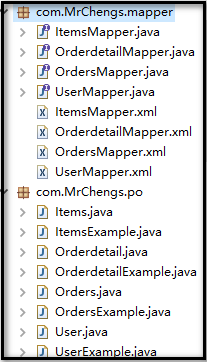

复制图中的文件到本工程中

public class test {

     private ApplicationContext applicationContext;

     public ApplicationContext getApplication(){

           applicationContext = new ClassPathXmlApplicationContext("classpath:spring/applicationContext.xml");

           return applicationContext;

     }

     //根据主键id进行查询

     @Test

     public void test() {

           ItemsMapper items = (ItemsMapper) getApplication().getBean("itemsMapper");

           Items it = items.selectByPrimaryKey(1);

           System.out.println(it.toString());

     }

     //自定义查询条件

     @Test

     public void test1() {

           ItemsMapper itemsMapperems = (ItemsMapper) getApplication().getBean("itemsMapper");

           ItemsExample itemsExample = new ItemsExample();

           //通过criteria构造条件查询

           ItemsExample.Criteria criteria = itemsExample.createCriteria();

           criteria.andNameEqualTo("笔记本");

           //可能返回多个记录

           List<Items> items = itemsMapperems.selectByExample(itemsExample);

           System.out.println(items);

           }

}
MyBatis(10)逆向工程的更多相关文章
- MyBatis框架——逆向工程
什么是逆向工程? 逆向工程师MyBatis提供的一种自动化配置方案,针对数据表自动生成MyBatis所需的各种资源,包括实体类.Mapper接口.Mapper.xml,但是逆向工程的缺陷在于只能针对单 ...
- mybatis的逆向工程
mybatis的逆向工程是很大的减少了程序员对代码的编写工作,由于mybatis是半自动的sql语句使用,我们在项目中一般都是采用逆向工程来生成mybatis的文件,mapper接口相当于我们平常所说 ...
- Mybatis(七) mybatis的逆向工程的配置详解
还是觉得看书学习有意思~嘿嘿.今天把mybatis给结束掉. --WH 一.什么是逆向工程? 简单点说,就是通过数据库中的单表,自动生成java代码. Mybatis官方提供了逆向工程,可以针对单表自 ...
- Mybatis【逆向工程,缓存,代理】知识要点
前言 本文主要讲解Mybatis的以下知识点: Mybatis缓存 一级缓存 二级缓存 与Ehcache整合 Mapper代理 使用Mapper代理就不用写实现类了 逆向工程 自动生成代码 Mybat ...
- Mybatis学习(七)————— mybatis的逆向工程的配置详解
一.什么是逆向工程? 简单点说,就是通过数据库中的单表,自动生成java代码. Mybatis官方提供了逆向工程,可以针对单表自动生成mybatis代码(mapper.java\mapper.xml\ ...
- SpringBoot+Mybatis+Generator 逆向工程使用(二)
Mybatis-Genarator 逆向工程使用 个人开发环境 java环境:Jdk1.8.0_60 编译器:IntelliJ IDEA 2017.1.4 mysql驱动:mysql-connecto ...
- 【MyBatis学习15】MyBatis的逆向工程生成代码
1. 什么是逆向工程 mybatis的一个主要的特点就是需要程序员自己编写sql,那么如果表太多的话,难免会很麻烦,所以mybatis官方提供了一个逆向工程,可以针对单表自动生成mybatis执行所需 ...
- 创建mybatis的逆向工程
1.mybatis的逆向工程(我使用的是maven仓库创建) 工作原理:反向工程(通过数据库中的表和字段信息去生成对应的增删改查方法) 其实就是一个自动生成工具 生成实体类(pojo)和映射文件(ma ...
- Mybatis的逆向工程以及Example的实例函数及详解
Mybatis-generator是Mybatis的逆向工程 (根据数据库中的表生成java代码) Mybatis的逆向工程会生成实例及实例对应的example,example用于添加条件,相当于w ...
- Mybatis Generator逆向工程的使用
一.在 idea 中使用 mybatis generator 逆向工程 1.在IDEA上创建maven工程. 2.在pom.xml中配置MyBatis逆向工程插件 <!--MyBatis自动生成 ...
随机推荐
- [转]用Excel制作甘特图并管理项目
对于比较简单的项目管理,或绘制甘特图,选用电子表格工具——比如价格高也最强大的Excel.开源的OpenOffice.免费的WPS——可能比项目管理软件更方便. 1. XL-Easy Gantt 模板 ...
- in和not in
当子查询返回的列的值是多个值,那么就不能使用比较运算符(> < = !=),使用关键字in 语法: select …..from …..where 表达式 in (子查询) 常用in替换等 ...
- Java - USC2字符串截取
Java内部采用UTF-16(USC2)编码,比如:"我" 为 98 17,"a" 为 0 97," " 为 0 32,"1&qu ...
- 02.ToString()方法详解
ToString()使用方法汇总(C#) C 货币 2.5.ToString("C") ¥2.50 D 十进制数 25.ToString("D5") 00025 ...
- <<数学传奇>>概述
简介 在网易公开课上看完了蔡天新教授的<<数学传奇>>,课程共10集.分别讲述了古希腊的毕达哥拉斯.波斯(伊朗)的 花拉子密和欧玛尔.海亚姆.中国的秦九韶.英国的牛顿.法国的笛 ...
- mysql根据时间查询日期的优化
例如查询昨日新注册用户,写法有如下两种: EXPLAIN select * from chess_user u where DATE_FORMAT(u.register_time,'%Y-%m-%d' ...
- Hibernate 注解(Annotations 一)
1. @Entity 将一个类声明为一个实体bean(即一个持久化POJO类). 2. @Table 声明了该实体bean映射指定的表(table),目录(catalog)和schema名字 3. @ ...
- JS如何使用Math.atan2获取两点之间角度的实践案例
本文主要介绍使用如何实现手动拖拽旋转元素的效果. 1.简述 最近在研究如何实现手动控制元素的旋转效果,在网上找了很多,都没有找出类似的实现,因此经过一些调研和计算,最终完美实现效果,在这里记录下来. ...
- iview框架modal中嵌套modal
modal的使用是平级的,后面的会覆盖前面,如下<modal>111</modal><modal>222</modal>内容为222的弹框会在内容为11 ...
- Python基础-socket编程
一.网络编程 自从互联网诞生以来,现在基本上所有的程序都是网络程序,很少有单机版的程序了. 计算机网络就是把各个计算机连接到一起,让网络中的计算机可以互相通信.网络编程就是如何在程序中实现两台计算机的 ...