
MyBatis(10)逆向工程
- From the command prompt with an XML configuration
- As an Ant task with an XML configuration
- As a Maven Plugin
- From another Java program with an XML configuration
- From another Java program with a Java based configuration

官方文档在解压后的doc文件中点击index.html
简单的讲解一下:
MyBatis GeneratorXML Configuration File Reference

<?xml version="1.0" encoding="UTF-8"?>

<!DOCTYPE generatorConfiguration

  PUBLIC "-//mybatis.org//DTD MyBatis Generator Configuration 1.0//EN"

  "http://mybatis.org/dtd/mybatis-generator-config_1_0.dtd">

<generatorConfiguration>

     <context id="testTables" targetRuntime="MyBatis3">

           <commentGenerator>

<!-- 是否去除自动生成的注释 true:是 : false:否 -->

                <property name="suppressAllComments" value="true" />

           </commentGenerator>

<!--数据库连接的信息:驱动类、连接地址、用户名、密码 -->

           <jdbcConnection driverClass="com.mysql.jdbc.Driver"

                connectionURL="jdbc:mysql://localhost:3307/shopping"

                userId="root"

                password="1234">

           </jdbcConnection>

<!-- 默认false,把JDBC DECIMAL 和 NUMERIC 类型解析为 Integer,为 true时把JDBC DECIMAL 和

NUMERIC 类型解析为java.math.BigDecimal -->

           <javaTypeResolver>

                <property name="forceBigDecimals" value="false" />

           </javaTypeResolver>

<!-- targetProject:生成PO类的位置 -->

           <javaModelGenerator targetPackage="com.MrChengs.po"

                targetProject=".\src">

<!-- enableSubPackages:是否让schema作为包的后缀 -->

                <property name="enableSubPackages" value="false" />

<!-- 从数据库返回的值被清理前后的空格 -->

                <property name="trimStrings" value="true" />

           </javaModelGenerator>

        <!-- targetProject:mapper映射文件生成的位置 -->

           <sqlMapGenerator targetPackage="com.MrChengs.mapper"

                targetProject=".\src">

<!-- enableSubPackages:是否让schema作为包的后缀 -->

                <property name="enableSubPackages" value="false" />

           </sqlMapGenerator>

<!-- targetPackage:mapper接口生成的位置 -->

           <javaClientGenerator type="XMLMAPPER"

                targetPackage="com.MrChengs.mapper"

                targetProject=".\src">

<!-- enableSubPackages:是否让schema作为包的后缀 -->

                <property name="enableSubPackages" value="false" />

           </javaClientGenerator>

<!-- 指定数据库表 -->

           <table tableName="items"></table>

           <table tableName="orders"></table>

           <table tableName="orderdetail"></table>

           <table tableName="user"></table>

     </context>

</generatorConfiguration>
public class GeneratorSqlmap {

     public void generator() throws Exception{

           List<String> warnings = new ArrayList<String>();

           boolean overwrite = true;

           //指定 逆向工程配置文件

           File configFile = new File("config/generatorConfig.xml");

           ConfigurationParser cp = new ConfigurationParser(warnings);

           Configuration config = cp.parseConfiguration(configFile);

           DefaultShellCallback callback = new DefaultShellCallback(overwrite);

           MyBatisGenerator myBatisGenerator = new MyBatisGenerator(config,

                     callback, warnings);

           myBatisGenerator.generate(null);

     }

     public static void main(String[] args) throws Exception {

           try {

                GeneratorSqlmap generatorSqlmap = new GeneratorSqlmap();

                generatorSqlmap.generator();

           } catch (Exception e) {

                e.printStackTrace();

           }

     }

}
2018-10-25 16:04:22,837 [main] DEBUG [org.mybatis.generator.internal.db.DatabaseIntrospector] - Retrieving column information for table "items"

2018-10-25 16:04:22,848 [main] DEBUG [org.mybatis.generator.internal.db.DatabaseIntrospector] - Found column "id", data type 4, in table "shopping..items"

2018-10-25 16:04:22,849 [main] DEBUG [org.mybatis.generator.internal.db.DatabaseIntrospector] - Found column "name", data type 12, in table "shopping..items"

2018-10-25 16:04:22,849 [main] DEBUG [org.mybatis.generator.internal.db.DatabaseIntrospector] - Found column "price", data type 7, in table "shopping..items"

2018-10-25 16:04:22,849 [main] DEBUG [org.mybatis.generator.internal.db.DatabaseIntrospector] - Found column "detail", data type -1, in table "shopping..items"

2018-10-25 16:04:22,849 [main] DEBUG [org.mybatis.generator.internal.db.DatabaseIntrospector] - Found column "pic", data type 12, in table "shopping..items"

2018-10-25 16:04:22,849 [main] DEBUG [org.mybatis.generator.internal.db.DatabaseIntrospector] - Found column "createtime", data type 93, in table "shopping..items"

2018-10-25 16:04:22,855 [main] DEBUG [org.mybatis.generator.internal.db.DatabaseIntrospector] - Retrieving column information for table "orders"

2018-10-25 16:04:22,859 [main] DEBUG [org.mybatis.generator.internal.db.DatabaseIntrospector] - Found column "id", data type 4, in table "shopping..orders"

2018-10-25 16:04:22,859 [main] DEBUG [org.mybatis.generator.internal.db.DatabaseIntrospector] - Found column "user_id", data type 4, in table "shopping..orders"

2018-10-25 16:04:22,859 [main] DEBUG [org.mybatis.generator.internal.db.DatabaseIntrospector] - Found column "number", data type 12, in table "shopping..orders"

2018-10-25 16:04:22,859 [main] DEBUG [org.mybatis.generator.internal.db.DatabaseIntrospector] - Found column "createtime", data type 93, in table "shopping..orders"

2018-10-25 16:04:22,859 [main] DEBUG [org.mybatis.generator.internal.db.DatabaseIntrospector] - Found column "note", data type 12, in table "shopping..orders"

2018-10-25 16:04:22,864 [main] DEBUG [org.mybatis.generator.internal.db.DatabaseIntrospector] - Retrieving column information for table "orderdetail"

2018-10-25 16:04:22,868 [main] DEBUG [org.mybatis.generator.internal.db.DatabaseIntrospector] - Found column "id", data type 4, in table "shopping..orderdetail"

2018-10-25 16:04:22,868 [main] DEBUG [org.mybatis.generator.internal.db.DatabaseIntrospector] - Found column "orders_id", data type 4, in table "shopping..orderdetail"

2018-10-25 16:04:22,868 [main] DEBUG [org.mybatis.generator.internal.db.DatabaseIntrospector] - Found column "items_id", data type 4, in table "shopping..orderdetail"

2018-10-25 16:04:22,868 [main] DEBUG [org.mybatis.generator.internal.db.DatabaseIntrospector] - Found column "items_num", data type 4, in table "shopping..orderdetail"

2018-10-25 16:04:22,869 [main] DEBUG [org.mybatis.generator.internal.db.DatabaseIntrospector] - Retrieving column information for table "user"

2018-10-25 16:04:22,874 [main] DEBUG [org.mybatis.generator.internal.db.DatabaseIntrospector] - Found column "id", data type 4, in table "shopping..user"

2018-10-25 16:04:22,874 [main] DEBUG [org.mybatis.generator.internal.db.DatabaseIntrospector] - Found column "username", data type 12, in table "shopping..user"

2018-10-25 16:04:22,874 [main] DEBUG [org.mybatis.generator.internal.db.DatabaseIntrospector] - Found column "birthday", data type 91, in table "shopping..user"

2018-10-25 16:04:22,874 [main] DEBUG [org.mybatis.generator.internal.db.DatabaseIntrospector] - Found column "sex", data type 1, in table "shopping..user"

2018-10-25 16:04:22,874 [main] DEBUG [org.mybatis.generator.internal.db.DatabaseIntrospector] - Found column "address", data type 12, in table "shopping..user"
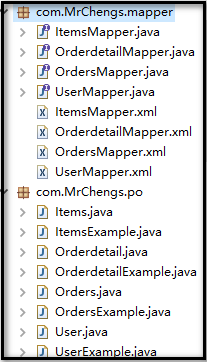

复制图中的文件到本工程中

public class test {

     private ApplicationContext applicationContext;

     public ApplicationContext getApplication(){

           applicationContext = new ClassPathXmlApplicationContext("classpath:spring/applicationContext.xml");

           return applicationContext;

     }

     //根据主键id进行查询

     @Test

     public void test() {

           ItemsMapper items = (ItemsMapper) getApplication().getBean("itemsMapper");

           Items it = items.selectByPrimaryKey(1);

           System.out.println(it.toString());

     }

     //自定义查询条件

     @Test

     public void test1() {

           ItemsMapper itemsMapperems = (ItemsMapper) getApplication().getBean("itemsMapper");

           ItemsExample itemsExample = new ItemsExample();

           //通过criteria构造条件查询

           ItemsExample.Criteria criteria = itemsExample.createCriteria();

           criteria.andNameEqualTo("笔记本");

           //可能返回多个记录

           List<Items> items = itemsMapperems.selectByExample(itemsExample);

           System.out.println(items);

           }

}
MyBatis(10)逆向工程的更多相关文章
- MyBatis框架——逆向工程
什么是逆向工程? 逆向工程师MyBatis提供的一种自动化配置方案,针对数据表自动生成MyBatis所需的各种资源,包括实体类.Mapper接口.Mapper.xml,但是逆向工程的缺陷在于只能针对单 ...
- mybatis的逆向工程
mybatis的逆向工程是很大的减少了程序员对代码的编写工作,由于mybatis是半自动的sql语句使用,我们在项目中一般都是采用逆向工程来生成mybatis的文件,mapper接口相当于我们平常所说 ...
- Mybatis(七) mybatis的逆向工程的配置详解
还是觉得看书学习有意思~嘿嘿.今天把mybatis给结束掉. --WH 一.什么是逆向工程? 简单点说,就是通过数据库中的单表,自动生成java代码. Mybatis官方提供了逆向工程,可以针对单表自 ...
- Mybatis【逆向工程,缓存,代理】知识要点
前言 本文主要讲解Mybatis的以下知识点: Mybatis缓存 一级缓存 二级缓存 与Ehcache整合 Mapper代理 使用Mapper代理就不用写实现类了 逆向工程 自动生成代码 Mybat ...
- Mybatis学习(七)————— mybatis的逆向工程的配置详解
一.什么是逆向工程? 简单点说,就是通过数据库中的单表,自动生成java代码. Mybatis官方提供了逆向工程,可以针对单表自动生成mybatis代码(mapper.java\mapper.xml\ ...
- SpringBoot+Mybatis+Generator 逆向工程使用(二)
Mybatis-Genarator 逆向工程使用 个人开发环境 java环境:Jdk1.8.0_60 编译器:IntelliJ IDEA 2017.1.4 mysql驱动:mysql-connecto ...
- 【MyBatis学习15】MyBatis的逆向工程生成代码
1. 什么是逆向工程 mybatis的一个主要的特点就是需要程序员自己编写sql,那么如果表太多的话,难免会很麻烦,所以mybatis官方提供了一个逆向工程,可以针对单表自动生成mybatis执行所需 ...
- 创建mybatis的逆向工程
1.mybatis的逆向工程(我使用的是maven仓库创建) 工作原理:反向工程(通过数据库中的表和字段信息去生成对应的增删改查方法) 其实就是一个自动生成工具 生成实体类(pojo)和映射文件(ma ...
- Mybatis的逆向工程以及Example的实例函数及详解
Mybatis-generator是Mybatis的逆向工程 (根据数据库中的表生成java代码) Mybatis的逆向工程会生成实例及实例对应的example,example用于添加条件,相当于w ...
- Mybatis Generator逆向工程的使用
一.在 idea 中使用 mybatis generator 逆向工程 1.在IDEA上创建maven工程. 2.在pom.xml中配置MyBatis逆向工程插件 <!--MyBatis自动生成 ...
随机推荐
- C#基础知识-使用XML完成一个小程序(十一)
上一篇中讲到XML基本的结构,还有增删改查的方法,这一篇中我们就来利用XML来完成一个简单的订单系统,主要是实现一个简单学生名单的增删改查,如果想要应用到实际的环境中建议考虑数据量的问题,如果数据量大 ...
- ASP.NET MVC4 新手入门教程之八 ---8.向模式中添加验证
在这本部分会将验证逻辑添加到Movie模式,和你会确保验证规则执行任何时候用户试图创建或编辑使用该应用程序的一部电影. 保持事物的干练性 ASP.NET MVC 的核心设计信条之一是 DRY(”Don ...
- split 将字符串分割成字符串数组
list_name = list_name.split(","); split() 方法用于把一个字符串分割成字符串数组. 语法 stringObject.split(separa ...
- jdk各版本
1.jdk1.7: 1.1二进制变量的表示,支持将整数类型用二进制来表示,用0b开头: 1.2 Switch语句支持string类型: 2.jdk1.8:
- 二、IOC容器基本原理
IOC容器就是具有依赖注入功能的容器,IOC容器负责实例化.定位.配置应用程序中的对象及建立这些对象间的依赖.应用程序无需在代码中new相关的对象,应用程序由IOC容器进行组装. spring IOC ...
- 结构型--代理模式(Proxy)
一.代理模式是什么? 代理模式属于GOF23设计模式中结构型中的设计模式,通过代理对象来屏蔽(部分或者屏蔽)对真实对象的直接访问,下图为UML图: 在代理模式中组件包括:抽象角色接口.代理角色类.真实 ...
- HOST文件配置
HOST文件配置位置:C:\Windows\System32\drivers\etc\HOSTS 127.0.0.1 localhost 127.0.0.1 app.weilan.com 127.0. ...
- Java Struts2 (二)
二.封装请求正文到对象中(非常重要) 1.静态参数封装 在struts.xml配置文件中,给动作类注入值.调用的是setter方法. 原因:是由一个staticParams的拦截器完成注入的. 2.动 ...
- 005hystrix.stream信息聚合Turbine
1.POM配置 和普通Spring Boot工程相比,仅仅添加了Turbine和Spring Boot Starter Actuator依赖 <dependencies> <!--添 ...
- CSS的BFC和hasLayout及其应用场景
前端精选文摘:BFC 神奇背后的原理 一.BFC是什么? 先介绍 Box.Formatting Context的概念. Box: CSS布局的基本单位 Box 是 CSS 布局的对象和基本单位, 直观 ...